Elon Musk is now worth around $1.3 trillion.
and the way the last chunk of that got built is the same thing Crypto gets called a scam for every cycle..
it's called valuation inflation, and one analogy makes it click.
say you own an old car worth $10K you sell it to your own second company for $35K then a third company you also own buys it for $70K
the car didn't change.
no new buyer showed up. but on paper the value tripled, because you sat on both sides of every deal.
now swap the car for musk's companies.
> he buys twitter for $44 billion.
> twitter gets folded into his Ai company xai.
> then in february his rocket company SpaceX buys Xai for $250 billion, the largest acquisition of a private company in history.
> same founder on both sides of every table.
then came the real multiplier.. spacex went public last week.
the IPO priced at $135 a share, opened at $150, and the valuation blew past a trillion dollars.
Musk owns around $860 billion of it.
that one listing is what tipped him over into trillionaire, and thousands of spacex staff became millionaires overnight..
now the uncomfortable part.
across that whole chain the businesses didn't triple their revenue or their customers.
the valuation number climbed faster than the actual value underneath it.
paper wealth, marked higher at each step, then cashed into a public market that was glad to pay.
and that is the exact mechanic crypto gets dragged for.
a token changes hands at a higher price each round, the chart goes vertical, and crypto twitter screams ponzi.
musk ran a version of the same playbook with private companies and a nasdaq listing, and got crowned a genius for it.
so the question that is important to ask..
forget whether he's brilliant, he obviously is.
can a trillion-dollar number built mostly on valuation hold up the day the market stops believing it?
anyone who held an overpriced token at the top already knows how that chapter ends. 👀
Did Saylor crash the market on purpose just to buy the dip?
let me break the whole thing down properly.
a few days ago michael saylor sold bitcoin for the first time since 2022.
just 32 coins, at around $75K each.
then today he turns around and buys 1,550 bitcoin for $101M, which works out to about $65K a coin..
so he sold a little high and bought a lot back around 15 percent cheaper..
once you understand how his machine works, you'll stop panicking whenever this headline shows up again..
first you have to understand what saylor's company actually is.
strategy is not just some rich guy buying bitcoin and trading it.
it's a machine built for one single job, which is to own more and more bitcoin over time.
and like any machine, it runs on a process.
here's how that process works, step by step..
▫️Step 1, strategy raises money from investors. it does this by selling its own stock, and by selling 4 special products called STRK, STRF, STRF and STRC.
each one lets an investor hand over cash and get paid a regular dividend in return, but they all work a little differently, and that part is worth knowing.
STRK pays 8 percent, but it can later convert into strategy's stock, so investors take a smaller dividend in exchange for that upside..
STRF pays 10 percent and sits at the top as the safest one. if saylor ever skips its payment, it piles up and he still owes every cent..
STRD also pays around 10 percent but it's the riskiest of the bunch.
its dividend isn't even guaranteed, so if things get rough, he can simply stop paying it without breaking anything..
STRC is the flexible one, paying around 11.5 percent every month, and he adjusts that rate to keep it trading near 100 dollars.
this is the main tap he raises cash from.
and here's the most important part about all 4. they're perpetual, which means saylor never has to pay the original money back.
there's no loan to repay, no margin call, no price where anyone can force him to sell.
the only thing he ever owes is the dividend.
Step 2, he takes all that raised money and buys bitcoin with it.
Step 3, those investors need to get paid their dividend, and that payment has to go out in actual dollars, not in bitcoin.
and that right there is the only reason he ever sells.
when the dividend bill comes due and he needs cash, he sells a tiny bit of bitcoin to cover it.
that's the entire story behind the 32 coins.
sold just to pay investors what they were owed.
it was never him giving up on bitcoin.
so why did he buy 1,550 today? because buying is the actual job. the buying is the plan, the selling is just maintenance.
And yes the flywheel:
he raises cheap money, buys bitcoin, the pile grows, his company gets more valuable, a more valuable company can raise even more money, and he buys even more bitcoin.
round and round, bigger every time.
and since he's paying 8 to 12 percent on money he never has to repay, the whole thing keeps printing as long as bitcoin grows faster than that.
there's only one thing that can break this loop, and it's worth knowing.
the machine works as long as his company is worth more than the bitcoin it holds.
the day it's worth less than its own bitcoin, raising money starts hurting him instead of helping, and the flywheel slows down.
that's the real thing to keep an eye on, not whether he sold a few coins...
so here's what you actually need to burn into your head.
this exact pattern, sell a little and buy a lot, is going to repeat over and over for years.
the headlines will scream "saylor is selling" every single time, and people will panic every single time. don't be one of them.
zoom out, ignore the scary number, and look at the net. for every coin he lets go, far more come back in.
it only moves one way..
Any trading strategy you've seen on youtube by your favourite Youtuber
can be turned into a backtestable pine script in under 30mins..
claude does the conversion, tradingview runs the test, and you find out fast whether the strategy actually holds up.
i ran this with @MarciSilfrain measured move trend approach (320% return at the world trading championship).
the whole loop took about 40 minutes.
▫️ the workflow is simple:
find a trading strategy explained clearly on youtube. transcribe the rules..
you can either paste the youtube link to claude if you've got notebooklm-py wired in, or just type the rules out from the video
feed the entry, stop, and exit rules into claude
claude writes the pine script
paste it into tradingview's pine editor and run a backtest on whatever ticker and timeframe you want
read the results, tell claude what to improve, regenerate
▫️ the prompt that actually works:
i want to convert a trading strategy into Pine Script v5 for TradingView.
here are the rules:
entry: [paste rules]
stop loss: [paste rules]
exit / take profit: [paste rules]
position sizing: [paste rules]
timeframe: [intraday / daily / weekly]
write a complete, backtestable Pine Script v5 strategy. include strategy.entry, strategy.exit, alert conditions, and plot the key levels on the chart so i can verify the logic visually.
after the code, list the assumptions you made and flag anything ambiguous from the rules so i can correct it.
the "flag ambiguous" line is what saves you. most youtube strategies leave out edge cases.. gap opens, what counts as a "valid setup," etc. and claude asks instead of guessing wrong.
▫️ the verify loop
once the script compiles, don't just trust the green PnL number. load the strategy on 3-5 different tickers and timeframes and look at:
- the equity curve shape (smooth uptrend or wild swings) - max drawdown vs. peak return - trade count (too few = no statistical significance) - what the trades look like on the chart (does each entry match the original rules visually?)
if any of those look off, tell claude what's wrong and have it fix the logic.
2-3 iterations usually gets you to a strategy you can actually evaluate.
▫️ direct tradingview connection (skip the copy-paste entirely)
if you've got the tradingview MCP wired into claude code, the whole loop runs in one prompt.
claude writes the pine script, injects it into your tradingview editor, compiles it, reads the errors, fixes them, and pulls the backtest results back into the conversation.
setup: paste this into claude code:
Install the TradingView MCP server. Clone https://t.co/4NApHd4Lyx, run npm install, add to my MCP config at ~/.claude/.mcp.json, and launch TradingView with the debug port.
then verify with:
Use tv_health_check to confirm TradingView is connected.
now you can just say "convert this strategy into pine script, test it on $BTC 4h, and show me the equity curve"
and watch the whole thing run end to end.
A full real estate marketing package normally costs $1,000 to $3,000 and takes about a week..
but with this MCP you can now make the entire thing in minutes.
and yes no shoot, no editing software required..
This is how you can do it and make money with this:
connect Higgsfield to Claude using MCP,
then drop in any listing: Zillow, Airbnb, Booking, or just the address.
Claude Code reads it and builds:
> a cinematic video tour
> clean, professional listing photos
> a simple property site
> short clips for social
This is worth working on as a side hustle..
as everyone knows, in real estate, the listing with the best visuals wins.
not the better price, not even the better property.
listings with pro visuals pull up to 40% more bookings and $8–15k more a year (Airbnb's own data).
So if you can solve this problem for property owners.. they will pay you good..
whether you're listing your own place or doing it for clients..
the whole package is now one chat away
For the longest time my claude agents (for crypto) only ran when i was sitting at my desk.
learning to deploy them properly is what actually changed my setup..
i've been running them on a schedule for a few weeks now..
- wallet monitors
- daily market briefs
- KOL trackers
- on-chain scrapers.
the gap between a cool agent and one that quietly works for you comes down to deployment..
below are the 3 ways i deploy them, ranked by setup effort, with crypto use cases for each..
first, the mental model that made this click for me. every deployment sits on 2 axes:
> where it runs → your machine vs the cloud > how autonomous → full agentic loop vs a fixed script
▫️ Method 1: /loop. zero setup, fastest to ship
you just tell claude code: "set up a loop every 10 minutes to [do X]." it fires on the interval, runs your skill, stops, repeats.
session-scoped, so multiple loops run without clashing.
crypto use cases:
watch a wallet → ping me when a tracked address moves > $50k
monitor X for a specific KOL → alert when they post about a token i hold
track a token's mentions → flag when chatter spikes in a 1-hour window
pro: zero setup, full agentic loop, all your skills + MCPs available. self-kills after X hours.
con: machine + terminal must stay ON. 7-day max.
tip: run it in the terminal, not desktop. terminal loops survive a /clear.
best for short-term, high-frequency monitoring while you're actively trading.
▫️ Method 2: scheduled tasks + cloud routines. always-on, built into claude
open claude desktop → routines. two flavors:
local → runs on your machine (app must be open). plays catch-up if your machine was off.
cloud → runs on anthropic's cloud. machine off, terminal closed, still runs. true 24/7.
each injects a prompt into a fresh claude code session with your keys + context, then executes.
crypto use cases:
7am daily brief → overnight price action, funding rates, top KOL takes, what to watch today
sunday KOL scorecard → who called what this week, did it play out
weekly portfolio review → what moved, what to rebalance
cloud limits: 5 runs/day (pro), 15 (max), 25 (team). 1-hour minimum interval.
sleeper feature: cloud routines can be triggered by schedule, github event, OR webhook so they're event-driven, not just time-based.
best for recurring research + reporting you want running whether your laptop's on or not.
▫️ Method 3: modal or https://t.co/YRXOkgqbgW your own cloud, max control
write a script (python for modal, typescript for https://t.co/YRXOkgqbgW), claude code deploys it, runs on a cron or webhook, full dashboard with run history + errors.
modal = cron job in the cloud (python serverless)
https://t.co/YRXOkgqbgW = durable workflow engine that also does cron (typescript)
crypto use cases:
real-time price alerts pulling from CEX/DEX APIs every 30 seconds
on-chain scraper → new whale wallets, large transfers, contract deploys
polymarket tracker → ping when a market moves >5% in a day
liquidation monitor → flag when a level gets hit
machine off, no session needed. the catch: AI processing is an API call (pay per token), not your subscription. pricier.
but here's something i didn't realize early.. most of these don't need AI at all.
price alerts, on-chain scrapers, liquidation monitors are pure deterministic scripts.
chuck them on modal and they run forever for almost nothing.
want the agentic loop on modal/trigger too?
wire in the Claude Agent SDK.. claude code as an endpoint, brain + hands, tools + sub-agents + memory.
(needs an API key, though anthropic now lets monthly credit go toward it.)
HOW im running is,
active trading hours, short-term monitoring → /loop
daily/weekly research running 24/7 → cloud routines
real-time alerts, on-chain scrapers, deterministic jobs → modal or https://t.co/YRXOkgqbgW
took me a while to stop overthinking this.
starting with /loop today, moving to cloud routines when you want always on
Higgsfield Supercomputer just got plugged into Gemini and the jump is wild.
a year ago AI video was basically a slot machine.
you typed, prayed, got something usable 1 in 5 tries.
text inside the video looked like a 4-year-old's handwriting.
now look at what this thing does:
> actually readable text generation inside the video
> motion graphics that look like a real ad agency made them
> frame-level editing so you can fix one bad frame, not regenerate the whole clip
> real-world search built in, so it knows actual facts and references
video attached.
this is what AI video is supposed to feel like → not a slot machine, an actual creative tool you steer.
Claude has a 10-20 message limit per session before context degrades..
Anthropic literally recommends restarting after that..
but the problem is, every restart loses the branch, the commits you shipped, the files you touched, every dead end you already hit.
you spend 20 mins re introducing the project before you can do any actual work.
now there's one claude code plugin that solves this entirely. call once, paste, done.
▫️ Setup (1 minute)
inside claude code, run:
/plugin marketplace add willseltzer/claude-handoff
/plugin install handoff
that's it. plugin's installed.
▫️ The 3 commands
/handoff:create — full handoff with everything
/handoff:quick — minimal handoff for simple tasks
/handoff:resume — pick up from an existing handoff in a new session
end of session you call /handoff:create. it generates a HANDOFF.md with your full state.
fresh window the next morning you call
/handoff:resume.. claude reads the doc,
checks if the repo drifted, summarizes, and keeps building.
▫️ what the handoff actually captures
the goal.. what you were trying to do
what's done, what's not
failed approaches + WHY they failed (so the next session doesn't loop on them)
key decisions with their rationale
current state of what works, what's broken with file:line refs
resume instructions with expected outcomes
warnings (env vars, sandbox limits, anything weird)
the failed approaches section is the most underrated part. "tried X, didn't work because Y" saves hours of next-session debugging.
▫️ the bonus part
HANDOFF.md is plain markdown. agent-agnostic. you can hand it to codex, gemini, cursor, anything.. just say "read HANDOFF.md and continue the work" and they pick up where claude left off.
imo this kills 90% of the memory MCPs people install.
zero infra, zero cost, zero context preloaded into every fresh session.. just a clean handoff doc when you actually need one.
repo: https://t.co/dU5n3dJaxg
This prompt engineering article is solid.
but most of you will read it, save it, and never apply it.
below is the same 6 elements i applied to a real trading prompt and it works so well. thanks @eng_khairallah1
> Role: you are a senior crypto trader with 10 years of experience in onchain analysis, funding rate arbitrage, and macro narrative trading. you write theses like alex krüger, not like chatgpt.
> Context: my current positions are [paste from memory MCP]. my cash balance on binance is [X]. my risk tolerance is 2% per trade. i'm swing trading 3-7 day timeframes.
> Task: build a full thesis on [ticker] using all connected MCPs (binance, dune, twitter, Tradingview, perplexity). not a generic overview. a tradeable thesis with entry, invalidation, and size.
> Format: 4 sections. macro setup. onchain flow. technical setup. trade plan (entry, TP, SL, size). no more than 300 words total.
> Constraints: no hedging language ("might", "could", "potentially"). take a side. if the thesis is weak, say "skip this ticker" and explain why. never suggest more than 3% of portfolio in one position.
> Quality standard: the output should be specific enough that i can place the trade in under 60 seconds without asking follow-ups. if i'm asking follow-ups, the thesis failed.
that's 6 elements. every trading prompt i run has them.
the outputs are night and day vs the generic "analyze $SOL" prompt most people use
save this as a skill.
name it trade-thesis. trigger on any ticker.
> Be cursor
> build the best coding IDE on earth
> $20/month subscription
> hit $100M ARR
> gpu bills start to eat the business
> openai acquisition talks fall apart
> anthropic acquisition talks fall apart
> elon texts at 3am
> "nice cursor. be a shame if it needed 1M h100s"
> SpaceXAI + colossus supercomputer
> $60B acquisition option or $10B exit payment
> cursor: yes
> meanwhile you: still wondering if you should switch to claude code
> the stack consolidates while you sleep
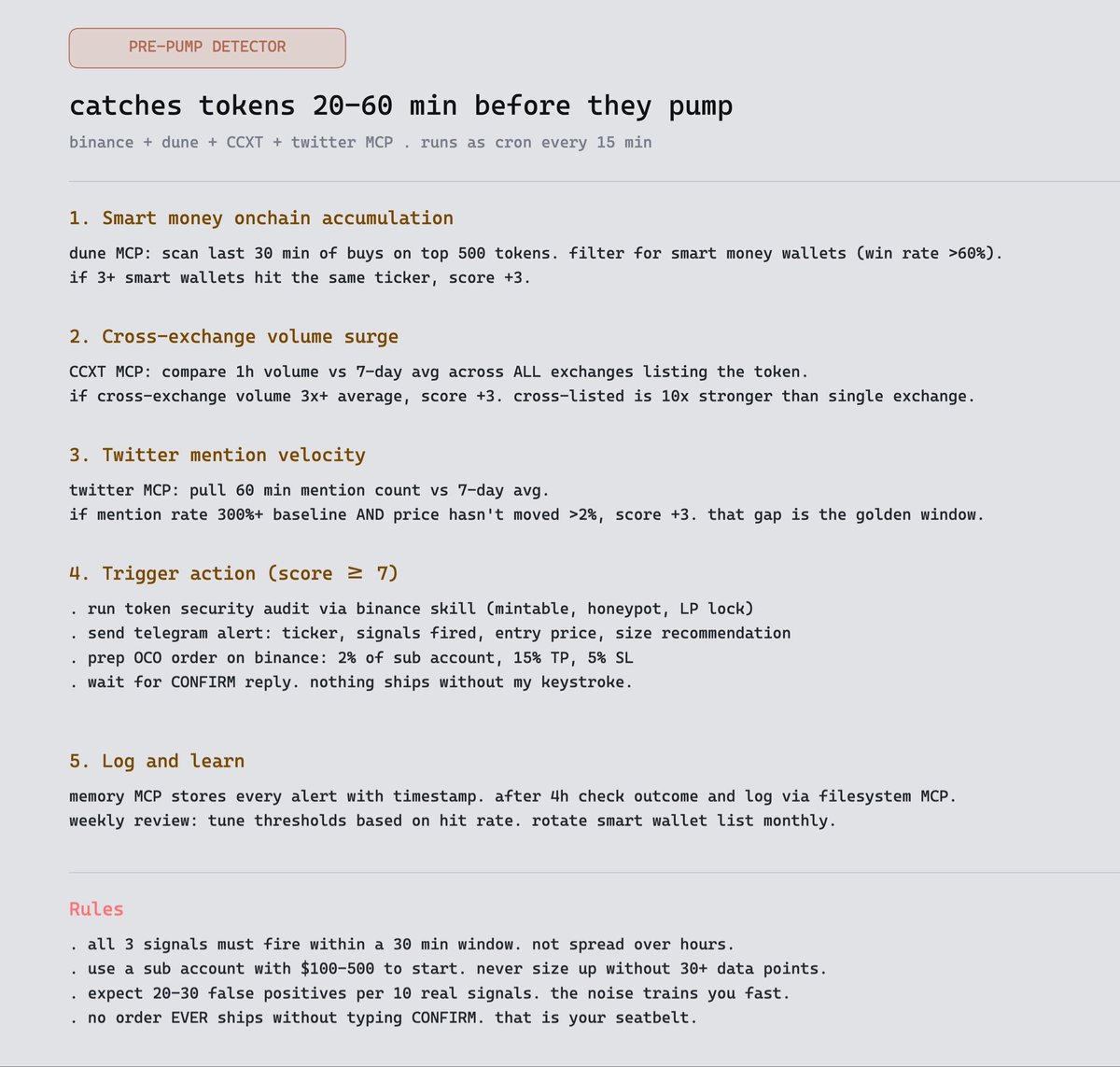
Trying this workflow with Claude Code x Binance
the pre pump detector that catches tokens 20-60 mins before they move..
wired binance skills hub with dune + CCXT + twitter MCPs.
3 signals need to fire in a 30 min window. when they do, claude pre-preps the order and sends me a telegram alert.
i hit CONFIRM. done.
the prompt below. steal it


![Axel_bitblaze69's tweet photo. Any trading strategy you've seen on youtube by your favourite Youtuber
can be turned into a backtestable pine script in under 30mins..
claude does the conversion, tradingview runs the test, and you find out fast whether the strategy actually holds up.
i ran this with @MarciSilfrain measured move trend approach (320% return at the world trading championship).
the whole loop took about 40 minutes.
▫️ the workflow is simple:
find a trading strategy explained clearly on youtube. transcribe the rules..
you can either paste the youtube link to claude if you've got notebooklm-py wired in, or just type the rules out from the video
feed the entry, stop, and exit rules into claude
claude writes the pine script
paste it into tradingview's pine editor and run a backtest on whatever ticker and timeframe you want
read the results, tell claude what to improve, regenerate
▫️ the prompt that actually works:
i want to convert a trading strategy into Pine Script v5 for TradingView.
here are the rules:
entry: [paste rules]
stop loss: [paste rules]
exit / take profit: [paste rules]
position sizing: [paste rules]
timeframe: [intraday / daily / weekly]
write a complete, backtestable Pine Script v5 strategy. include strategy.entry, strategy.exit, alert conditions, and plot the key levels on the chart so i can verify the logic visually.
after the code, list the assumptions you made and flag anything ambiguous from the rules so i can correct it.
the "flag ambiguous" line is what saves you. most youtube strategies leave out edge cases.. gap opens, what counts as a "valid setup," etc. and claude asks instead of guessing wrong.
▫️ the verify loop
once the script compiles, don't just trust the green PnL number. load the strategy on 3-5 different tickers and timeframes and look at:
- the equity curve shape (smooth uptrend or wild swings)
- max drawdown vs. peak return
- trade count (too few = no statistical significance)
- what the trades look like on the chart (does each entry match the original rules visually?)
if any of those look off, tell claude what's wrong and have it fix the logic.
2-3 iterations usually gets you to a strategy you can actually evaluate.
▫️ direct tradingview connection (skip the copy-paste entirely)
if you've got the tradingview MCP wired into claude code, the whole loop runs in one prompt.
claude writes the pine script, injects it into your tradingview editor, compiles it, reads the errors, fixes them, and pulls the backtest results back into the conversation.
setup: paste this into claude code:
Install the TradingView MCP server. Clone https://t.co/4NApHd4Lyx, run npm install, add to my MCP config at ~/.claude/.mcp.json, and launch TradingView with the debug port.
then verify with:
Use tv_health_check to confirm TradingView is connected.
now you can just say "convert this strategy into pine script, test it on $BTC 4h, and show me the equity curve"
and watch the whole thing run end to end.](https://pbs.twimg.com/media/HKGO9z1akAEHD2g.jpg)