You don't need to spend thousands of dollars to start learning AI and automation.
I found a collection of FREE courses on Alison that can help you build real AI skills from beginner to advanced. 👇
You can learn things like:
🤖 AI fundamentals
🧠 Machine Learning
⚙️ Robotic Process Automation
💼 AI in Business
📊 AI-driven data analytics
💻 Practical applications of AI
For example, Alison has an Artificial Intelligence for Beginners course that covers AI fundamentals, machine learning, applications of AI, and the future impact of the technology.
There's also a Robotic Process Automation course covering workflows, automation, debugging and working with automation tools.
The interesting part?
You can learn at your own pace instead of waiting for someone to teach you.
And if you're serious about AI, don't just learn how to use ChatGPT.
Learn how to combine AI + automation to actually save time and build systems.
🔗 Explore the AI & Automation courses here:
https://t.co/lzYSAaFVsU
I'm going to keep sharing useful AI tools, automation strategies, free resources and practical ways to use them.
Follow me if you want to learn AI without the unnecessary complexity.
♻️ Repost this so someone else can find these resources.
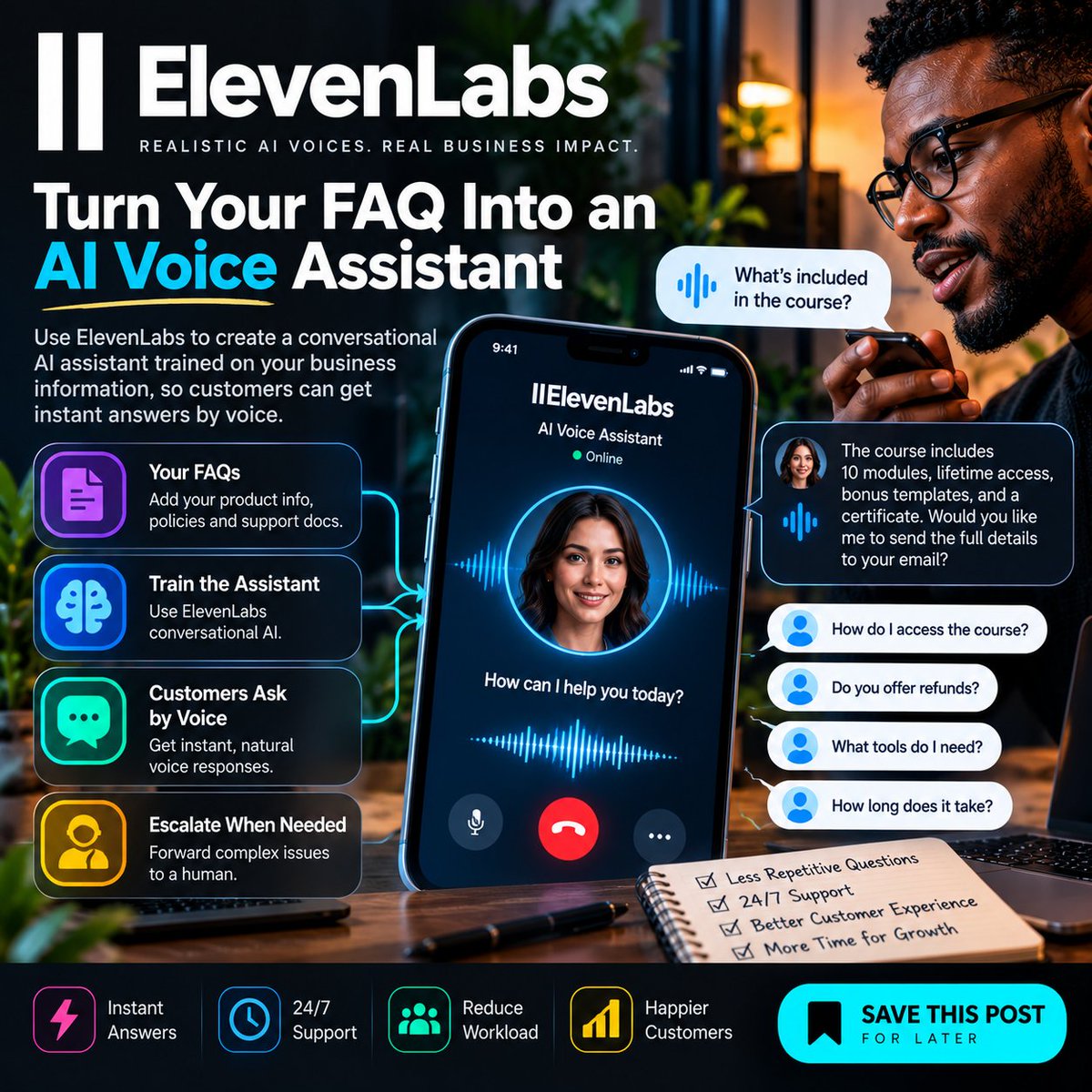
TURN YOUR FAQ INTO AN AI VOICE ASSISTANT WITH ELEVENLABS
What if customers could ask your business questions by voice and get answers without waiting for you?
Most people use ElevenLabs to create AI voices.
A more useful business application is:
Turn your existing FAQ and business information into an AI voice assistant.
Real-life example
Imagine you sell an online course.
Customers constantly ask:
• What is included?
• How do I access the course?
• What tools do I need?
• How long does the course take?
• Do you offer refunds?
Instead of answering the same questions repeatedly, create an AI voice assistant trained on your approved information.
Here's how
1. Collect your FAQs, product information, and support documentation.
2. Organize the information into a clear knowledge base.
3. Create an ElevenLabs conversational AI agent.
4. Add your approved information as its knowledge source.
5. Define what the agent can and cannot answer.
6. Test it with real customer questions.
7. Put the assistant on your website or another supported customer channel.
Use this instruction
“Answer customer questions using only the approved business information provided to you.
Keep responses concise and conversational.
Never invent prices, policies, features, or promises.
If the answer is unavailable or requires human judgment, clearly tell the customer that a human representative needs to assist them.
For payment, refund, account, or sensitive issues, escalate to a human.”
The automation workflow
Customer asks a question
↓
AI voice assistant receives it
↓
AI identifies the question
↓
AI checks the approved knowledge
↓
Answer available
↓
AI responds
↓
Answer unavailable
↓
Customer is directed to human support
The real advantage
You're not just generating an AI voice.
You're turning your existing business knowledge into an interactive customer-support channel.
That means your customers can get answers without you personally responding to every repetitive question.
💾 SAVE this post if you run a business, sell a course, or provide a service.
📤 SHARE it with someone who spends too much time answering the same customer questions.
Follow for more practical AI workflows you can actually implement.
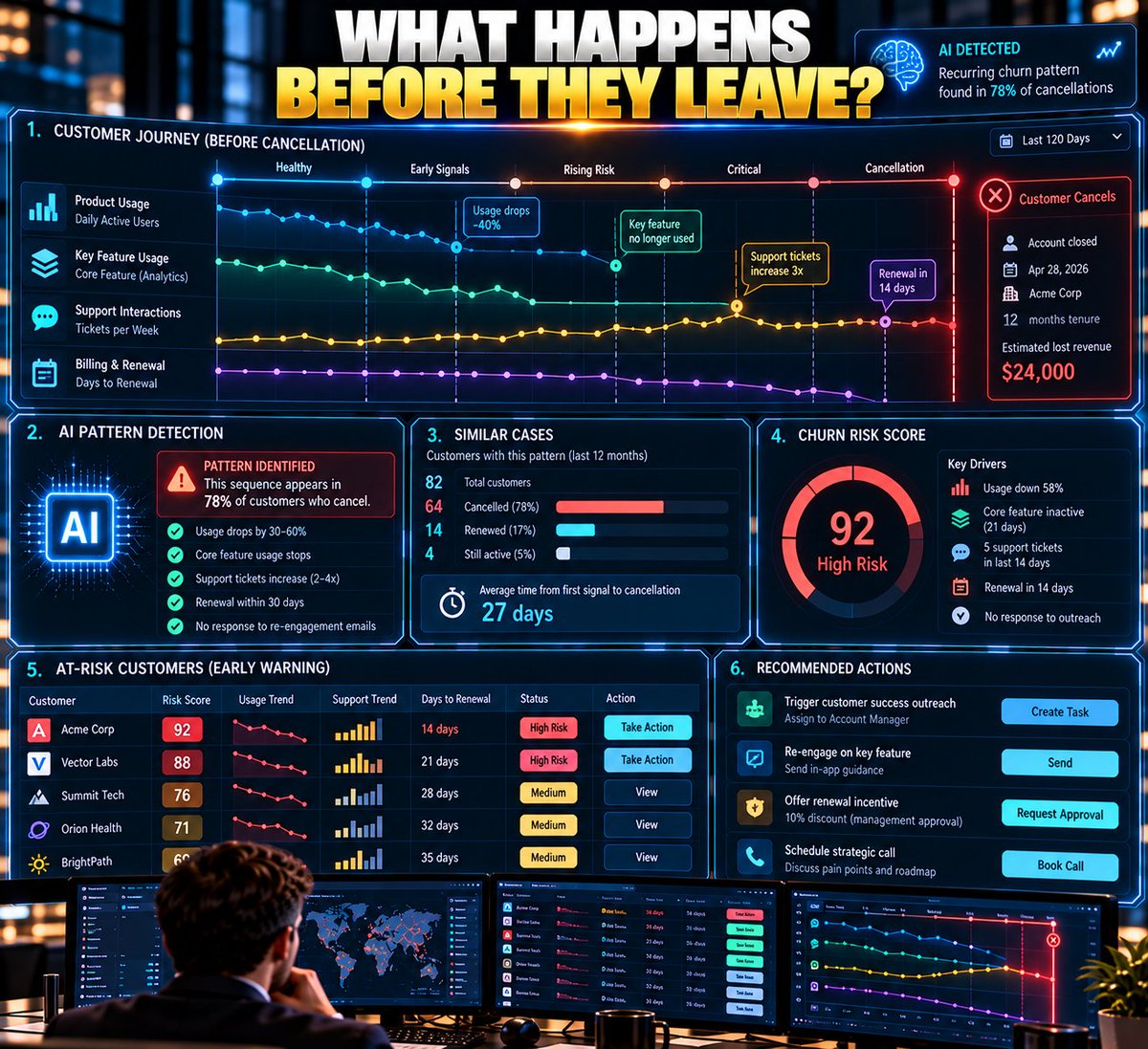
BUILD A “WHY ARE CUSTOMERS LEAVING?” ENGINE
A cancellation form usually tells you what happened.
It doesn't necessarily tell you why.
Build an AI churn-investigation workflow.
Example:
Every month, collect:
• cancellation reasons
• support conversations
• product usage
• customer tenure
• plan type
• complaints
• refund requests
Then:
1. Remove sensitive information you don't need.
2. Give AI the approved customer data.
3. Ask it to group cancellations by underlying themes.
4. Compare those themes against actual product behavior.
5. Look for combinations.
Example:
Customers who:
stopped using Feature X
+
opened 2+ support tickets
+
renewal within 30 days
may be showing a different pattern from customers who simply became inactive.
6. Quantify how common each pattern is.
7. Send the highest-impact patterns to the relevant team.
Now you're not asking:
“Why did customers leave?”
You're asking:
“What sequence of events tends to happen before they leave?”
That's where AI becomes genuinely useful.
What customer behavior would you investigate first?
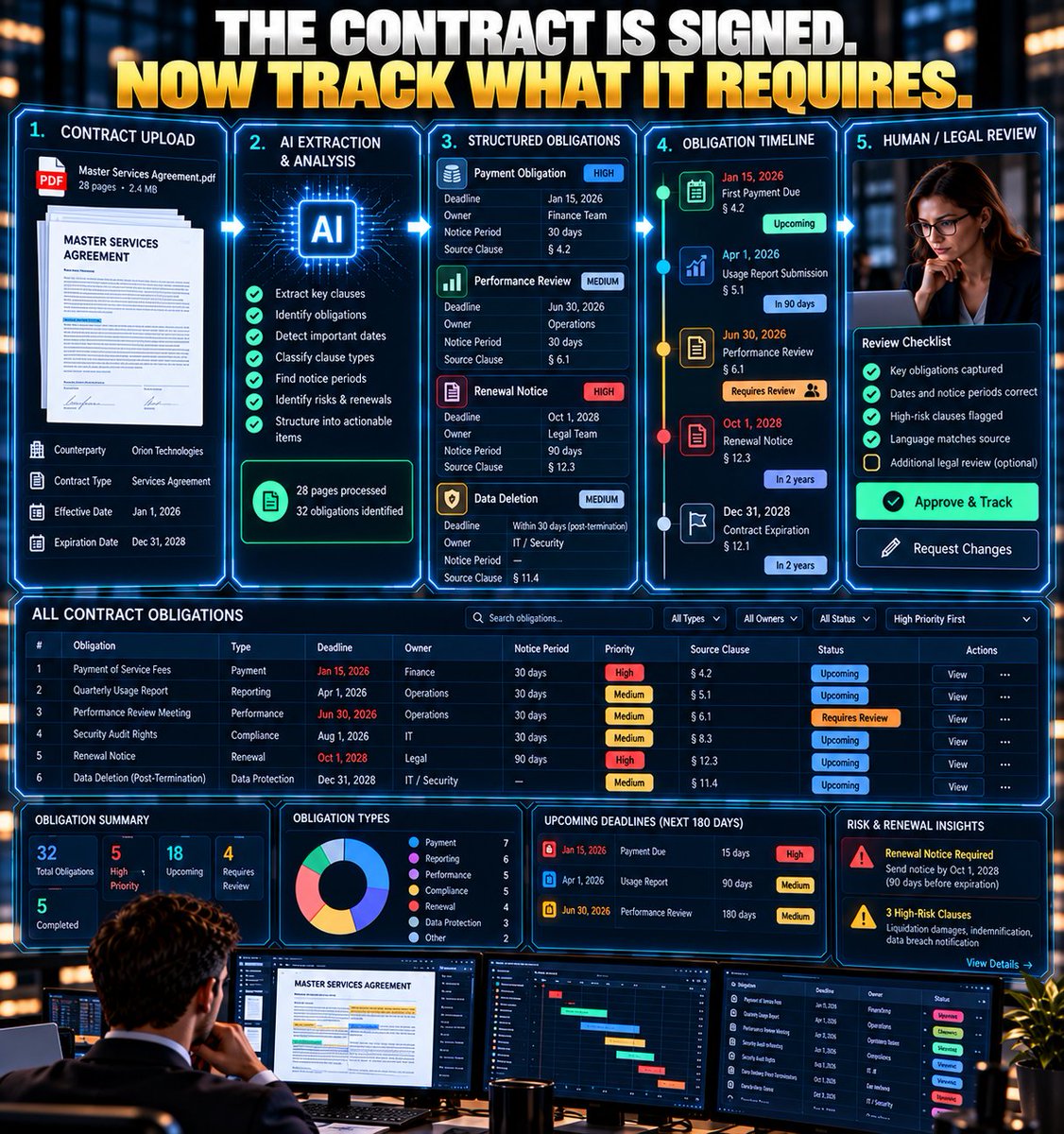
TURN CONTRACTS INTO AN AI OBLIGATION TRACKER
Signing the contract isn't the end of the workflow.
Sometimes it's the beginning.
Imagine a company signs 50 contracts.
Buried inside them are:
• renewal dates
• notice periods
• reporting obligations
• payment dates
• service requirements
• termination conditions
Nobody should have to remember all of that manually.
Build this:
1. Store approved contracts in a controlled document repository.
2. When a new contract is added, AI extracts the important obligations.
3. Attach every extracted obligation to its source clause.
4. Record the responsible person/team.
5. Calculate upcoming deadlines.
6. Create reminders before each deadline.
7. If AI is uncertain, send the clause to a human/legal reviewer.
8. Never allow AI to modify or interpret a contract without appropriate human review.
Now the contract becomes:
DOCUMENT → OBLIGATIONS → OWNERS → DEADLINES → ALERTS
The valuable part isn't “AI reads contracts.”
It's:
AI turns forgotten obligations into visible work.
What recurring obligation would be easiest for your business to forget?
@olegzanx The real value isn’t the diagram—it’s what the diagram exposes. If you can’t trace every branch, retry, and exception, the automation probably isn’t ready.
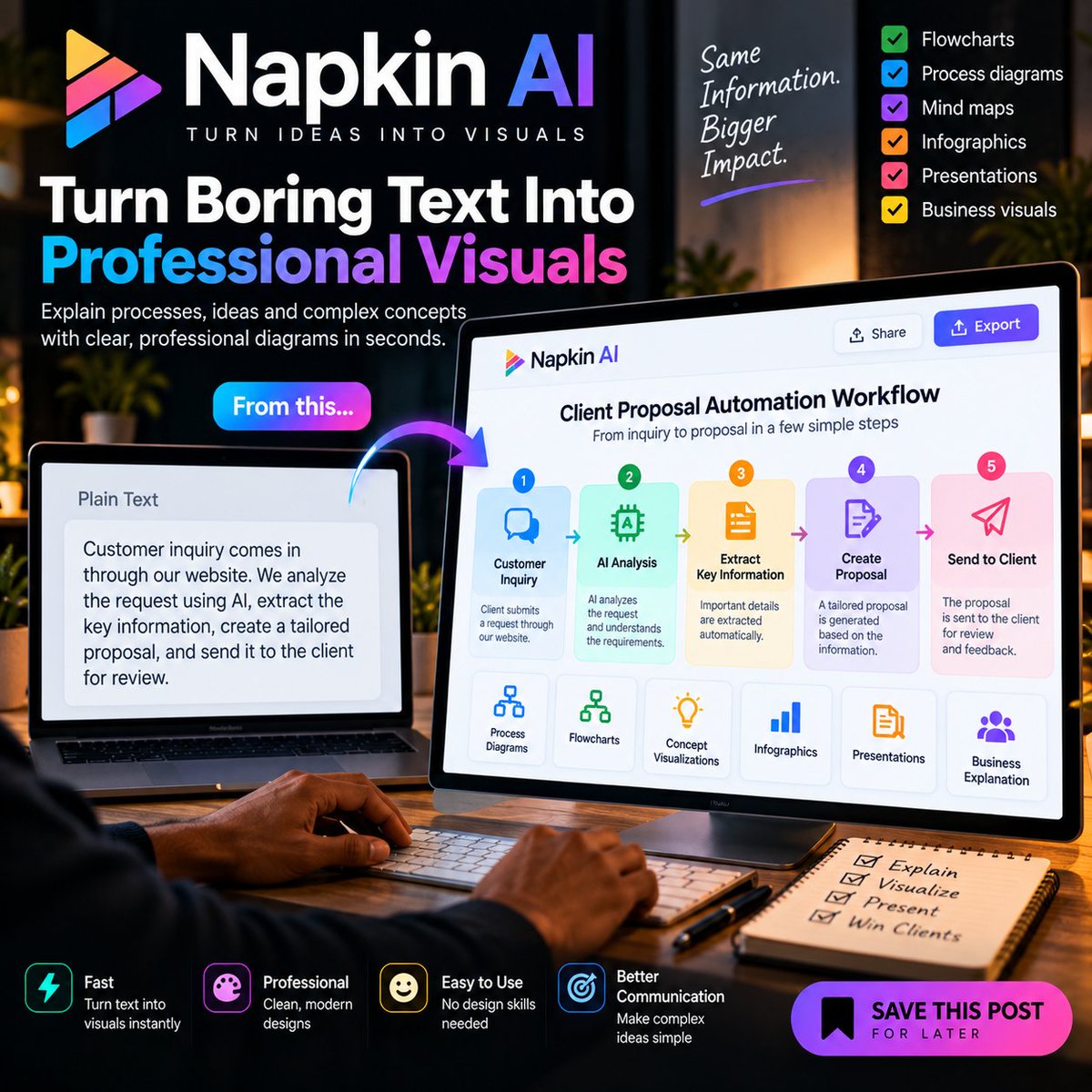
TURN BORING TEXT INTO PROFESSIONAL VISUALS WITH NAPKIN AI
You have the information. Napkin AI can help you make people understand it faster.
Most people use AI to generate text.
Here's a less obvious use:
Turn a complicated explanation into a professional visual diagram without designing it manually.
Real-life example
Imagine you're selling an AI automation service.
You need to explain your workflow to a potential client:
Customer inquiry → AI analyzes the request → Information is extracted → Proposal is created → Client receives it.
Instead of explaining everything in a long paragraph, turn the process into a visual.
Here's how
1. Write your process in plain English.
2. Paste it into Napkin AI.
3. Ask it to visualize the process.
4. Choose the visual format that best explains the information.
5. Edit the wording and structure.
6. Export the visual for your proposal, presentation, website, or social media.
Use this prompt
“Turn this process into a clear professional workflow diagram.
Show each stage in the correct order.
Keep the wording short.
Make the relationships between each stage obvious.
Use a clean business presentation style.
The diagram should be understandable within a few seconds.”
The automation workflow
Your notes or process
↓
Napkin AI
↓
AI-generated visual
↓
Human review
↓
Export to presentation, proposal, website, or social media
You can take it further by connecting your content workflow to an automation platform.
For example:
New process document
↓
Automation detects the new content
↓
Content is prepared for visualization
↓
Napkin AI creates the visual
↓
You review it
↓
Approved visual goes into your content library
Why this is useful
A customer may ignore a page of instructions.
A clear visual can make the same information much easier to understand.
You can use this for:
• Business processes
• Client proposals
• Tutorials
• SOPs
• Presentations
• Product explanations
• Social media content
The goal isn't to make information prettier.
It's to make complicated information easier to understand.
💾 SAVE this post if you regularly explain processes, systems, or complicated ideas.
📤 SHARE it with a consultant, entrepreneur, educator, or content creator who still explains everything with long blocks of text.
Follow for more practical AI workflows you can actually implement.
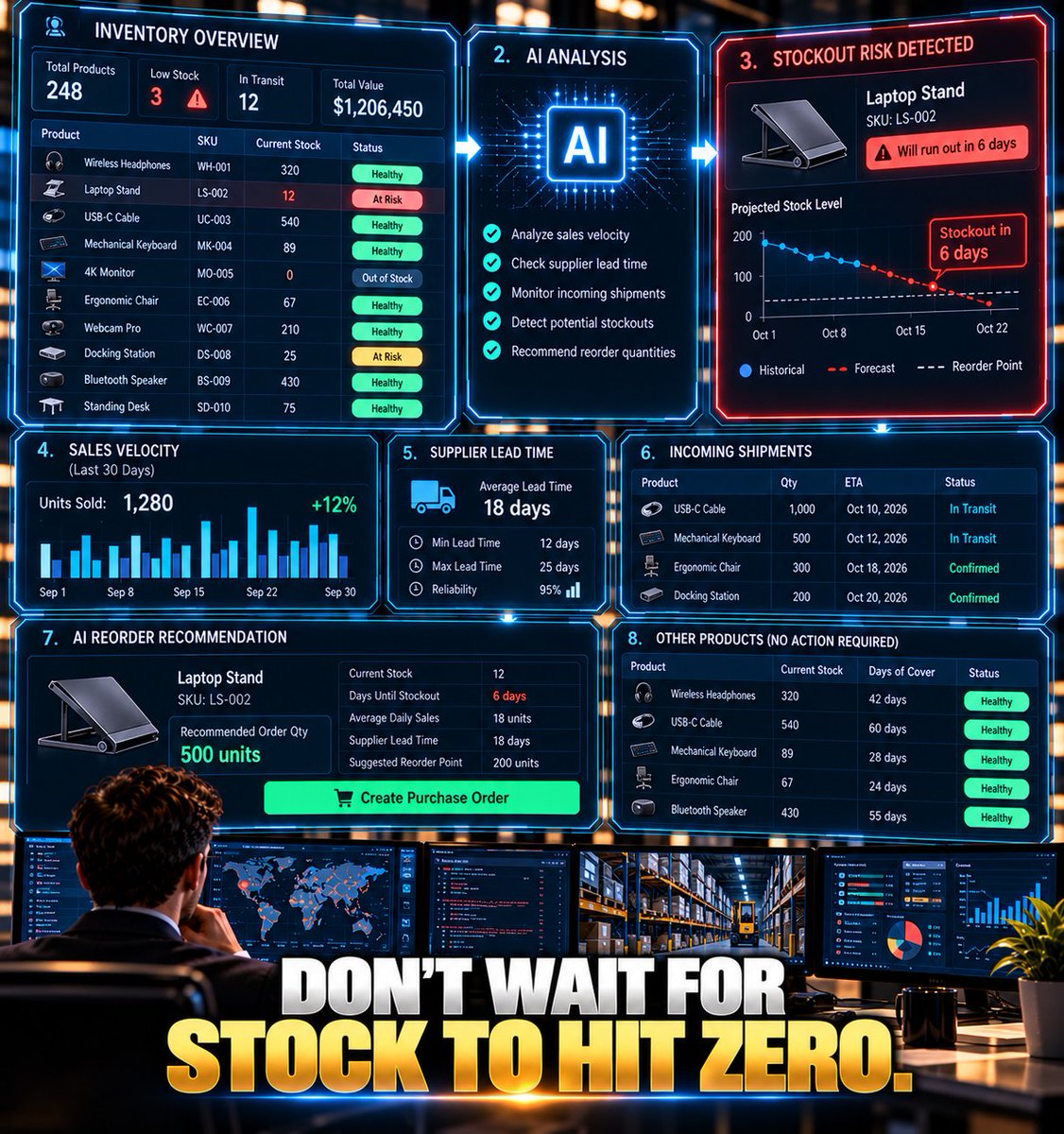
BUILD AN AI INVENTORY REORDER SYSTEM
“Stock is low.”
That's not enough information to decide whether you should reorder.
Build an AI inventory workflow that asks:
How quickly are we selling it?
How long does the supplier take?
Is demand increasing?
Is this seasonal?
Do we already have another shipment coming?
Build it:
1. Put inventory, sales history, supplier lead times, and incoming orders into your data system.
2. Run the workflow daily.
3. AI calculates demand trends.
4. Compare projected demand against available stock.
5. Include supplier lead time.
6. Calculate the risk of running out.
7. If risk crosses your threshold, create a reorder recommendation.
8. If the purchase is above your approval limit, send it to a human.
9. After approval, create the purchase order.
Now your system isn't asking:
“Is stock low?”
It's asking:
“Are we likely to run out before the next shipment arrives?”
That's a much more useful question.
What inventory decision would you automate?
I spent over 100k in less than a month for data. The situation is getting worse daily
Data that is meant for one month just exhaust in few days and I can't point out what exactly it's been used that will exhaust it in few days.
Data subscription abroad is just exceptional and you will be glad you did subscribed.
Back home in Nigeria, reverse is the case and MTN keep frustrating people on top of the hardship people are facing 🤦
@DEuropanostra@InsaneContext Black and white is just the color. Different color but one people
I have watched several clips where the whites bully the blacks as well
I'm not here to judge but to say 👉 we should all make the world a nice place to live 🙏
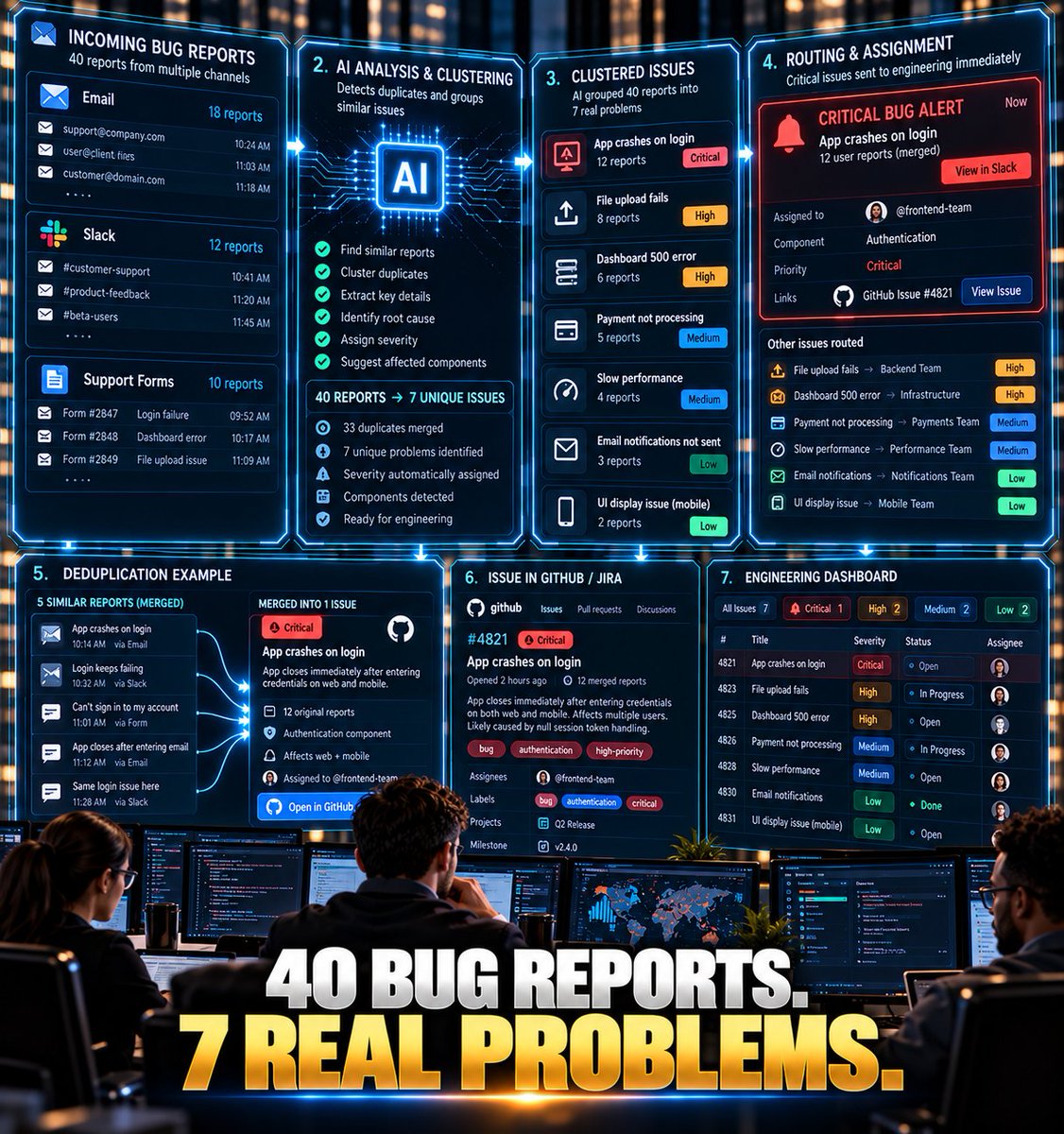
BUILD AN AI WEBSITE BUG TRIAGE SYSTEM
Your developers shouldn't have to read 40 bug reports to discover that 17 of them are the same problem.
Build this:
BUG REPORTS → AI TRIAGE → DUPLICATE DETECTION → PRIORITY → DEVELOPER
How:
1. Send website bug reports into one database.
2. When a new report arrives, AI extracts:
- Error
- Page
- User action
- Device/browser
- Severity
- Expected behavior
- Actual behavior
3. AI searches previous reports.
4. If it finds a likely duplicate, attach the new report to the existing issue.
5. If it's new, classify severity.
6. AI explains why it assigned that severity.
7. Create/update the issue in GitHub, Linear, Jira, etc.
8. Critical issues trigger an immediate alert.
9. Everything else enters the normal queue.
Now developers receive:
ONE CLEAN ISSUE
instead of:
17 versions of the same complaint.
The interesting part isn't AI writing the bug report.
It's AI reducing the noise before engineering sees it.
What would you automate first in your development workflow?
AI INSTRUCTION TO USE:
Analyze this bug report. Extract the technical details without inventing information. Compare it with the existing issue summaries and identify possible duplicates. Explain the evidence for any duplicate match and assign a severity based only on the defined criteria.
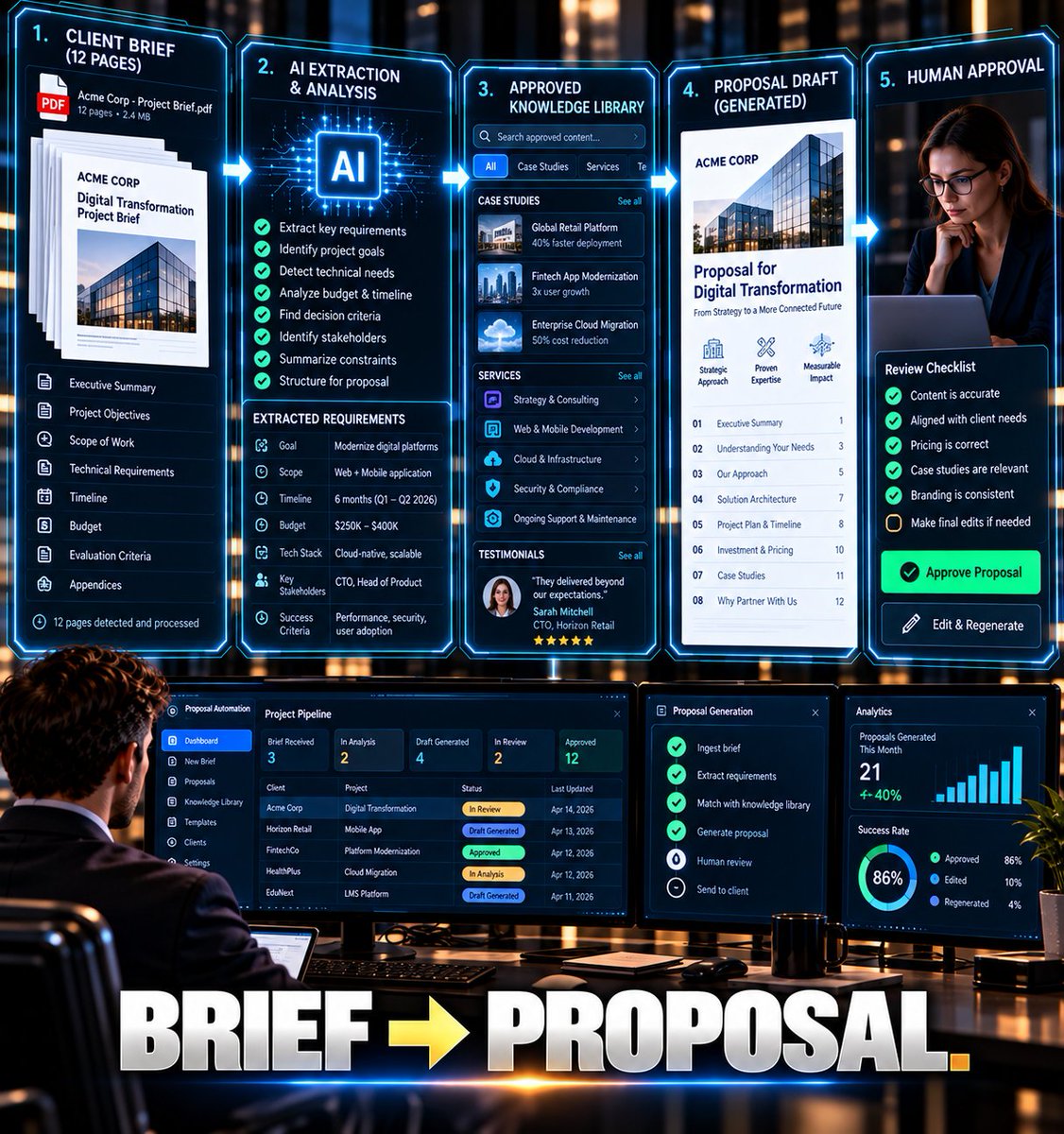
TURN A CLIENT BRIEF INTO A PROPOSAL — WITHOUT STARTING FROM ZERO
A client sends you a 12-page project brief.
Most people:
Read everything → take notes → open Word → start writing.
I'd build this instead:
CLIENT BRIEF → AI → PROPOSAL DRAFT
Build it:
1. Save incoming briefs in Google Drive/OneDrive.
2. Trigger Make or Zapier when a new brief appears.
3. Send the document to AI.
4. Extract:
- Client objectives
- Deliverables
- Requirements
- Budget
- Timeline
- Risks
- Missing information
5. Search your approved library for relevant case studies, services, testimonials, and previous proposals.
6. AI combines only the relevant material into a proposal draft.
7. Run a second AI check for missing requirements and unsupported claims.
8. Send the draft to a human for editing and pricing approval.
9. Generate the final document.
The AI isn't inventing a proposal.
It's assembling the first 80% from information you already own.
Tools:
Google Drive + Make/Zapier + AI + Google Docs/Word.
What document would you want AI to build from your existing files?