50 legendary internet rabbit holes you can spend hours exploring👇
1. https://t.co/BKQKtCpfmF — Watch the world via live satellite imagery
2. https://t.co/skHM6iilRk — See every plane currently in the sky
3. https://t.co/3wHLr5Crg0 — Track all ships at sea in real time
4. https://t.co/wneZoYlvLt — Live map of winds and storms
5. https://t.co/th5qTv52O1 — Watch lightning strikes hitting Earth in real time
6. https://t.co/ugJruuAACv — Live list of recent earthquakes
7. https://t.co/KjzFm8N2Vf — Ocean cables carrying the internet
8. https://t.co/ihBKAFPTgk — Watch forests disappear from space
9. https://t.co/QO76fqlnqY — The world's statistics, second by second
10. https://t.co/6aNOFkqc0c — Current number of tweets and searches being posted
11. https://t.co/Ng5YgeP1em — Compare the true sizes of countries
12. https://t.co/8nxdhZQV3I — Maps from centuries ago
13. https://t.co/KxBUC8vSl0 — Archive of 150,000 historical maps
14. https://t.co/jCKAhsZeWZ — World map drawn by volunteers
15. https://t.co/d5QWs5nRf2 — Look out the window of a random person around the world
16. https://t.co/RKjjmyrsVb — Virtual walks through cities
17. https://t.co/foY7sok6b8 — Teleport to a random spot on Earth
18. https://t.co/ZJ889ivqJL — Catalog of the world's strangest places
19. https://t.co/wVGZkiJzPW — Interactive knowledge experiences
20. https://t.co/j1VNMfZb26 — Scale journey from atom to universe (Updated HTML5 link)
21. https://t.co/CvOBtlatbG — Explore the solar system in 3D
22. https://t.co/RnlofaWZQo — Real sky map in your browser
23. https://t.co/1PlQgAjJCs — NASA's astronomy picture of the day
24. https://t.co/2RuTZvWLiB — NASA's entire visual archive, free
25. https://t.co/beEkHBhqUT — Visual articles told through data
26. https://t.co/RMccQyC8He — The state of the world with real data
27. https://t.co/gNH6mlA69d — What we mistakenly think we know about the world
28. https://t.co/ZrVElnZiNA — Visualizing complex data
29. https://t.co/ahtXNpoz2M — World Bank's open data
30. https://t.co/ShMYouwDwn — Turkey's official statistics database
31. https://t.co/GqEd2SxLvM — Archive of millions of books, films, and software
32. https://t.co/8ijFqv8DuN — 70,000 free books whose copyrights have expired
33. https://t.co/Gt6dp7heDe — Record of every book in the world
34. https://t.co/LogFrI5jlv — U.S. Library of Congress digital archive
35. https://t.co/O9XxbTPS1x — Europe's cultural heritage archive
36. https://t.co/lQg0HnIwh5 — America's digital library collection
37. https://t.co/TcOIZ5lCj1 — Tour museums from home
38. https://t.co/6wMBrfTIET — Download artworks in high resolution
39. https://t.co/trYjdzyr6U — Archive of 250,000 artworks
40. https://t.co/Jgz9AbgAKa — Forgotten visual treasures of history
41. https://t.co/y4axNFFkqQ — Free archive of culture and education
42. https://t.co/wkw7PgUdb9 — Met Museum's open collection
43. https://t.co/AZ98yxOTNa — Family tree of music genres
44. https://t.co/UWyCzSRkHo — Pick a country and decade to listen to that era
45. https://t.co/Q0NMpmavgo — Turn Wikipedia edits into audio
46. https://t.co/lT2YvOjIlU — Random knowledge well
47. https://t.co/tukI2JDkMX — Time, sunrises, and sky events
48. https://t.co/A8xsuxYYwL — Live stream of science news
49. https://t.co/RrqPEgxlzB — Free preprints of scientific papers
50. https://t.co/4ZyBN6HX2S — Visualize data with live code
Save this. You’ll definitely need some of these later. 🔖
Follow @justinbrave21 for more useful websites, AI tools & tech resources.
Si haces Threat Intelligence o ciberseguridad defensiva, tienes que guardar esto ahora mismo.
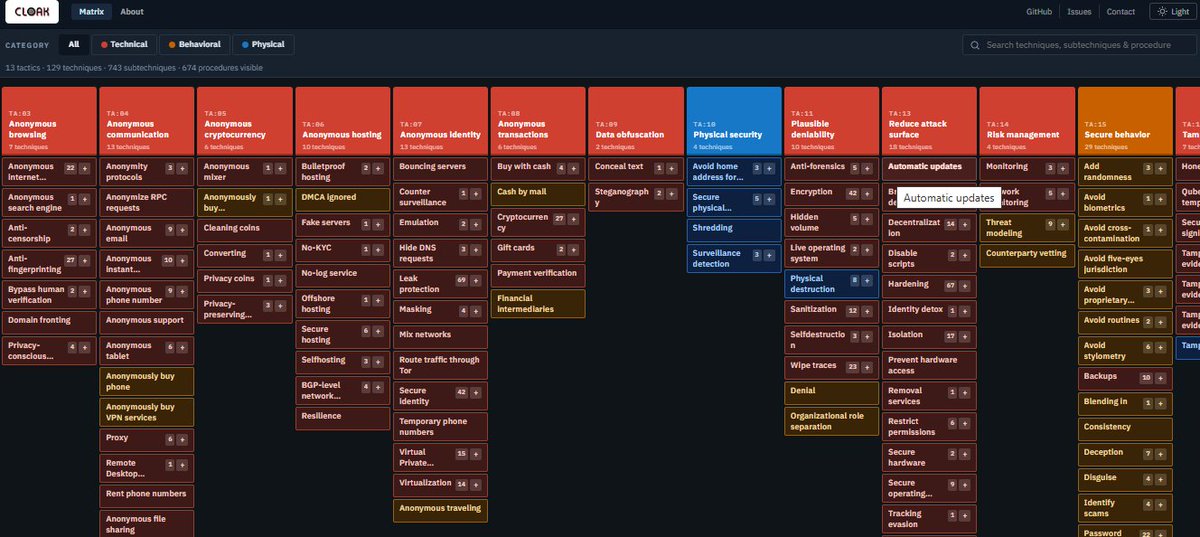
Crearon CLOAK, un framework al estilo MITRE ATT&CK pero enfocado 100% en las tácticas de ocultación y evasión de los cibercriminales.
🔍 ¿Qué incluye? • 1,387 TTPs documentados. • Capas técnicas, comportamentales y físicas. • 100% Open source y actualizado este 2026.
Entender cómo se esconden los atacantes es la única forma de encontrarlos antes de que sea tarde.
Te dejo la plataforma interactiva y los detalles abajo en los comentarios 🛡️👇
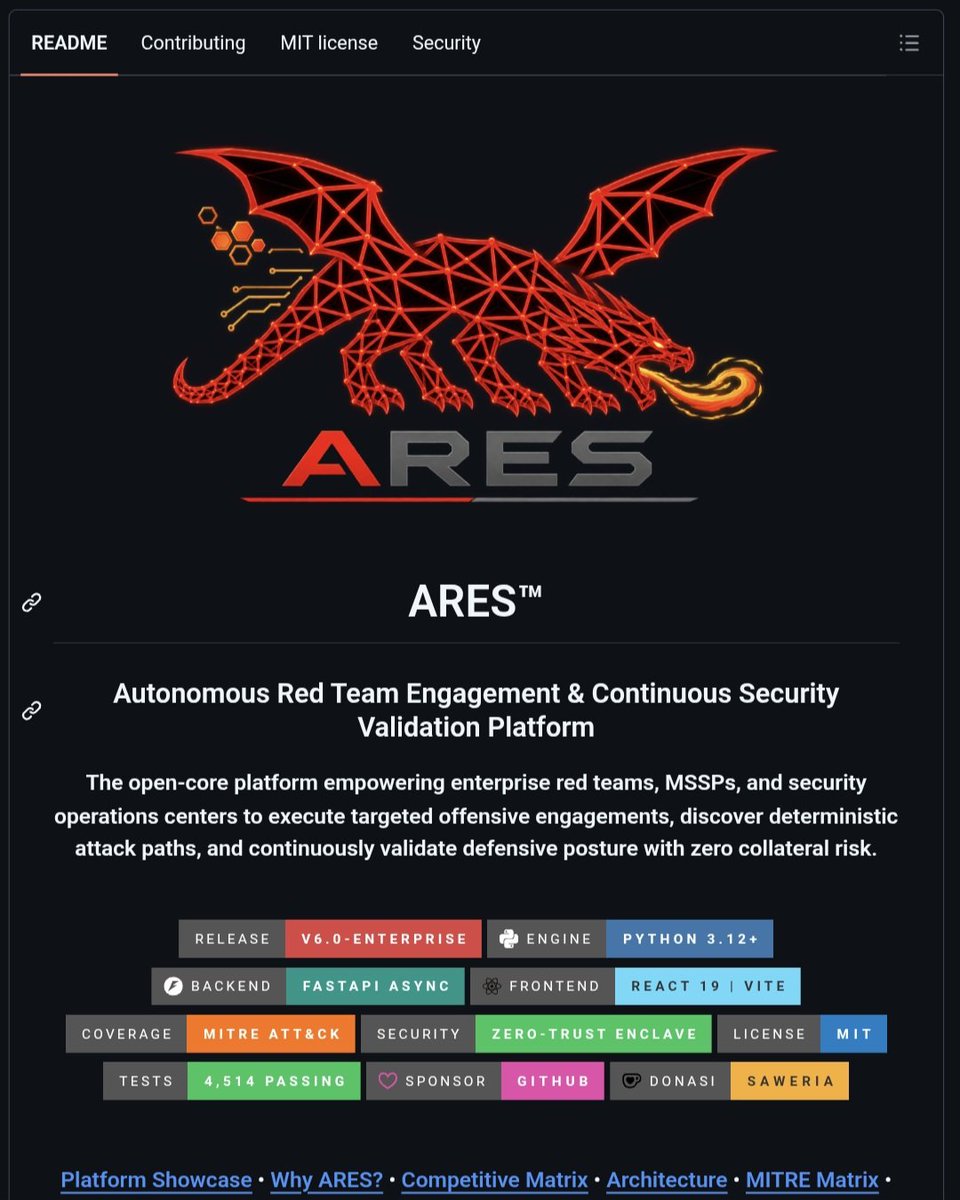
🔥 أداة ARES
هي أداة مخصصة للأختراق الهجومي و الأمن السيبراني للقيام بعمليات أختراق ذاتية واكتشاف مسارات الاختراق
🚀 تستخدم هذه الاداة للقيام بالمهام التالية :
1. المحاكاة الذاتية للهجمات
2. اكتشاف مسارات الاختراق
تستخدم هذه الأداة من قبل فرق Red Teams و SOC
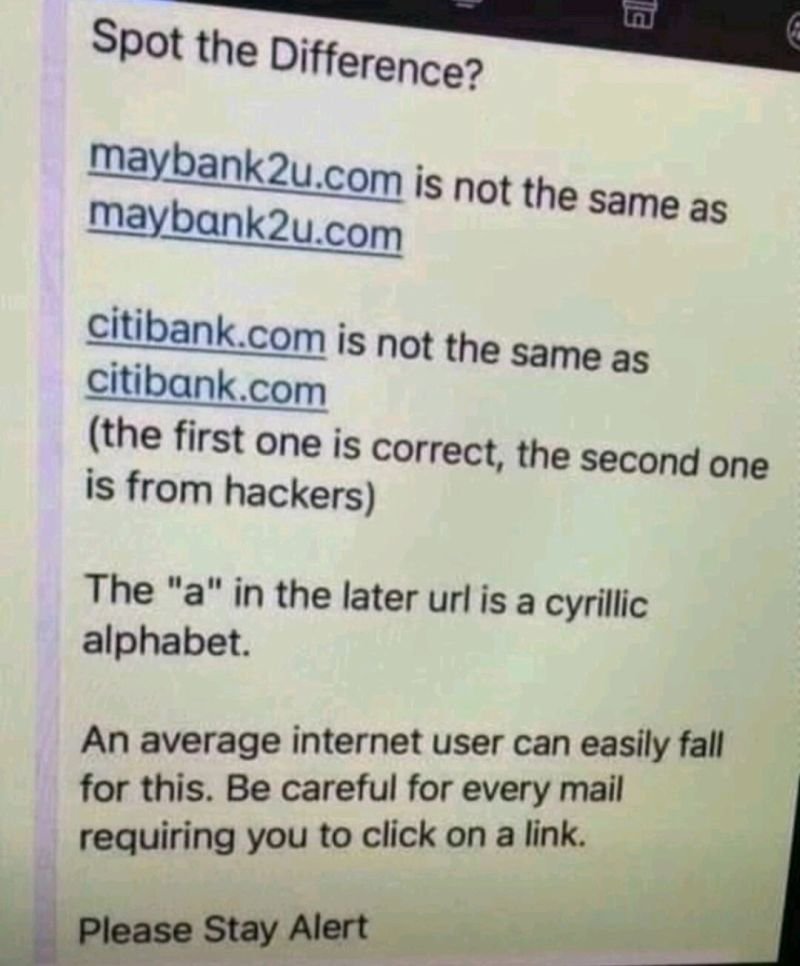
A domain that looks like https://t.co/ItCL8t345u but isn't https://t.co/ItCL8t345u where the actual characters are different.
Internationalized domain names (IDN) let browsers render non-Latin scripts, Cyrillic, Greek, Cyrillic lookalikes for Latin letters. а Cyrillic "а" (U+0430) looks pixel-identical to a Latin "a" in most fonts. so does Cyrillic "е," "о," "р," "с," "у," "х."
register "аррӏе.com" using Cyrillic characters, and browsers that support IDN will render it as https://t.co/ItCL8t345u in the address bar. underneath, the actual domain is https://t.co/NZco4fd9Qd punycode, the ASCII-safe encoding browsers convert IDNs into. you never see the punycode. you see https://t.co/ItCL8t345u. so does your email client. so does the padlock.
a researcher demonstrated this against Chrome and Firefox in 2017 using exactly that https://t.co/ItCL8t345u spoof, and both browsers rendered it clean.
the fix isn't "look closely." you can't. it's browsers flagging mixed-script domains, and you checking the punycode directly when something feels off.
Knowing APIs won’t make you a good DevOps engineer. Knowing how they work in production will.
Early in my career, I mostly thought about APIs as:
GET → POST → PUT → DELETE
But working on real systems changes the questions:
→ Should this API be public or internal?
→ REST, GraphQL, or SOAP?
→ Should services communicate synchronously or asynchronously?
→ Is this a partner integration or internal service?
→ How do we secure, monitor, and rate-limit it?
→ Should this traffic go through an API Gateway?
→ How do we handle authentication, TLS, retries, and failures?
That's when you realise there isn't just one type of API.
Different API patterns solve different problems:
🔹 REST → Application & service communication
🔹 GraphQL → Flexible data fetching
🔹 SOAP → Enterprise integrations
🔹 Internal APIs → Service-to-service communication
🔹 Partner APIs → External integrations
🔹 B2B APIs → Business system connectivity
The syntax is the easy part.
The real skill is understanding how the API fits into the overall architecture and behaves in production.
That's what separates someone who knows the tools from someone who understands the system.
⏱️ 𝟲𝟬-𝗦𝗲𝗰𝗼𝗻𝗱 𝗕𝗶𝘁𝘀 🔒
𝗔𝘃𝗼𝗶𝗱 𝘁𝗵𝗶𝘀 𝗪𝗶𝗻𝗱𝗼𝘄𝘀 𝗙𝗶𝗿𝗲𝘄𝗮𝗹𝗹 𝘁𝗿𝗼𝘂𝗯𝗹𝗲𝘀𝗵𝗼𝗼𝘁𝗶𝗻𝗴 𝗺𝗶𝘀𝘁𝗮𝗸𝗲!
Ever checked Windows Firewall and got 𝗰𝗼𝗻𝗳𝗹𝗶𝗰𝘁𝗶𝗻𝗴 𝗿𝗲𝘀𝘂𝗹𝘁𝘀?
🔹 netsh advfirewall → Firewall is ON
🔹 Get-NetFirewallProfile -PolicyStore ActiveStore → Firewall is OFF
🔹 GUI → Firewall is OFF via Group Policy
The difference? netsh advfirewall can show the 𝗹𝗼𝗰𝗮𝗹 𝗰𝗼𝗻𝗳𝗶𝗴𝘂𝗿𝗮𝘁𝗶𝗼𝗻, while ActiveStore represents the 𝗰𝘂𝗿𝗿𝗲𝗻𝘁 𝗮𝗰𝘁𝗶𝘃𝗲 𝗽𝗼𝗹𝗶𝗰𝘆.
I learned this one after a few hours of nonsense troubleshooting 😅.
𝗗𝗼𝗻’𝘁 𝗷𝘂𝘀𝘁 𝘁𝗿𝘂𝘀𝘁 𝘁𝗵𝗲 𝗳𝗶𝗿𝘀𝘁 𝗰𝗼𝗺𝗺𝗮𝗻𝗱 𝘆𝗼𝘂 𝗳𝗶𝗻𝗱. Make sure you’re checking the right configuration store.
#WindowsSecurity #WindowsFirewall #PowerShell #ActiveDirectory #CyberSecurity
The laptop was supposed to be asleep.
But at 3:07 AM, it was still making outbound connections to the internet every five minutes.
The user had already gone to bed, so there was no reason for the machine to be doing anything serious at that time.
At first, I thought it could just be Windows doing normal background activity.
Windows Update, OneDrive, Defender, plenty of legitimate services can make network connections when nobody is using the system.
But the timing was too consistent.
Every five minutes.
So I checked which process owned the connection.
That was when I found:
OneDriveSyncHelper.exe
Again, the name looked normal.
The problem was the location:
C:\Users\marcus\AppData\Roaming\Microsoft\Sync\OneDriveSyncHelper.exe
That was not the normal location for Microsoft OneDrive.
I checked the digital signature.
The file was not signed.
Now it was getting interesting.
The process had an active HTTPS connection to an external IP address, so I checked how it was starting.
Inside Task Scheduler, I found a task called:
OneDrive Sync Maintenance
The task was configured to launch the same unsigned executable from the user’s AppData folder.
And the repetition interval?
Every five minutes.
That explained the network traffic.
The attacker had deliberately used Microsoft-looking names so that anyone checking the system quickly might assume everything was legitimate.
OneDriveSyncHelper.exe
OneDrive Sync Maintenance
Even the folder was called:
Microsoft\Sync
Everything was made to look normal.
When we spoke to the user, he remembered downloading a document converter the previous afternoon because somebody had sent him a file he could not open.
The installer appeared to work, so he never thought anything was wrong.
But shortly after it ran, the scheduled task was created.
From that point, the suspicious binary kept starting quietly in the background and calling out every five minutes.
We isolated the laptop, collected the executable and scheduled-task configuration for analysis, revoked the user’s active sessions, reset the affected credentials and rebuilt the endpoint.
What exposed the compromise was not ransomware.
It was not a strange message on the screen.
It was one laptop communicating when nobody was supposed to be using it.
In incident response, sometimes the smallest behaviour is the thing that tells you the whole story.
Moving off of Active Directory doesn't mean you're more secure. I've worked with clients who have varying degrees of on-prem infrastructure all day, every day, for the last 5 years. Prior to that I have helped administer and secure an Active Directory environment.
You absolutely CAN secure and defend Active Directory. Active Directory DOES NOT get companies hacked.
Poor decisions and lack of effort get companies hacked. It doesn't matter if you're cloud-only or fully on-prem.
Whatever you do, do it well.
He copied a value out of the Windows Event Log.
Pasted it into his special browser.
And he was signed into Microsoft Entra as the user who had just authenticated.
No password. No phishing link. No stolen private key.
@MGrafnetter's Black Hat USA 2026 research...
A 21-year-old woman took all 5 anti-rabies injections and rabies immunoglobulin after a dog bite. Still she died of rabies.
Here are the real reasons why the vaccine sometimes fails and what we must fix.
1. Stitching the bite wound
🚨 Passkeys and MFA don’t automatically stop device code phishing!
Device code phishing abuses Microsoft’s sign in flow to give attackers a session without stealing a password or using a fake page.
Learn how it works and the Conditional Access policy that stops it:
🔗 https://t.co/Rqr7JqjwVG
🚨 ¡ALERTA! Tu WiFi de casa ya puede verte a través de las paredes.
Un desarrollador convirtió el WiFi normal de cualquier hogar en un radar que atraviesa muros de concreto.
Su proyecto en GitHub ya supera las 62.000 estrellas.
No usa cámaras. No usa lentes.
Solo analiza cómo tu cuerpo altera las ondas de radio que ya emite tu router.
Mira lo que pasa cuando alguien se acuesta en la cama de la habitación de al lado:
La IA detecta al instante:
Su postura exacta
Su respiración
Incluso sus latidos del corazón en tiempo real
Todo con un microchip de 5 dólares.
Las cámaras normales necesitan verte directamente e invaden tu espacio.
Este sistema no necesita verte… te “siente” a través de las paredes.
Tu router WiFi ya no es solo internet.
Ahora es una cámara invisible que atraviesa ladrillos.
¿Estamos listos para esto… o ya es demasiado tarde? 👀
¿Qué opinas? Comenta abajo.
⚠️ 7-Zip Vulnerability Exposes Millions of Users to Remote Code Execution Risk
Source: https://t.co/iRliCYhIwE
A newly disclosed vulnerability in 7-Zip, one of the most widely used open-source file archiving tools, could allow remote attackers to execute arbitrary code on affected systems.
Tracked as CVE-2026-14266, the flaw stems from improper handling of XZ chunked data and has been addressed in the latest software update. The vulnerability resides in how 7-Zip processes XZ-compressed data streams.
Specifically, specially crafted XZ chunked data can trigger a heap-based buffer overflow, a memory corruption issue that occurs when data written to a buffer exceeds its allocated space.
#cybersecuritynews #vulnerability
🥕 Fresh Kali365 Domains
If you have not restricted Device Code Flow in your tenant, keep an eye on the newly observed Kali365 domains that have emerged in recent week. These domains may be leveraged in device code phishing attacks, where unsuspecting users authorize an attacker-controlled device. Once authorized, the attacker can gain persistent access to Microsoft 365 resources such as Outlook, Teams, OneDrive, and other connected services without needing the user's password.🫡
#Cybersecurity #Kali365 #AnyRun
Be careful while travelling. Crooked airport employees are cutting off your baggage tags and sticking them on bags full of drugs. The gangs place air tags in the bags and pick them up at the destination airport. You may never know your tag was misused until airport security detects the drugs and then questions you.
Here is what you can do. At the airport check-in, take a photo of yourself with your bag showing the exact weight. The weight difference can save you.
Shocking beyond words ..
Share max .
Let this reach all..
A ₹1.6 crore hospital bill collapsed to just ₹27 lakhs, not because of a lawyer, not because of connections, but because of an AI chatbot. This family uploaded the entire medical bill into an AI system and let it audit every line item. The AI detected duplicate billing, illegal code stacking, and procedures that hospitals are not legally allowed to charge for. It then drafted a legally structured dispute letter referencing exact compliance violations. The hospital had no counter. The bill was slashed by over eighty percent. This is the real power of AI in healthcare — medical bill audits, hospital compliance checks, insurance dispute automation, and patient protection at scale.
HR: We lost another senior employee today.
CEO: What happened?
HR: He resigned after receiving an external offer.
CEO: That makes no sense. We could have matched it.
HR: That is the issue. We were willing to pay a stranger 70% more for the same role, but would not give our existing employee even a 20% raise.
CEO: External hiring is different. That is market pricing.
HR: He noticed that too.
CEO: We appreciated his loyalty. He had been here for years.
HR: Yes. And during those years, he consistently exceeded expectations while being told to “wait for the next review cycle.”
CEO: But budgets are complicated for internal employees.
HR: Apparently not for external candidates. The new hire budget was approved in three days. His raise request sat for eight months.
CEO: We had to stay competitive in the hiring market.
HR: He was part of that same market. The only difference is that another company valued him before we did.
CEO: So he left over salary?
HR: Not just salary. He left because he realized loyalty was being rewarded less than leaving.
CEO: That is unfortunate.
HR: Yes. Companies will sometimes trust a candidate after a 45-minute interview more than an employee who already proved themselves for five years.
CEO: So what are you saying?
HR: If companies only recognize employee value after a resignation letter appears, then eventually employees will stop waiting to be appreciated internally.
Sometimes the fastest way for an employee to get market value is to stop being your employee.
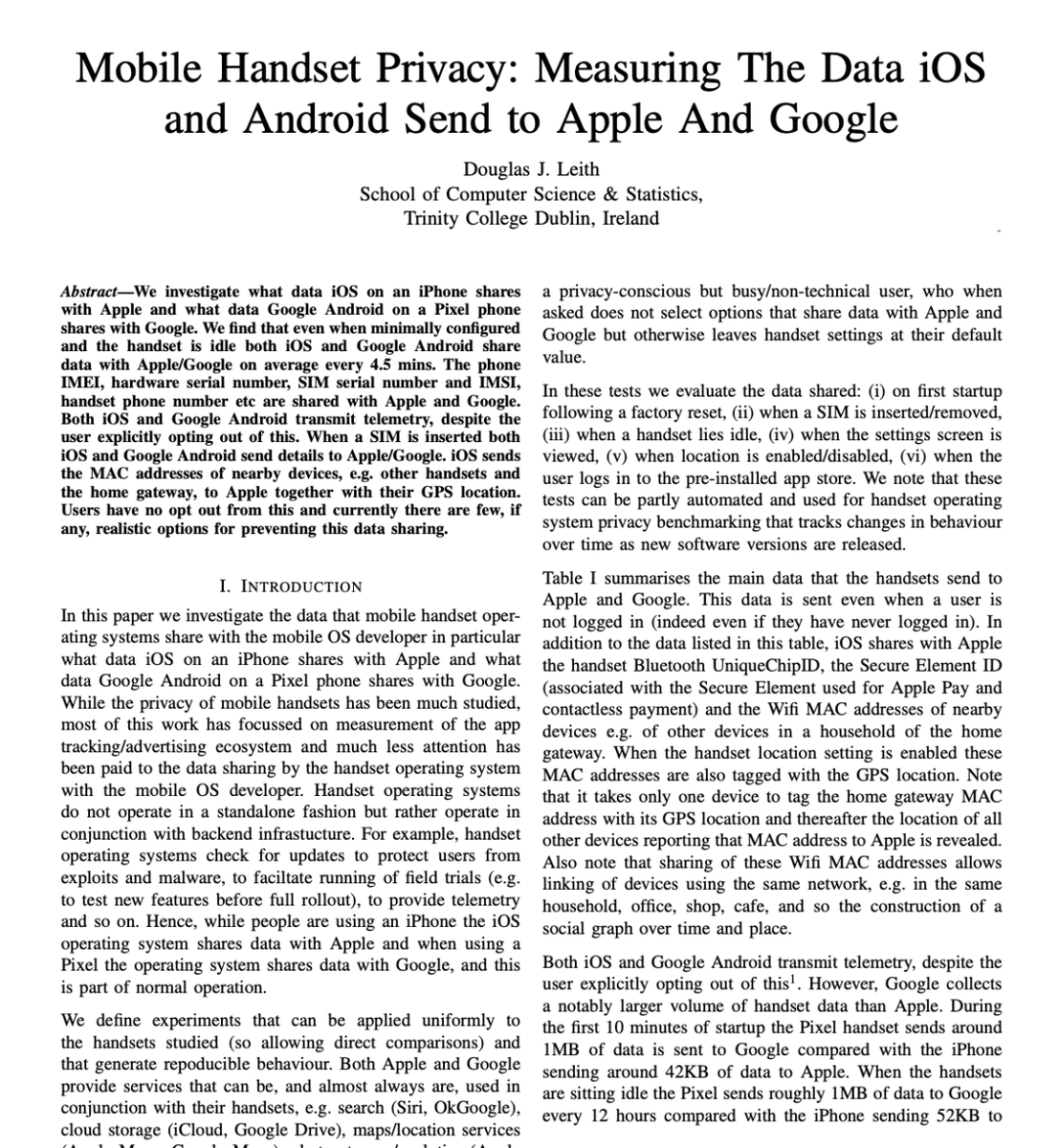
Researchers proved that your Android phone is sending data to Google every 4.5 minutes.
Even when you opt out of EVERYTHING.
Researchers at Trinity College Dublin did an exhaustive deep-dive into exactly how much data iOS and Android devices stealthily transmit back to Apple and Google.
Both tech giants are running non-stop telemetry pipelines from your device.
Even when you are not logged into an account. Even when you explicitly opt out of data collection. Even when the phone is completely untouched.
The sheer volume of data being harvested is staggering.
Android sends data back to Google every 4.5 minutes. iOS follows right behind, pinging Apple every 4.5 minutes.
Within the first 10 minutes of powering on a fresh device, Android sends roughly 1MB of data to Google. iOS sends about 42KB to Apple.
When the phones are just sitting there doing nothing, Google harvests around 1MB of data every 12 hours. Apple collects roughly 52KB.
Google is collecting 20x more telemetry data than Apple.
But what they are collecting is the real problem.
The researchers discovered that your phone isn’t just sending generic system diagnostics. It is sending a highly detailed digital fingerprint:
- Hardware serial numbers
- Device IMEI numbers
- Wi-Fi MAC addresses
- Your phone number
- SIM card details
And it gets darker.
iOS uploads the WiFi MAC addresses of every device near you. Your roommate's laptop, the café router, your neighbor's home gateway—all tagged with your exact GPS coordinates.
If just one person in your building enables location services once, Apple now knows where every single device on that network lives. Forever.
The researchers tried to opt out of everything. They turned off location services, restricted background data, and avoided signing into any accounts.
It didn't matter. The data transmission never stopped.
The escape hatch has been welded shut.
Right now, millions of professionals use these devices to handle sensitive business data, proprietary code, and private operations under the assumption that "idle" means "safe."
But the data shows there is no such thing as an offline smartphone anymore.
---
Paper: Mobile Handset Privacy: Measuring The Data iOS and Android Send to Apple And Google (2021)