El comando más absurdo de Claude Code es el que más uso.
/radio → abre el navegador con un directo de lo-fi 24/7. Punto.
Lo lancé pensando que era una broma. 2 semanas lo sigo utilizando todas las mañanas. Y cómo me gusta el arte del vídeo!
¿El vuestro cuál es?
Introducing Zero
The programming language for agents.
I wanted a systems language that was faster, smaller, and easier for agents to use and repair.
Explicit capabilities. JSON diagnostics. Typed safe fixes.
Made for agents on day zero.
¡Han sacado el Claude Code de DeepSeek!
Es de código abierto y está desarrollado con Rust
✓ Usa API Key o modelos locales
✓ MCP, Skills, Tools, Memoria y más
$ npm install -g deepseek-tui
→ https://t.co/3XYXsq3gDs
@miriamgonp@miriamgonp@javilop en @idoctus acabamos de lanzar #kleia si podemos ayudar escribirme.
https://t.co/vuB2fMDKTW
Estamos en fase temprana pero según lo que nos dicen estamos a la altura de OE.
Introducing Claude Design by Anthropic Labs: make prototypes, slides, and one-pagers by talking to Claude.
Powered by Claude Opus 4.7, our most capable vision model. Available in research preview on the Pro, Max, Team, and Enterprise plans, rolling out throughout the day.
I've tried many orchestration skills for coding agents.
They all overwhelmed me. Too many agents, too many skills, too many files... I never knew where to start. And when I finally figured them out, they didn't really work.
So I built my own.
New in Claude Code: /ultraplan
Claude builds an implementation plan for you on the web. You can read it and edit it, then run the plan on the web or back in your terminal.
Available now in preview for all users with CC on the web enabled.
Today we're excited to announce NO_FLICKER mode for Claude Code in the terminal
It uses an experimental new renderer that we're excited about. The renderer is early and has tradeoffs, but already we've found that most internal users prefer it over the old renderer. It also supports mouse events (yes, in a terminal).
Try it: CLAUDE_CODE_NO_FLICKER=1 claude
Mistakes happen. As a team, the important thing is to recognize it’s never an individuals’s fault — it’s the process, the culture, or the infra.
In this case, there was a manual deploy step that should have been better automated. Our team has made a few improvements to the automation for next time, a couple more on the way.
To manage growing demand for Claude we're adjusting our 5 hour session limits for free/Pro/Max subs during peak hours. Your weekly limits remain unchanged.
During weekdays between 5am–11am PT / 1pm–7pm GMT, you'll move through your 5-hour session limits faster than before.
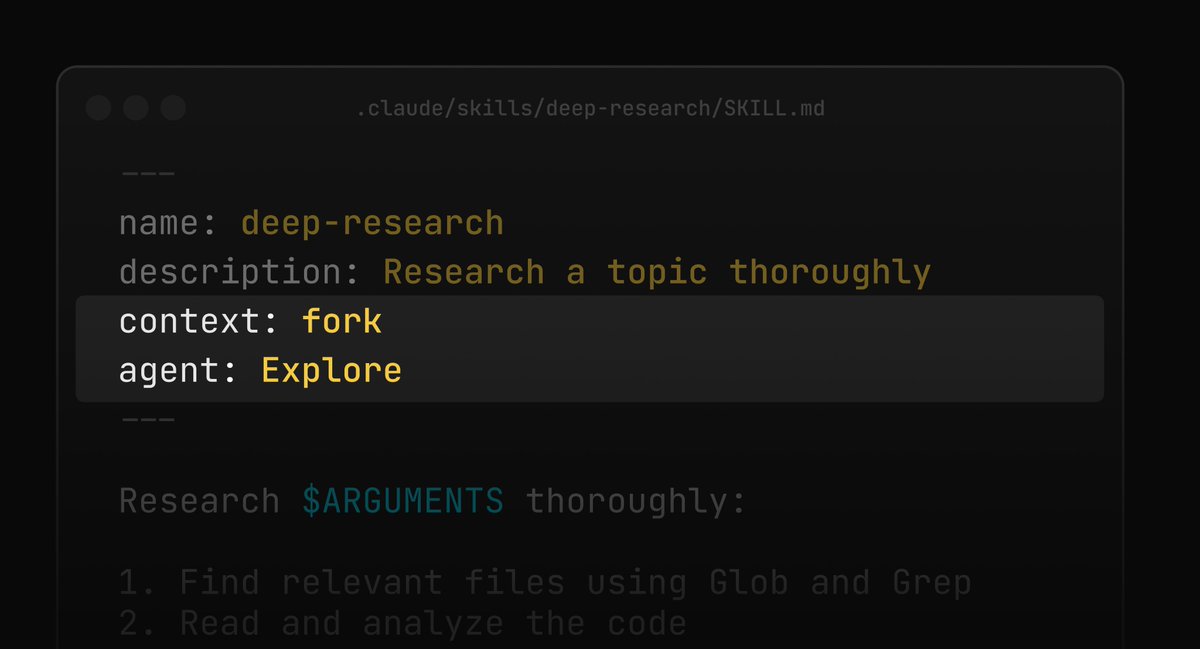
Btw you can add `context: fork` to run a skill in an isolated subagent. The main context only sees the final result, not the intermediate tool calls
It gets a fresh context window with CLAUDE.md + your skill as the prompt. The `agent` field even lets you set the subagent type!
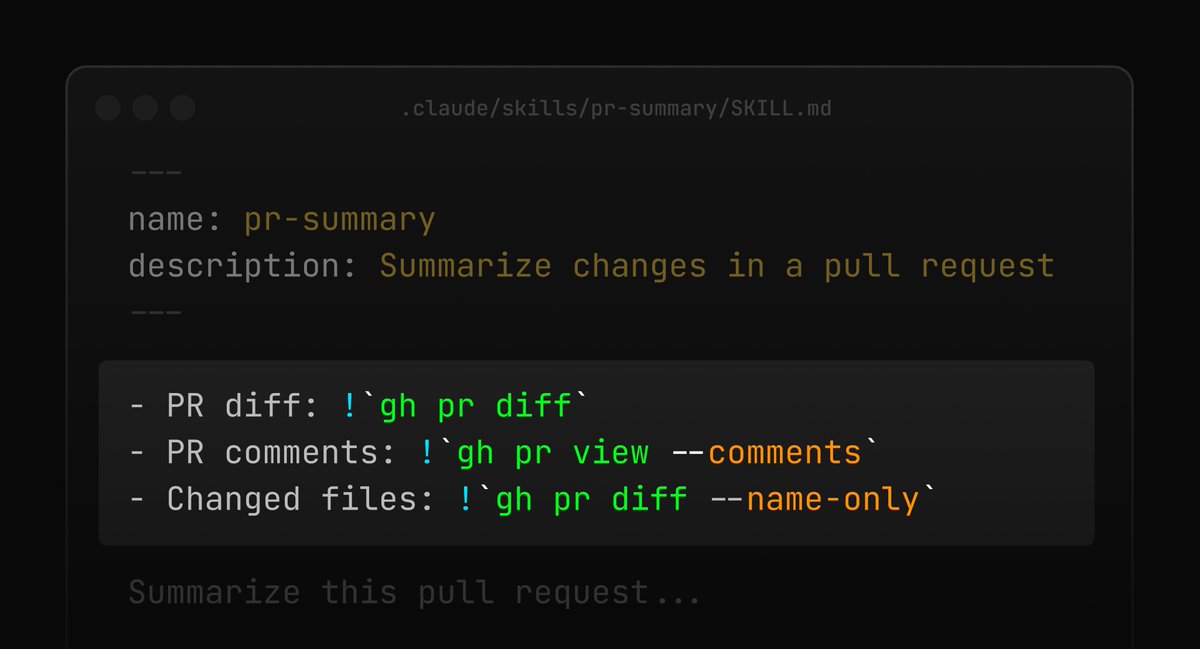
if your skill depends on dynamic content, you can embed !`command` in your SKILL.md to inject shell output directly into the prompt
Claude Code runs it when the skill is invoked and swaps the placeholder inline, the model only sees the result!
we're testing a new version of /init based on your feedback- it should interview you and help setup skills, hooks, etc.
you can enable it with this env_var flag:
CLAUDE_CODE_NEW_INIT=1 claude
would love your feedback!
I put a lot of heart into my technical writing, I hope it's useful to you all.
📌 Here's a pinned thread of everything I've written.
(much of this will be posted on the Claude blog soon as well)
For Claude Code Remote Control setup:
1. Update to v2.1.51+
2. Run claude --remote-control or /remote-control in your project
3. Go to Mobile / Desk App -> Code
4. Choose your opened session
5. Enjoy