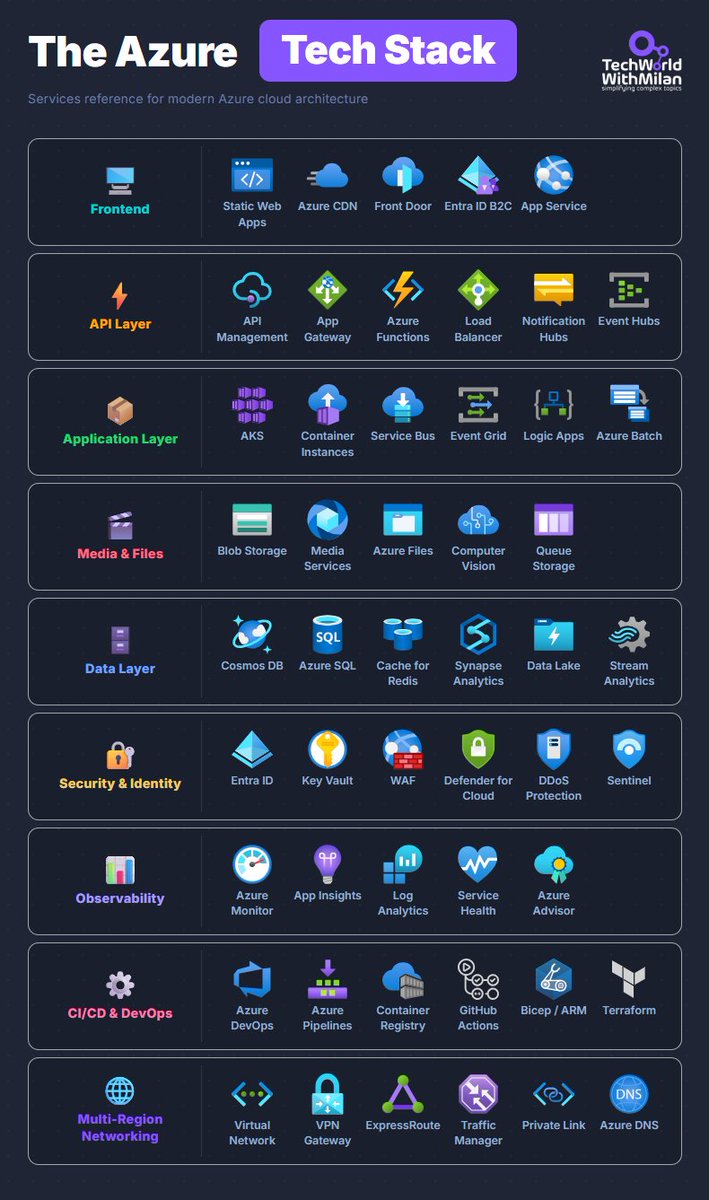
𝗧𝗵𝗲 𝗔𝘇𝘂𝗿𝗲 𝗧𝗲𝗰𝗵 𝗦𝘁𝗮𝗰𝗸
Here are the most important Azure services organized by layer.
𝟭. 𝗙𝗿𝗼𝗻𝘁𝗲𝗻𝗱
Here we have Static Web Apps for Single-Page Applications, and a Content Delivery Network (CDN) for edge caching. If you need global routing, you can use Front Door, and here you also get WAF. Entra ID B2C can be used for customer identity.
Most teams start with App Service, and honestly, that's the right call because it handles 80% of the cases that we need.
𝟮. 𝗔𝗣𝗜 𝗟𝗮𝘆𝗲𝗿
API Management is heavy, but if you need versioning, rate limiting, and a developer portal, it's worth the cost. App Gateway in front of internal services. Functions for event-driven compute, Event Hubs, when you're ingesting at scale and need Kafka compatibility. Load Balancer for Layer 4 routing.
𝟯. 𝗔𝗽𝗽𝗹𝗶𝗰𝗮𝘁𝗶𝗼𝗻 𝗟𝗮𝘆𝗲𝗿
Use AKS if your project requires Kubernetes. Container Instances for short-lived jobs, where spinning up a cluster is overkill. Service Bus for reliable queuing between services. Event Grid for reactive, event-driven stuff.
Logic Apps is something people swear by for integration workflows, and I've never quite gotten there myself, but the use case is legitimate.
𝟰. 𝗗𝗮𝘁𝗮 𝗟𝗮𝘆𝗲𝗿
Most of the real architecture arguments happen here. Cosmos DB is when you need global distribution and multi-model flexibility, but also write-heavy systems. Azure SQL when relational is the right fit and you'd rather not manage your own SQL Server. Cache for Redis in front of either.
Synapse for analytics workloads, Data Lake for raw storage, Stream Analytics when you need real-time processing on incoming event streams.
𝟱. 𝗦𝗲𝗰𝘂𝗿𝗶𝘁𝘆 𝗮𝗻𝗱 𝗜𝗱𝗲𝗻𝘁𝗶𝘁𝘆
Entra ID for identity, Key Vault for secrets and certificates. WAF placement depends on whether you're using Front Door or App Gateway. Defender for Cloud across the subscription, Sentinel as the SIEM.
This layer tends to get scoped down when budgets are tight. Then something happens, and you rebuild it properly under pressure.
𝟲. 𝗢𝗯𝘀𝗲𝗿𝘃𝗮𝗯𝗶𝗹𝗶𝘁𝘆
App Insights for application telemetry and distributed tracing. Log Analytics for querying everything. Service Health so you know when Azure itself is having a bad day, which happens more often than the 99.9% SLA suggests. Most teams set this up too late.
𝟳. 𝗖𝗜/𝗖𝗗 𝗮𝗻𝗱 𝗗𝗲𝘃𝗢𝗽𝘀
Azure DevOps or GitHub Actions. Pick one, use it everywhere, don't mix them across teams. Bicep over ARM, the syntax is dramatically cleaner, and the tooling has caught up. Terraform, if you're multicloud or the team already has it. Container Registry for images close to your AKS clusters.
The projects I've seen with the messiest pipelines are the ones that let different teams pick different tools.
𝟴. 𝗠𝗲𝗱𝗶𝗮 𝗮𝗻𝗱 𝗙𝗶𝗹𝗲𝘀
Blob Storage for unstructured data, Azure Files for SMB shares, Queue Storage for simple message passing. Media Services, if you're doing video processing. Computer Vision, when you need image analysis without building the model yourself.
𝟵. 𝗠𝘂𝗹𝘁𝗶-𝗥𝗲𝗴𝗶𝗼𝗻 𝗡𝗲𝘁𝘄𝗼𝗿𝗸𝗶𝗻𝗴
Virtual Network as the foundation. VPN Gateway for site-to-site, ExpressRoute, when you need private dedicated connectivity with predictable latency, and the cost is justified. Traffic Manager for DNS-based global routing. Private Link to expose services internally without putting them on the public internet.
Most teams don't think about this layer until they're designing for a second region.
What performance issue might this cause?
List<Order> orders = orderRepository.findAll();
for (Order order : orders) {
System.out.println(order.getCustomer().getName());
}
Looks harmless.
What happens when you have 50,000 orders?
🚗 From two pilot projects to a Kotlin-first backend!
Mercedes-Benz.io refactored its Java-based systems with Kotlin to reduce boilerplate, speed up development, and enhance stability across its digital ecosystem.
Explore Kotlin for backend development!
Our annual Java Champions Conference. All speakers and moderators are Java Champions. It's the crème de la crème of Java luminaries. And it's completely free, as in beer. Hope to see you there! @Java#Java
𝗔𝗜 𝗣𝗿𝗼𝗱𝘂𝗰𝘁𝗶𝘃𝗶𝘁𝘆 𝗧𝗼𝗼𝗹𝘀
I organized a list of 100+ tools that can save you hours every week, across categories like writing, spreadsheets, design, and coding.
✍️ AI Writing
Write faster and better emails, posts, and even books
→ Jasper, Copy .ai, Grammarly, Writesonic, Quillbot, Rytr, Sudowrite, JotBot
📽️ AI Presentations
Create slide decks in minutes
→ Tome, Gamma, Pitch, Beautiful .ai, PopAi, Presentations .ai, Plus, Slidesgo
📊 AI Spreadsheets
Get Excel/Sheets superpowers
→ Formula Bot, SheetAI, Rows, Gigasheet, Bricks
🗓️ AI Scheduling
Optimize your calendar without thinking
→ Reclaim, Motion, Clockwise, Calendly, Trevor AI, Taskade
🧠 Knowledge Management
Turn notes into insights
→ Notion, Mem, Reflect, Tettra
💻 Coding Assistants
Write, debug, and understand code faster
→ GitHub Copilot, Cursor, Tabnine, Replit, Codiga, AskCodi, Qodo, Bolt, Loveable, Windsurf
📝 Meeting Notes
Never take manual notes again
→ Otter, Fathom, Fireflies, Avoma, Fellow, Equal Time, Krisp
📧 Email Assistants
Manage your inbox in half the time
→ Superhuman, Shortwave, MailMaestro, Clippit, Friday
🔁 Workflow Automation
Connect your tools, automate tasks
→ Zapier, Make, n8n, Integrately, Wrike, Monday .com
🎨 Graphic Design
Design like a pro with zero experience
→ Canva, Uizard, AutoDraw, Microsoft Designer, Design .com, Framer
🎨 Image Generation
Visualize your ideas in seconds
→ Midjourney, DALL·E, Firefly, Recraft, Stable Diffusion, Ideogram, FLUX-1
🎬 Video Generation
AI video from text or script
→ Runway, Pika, Sora, LTX, InVideo, Descript, Krea, Kling, Haiper, Luma
📈 Data Visualization
Make your data speak clearly
→ Flourish, Visme, Deckpilot, Julius, Zing Data
You don’t need to use them all. Just pick 2–3 that solve your pain points.
This AI Agent does full-stack SEO 🤯
Built in n8n:
📊 Analyzes GA4 + Rank + SERP
🧠 Crawls + Cleans FAQ
🔍 Tracks Competitor Keywords
✍️ Auto-rewrites articles
📈 Saves reports & performance
🔁 Like + RT
✅ Reply “AI”
🤝 Follow me & I’ll DM you the full workflow FREE