Hey guys, anyone on OpenWrt or a GL.iNet box want to try WAN Observer?
Still experimental. The core is OpenWrt, the dashboard is GL.iNet, and I've only tested it on a Flint 2 so far.
https://t.co/YZFbtUUfX4
#OpenWrt#GLiNet#HomeNetworking
What are you running?
Hey guys, ever called support about slow internet, only for it to look fine?
WAN Observer keeps speed-test history on your router and exports a record for support. GL.iNet dashboard; tested on Flint 2 so far.
https://t.co/YZFbtUUfX4
#OpenWrt#GLiNet#HomeNetworking
The internet is slow again.
On my 400/40 plan, I measured roughly 18–196 Mbps during a bad stretch. Later: 399–418 Mbps.
I built WAN Observer to keep that history on the router—and export a record for support.
Open source. #OpenWrt
https://t.co/YZFbtUUfX4
Took the phone to the actual TV this time 📺
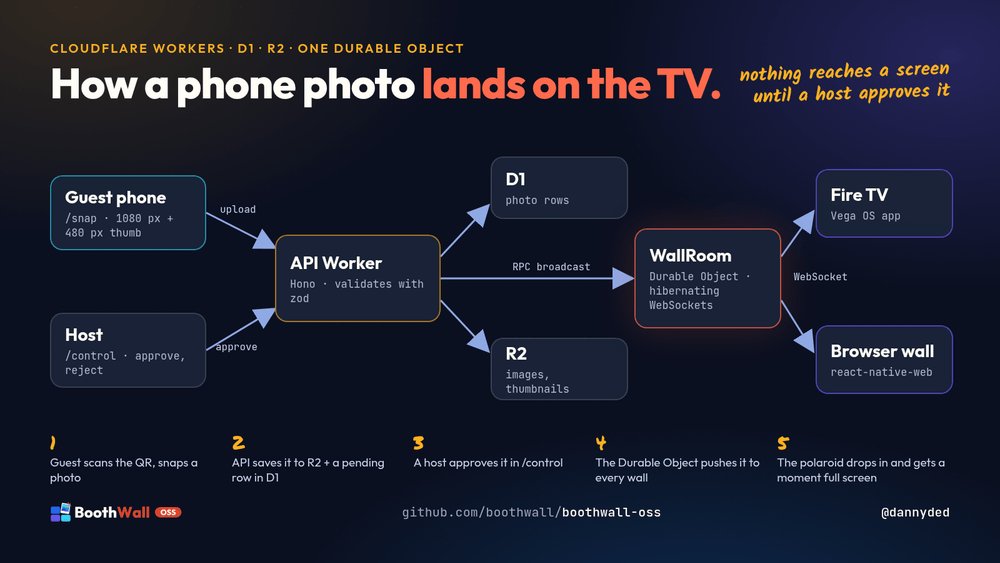
Scan the QR, snap, approve, and a moment later it's on the wall. Native Fire TV app on Vega OS, Cloudflare behind it.
Open source, MIT 👇
https://t.co/CYsutQXyeE
@AmazonAppDev@CloudflareDev#FireTV#VegaOS#ReactNative
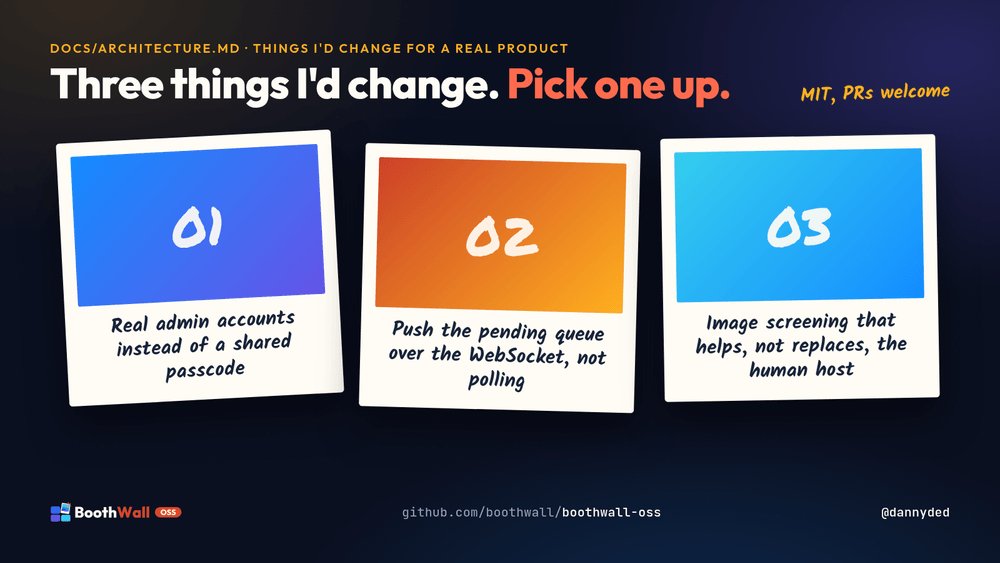
My photo wall repo has a list called "Things I'd change".
1. Real admin accounts, not a shared passcode
2. Push the pending queue over WebSocket, not polling
3. Image screening that helps hosts, not replaces them
MIT. Pick one, open a PR 🙏 #opensource
https://t.co/CYsutQXyeE
1/ Vega OS is new, and a lot of it isn't written down yet.
Things that cost me time building a Fire TV app, so they don't cost you 🧵 #VegaOS#ReactNative
4/ Fonts load by file name. PermanentMarker-Regular.ttf failed silently. "Permanent Marker.ttf", with the space, worked.
The canvas is 960×540 dp, drawn at 2×. Tilted cards need renderToHardwareTexture. Changing zIndex makes images blink.
@honojs 5/ The new polaroid drops in and gets a moment full screen. On the guest's phone: "You're live. Look up!"
The full walk-through, with diagrams, is in docs/architecture.md.
1/ By default, nothing reaches the big screen until a person says yes.
Here's the trip one guest photo takes, from a phone to a Fire TV, on Cloudflare 🧵 #buildinpublic
@honojs 4/ The host approves it in /control. The API tells one Durable Object, and that object pushes the photo over WebSocket to the TV and every browser wall.
A Fire TV Stick has 1 GB of RAM. My wall shows 12 drifting polaroids.
Each card is ~210 px wide on a 1080p screen. Uploads were 1080 px. So every card decoded ~27× the pixels it showed.
Now the phone also sends a 480 px thumbnail. Only the spotlight loads the full one. #VegaOS
My wall's API takes ❤️ taps on photos (no tap button in the open app yet). A busy room could flood every screen.
So taps go through a Durable Object alarm. The first tap sets a 2 s alarm, and the alarm flushes the batch.
One push per photo every 2 s, however fast people tap.
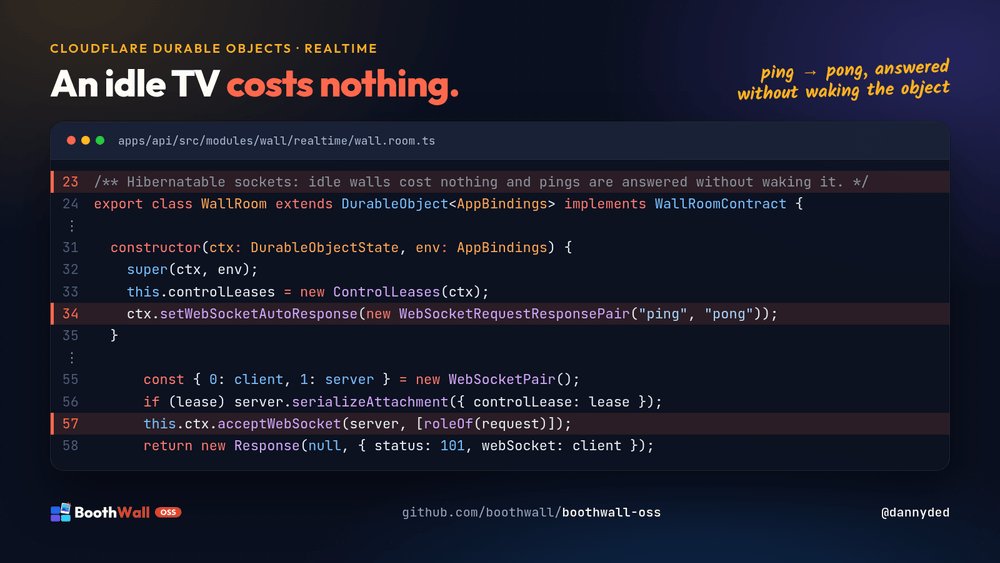
How does an idle TV wall cost nothing on Cloudflare?
Every screen holds a WebSocket to one Durable Object. The TV pings every 25 s. setWebSocketAutoResponse answers ping with pong, and the object stays asleep.
It wakes up when there's something to push. @CloudflareDev