Isometric Box Generator for @aseprite is out:
✓ Custom colors for each side of the box
✓ Two types of the corner: 2px and 3px
✓ Optional Lite version with stroke-only box for quick prototyping
🥁 Go get it here for free:
https://t.co/dHwV7F7jzg
#pixelart#screenshotsaturday
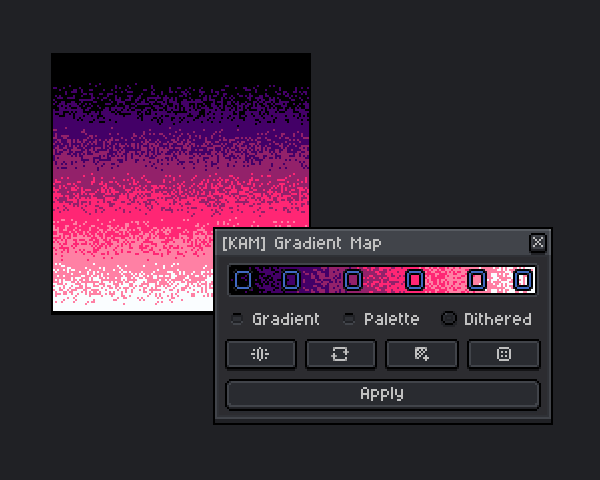
✨ Gradient Map is one of the features I always wanted to have in @aseprite
And since Scripting API is practically gives you super powers, I started working on this little weekend project
#screenshotsaturday#pixelart#gamedev
@YotamShitrit7@aseprite Hey, it was more of an experiment, so it is not available. But maybe I'll get back to this one at some point, and re-imagine it as a plugin
Working on another script for @aseprite. This one generates 3D voxels based on your current sprite
There are a few different modes, but the most exciting one is using a height map to generate extrusion:
(MagicaVoxel + Aseprite = 🧡)
#screenshotsaturday#MagicaVoxel#gamedev
✨ Still working on Gradient Map for @aseprite
Now it has Presets and Dithering!
It's fascinating to me how Bayer matrices produce such pixel patterns. Might be useful for creating stylized retro textures, I guess?
#screenshotsaturday#pixelart#gamedev
@howieeday@aseprite Oh, this looks interesting! I've actually implemented a random dithering method too. But I'm not sure if it is the same one that Deluxe Paint is using.
I'll have to look into it
@aseprite Hey, I'm trying to implement a button with custom icon using external PNGs. What is the best way to do this? "gc:drawImage(Image{fromFile=…})" asks for a file permission and shows "Loading file…" for a second, which might be a bit interruptive
@ThKasparrr You were pretty productive this year and a big inspiration for me to get back to trying making something for Aseprite. Don't be hard on yourself for taking a break 🙌