rekordbox + SoundSwitch can connect your DJ performance to synchronized lighting. 🎧💡
Track structure, beats and phrases can drive automated DMX lighting for a more cohesive show.
Would you use this in your DJ setup?
#rekordbox#SoundSwitch#DJLighting
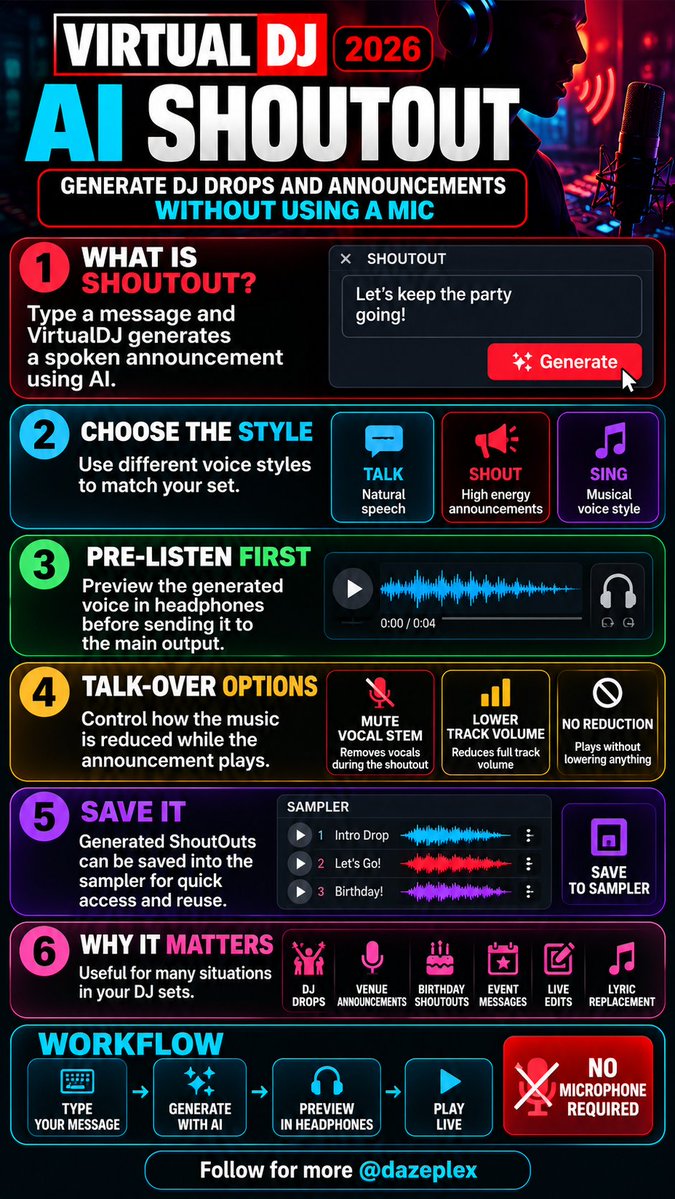
VirtualDJ 2026 introduces AI ShoutOut. 🎙️🤖
Type a message, generate a voiceover, preview it in headphones, then play it live — no mic required.
Great for DJ drops, venue announcements, birthdays and live edits.
Would you use it?
#VirtualDJ#DJTechnology
Serato DJ Pro 5.0 introduces Lucid Beatgrids for tracks that don’t stay at one fixed BPM.
Better grids can improve Sync, loops, Beat FX and BPM tracking on disco, funk, soul and live-recorded music.
Would you use it?
#SeratoDJPro#LucidBeatgrids#serato
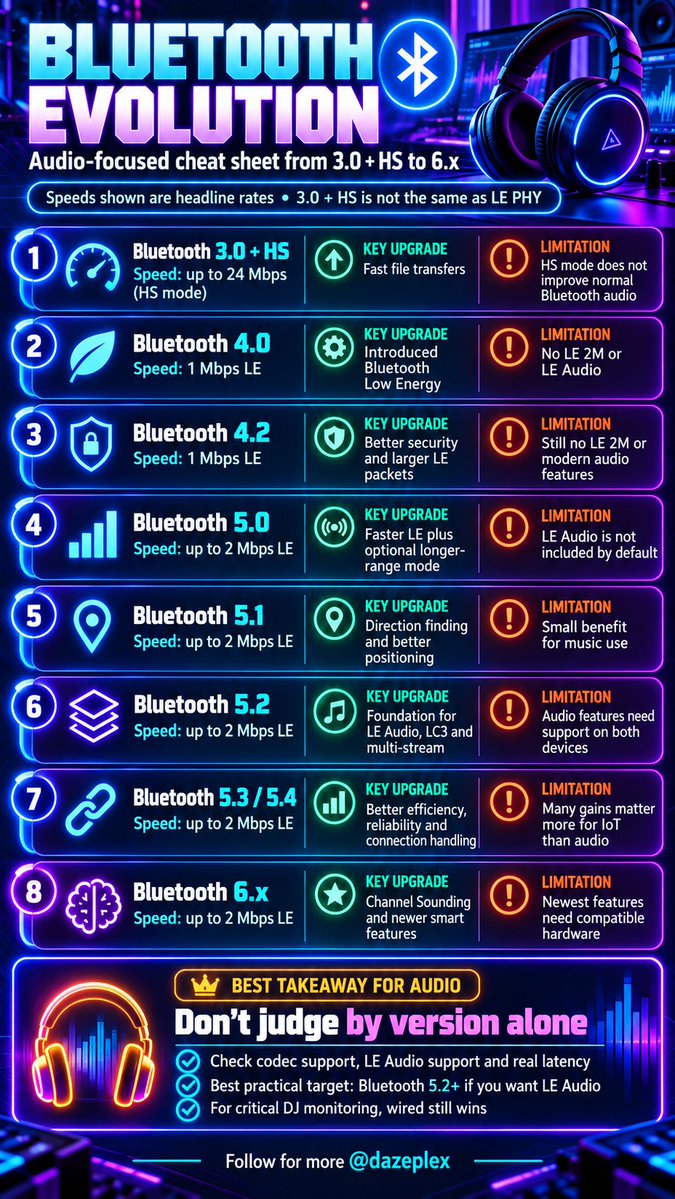
🎧 Bluetooth 3.0 → 6.x: newer doesn’t always mean better audio.
For DJs & producers, check:
✅ Codec support
✅ LE Audio compatibility
✅ Real-world latency
✅ Connection stability
🎛️ For critical monitoring, wired still wins.
#Bluetooth#tech#audio
🎧 Bluetooth 6.x doesn't automatically mean better sound or lower latency!
For DJs & producers, audio codecs, device compatibility, and latency matter more than version numbers.
🎚️ For DJ cueing and recording, wired is still king! 🔌
#Bluetooth#DJTips#audio
🎛️ SUBTRACTIVE vs ADDITIVE EQ
🔵 CUT: Control mud, resonances & masking.
🟠 BOOST: Enhance warmth, presence & clarity.
💡 PRO TIP: Before boosting an instrument, try cutting competing frequencies in another.
🎧 EQ with purpose, not habit.
#MixingTips#eq
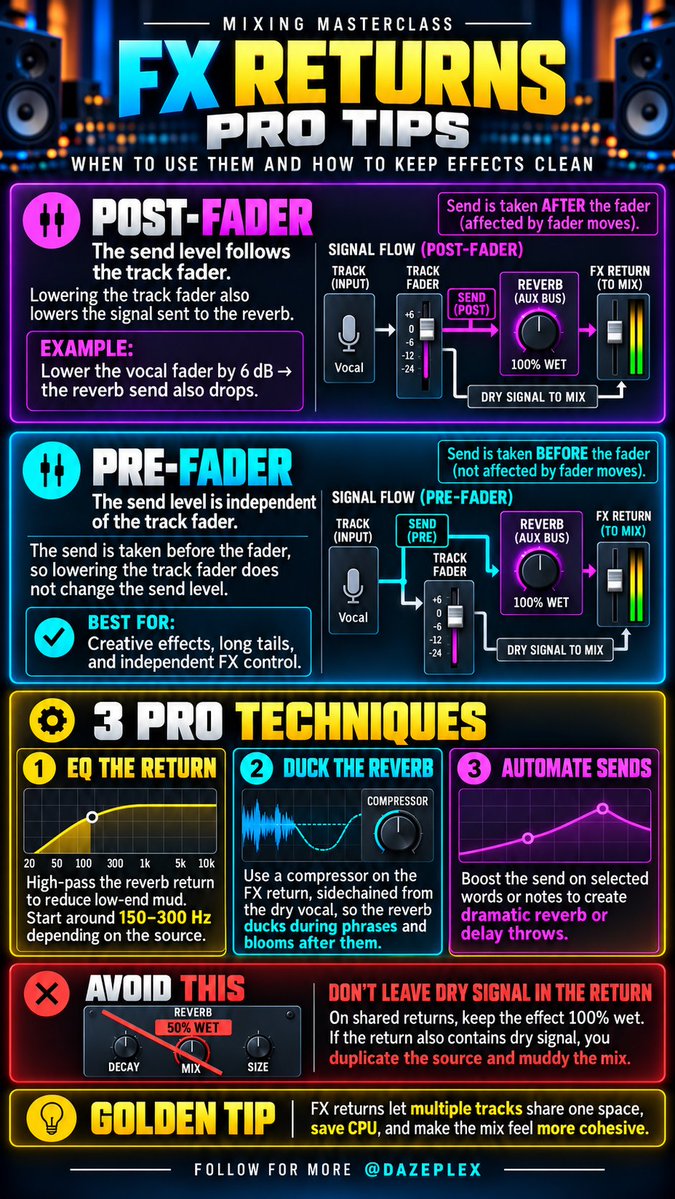
🎛️ 3 PRO FX RETURN TECHNIQUES:
1️⃣ EQ your reverb return to remove low-end mud.
2️⃣ Sidechain compression to duck reverb during vocals.
3️⃣ Automate sends for dramatic delay and reverb throws.
💡 Keep shared FX returns 100% wet!
#AudioMixing#MusicProduction
🎛️ FX RETURNS EXPLAINED!
Stop adding separate reverbs to every track!
✅ Send multiple tracks to one FX Return
✅ Set reverb/delay to 100% wet
✅ Control depth with send levels
✅ Adjust overall FX with the return fader
💡 One shared space, cleaner mixes!
#AudioMixing#audio
🎚️ POST-FADER EXPLAINED!
Your effects follow your channel fader.
⬇️ Lower the fader = Less signal to FX
⬆️ Raise the fader = More signal to FX
💡 Pro Tip: Set reverb/delay plugins on FX returns to 100% wet.
Master your signal flow! 🎛️
#MixingTips#MusicProduction
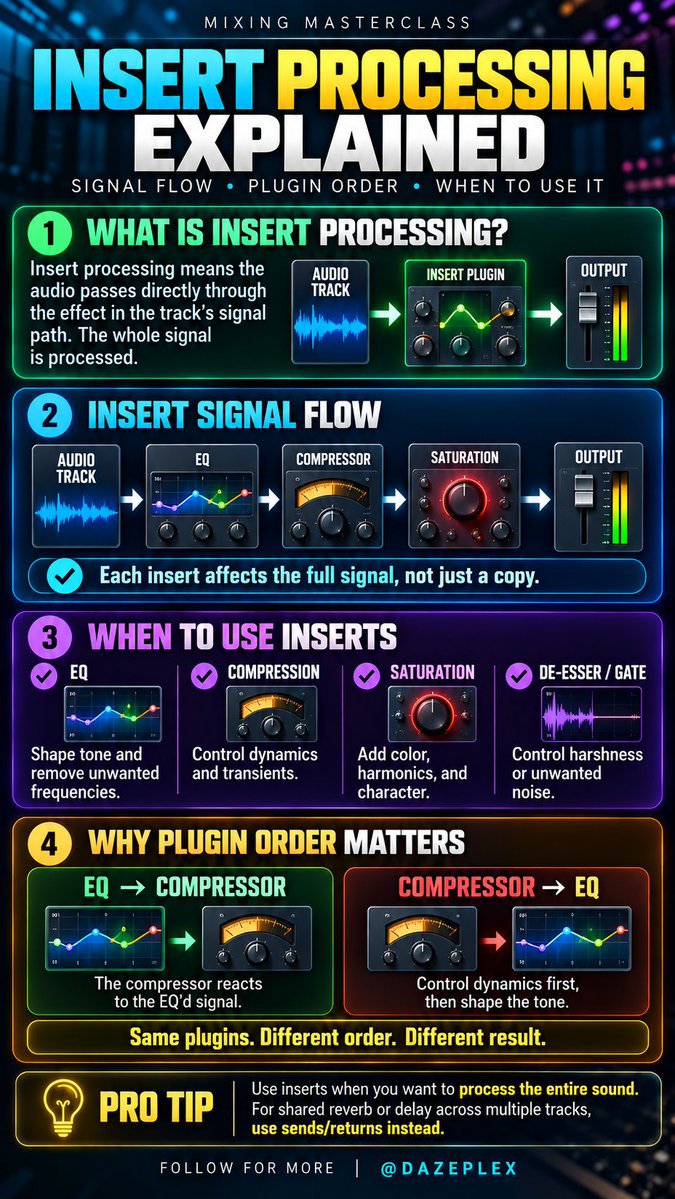
🎛️ INSERT PROCESSING EXPLAINED
EQ → Compressor → Saturation: plugin order changes how your audio is processed.
Same plugins. Different order. Different sound. 🔥
Do you put EQ before or after compression? 👇
#AudioMixing#MusicProduction
🎛️ Great mixes start with understanding signal flow.
Source → Track → FX → Fader → Bus → Master → Output.
💡 Pro tip: EQ before compression can sound different from EQ after it.
Understand your routing. Take control of your mix.
Follow @dazeplex#MusicProduction#daw
HID Mode vs USB Mode:
HID = your CDJ/XDJ controls DJ software on a laptop.
USB = the player plays music directly from your USB drive.
Learn both but master USB standalone workflow if you want to play confidently on club setups.
#djing@dazeplex
7 DJ tips to make your mixes sound more professional 🎧
Phrasing, EQ, gain control, FX, cue points, track structure and recording your sets all matter more than just matching BPM.
Save this checklist for your next session.
#DJTips#DJMixing#TechnoDJ
HOW TO UNDERSTAND ANY SYNTH - 3/3
Unison, detune, mono/poly, glide, velocity, key tracking and modulation appear on countless synths.
Understand these controls and complex synth interfaces become much easier to read.
#Synthesizer#Synth#synths
HOW TO UNDERSTAND ANY SYNTH - 2/3
ADSR shapes sound over time: Attack
Decay Sustain Release
Envelope = shape over time. LFO = repeating movement.
These are two of the most important concepts in synthesis.
#SoundDesign#Synthesis
HOW TO UNDERSTAND ANY SYNTH - 1/3
Start with the core signal flow: OSCILLATOR → FILTER → AMP
Oscillator creates the sound, filter shapes the tone, amp controls the level.
Master this first and most synths become much easier.
#Synthesizer#MusicProduction
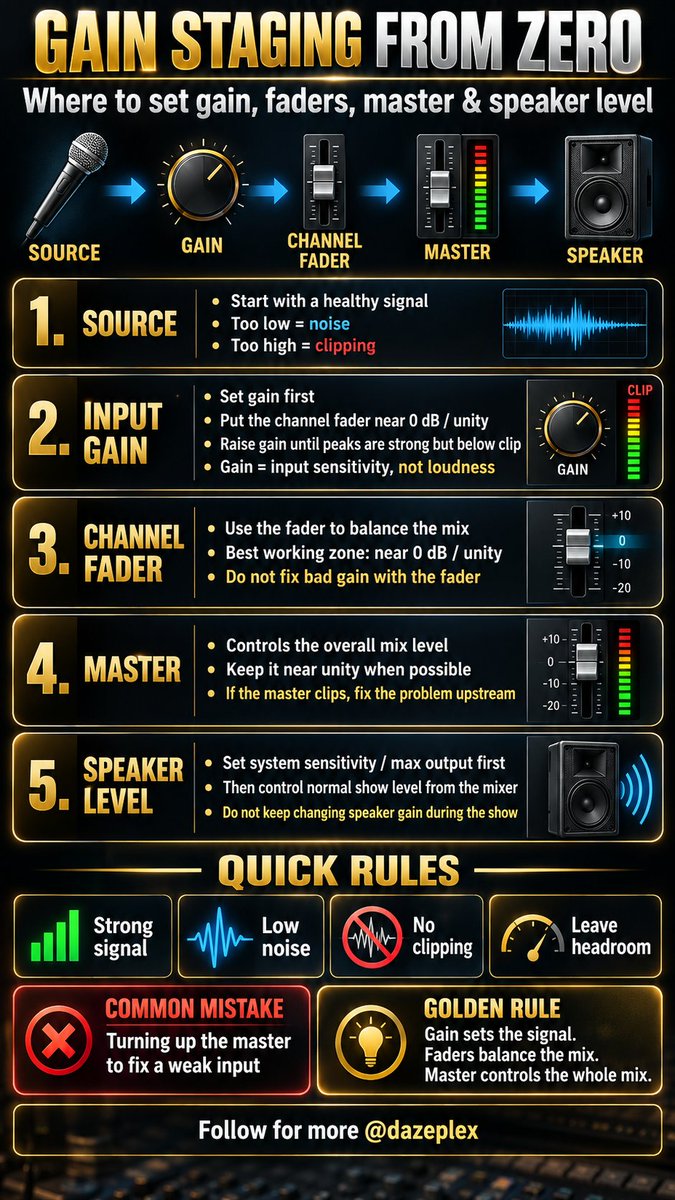
Gain staging isn’t “turn everything up.” 🎚️
SOURCE → GAIN → FADER → MASTER → SPEAKER
Set a healthy input, keep headroom, avoid clipping, and don’t use the master to fix weak gain.
Follow @dazeplex#GainStaging#AudioEngineering