New in dbdiagram: 💽 Data Sample.
Add example rows to your table definitions in DBML — see real data in your diagram, document lookup tables as code, and export to `SQL INSERT INTO` statements.
👉 Learn more: https://t.co/aHNjviVm3J
🎅 Ho ho ho, database pros! While kids unwrap gifts, dbdiagram users get our new AI Assistant—chat to build/refine diagrams, add tables/relationships, & get best practice tips.
Boost your workflow & save time for family! Included in paid plans at no extra cost.
#Database#AI
🔮We're happy to announce that dbdiagram now fully supports @Oracle databases!
Key features:
⬆️ Import Oracle SQL dump files.
⚙️ Connect to your Oracle DB to automatically generate DBML.
⬇️ Export Oracle SQL scripts to create or update your databases.
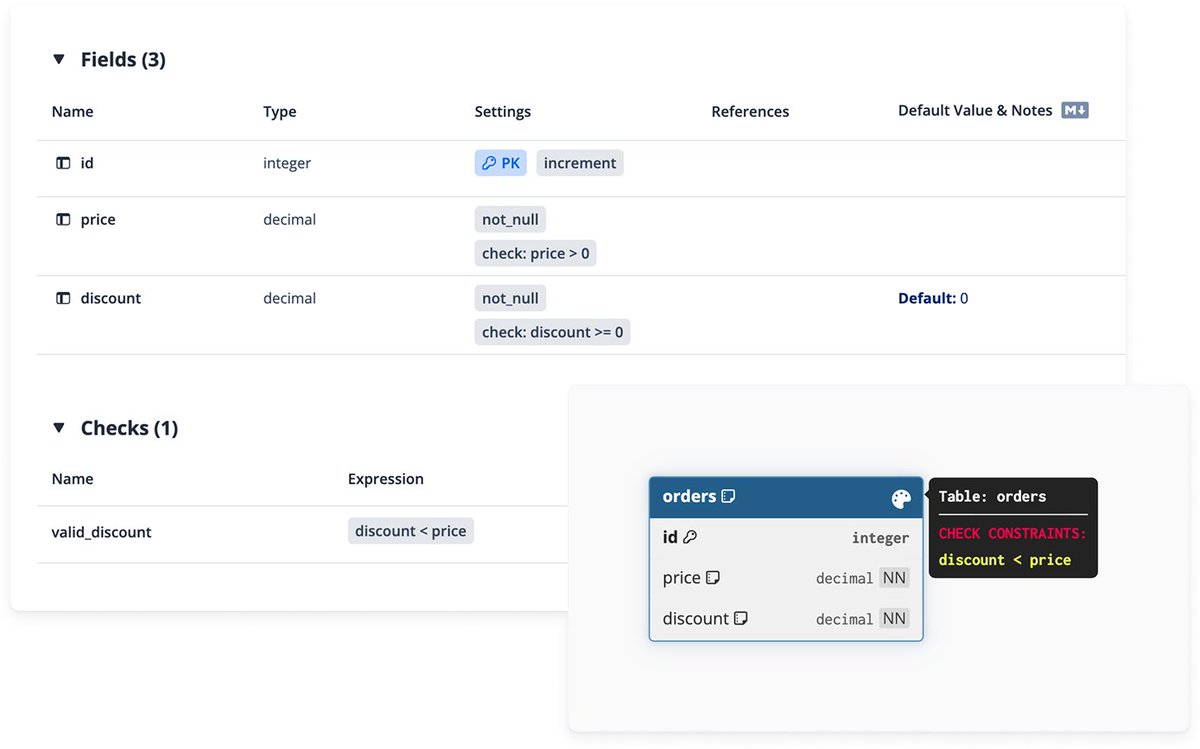
✔️ Introducing DBML Check Constraints — Enforce Data Rules with Ease.
Set rules on your table fields to enforce data quality (e.g., balance >= 0), keep them in SQL imports/exports, and see them in your diagrams and docs.
👉 Learn more: https://t.co/IxPgzgJfnf
⬆️ You can now upload a CSV file and automatically generate DBML table code following the CSV structure. This feature makes it easy to visualize database schemas from existing CSV files.
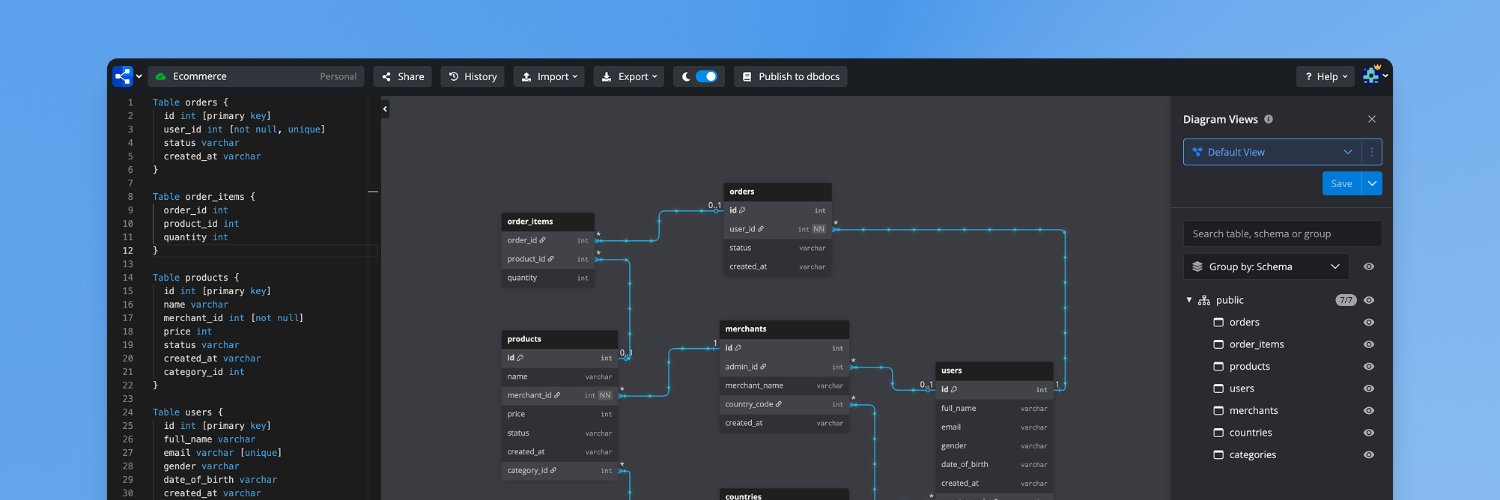
🖼️ Introducing Diagram Views - create multiple, focused views from one database model. Show only the tables you need for a domain, workflow, or team conversation. No more overwhelming, all-in-one diagrams.
👉 Learn more: https://t.co/1gg3Mrwgvu
We’re excited to announce Wiki Changelog – a collection of features that show schema changes directly in your documentation pages.
✅ Stay in your flow. Know what changed. When it changed. Who changed it.
See it live: https://t.co/l2u8sMIqXr
🌐 You can now edit your dbdocs projects directly in the browser with a visual interface — no CLI needed. Powered by @dbdiagram to make schema editing faster and easier.
👉 Learn more: https://t.co/bS5aTbxE1l
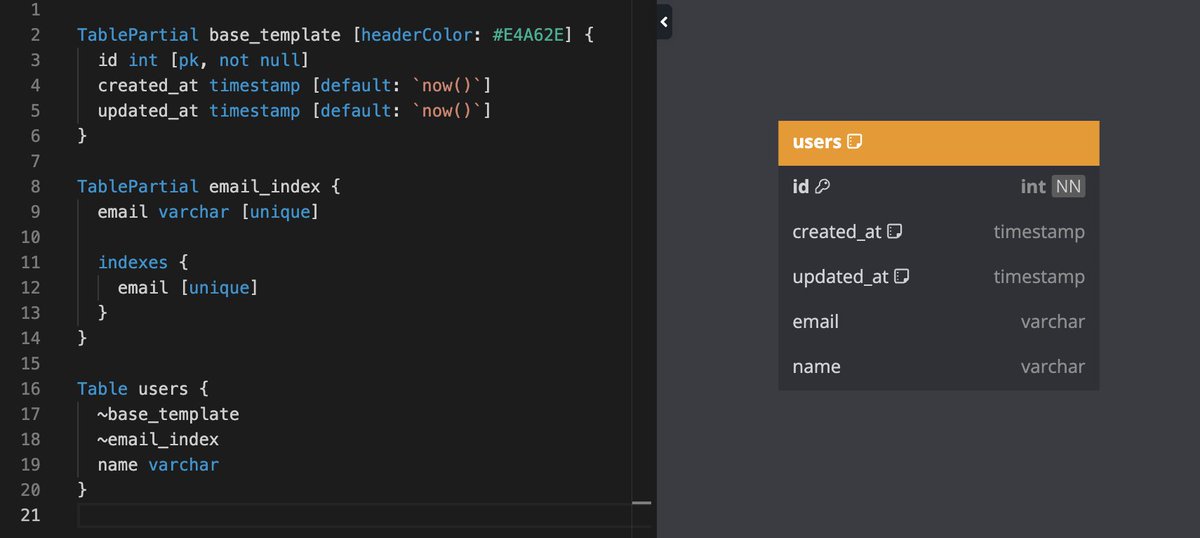
♻️ Introducing DBML TablePartial — Reuse Fields, Reduce Repetition.
Now you can define reusable sets of fields, settings, and indexes and inject them into multiple tables with a simple `~partial_name` syntax.
👉 Learn more here: https://t.co/kHZkWckhGy
🚀 MySQL support is now LIVE on RunSQL!✅
✅ Spin up mock MySQL databases instantly
✅ No setup required—just query
✅ Perfect for developers, testers & learners
👉 Try it now: https://t.co/j2AuSwDKvb
#MySQL#database#developer#testing
🎨 Make your diagrams more readable by assigning colors to relationships.
🧭 We also added a flowing animation to show the direction of each relationship, so you can quickly grasp the data flows.
👉 Learn more here: https://t.co/BTzJ9Ozytw
⚡️ RunSQL now supports Microsoft SQL Server 2022!
You can now spin up mock SQL Server 2022 databases right within the RunSQL interface you already know and love.
No extra setup needed – just connect and start querying.
Read more: https://t.co/22M9F7ajVO
🚀 Introduce RunSQL - a new product from dbdiagram
✅ On-demand sandboxes for SQL testing
✅ Easy dataset uploads via CSV (no manual CREATE and INSERT queries)
✅ Secure, shareable environments
✅ Supports PostgreSQL, MySQL (upcoming).
👉Try now: https://t.co/9cMrlQna2Z
You can now seamlessly embed your database diagrams and documentation into your favorite platforms like Notion, Confluence, and your own websites with dbdocs’ new Embedded Views feature. 🚀 📷
Learn more here: https://t.co/SikbKDqF6V
You can now invite others to collaborate on your projects, helping you create even better database documentation together.
👉 Learn more here: https://t.co/tfRK7LNqj4
Now you can add Markdown descriptions for table groups to provide extra information, such as their purposes, specific details about child tables, and so on.
Our new "db2dbml" CLI command now allows you to generate DBML code directly from your database.
This feature simplifies the database visualization process so that you can focus solely on designing new database structures for your new features.