I am interviewing with some AI companies, and it has been such an interesting learning curve :)
I may not get selected by any of them, but the learning has been incredible. One major realization - solving these problems requires software engineering complexity far beyond what I imagined.
The engineer in me is happy :) So much to learn.
The SILENT WITNESS ON YOUR COMPUTER WAITING FOR YOU TO GET INTO TROUBLE.
Most people believe that deleting a folder, clearing recent files, or wiping their history is enough to hide their tracks on a computer. What they don’t realize is that Windows quietly keeps a hidden record of the folders they open, even after those folders are deleted or the drive is removed. These records are called Shellbags, and they are one of the most powerful and incriminating artifacts available to forensic investigators.
Shellbags appear inside two registry hives NTUSER.DAT and USRCLASS.DAT and they store detailed information about a user’s folder-browsing activity. This includes local folders, USB drives, external hard drives, network shares, and even directories that no longer exist. Each time a user opens a folder in Windows Explorer, the system automatically creates or updates a Shellbag entry. These entries contain timestamps, folder paths, the hierarchy of subfolders, the order in which a folder was accessed, and even the specific view settings used by the user. Because of this, Shellbags reconstruct a user’s exact navigation trail long after the person believes the evidence is gone. What makes Shellbags truly dangerous is the fact that they survive actions that users typically rely on to cover their tracks.
Deleting a folder does not delete the Shellbag. Formatting a drive does not delete it. Even privacy tools and cleaners like CCleaner or BleachBit cannot reliably erase Shellbag data, because the information is deeply embedded within registry hives that standard cleaning utilities do not touch. The only way to remove Shellbags is through advanced forensic wiping, and attempting such wiping is, in itself, a sign of suspicious behavior.
Forensic examiners rely heavily on Shellbags because they expose the truth even when a suspect tries to lie.
If a person denies ever accessing a directory, the Shellbags can show when that folder was opened, how many times it was accessed, and whether it was located on an internal drive, an external USB, or a deleted partition. This makes Shellbags extremely valuable in investigations involving insider threats, data theft, fraud, child exploitation, unauthorized data access, and corporate disputes. In many cases, Shellbags become the deciding factor that disproves a suspect’s story. In the screenshot, the highlighted red section shows three important keys inside the registry.
When all of this information is combined, Shellbags become a silent witness that never forgets. They reconstruct a hidden story of user activity that the person cannot deny, overwrite, or talk their way out of. This is why Shellbags remain one of the most feared artifacts for anyone attempting to conceal their actions on a Windows computer. You can delete the folder… but Shellbags still show it existed
Even if you format a drive or delete the directory, Windows has already logged:
1. The folder name
2. Its full path
3. When it was opened
4. How many times it was opened
5. The view settings (icon mode, window size)
6. The order in which folders were browsed
This means forensic investigators can prove someone accessed:
“Secret” directories
Hidden folder structures
USB drives or removable media
Folder paths used for storage of illicit or suspicious
Folder paths used for storage of illicit or suspicious data even if the folders are long gone.
My bad, it's lsof (lowercase) in Linux. lsof command in Linux, which stands for "List Open Files," is a utility used to display information about files opened by processes on a system. In Unix-like operating systems, the concept of a "file" extends beyond regular files to include directories, pipes, sockets, and even network connections.
Linux stops feeling mysterious the moment you learn lsof.
It shows you exactly which process is touching a file and why it matters.
Know this tool and you can uncover the truth behind almost any system issue.
Have you used lsof before or daily?
I am looking for people who are:
- passionate about technology
- learning Linux/DevOps
- building their home lab from scratch
I want to hear about their experiences, learning journeys, and the advice they can give to a new fresher who wants to break into this field.
let's connect!
These commands teach you real DevOps:
✔ Filesystem understanding
✔ Permission logic
✔ Troubleshooting mindset
✔ Fast debugging
✔ Thinking like SRE
Tools change.
Linux skills don’t.
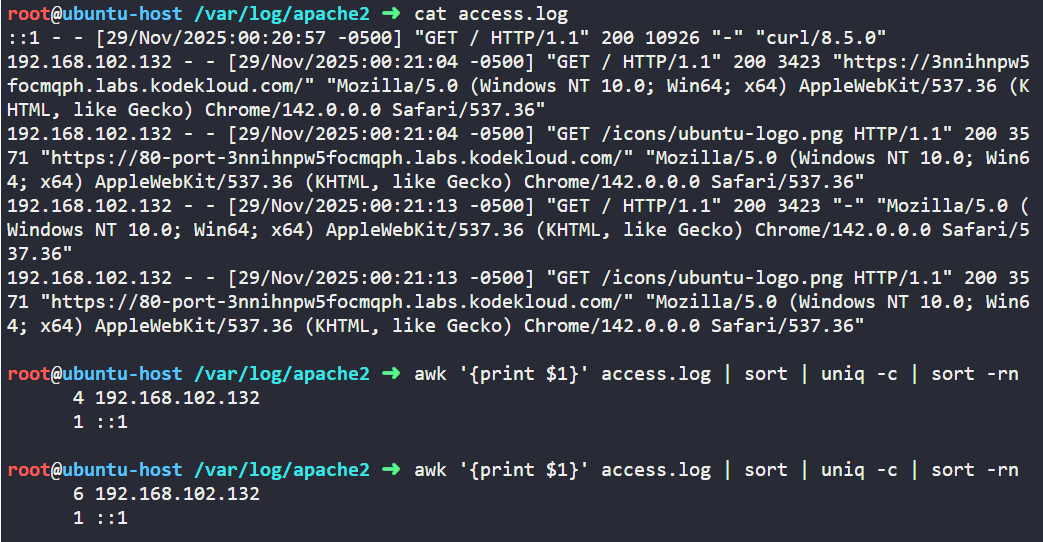
Got an interview task to count how many times each IP hit a web server.
No tools, no UI — just Linux. 🐧
This one-liner solves it:
awk '{print $1}' access.log | sort | uniq -c | sort -rn
Master Linux basics. They never stop being useful. ⚡️
#DevOps#Linux#SRE#CommandLine #TechTips