How to never be stuck on "I don't know how" again:
(download the /how-to Claude skill for free)
1. Go to Claude (desktop app). Open Cowork.
2. Download my /how-to skill here: https://t.co/psB7XxB2Y4.
3. Don't pay anything. Reply to the welcome email.
4. Open the Notion link. Go to "Claude Cowork"
5. Download /how to skill under "Skills"
6. Click Customize → Skills → "+" → Upload a skill.
7. Select the skill you just downloaded from me.
8. Open a new chat. Type /how-to.
9. Prompt the thing you've been avoiding:
"I want to do X with Claude, but I have no idea where to start."
To copy-paste the skill prompt instead:
---
name: how-to
description: Turn any 'I want to do X with Claude but I don't know how' into a finished result the user built with their own hands. Use this whenever someone names a goal they want to reach with Claude or AI and wants to be walked there until it is actually done. That covers building a Cowork workflow, automating a repetitive task, setting up a content or newsletter system, writing better prompts, connecting a tool, organizing files, or any 'how do I get Claude to' request. Trigger on phrases like 'how do I', 'I want to do this with Claude', 'give me the exact steps', 'walk me through', 'teach me to', 'I don't know how to', 'get me to the result', or the command /how-to. The skill maps the full step list first, then coaches one rookie-level step at a time and will not move on until the current step is finished and understood. Built for non-technical beginners.
---
# How-to
Coach a non-technical person from "I want to do X with Claude but I don't know how" to a finished result they built with their own hands, in a way they could repeat without you.
## Core rule
Map the whole path first. Then coach one step at a time. Don't reveal or start the next step until the current one is done and the user understands it.
Why this matters: a beginner who sees every step at once freezes. A beginner who finishes one clear step and feels it work keeps going. Going one step at a time is the whole method, not a nicety.
They do the work, not you. Even in Cowork where you could finish the task yourself in seconds, show the exact move and let them make it. Optimize for them repeating it next week on their own.
If you've put more than one step in front of them, pull back to one.
## Who you're coaching
Assume non-technical, possibly their first real project with Claude. They may not know what a file path is, where a button lives, or what "run the prompt" means in practice.
- Define any word that isn't everyday English, the first time you use it.
- Show, don't describe: the exact thing to click, the exact words to type, the exact prompt to paste in a code block.
- Never call a step obvious. If it has three sub-actions, write all three.
...."
PS: I couldn't paste the entire prompt here.
Access the full skill here: https://t.co/pNs1hPNDy5
Sam Altman:
"We're going to see 10-person billion-dollar companies pretty soon."
"If I were 22 right now, I'd feel like the luckiest kid in history."
Most people will read this, feel inspired for 3 minutes, and go back to what they were doing.
The ones who act will build an app studio this weekend.
One tool. 10 minutes. $10K/month.
This is the how ↓
🚨 Anthropic just showed a 27-minute workshop on how to actually do prompts for Claude.
Taught by the people who built it.
Free. No registration. No paywall.
I've seen $300 courses that don't cover what they teach in the first 8 minutes.
Watch it and bookmark it now.
INSTEAD OF WATCHING AN HOUR OF NETFLIX TONIGHT.
This 1 hour Stanford lecture by Joel Peterson will teach you more about negotiation and getting what you want than most people learn in years.
Bookmark it and give it an hour, no matter what.
Claude is going to make many millionaires
Claude is going to make many Millionaires
What’s stopping you from learning this and selling it as a service to founders? 👨🏽💻
People think learning Claude takes days. It doesn't.
I wrote 17 free guides that teach it in hours:
Claude 101: https://t.co/QQDmzBAoH5
Claude Code: https://t.co/o782qegoKu
Claude Skills: https://t.co/RgQUCNMqzQ
Claude Connectors: https://t.co/cSPMBUNmRG
Claude for Excel: https://t.co/ZgmUFXd0Iw
How to Prompt: https://t.co/Sw2tg2PMMc
Claude Certificates: https://t.co/LyV7fegv4c
Claude for your team: https://t.co/NakViTGCAL
Stop Prompting Claude: https://t.co/45xPLDRB6Y
AI Slides (PPT in 2026): https://t.co/OY7cHDTV7l
Claude Design: https://t.co/FhlRSlH0aD
Set up Claude Cowork: https://t.co/4jygw4M1RO
Claude to sound like you: https://t.co/LyV7fegv4c
Stop writing like AI: https://t.co/JXKAVP6hdS
Claude as your computer: https://t.co/tQDrcs8drQ
Claude Cowork + Project: https://t.co/xU97EpdrEe
Stop hitting Claude limits: https://t.co/Yu24rPQafQ
___
1. Save this list for later (three dots, top right).
2. Share it with a friend by ♻️ reposting this image.
3. Subscribe to my free newsletter: https://t.co/psB7XxAv8w.
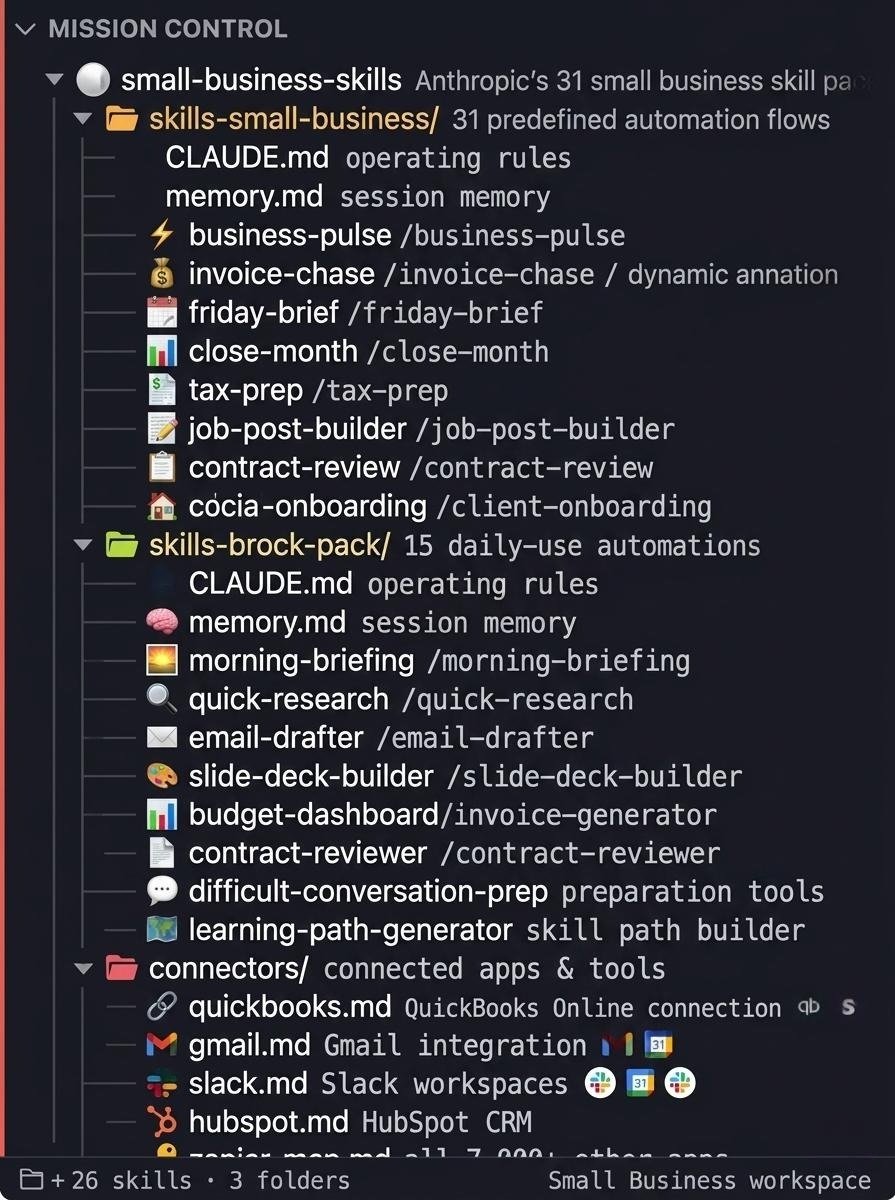
Claude For Small Business is INSANE.
I've built a complete breakdown of all 31 Anthropic Small Business skills that maps every workflow, connector, and automation in under 10 minutes.
The same skill stack that had 382,000 downloads on its first day.
Financial operations, sales and client work, HR and hiring, marketing and growth, reporting and dashboards.
Inside the breakdown:
- All 31 skills organised by function with the 5 to run first
- The 12 connector setup guide in priority order with permission settings for every sensitive action
- Worked examples for Business Pulse, Invoice Chase, and Job Post Builder with real output shown
Want a copy? Like + Comment "31" and I'll send it over ASAP
(Must be following)
Most of us spend years trying to change outcomes without examining the internal framework producing them.
This article gets to the root by examining and then stripping away the conditioning that keeps you from becoming fully yourself and finding your bliss.
Great read @thedankoe !
GAVE MY INSTAGRAM TO CLAUDE.
What followed? 30.1M views in 10 days.
No face cam. No trends. No posting daily. Just copy + artificial intelligence.
These 7 prompts took my content from invisible to unavoidable:
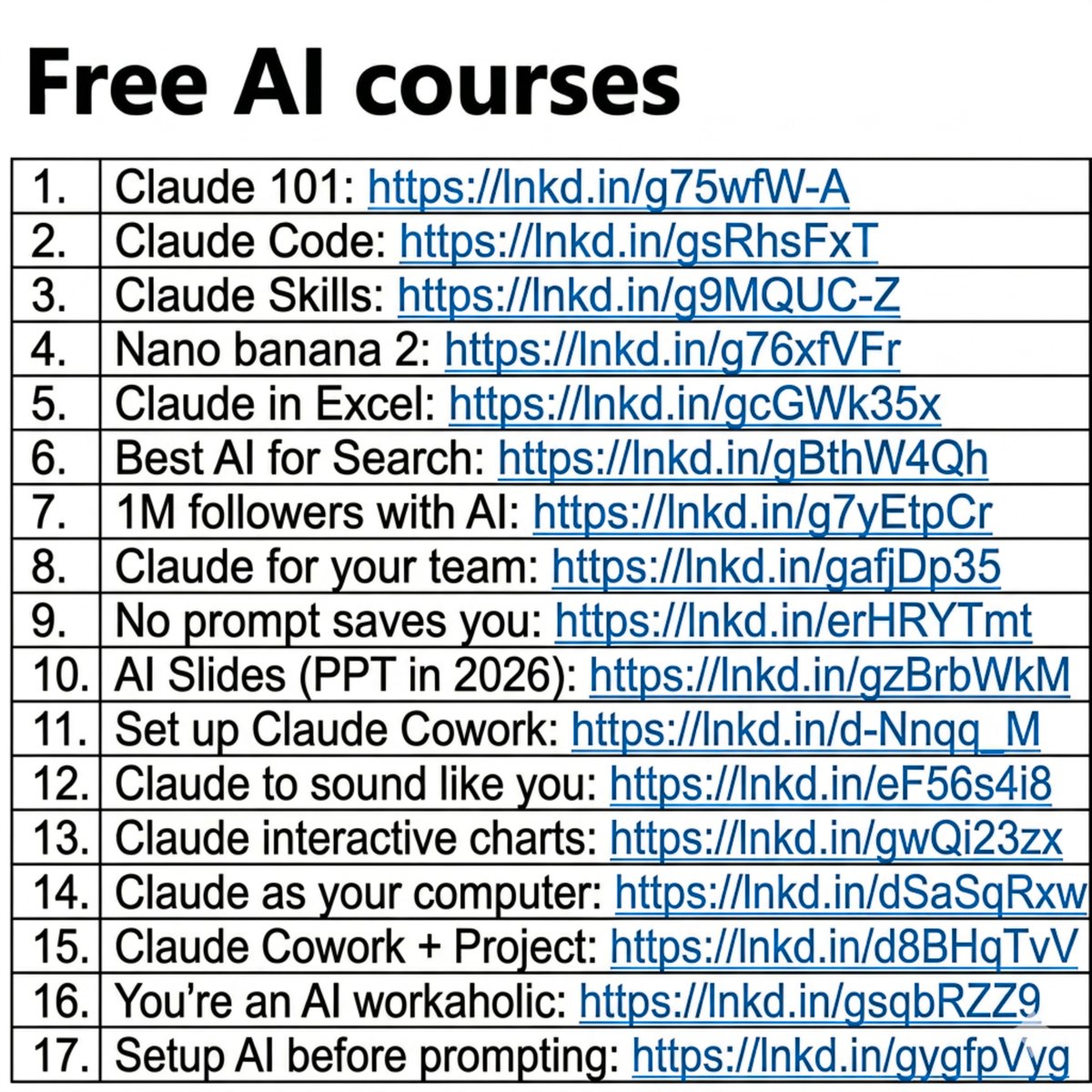
People think learning AI takes months.
It's really just a couple of hours.
And I wrote 17 free guides to start right away:
Claude 101: https://t.co/Jv1jsvFB7T
Claude Code: https://t.co/WYZd5ltnXo
Claude Skills: https://t.co/jT4uB5AFtY
Nano banana 2: https://t.co/qfHT594CCI
Claude in Excel: https://t.co/mfcXYSA57j
Best AI for Search: https://t.co/77BmjbJjP0
1M followers with AI: https://t.co/1TV9LYAptv
Claude for your team: https://t.co/U1JsBVC299
No prompt saves you: https://t.co/SDKJWykHE4
AI Slides (PPT in 2026): https://t.co/RfcyYRQ2Ad
Set up Claude Cowork: https://t.co/diDhiKjHtU
Claude to sound like you: https://t.co/99RzxXTvzs
Claude interactive charts: https://t.co/ebCHGZqgPt
Claude as your computer: https://t.co/TxYuHPiImn
Claude Cowork + Project: https://t.co/Q7AN9CZ2mg
You're an AI workaholic: https://t.co/mCIvB3ZPA5
Setup AI before prompting: https://t.co/pE3OF722aw
___
1. Save this list for later (three dots, top right).
2. Share it with a friend by ♻️ reposting this image.
3. Subscribe to my free newsletter: https://t.co/psB7XxAv8w.