Nowadays I use Codex for real work and Claude for fast tasks. Just don’t expect much from the results. Claude loses context too fast and gives up easily. I hope Anthropic hears this.
idk what changed but…
for the longest time i was using Claude for like 80–90% of my work
last 7 days tho, i’ve slowly moved almost everything to Codex
Not because I stopped liking Claude — I still do.
but somewhere in between tasks i started losing confidence…
like i had to explain more, guide more, repeat things
and still felt like fewer cases were being considered by default
even with the max plan, i’m not using it like before
Lately I’ve been learning hardware and electronics. Found a massager at home, got curious about how it works, and ended up opening it to see all the parts inside.
**atoms to electricity to transformers to motors to metals**.
---
# Complete Beginner Guide: Electricity, Electronics, Energy, Motors, Transformers, Batteries, Transistors, and Metals
## 1. The smallest foundation: atoms and electrons
Everything around you is made of **atoms**:
* your body
* phone
* wire
* table
* air
* water
An atom is a tiny building block of matter.
Inside an atom, the main parts are:
* **protons**
* **neutrons**
* **electrons**
### Electron
An **electron** is a tiny negatively charged particle.
In simple electronics, when we say electricity is flowing in a wire, we usually mean:
**electrons are moving through the material**
### Important correction
There is **no separate “electricity atom.”**
* body atoms, phone atoms, wire atoms are all normal atoms
* electricity is **moving charge**, usually electrons
---
# 2. Why some materials conduct electricity
In metals like **copper**, some electrons can move more easily.
That is why copper is a good conductor.
In materials like:
* rubber
* plastic
* glass
electrons do not move easily, so they are insulators.
### So:
* **copper** = conductor
* **plastic** = insulator
That is why wires have:
* copper inside
* plastic outside
---
# 3. What is electricity
Electricity is the movement of electric charge.
In a metal wire, the simple beginner view is:
**electricity = electrons moving through the wire**
---
# 4. Voltage, current, resistance, power
These 4 are the core basics.
## Voltage (V)
Voltage is **electrical push** or **pressure**.
Think:
* 5V = small push
* 230V = much bigger push
Analogy:
**water pressure**
---
## Current (A)
Current is **flow of electric charge**.
Think:
how much electricity is actually moving
Analogy:
**water flow**
---
## Resistance (R)
Resistance is **opposition to current flow**.
Inside a wire, moving electrons interact with the atomic structure of the material. That struggle is resistance.
Analogy:
* narrow pipe
* traffic jam
* friction
So:
* low resistance = easy flow
* high resistance = hard flow
Unit:
**ohm (Ω)**
---
## Power (W)
Power is how much electrical work is being done per second.
It tells how strongly electricity is being used.
Examples:
* phone charger = low power
* PS5 = much higher power
* heater = very high power
---
## Main formulas
### Power
**P = V × A**
### Ohm’s law
**I = V / R**
**R = V / I**
---
# 5. One simple mental picture
* **Voltage** = push
* **Current** = flow
* **Resistance** = blockage
* **Power** = total work happening
That is the cleanest beginner memory model.
---
# 6. Why a wire gets hot
A wire gets hot because when current flows through a material with resistance, electrical energy turns into heat.
This is called **resistive heating** or **Joule heating**.
### Why?
Electrons moving through the wire keep interacting/colliding with the material’s atomic structure. That struggle creates heat.
### Important difference
## House wire
House wire is made to:
* carry power
* have low resistance
* avoid heating too much
So copper is used.
## Heater wire
Heater wire is made to:
* resist current more
* produce heat on purpose
So materials like **nichrome** are used.
### So:
* house wire = low resistance, low heating
* heater wire = chosen resistance, strong heating
---
# 7. What is energy
Energy means:
**the ability to do work or cause change**
Examples:
* move something
* heat something
* light something
* make sound
* spin a fan
* charge a battery
---
# 8. Types of energy
## Mechanical energy
Energy of motion or position.
Examples:
* spinning fan
* moving car
* rotating motor shaft
---
## Electrical energy
Energy carried by electric charge.
Examples:
* wall socket
* battery powering a device
---
## Chemical energy
Energy stored in chemicals.
Examples:
* battery
* petrol
* food
* gas cylinder
---
## Thermal / heat energy
Energy related to temperature.
Examples:
* heater
* hot pan
* stove
---
## Light energy
Examples:
* sunlight
* LED
* laser
---
## Sound energy
Examples:
* speaker
* voice
* music
---
## Magnetic energy
Examples:
* inductor
* transformer
* electromagnet
---
## Potential / stored energy
Examples:
* spring
* raised object
* stretched rubber band
---
# 9. Energy conversion
Most machines do not create energy from nothing.
They **convert energy from one form to another**.
Examples:
* battery: **chemical → electrical**
* heater: **electrical → heat**
* motor: **electrical → mechanical**
* generator: **mechanical → electrical**
* speaker: **electrical → sound**
* induction stove: **electrical → magnetic → heat in pan**
* petrol engine: **chemical → heat/pressure → mechanical**
---
# 10. Energy vs power
This is very important.
## Energy
Total amount available or used
## Power
How fast energy is being used
### Easy idea
* energy = total water in a tank
* power = how fast water is coming out
So:
* **power is rate**
* **energy is amount**
---
# 11. Battery: what it really stores
A battery does **not store volts directly**.
A battery stores:
**chemical energy**
Its chemistry creates a voltage difference between its terminals.
### What is inside a battery
Usually:
* positive electrode
* negative electrode
* electrolyte
* separator
* outer case
The chemical difference between the two sides creates voltage.
---
## What is voltage in a battery
Voltage is the push created by the battery chemistry.
Examples:
* AA battery ≈ 1.5V
* lithium-ion cell ≈ 3.7V nominal
* 9V battery ≈ 9V
---
## What unit tells battery capacity
### mAh / Ah
This tells charge capacity.
Example:
* 2000 mAh = 2 Ah
Meaning roughly:
* 2A for 1 hour
* or 1A for 2 hours
* or 0.1A for 20 hours
---
## Better total energy unit: Wh
Battery energy is better described by:
**Wh = V × Ah**
Example:
* 3.7V battery
* 5Ah
Energy:
**3.7 × 5 = 18.5Wh**
So battery stores chemical energy, and we often describe usable capacity as:
* mAh / Ah
* Wh
---
# 12. AC, DC, and 50Hz
## AC
Alternating current
It changes direction again and again.
Your home power is AC.
## DC
Direct current
It mainly flows one way.
Electronics like phones, chips, and batteries use DC internally.
---
## What does 50Hz mean
Your home electricity is usually **50Hz AC**.
That means:
**50 cycles per second**
A cycle is:
* 0 → positive peak → 0 → negative peak → 0
One cycle takes:
**1 / 50 = 0.02 seconds = 20 ms**
---
# 13. Why high voltage is used in the grid
Power plants send electricity far away through transmission lines.
They use very high voltage like:
* 33kV
* 132kV
* 220kV
* 400kV
Why?
Because for the same power:
* higher voltage means lower current
* lower current means lower wire loss
### Important idea
Wire heating loss grows strongly with current.
So long-distance transmission prefers:
**high V + low A**
Then near cities/homes the voltage is stepped down gradually.
---
# 14. Power flow from plant to home
Typical path:
**Power plant → transmission line → substation → local transformer → home**
Example chain:
**400kV → 132kV → 33kV → 11kV → 230V**
At home you finally get about:
**230V AC**
---
# 15. What happens in a transformer
A transformer is used to change voltage efficiently.
Inside a transformer are:
* **primary coil**
* **secondary coil**
* **magnetic core** (iron/ferrite)
### How it works
Electricity in primary coil creates a **changing magnetic field**.
That changing magnetic field passes through the core and induces voltage in the secondary coil.
So:
**electricity in primary → magnetic field in core → electricity in secondary**
### Very important
Primary and secondary are **separate electrical circuits**.
It is **not** the same electrons traveling from one coil into the other.
Energy transfers through the **changing magnetic field**.
---
# 16. Magnetic field
A magnetic field is an invisible effect created by:
* magnets
* electric current
In transformers and inductors, magnetic field is what carries or stores energy.
### Important
A transformer needs a **changing magnetic field**.
A constant field is not enough.
---
# 17. Why voltage goes down but power stays similar
If a transformer steps voltage down:
* voltage decreases
* current increases
Power stays roughly the same, ignoring losses.
So:
**33kV × low current → 11kV × higher current**
That does **not** mean the extra voltage is thrown away.
Voltage is not “used up” like water being lost.
The electrical relationship changes so that power is transferred with different voltage/current balance.
---
# 18. Why not use a resistor instead of a transformer
Because a resistor is **not a proper voltage converter**.
A resistor mostly drops extra voltage by turning it into heat.
Example:
If you tried to go from **230V to 5V at 2A** using only a resistor, the resistor would waste huge power as heat.
So:
* resistor = crude brake
* transformer/SMPS = efficient converter
---
# 19. Resistor
A resistor is a component that adds controlled resistance.
### Uses
* limit current
* protect parts
* divide voltage
* feedback and sensing
* biasing transistors
### Analogy
A resistor is like:
* brake
* speed breaker
* narrow pipe section
---
# 20. Capacitor
A capacitor stores a small amount of electrical energy and releases it quickly.
### Uses
* smooth voltage
* filter noise
* store energy briefly
* timing
* coupling signals
### Analogy
Capacitor = tiny storage tank or bucket
### Important
A capacitor may have markings like **25V**.
That does **not** mean it outputs 25V.
It means it can safely handle up to 25V across it.
Example:
* 9V circuit with 25V capacitor = safe
---
# 21. Inductor
An inductor is usually a coil of wire that stores energy in its **magnetic field** and resists sudden changes in current.
### Uses
* smooth current
* filters
* power converters
* EMI control
* voltage regulators
* motor/coil systems
### Analogy
Inductor = flywheel for current
### Important contrast
* capacitor resists sudden **voltage** change
* inductor resists sudden **current** change
---
# 22. Transformer vs inductor
They are similar because both use:
* coils
* magnetic fields
* often magnetic cores
But they are different.
## Inductor
* usually one main winding
* stores energy in its own magnetic field
* smooths current
## Transformer
* usually two or more windings
* transfers energy between circuits
* changes voltage
* provides isolation
### One-line memory
Inductor stores energy in one coil.
Transformer transfers energy between coils.
---
# 23. Induction and inductor
These are related.
* **Induction** = the physical principle
* **Inductor** = the component using that principle
### Self-induction
A coil affects itself.
### Mutual induction
One coil affects another.
Transformer mainly uses **mutual induction**.
---
# 24. Induction cooktop
An induction stove works differently from a normal heater.
It has a coil carrying high-frequency current.
That creates a changing magnetic field.
That field induces currents in the metal pan.
The pan’s resistance makes it hot.
So:
**cooktop coil → magnetic field → induced currents in pan → pan heats**
The pan itself becomes the heater.
---
# 25. Diode
A diode mostly lets current go one way.
### Uses
* AC to DC conversion
* rectification
* reverse protection
* output stages of power supplies
### Analogy
Diode = one-way valve
---
# 26. Transistor
A transistor is an electronic control component used for:
* switching
* amplification
* logic operations
* power control
### Old radio transistor
In old radios, a few transistors were used as:
* amplifiers
* signal control parts
### Modern transistor in chips
In a CPU or GPU, there are **billions of microscopic transistors** inside silicon.
Same core idea, but huge scale difference.
### Analogy
A transistor is like a controllable switch.
So:
* old radio = a few transistor parts
* GPU = billions of tiny transistor switches
---
# 27. Simple transistor radio circuit
The radio circuit image we discussed had:
* antenna
* coil / inductor
* tuning capacitor
* transistors
* resistors
* capacitors
* speaker
* 9V battery
### What it does
* antenna catches radio signal
* coil + tuning capacitor select one frequency/station
* transistor amplifies weak signal
* speaker outputs sound
### Important note
The capacitor marked **25V** near speaker is just its safe voltage rating.
The circuit itself may still be powered by **9V** battery.
---
# 28. SMPS: switch mode power supply
A TV, PS5, charger, laptop adapter, etc. usually use SMPS.
Its job is to convert:
**230V AC → lower stable DC voltages**
### Basic flow
1. AC enters
2. EMI filter removes noise
3. rectifier converts AC to pulsating DC
4. big capacitor smooths it
5. transistor/MOSFET switches at high frequency
6. transformer changes voltage and isolates
7. diodes rectify again
8. capacitors and inductors smooth output
9. control circuit keeps voltage stable
This is why many charger/PSU boards look similar.
---
# 29. Why the device decides current, not the wall
Your home socket gives fixed voltage, around **230V AC**.
The device pulls the current it needs.
Examples:
* charger takes little current
* TV takes more
* PS5 takes much more
So the wall provides supply, but the device load determines actual current draw.
---
# 30. Why PS5 or GPU uses more watts
Inside PS5/GPU are billions of transistors switching very fast.
More activity = more electrical work = more heat = more watts.
So a GPU consumes more power because:
* many transistors
* fast switching
* heavy workload
* cooling needed
---
# 31. Fan: how it spins
A fan works like this:
**electricity → magnetic effect → rotation → moving air**
### Main fan parts
* stator
* rotor
* shaft
* bearings
* capacitor in some designs
* blades
* regulator/controller
* wires/switch
### What happens
Current flows in motor windings → magnetic field is created → magnetic interaction turns rotor → shaft spins → blades spin → air moves.
---
# 32. Car: how it moves
There are 2 big cases.
## Petrol/diesel car
**chemical fuel → heat/pressure → piston movement → crankshaft rotation → gearbox → wheels**
Important parts:
* fuel tank
* injectors
* pistons
* cylinders
* crankshaft
* valves
* gearbox
* differential
* wheels
Electricity is still used for:
* starter motor
* battery
* spark plugs
* ECU
* sensors
* lights
* electronics
---
## Electric car
**battery chemical energy → electrical energy → inverter/controller → motor magnetic force → wheel rotation**
Main EV parts:
* battery pack
* BMS
* inverter
* motor
* reduction gear
* differential
* cooling
* control electronics
An EV motor uses the same broad principle as a fan motor, just much bigger and more controlled.
---
# 33. Servo motor
A servo motor mainly converts:
**electrical energy → mechanical energy**
It takes electrical input and gives controlled shaft movement.
In reverse, a motor can also act as a generator:
**mechanical energy → electrical energy**
---
# 34. Why a motor rotates at all
A motor has coils and magnetic fields arranged so that magnetic attraction/repulsion creates turning force.
That turning force is called **torque**.
So the chain is:
current in coils → magnetic field → force on rotor → torque → rotation
---
# 35. Metals and their use cases
## Iron
* strong
* magnetic
* rusts easily
Uses:
* structures
* tools
* machine parts
---
## Steel
Iron + carbon, often with other elements.
Uses:
* buildings
* cars
* machinery
* screws
* rails
### Stainless steel
Rust resistant.
Used in:
* utensils
* kitchen items
* medical tools
* appliances
---
## Copper
Very good conductor.
Uses:
* wires
* motors
* transformers
* PCB traces
* chargers
---
## Aluminum
Lightweight, decent conductor.
Uses:
* heat sinks
* frames
* transmission lines
* foil
* vessels
---
## Gold
Excellent corrosion resistance and good conductor.
Uses:
* connectors
* contact plating
* electronics
* jewelry
---
## Silver
Excellent conductor.
Uses:
* special electronics
* contacts
* high-end applications
---
## Nickel
Used in:
* batteries
* plating
* stainless steel alloys
---
## Zinc
Used for:
* galvanizing steel
* batteries
* cast parts
---
## Tin
Used in:
* solder
* coating metals
* electronics joining
---
## Lead
Used in:
* lead-acid batteries
* shielding
* older solder systems
---
## Lithium
Used in:
* modern rechargeable batteries
---
## Cobalt
Used in:
* battery chemistry
* high-performance alloys
---
## Chromium
Used in:
* stainless steel
* chrome finish
* corrosion resistance
---
## Titanium
Used where strong + light + corrosion-resistant is needed:
* aerospace
* implants
* premium devices
---
## Magnesium
Very light metal.
Uses:
* lightweight structures
* electronics bodies
* alloys
---
## Tungsten
Very dense, high melting point.
Uses:
* cutting tools
* weights
* high-temperature applications
---
## Brass
Copper + zinc alloy.
Uses:
* fittings
* taps
* decorative hardware
* screws
---
## Bronze
Copper + tin alloy.
Uses:
* bearings
* sculptures
* marine parts
---
## Silicon
Not a metal, but very important in electronics.
Uses:
* transistors
* CPU/GPU
* chips
* solar cells
### Very important contrast
* **copper** carries current in wires
* **silicon** controls current in chips
---
# 36. One final cheat-sheet summary
## Basic meanings
* Voltage = push
* Current = flow
* Resistance = blockage
* Power = work per second
* Energy = ability to make something happen
## Components
* Resistor = brake
* Capacitor = tiny storage tank
* Inductor = flywheel for current
* Diode = one-way valve
* Transformer = magnetic gearbox
* Transistor = controllable switch/amplifier
## Matter
* atoms make everything
* electrons move in conductors
* electricity in wires is moving charge
## Devices
* battery = chemical to electrical
* heater = electrical to heat
* motor = electrical to motion
* generator = motion to electrical
* speaker = electrical to sound
* induction stove = magnetic induction to heat in pan
* SMPS = smart AC-to-DC converter
## Power system
* plant generates electricity
* grid sends it at high voltage
* substations step it down
* home gets about 230V AC
* devices convert it internally to useful DC
---
# 37. The single most useful beginner sentence
**Electricity is moving charge, voltage is the push, current is the flow, resistance is the opposition, and almost every electrical machine works by converting energy from one form to another.**
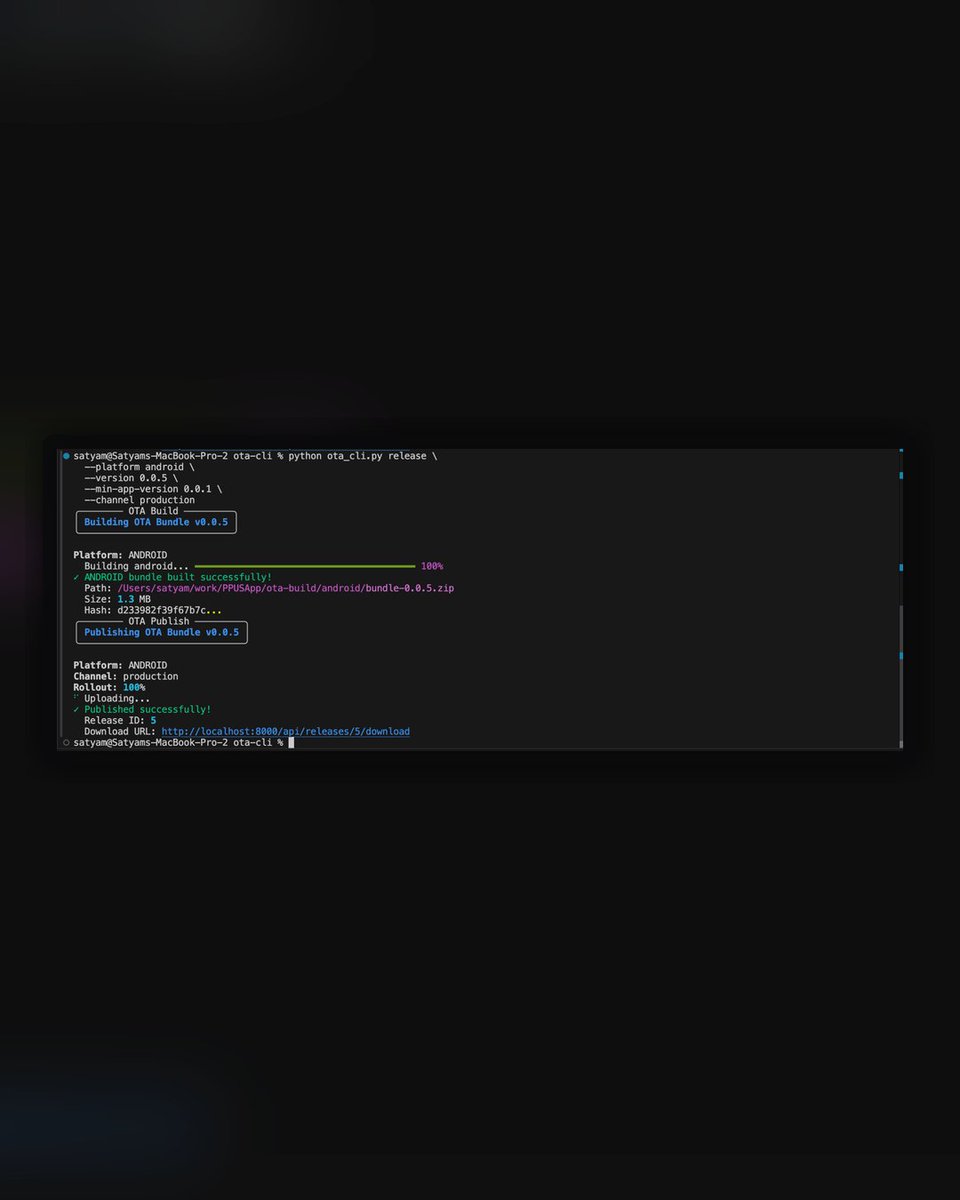
AI is quietly replacing a lot of mid-level SaaS.
Microsoft shut down App Center / CodePush — so we replaced react-native-code-push with our own in-house CodePush update server.
100% implemented via Claude Code.
There are SaaS products charging $100–$500/mo for this (often priced by install count).
we built (same UX + core features as App Center):
-CodePush update server + Web Dashboard Auth + multi-project support
- Staged rollouts (10% → 50% → 100%)
- Upload releases + version targeting
- Download analytics
- API key management
CLI
ota-cli configure --api-key <API_KEY_HERE> --project-id ID
ota-cli release --platform android --version 1.0.0
ota-cli list
ota-cli rollback --release-id 5
React Native integration
Native iOS + Android bridges
Got asked a few questions in my DMs — thought I'd share my take:
- Do you feel the AI job market favors specialists or strong generalists who can ship end-to-end?
Yes — When you build end-to-end, you develop judgment on AI-generated code — what’s right, what’s wrong — and you can move fast without blindly trusting outputs.
- Also, from your experience, what’s the most practical path into AI for someone with a strong frontend background?
For someone with a strong frontend background, the path into AI is the same as learning anything else: you learn by doing: read a lot, build small things, and watch a lot of content around math and ML. Over time, things start to connect.
- if you were starting today, what kind of project would you build first to go end-to-end in AI?
I'd go with a text + image retrieval project in an e-commerce setting: 'Find similar products' + 'search by natural language.' It touches embeddings, vector search, and UI — all in one project.
How it works (internal advantage): since it’s for store stylists + company users, we control the inference environment:
→ Qwen3 0.6B with prompt engineering
→ Fashion vocabulary baked in — fabrics, work types, designer names
→ Handles messy price inputs (“under 2 lakh”, “below ₹50K”, “above 1L”)
→ Can be extended with more filters (availability, ready-to-ship, store inventory, etc.)
Filter combinations can get complex — Qwen3 converts the text into a clean JSON filter, which we pass to Qdrant (vector DB) to retrieve results.
We also had a requirement: stylists should be able to snap a product tag and get instant details + similar items. So we built a fallback chain:
Detect whether the image contains a barcode
If yes → barcode reader
If barcode read fails → OCR text reader
Regex extracts our product unique key from the tag
Works even with crumpled tags and bad lighting.
We’re experimenting with a new way to search products across our 20+ offline stores at @PerniasPopUp — a premium multi-designer fashion platform with stores in India (20+), London, and New York (opening soon).
The experiment: customers ask naturally, stylists type in their own words (including imperfect spelling), and the system understands it. Autocomplete also helps as stylists type (fashion terms aren’t easy to spell mid-conversation).
Stylist: “Show me embroidered lehenga under ₹2L in Mumbai store”
→ {"price_max": 200000, "city": "Mumbai", "category": "Embroidered Lehenga"}
Stylist: “Masaba products under ₹2L”
→ {"price_max": 200000, "brand": "Masaba"}
Stylist: “Hot pink Petticoat Lane lehengas between ₹1–2L”
→ {"price_min": 100000, "price_max": 200000, "color": "hot pink", "brand": "Petticoat Lane", "category": "Lehenga"}
You see it every day. Another tweet. Another post. Another developer you admire saying "I don't write code anymore."
And something sinks in your chest.
You start questioning everything. Your skills. Your career. Your future.
Here's what I've realized:
The people posting aren't trying to scare you. But the silence from everyone else? That's what's actually terrifying.
Because right now, thousands of developers are figuring this out in real time — adapting, learning, struggling, succeeding — and saying nothing.
But honestly, the thing that gives you real confidence isn’t doom-scrolling. It’s sharing. Post what you’re building. Share how you’re adapting. Talk about what’s working and what’s hard.
Python is about to explode among full-stack devs.
Here’s why your Node.js backend friends are quietly learning it:
- It’s not just “Python for data science” anymore.
- You can self-host or fine-tune small open-source models for specific tasks.
- Full control: privacy, latency, cost.
The stack is shifting:
React/Next.js frontend
↓
Python + FastAPI backend
Yes, AI will write most code.
But if you want your job to stay—and stay valuable—you need to tell AI what you want, not just accept what it outputs.
Feels like the developer community is getting closer lately.
Less tech negativity.
Less framework and language wars.
More focus on productivity and real work.
People are sharing what they’re building and how they’re solving problems.
That’s how we end up solving harder problems.
1 in 4 tweets in my feed is "vibe coding is taking your job"
Yes, engineers are writing less code. Some are writing none.
People who got into this field because they love solving problems aren't going anywhere. They'll adapt. They always do.
Engineers figure out how to stay valuable.
Claude Projects is seriously powerful
1000 meme templates = only 8% files capacity used
(ChatGPT Projects caps at 20 files max)
Built this to test Claude's meme humor:
→ Web search for latest news
→ Find trending topics
→ Generate meme prompt
→ Match with the right template
Time to see if AI can actually be funny
Everybody says programming is dead.
Here’s the secret: typing was never the job. Thinking was.
Programming isn’t dying — it’s moving keyboards.
From IDEs → prompts → agents → whatever comes next.