You built your app, but where will you get customers from?
I found an open-source AI sales agent called Harvey - a free lead generation tool that finds customers for you.
This AI cold email generator finds leads, does prospect research, writes personalized cold emails, tracks replies, and manages your entire sales pipeline.
It can run 24/7 on your system as your AI SDR and you can track everything on a live dashboard.
This is the best GitHub repo for startups and SaaS founders who need customers.
Want the link? Comment VIRAL and I'll DM you. See less
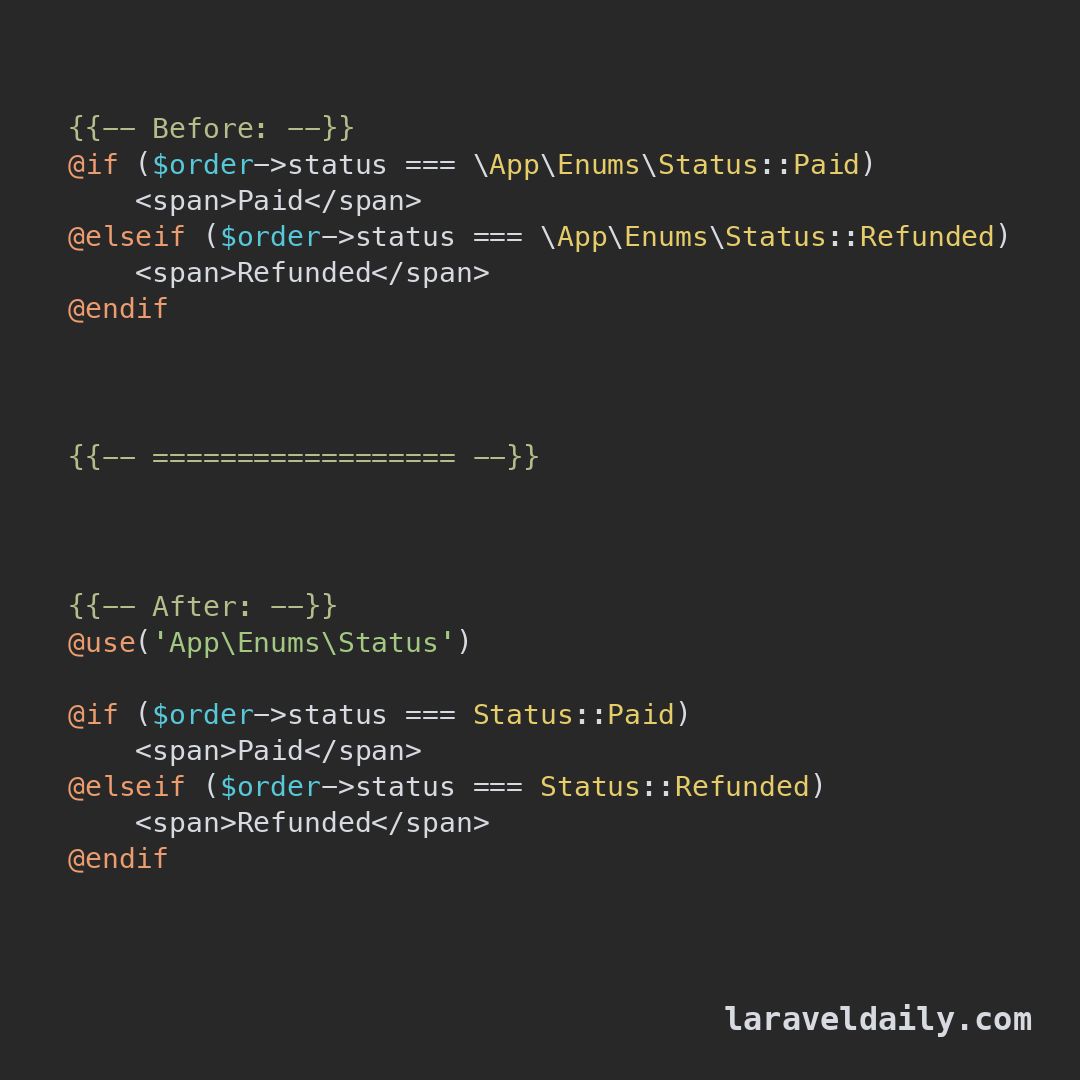
Laravel tip.
Blade has a `@use` directive for importing classes.
Put it at the top of the view and write `Status::Active`, not the full namespace, everywhere below.
A second argument gives the class an alias.
Hey Laravel developers 👩💻
Are you aware of the afterQuery() method that exists on the Eloquent class?
So, the afterQuery() method is useful when the query results need post-processing from a source that Eloquent can't eager-load
Suppose you need an online flag on every User in a paginated list, keyed from Redis or Cache?
with(), withCount(), and loadExists() only know Eloquent relations — they cannot hydrate external presence keys.
Instead, you can enrich the collection after SQL.
Eloquent’s afterQuery() runs once with the get()/paginate() result — ideal for Cache::many() / MGET in one shot, then stamp each model.
That is the hook Laravel gives for post-query enrichment.
In the example below, afterQuery() builds presence keys, batch-loads them, and sets an online attribute on every User.
This helps you to encapsulate the behaviour and reuse it instead of modifying the collection later at multiple places
#laravel #php
I am opening a FREE DevOps academy
1 month, live sessions, I explain and present everything
What will be covered:
- Linux and Networking basics
- Git and CI/CD pipelines
- Docker and Containers
- Kubernetes
- AWS core services
- Terraform and infrastructure as code
- Monitoring and Logging
- How DevOps interviews actually work
How it will work:
- Homework after each session
- Final project at the end
- I review your projects
- 1 on 1 with each of you to review your project and build your CV
Slots are limited, I can only properly review projects and do CVs for a small group.
If you want in, reply "interested" below. Once I see the interest I'll post the schedule and how to apply.
Control your mouth before words control your life. Control your mind before thoughts steal your peace. Control your mood before emotions ruin your day. Control your money before spending steals your future. Self-control today is the freedom and success of tomorrow..
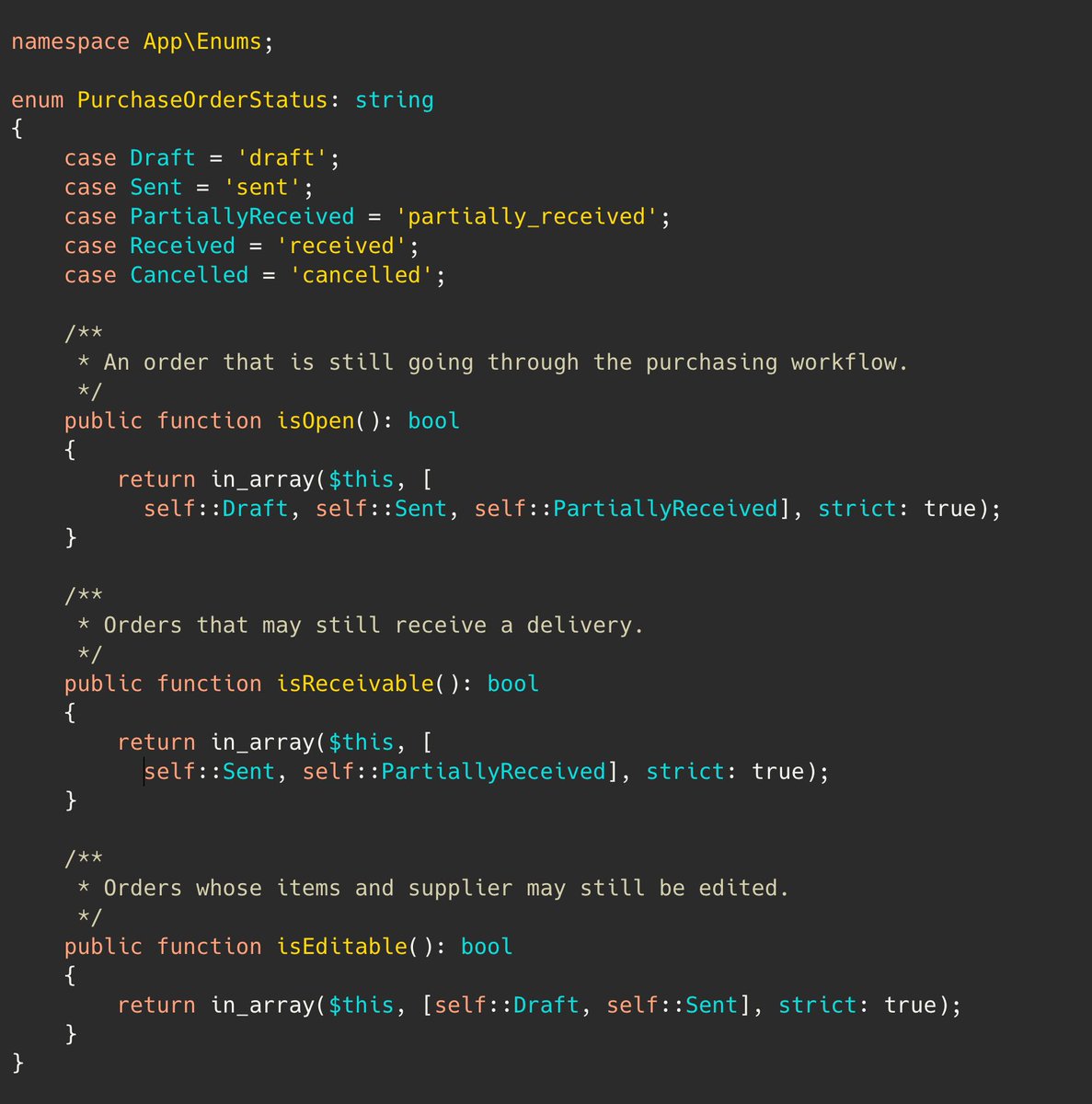
PHP tip.
In Enums, you may create "helper methods" that describe a few of the possible values in one "group", to make it more readable from the outside.
Similar how Laravel devs have been doing this in Eloquent, for many years.
🚀 One tab for your whole Laravel project. Work with Artisan commands, error logs, and Laravel Cloud deployments – all without leaving PhpStorm.
👉 Learn more at: https://t.co/UtBcqQn1mn
#Laravel#PhpStorm#release #2026.2
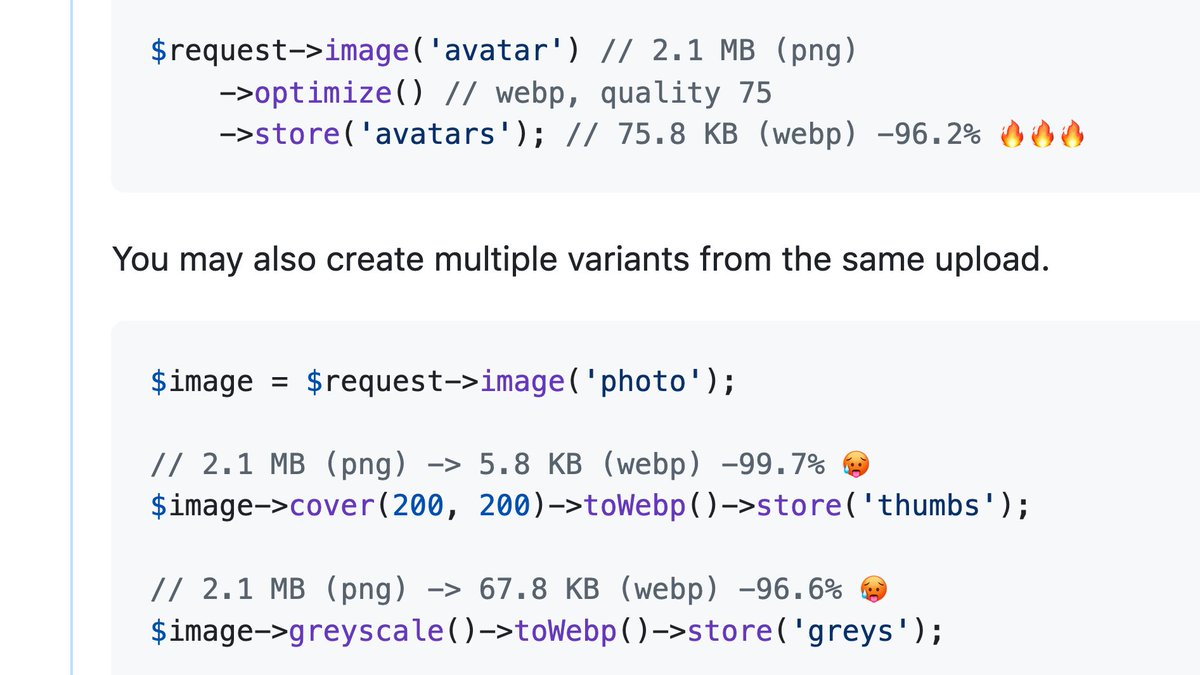
proud to announce that we've just added first-party image processing for @laravel
immutable api for manipulating images from resize, crop, convert to webp, store, and more, directly from the request object
a 2.1 mb png down to 75 kb 🤌🏻
When you're defining a query scope on a Laravel model, which approach do you prefer?
1️⃣ Attribute?
#[Scope]
protected function nameHere() {...}
2️⃣ "scope" method prefix?
public function scopeNameHere() {...}
Personally, I prefer the attribute approach 😄
Git Tip💡
`git worktree` command allows you to create multiple working directories, each associated with a different branch or commit.
This is useful for working on different tasks simultaneously without having to constantly switch branches.
Laravel tip:
If you update records while chunking them, be careful with `chunk()`.
Because `chunk()` uses offset pagination, changing the result set during processing can make you skip rows.
Use `chunkById()` when the records can change while processing.
Instead of watching Netflix tonight.
Spend a day mastering Claude here: https://t.co/Vn60ElPZ2i
→ Level 1 - 24 min: The basics.
Claude For Dummies: https://t.co/jw2qdIcjnh
Claude Certified: https://t.co/9jKsXWOt66
Stupid simple Claude: https://t.co/SVGd967eMQ
→ Level 2 - 1 hour: Real workflows.
Claude Cowork: https://t.co/uWTpOI3Woc
Claude for teams: https://t.co/qxlcqhf8bM
Claude Design: https://t.co/ZY8Fg5D2ea
Cowork + Projects: https://t.co/Q7AN9CZAbO
Claude for slides: https://t.co/L0bPMgXci6
Claude Skills: https://t.co/6cHYYfjXEA
→ Level 3 - 3.5 hours: The pro moves.
Claude to sound like you: https://t.co/kDGBpSF7Wh
Stop hitting Claude limits: https://t.co/j5fEzSH5br
Stop Prompting: https://t.co/j1LATSJiat
Claude replaced me: https://t.co/pNs1hPNDy5
Stop sounding like AI: https://t.co/JWKUGNKgOS
Excel with Claude: https://t.co/7g3CFNcKrs
→ Level 4 - 8 hours: Expert mode.
Claude Code: https://t.co/UgE9xBXVbE
Claude Connectors: https://t.co/TSAQqOpDeV
Stop using Claude at work: https://t.co/c6X55Thy6t
Pro tip: Don't binge it. Do one level per sitting.
Actually apply each guide before moving to the next.
𝗗𝗮𝘆 𝟭𝟴/𝟲𝟬 𝗼𝗳 𝗦𝗤𝗟 𝗦𝗲𝗿𝗶𝗲𝘀 — 𝗙𝗶𝗹𝘁𝗲𝗿𝗶𝗻𝗴 𝗚𝗿𝗼𝘂𝗽𝘀 – 𝗛𝗔𝗩𝗜𝗡𝗚 𝘃𝘀. 𝗪𝗛𝗘𝗥𝗘
Filtering data is one of the most common tasks in SQL.
However, many beginners get confused about when to use WHERE and when to use HAVING.
While both are used for filtering, they operate at different stages of query execution.
Today’s lesson explains one of the most important SQL concepts for data analysis 👇
1️⃣ 𝗪𝗵𝗮𝘁 𝗶𝘀 𝗪𝗛𝗘𝗥𝗘?
WHERE filters individual rows before any grouping or aggregation occurs.
Example:
SELECT *
FROM employees
WHERE salary > 50000;
Only employees earning more than 50,000 are selected.
2️⃣ 𝗪𝗛𝗘𝗥𝗘 𝗼𝗽𝗲𝗿𝗮𝘁𝗲𝘀 𝗯𝗲𝗳𝗼𝗿𝗲 𝗚𝗥𝗢𝗨𝗣 𝗕𝗬
SQL first filters rows using WHERE and then creates groups.
Example:
SELECT department,
COUNT(*)
FROM employees
WHERE salary > 50000
GROUP BY department;
Only employees earning above 50,000 are included in the groups.
3️⃣ 𝗪𝗵𝗮𝘁 𝗶𝘀 𝗛𝗔𝗩𝗜𝗡𝗚?
HAVING filters groups after GROUP BY has already created them.
Example:
SELECT department,
COUNT() AS employee_count
FROM employees
GROUP BY department
HAVING COUNT() > 10;
Only departments with more than 10 employees are returned.
4️⃣ 𝗛𝗔𝗩𝗜𝗡𝗚 𝘄𝗼𝗿𝗸𝘀 𝘄𝗶𝘁𝗵 𝗮𝗴𝗴𝗿𝗲𝗴𝗮𝘁𝗲𝘀
Unlike WHERE, HAVING can filter using aggregate functions.
Example:
SELECT department,
AVG(salary) AS avg_salary
FROM employees
GROUP BY department
HAVING AVG(salary) > 60000;
5️⃣ 𝗪𝗛𝗘𝗥𝗘 𝗰𝗮𝗻𝗻𝗼𝘁 𝘂𝘀𝗲 𝗮𝗴𝗴𝗿𝗲𝗴𝗮𝘁𝗲 𝗳𝘂𝗻𝗰𝘁𝗶𝗼𝗻𝘀
This query is invalid:
SELECT department,
COUNT()
FROM employees
WHERE COUNT() > 10
GROUP BY department;
Aggregate functions are not available during the WHERE stage.
6️⃣ 𝗛𝗔𝗩𝗜𝗡𝗚 𝗰𝗮𝗻 𝗯𝗲 𝘂𝘀𝗲𝗱 𝘄𝗶𝘁𝗵 𝗖𝗢𝗨𝗡𝗧()
Example:
SELECT customer_id,
COUNT() AS total_orders
FROM orders
GROUP BY customer_id
HAVING COUNT() >= 5;
This returns customers who have placed at least five orders.
7️⃣ 𝗛𝗔𝗩𝗜𝗡𝗚 𝗰𝗮𝗻 𝗯𝗲 𝘂𝘀𝗲𝗱 𝘄𝗶𝘁𝗵 𝗦𝗨𝗠()
Example:
SELECT region,
SUM(revenue) AS total_revenue
FROM sales
GROUP BY region
HAVING SUM(revenue) > 100000;
Only regions exceeding 100,000 in revenue are displayed.
8️⃣ 𝗪𝗛𝗘𝗥𝗘 𝗮𝗻𝗱 𝗛𝗔𝗩𝗜𝗡𝗚 𝗰𝗮𝗻 𝗯𝗲 𝘂𝘀𝗲𝗱 𝘁𝗼𝗴𝗲𝘁𝗵𝗲𝗿
Example:
SELECT department,
AVG(salary) AS avg_salary
FROM employees
WHERE salary > 30000
GROUP BY department
HAVING AVG(salary) > 50000;
WHERE filters rows first.
HAVING filters the resulting groups.
9️⃣ 𝗪𝗛𝗘𝗥𝗘 𝗶𝘀 𝘂𝘀𝘂𝗮𝗹𝗹𝘆 𝗳𝗮𝘀𝘁𝗲𝗿
Since WHERE reduces rows before grouping, it can improve query performance by processing less data.
🔟 𝗞𝗻𝗼𝘄𝗶𝗻𝗴 𝘁𝗵𝗲 𝗱𝗶𝗳𝗳𝗲𝗿𝗲𝗻𝗰𝗲 𝗶𝘀 𝗲𝘀𝘀𝗲𝗻𝘁𝗶𝗮𝗹
Many reporting and analytics queries require both WHERE and HAVING to produce accurate and efficient results.
💡 𝗞𝗲𝘆 𝘁𝗮𝗸𝗲𝗮𝘄𝗮𝘆:
WHERE filters rows before grouping.
HAVING filters groups after aggregation.
Remember:
• WHERE → individual rows
• HAVING → grouped results
Mastering this distinction will help you write more powerful SQL reports and analytical queries.
Grab SQL Playbook:
https://t.co/0bRVxTZBbK
What was the first SQL query where you discovered you needed HAVING instead of WHERE?