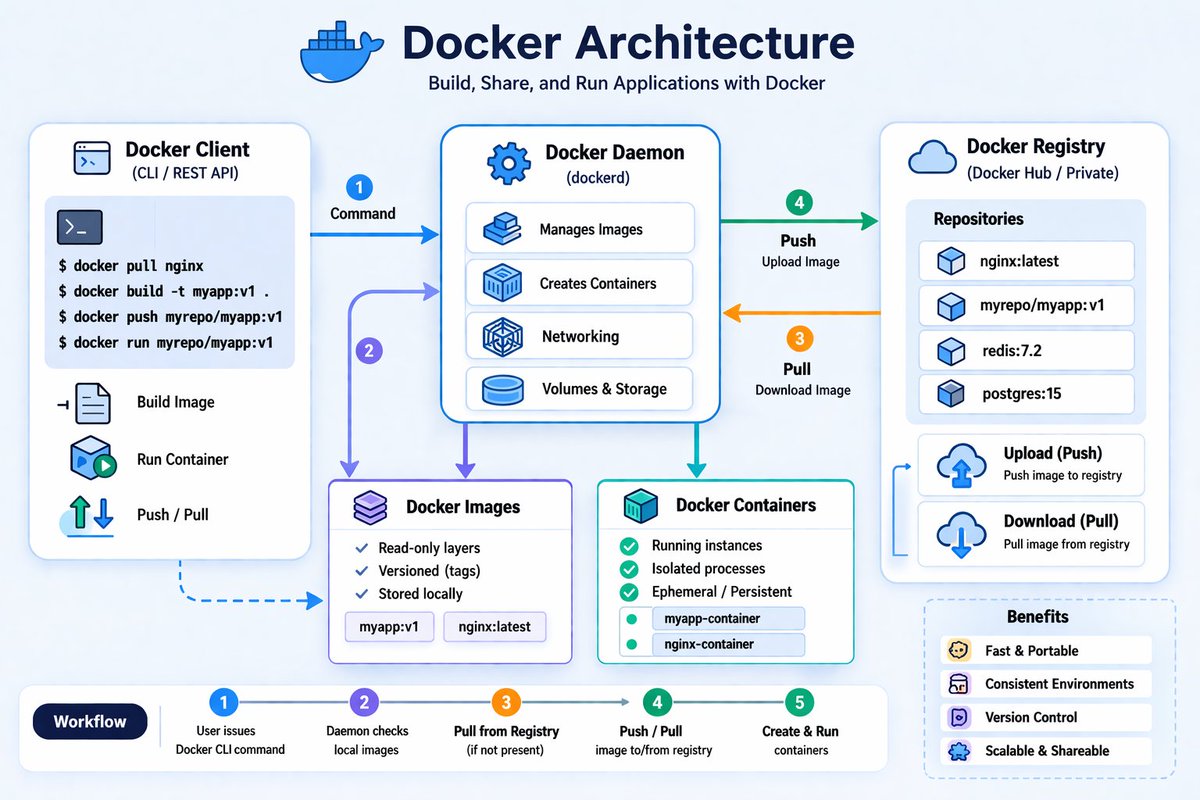
Basics of Docker Architecture
------------------------------------
The below are the important components of Architecture.
Docker Client -->
This is where we run commands like docker build, docker pull, docker push, docker run etc.
When we run commands, the client sends a REST API call to Docker daemon.
Docker Daemon (dockerd or containerd) -->
This is the engine which builds images, creates containers, push&pull images and manages networking & storage etc.
It Accepts REST API calls from clients and perform the required function.
Docker Images -->
Read-only templates used to create containers. The Applications along with it's libraries and other required components would be packaged as Docker image which will be used to create containers.
Docker Containers -->
Running instances of images that execute applications.
Docker Registry -->
A remote repository (like ARtifactory registry/Nexus Riegistry/ Docker Hub etc) which stores docker images.
The flow is explained in the diagram as below.
1. docker command is executed in the client.
docker build --> For building docker images by using Dockerfile and Application code and libraries etc.
docker pull --> For getting docker image from Docker Registry
docker push--> For pushing docker image to Docker registry
docker run --> To create and run the container.
docker stop/start --> To stop and start the docker container respectively
2. Client sends REST API request to daemon.
3. Daemon pulls image from registry if not present.
4. Daemon push the image(if we execute docker push command) to registry.
5. Container is created and started(if we execute docker run command)
@AstroPrashanth9 Our corrupted black money holders will not let it down...they have huge black money to deploy..see in news papers..in Hyderabad during ACB raids every corrupted has crores of rupees irrespective of their designation... until corruption stops nothing will happen to real estate...
@naralokesh@Anitha_TDP@APPOLICE100 Dear Lokesh Garu, I think it is not a good decision to allow DJs. Many people would feel irritation and anxiety listening to those Louder noises. Especially it is not good for old people and children. Kindly rethink about this decision.
Git fundamental objects: Blobs, Trees, and Commits
----------------------------------------------------------
Git stores data using three fundamental types of objects: Blobs, Trees, and Commits.
1. Blob Objects (Binary Large Objects) -->
Git is a content-addressable file system that stores file contents as Blob objects.
These objects contain a checksum (hash) of the file content.
If the content of two files is identical, Git saves space by referencing the same existing blob object rather than creating a new one.
2. Tree Objects -->
Since blobs do not store file names or directory structures, Tree objects are used to map these blobs to their respective filenames and manage subdirectories
Tree objects essentially act as a directory listing, referencing blob entries or other sub-tree objects.
3. Commit Objects -->
Commit objects are created when changes are saved to the repository.
They contain metadata, including references to the top-level Tree object, the parent commit (to maintain history), and details about the author and committer.
These objects allow Git to track the history of files over different points in time. These objects are stored in the .git/objects directory.
All these objects (blobs, trees, and commits) are identified by a unique 40-character checksum (hash), which serves as the object's name.
Some useful commands:
git cat-file -p [hash] --> Prints the content of a specific Git object identified by its checksum.
git cat-file -t [hash]: Displays the type of the object (blob, tree, or commit) associated with a specific hash.
git commit -m "message": Creates a new commit object, saving the current state of the index to the repository history.
git log: Displays the commit history of the repository, showing the sequence of changes made
Example:-
HP@LAPTOP-5GCK8CJK MINGW64 /e/linux/git_examples/repo1/.git/objects (GIT_DIR!)
$ ls
14/ 41/ 71/ ce/ info/ pack/
HP@LAPTOP-5GCK8CJK MINGW64 /e/linux/git_examples/repo1/.git/objects (GIT_DIR!)
$ cd 14;ls
be0d41c639d701e0fe23e835b5fe9524b4459d
HP@LAPTOP-5GCK8CJK MINGW64 /e/linux/git_examples/repo1/.git/objects/14 (GIT_DIR!)
$ git cat-file -t 14be0d
blob
HP@LAPTOP-5GCK8CJK MINGW64 /e/linux/git_examples/repo1/.git/objects/14 (GIT_DIR!)
$ git cat-file -p 14be0d
hello2
To know more about these objects, please go through the video https://t.co/cWTFwKcBM2
Bare Repository in Git
---------------------------
A bare repository is a Git repository designed for collaboration among multiple developers.
Unlike a standard repository, it does not contain a working directory or the standard .git folder structure that allows for local file editing, adding, or committing.
Creating a bare repository --> The below commands are used to create a bare reposiotry.
git init --bare <reponame>
git clone --bare <repo-url>
Example:-
HP@LAPTOP-5GCK8CJK MINGW64 /e/linux/git_examples
$ git init --bare repo1.git
Initialized empty Git repository in E:/linux/git_examples/repo1.git/
HP@LAPTOP-5GCK8CJK MINGW64 /e/linux/git_examples
$ ls
repo1.git/
HP@LAPTOP-5GCK8CJK MINGW64 /e/linux/git_examples
$ cd repo1.git/
HP@LAPTOP-5GCK8CJK MINGW64 /e/linux/git_examples/repo1.git (BARE:master)
$ ls -lart
total 11
-rw-r--r-- 1 HP 197121 73 Apr 13 16:56 description
drwxr-xr-x 1 HP 197121 0 Apr 13 16:56 ../
drwxr-xr-x 1 HP 197121 0 Apr 13 16:56 info/
drwxr-xr-x 1 HP 197121 0 Apr 13 16:56 hooks/
drwxr-xr-x 1 HP 197121 0 Apr 13 16:56 refs/
drwxr-xr-x 1 HP 197121 0 Apr 13 16:56 objects/
-rw-r--r-- 1 HP 197121 104 Apr 13 16:56 config
-rw-r--r-- 1 HP 197121 23 Apr 13 16:56 HEAD
drwxr-xr-x 1 HP 197121 0 Apr 13 16:56 ./
Here we can see there is no .git directory and it lacks a working tree. If we attempt to run commands like "git add" directly within it will result in an error.
HP@LAPTOP-5GCK8CJK MINGW64 /e/linux/git_examples/repo1.git (BARE:master)
$ echo "hello" > a.txt
HP@LAPTOP-5GCK8CJK MINGW64 /e/linux/git_examples/repo1.git (BARE:master)
$ git add a.txt
fatal: this operation must be run in a work tree
Usage of a Bare Reposiotry -->
Developers use these repositories as a central, shared hub.
A developer clones the bare repository to their local machine, performs their work (like adding and committing files locally), and then uses git push to upload their changes to the shared bare repository.
Real-world application --> Bare repositories are used in everyday workflows. Services like GitHub, GitLab, and Bitbucket host our projects as bare repositories, acting as the remote shared point for the teams to collaborate effectively.
You may check the video https://t.co/XyxUOAQDY8 for more info on this.
Linux Process States and Signals
---------------------------------------
Linux Process States --> Once the process is created in Linux, it can be in one of below states.
Running/Runnable (R): The process is currently executing on the CPU or is in the queue waiting for a CPU cycle.
Interruptible Sleep (S): The process is waiting for a resource, such as a file or input, and can be awakened by a signal.
Uninterruptible Sleep (D): Typically triggered by hardware I/O (like an NFS mount), these processes cannot be awakened by signals until the required resource becomes available.
Stopped (T): The process is paused.
Zombie (Z): A process that has completed but remains in the process table because the parent hasn't collected its exit status.
Signals -->
The processes are controlled using various signals.
we can send signals by using kill command.
kill -<signalnum> <pid>
kill -<signalname> <pid>
example:- kill -9 1234 or kill -SIGKILL 1234
Some important signals are as below.
SIGINT (2): Sent via Ctrl+C to interrupt a process.
SIGTERM (15): The default signal sent by the kill command to request a graceful termination.
example:- kill -15 1234 or kill 1234 --> stop the process with pid 1234 gracefully(Allows process to clean up before exiting).
SIGKILL (9): Used for the forceful termination of a process when a graceful shutdown isn't possible.
example:- kill -9 1234 --> Immediately stops process as SIGKILL cannot be caught or ignored.
Used to stop Hung or unresponsive process.
SIGHUP (1): Often sent to child processes when a terminal session is closed or used to reload configuration of a server process.
to reload that server process
example:- kill -1 1234 (Reload the configuration of server with process id 1234..we use this to reload that server process when the server configurations are changed)
SIGQUIT (3): Used to terminate a process and generate a core dump (memory snapshot) for debugging.
SIGSTOP & SIGCONT: Used to pause a process and resume it, respectively.
--> While most signals can be caught or ignored using custom handlers in our code (such as the trap command), SIGKILL and SIGSTOP cannot be trapped by a process, ensuring they always perform their default action.
For more details with examples, you may go through the video https://t.co/Lj3Mi3oGWA
Docker Layers - Copy On Write(COW) strategy
------------------------------------------------------
COW(Copy On Write) Strategy --> Enables efficient storage and management of image and container layers.
Image Layers --> Docker Image consist of multiple read-only layers.
Example: Python application Docker image contains below layers.
Base Image (Ubuntu) --> Layer 1 (Install Python) --> Layer 2 (Add App Code)
Container Layers --> When Containers are created, they add a single read-write layer on top of read only layer for temporary modifications.
COW(Copy On Write) Strategy -->
When a container needs to modify a file, it searches for it from the top layer downwards. If found in a lower read-only layer, the file is copied to the top read write layer to be edited, preventing changes to the base image. This is the reason, it is called as Copy On Write strategy.
Example: let's say, we have a file /app/config.txt exists in image.
For read operation on this file:
Container reads → directly from image layer (no copy).
For Write operation or modification of this file
Docker copies file from image layer to container layer and modifies it there. This is Copy On Write process.
Implementation --> To implement this COW, Docker uses storage drivers.
Examples of storage drivers : overlay2,devicemapper,autofs,btrfs,zfs etc.
Advantages of COW -->
1. Efficient Disk Usage and Layer reusability
Multiple containers share the same image layers. No duplicate storage for unchanged files.
2. Optimized for Read Operations
Reads happen directly from lower (image) layers. Very fast for read-heavy workloads.
3. Lightweight Containers
Containers only store changes (diffs).
Disadvantages -->
Slower Write Performance:
Since for write operations, it needs to Copy from lower layer to writable layer, this adds latency for write heavy apps.
Databases do frequent writes and it is not Ideal for Databases.
So for write heavy apps, we use volumes instead of container layer.
So we use combination of COW(great for saving space and fast startup) and volumes for write heavy workloads.
For more info on this, you may watch video https://t.co/gM9QuIXPVq
We can use moth merge as well as rebase depends on use case.
Merge --> Merge is a simple and safe operation(extra commit) as history will not be rewritten which means we can keep full history intact.
Rebase --> Rebase makes the history is clean and linear and it is easier for code reviews.
case1 --> If we make commits on our branch and these are already shared with the team by using push, then better use merge to avoid breaking of other's work.
case2 --> If the commits on our branch are not shared with others and if we want clean history, we can go with rebase.