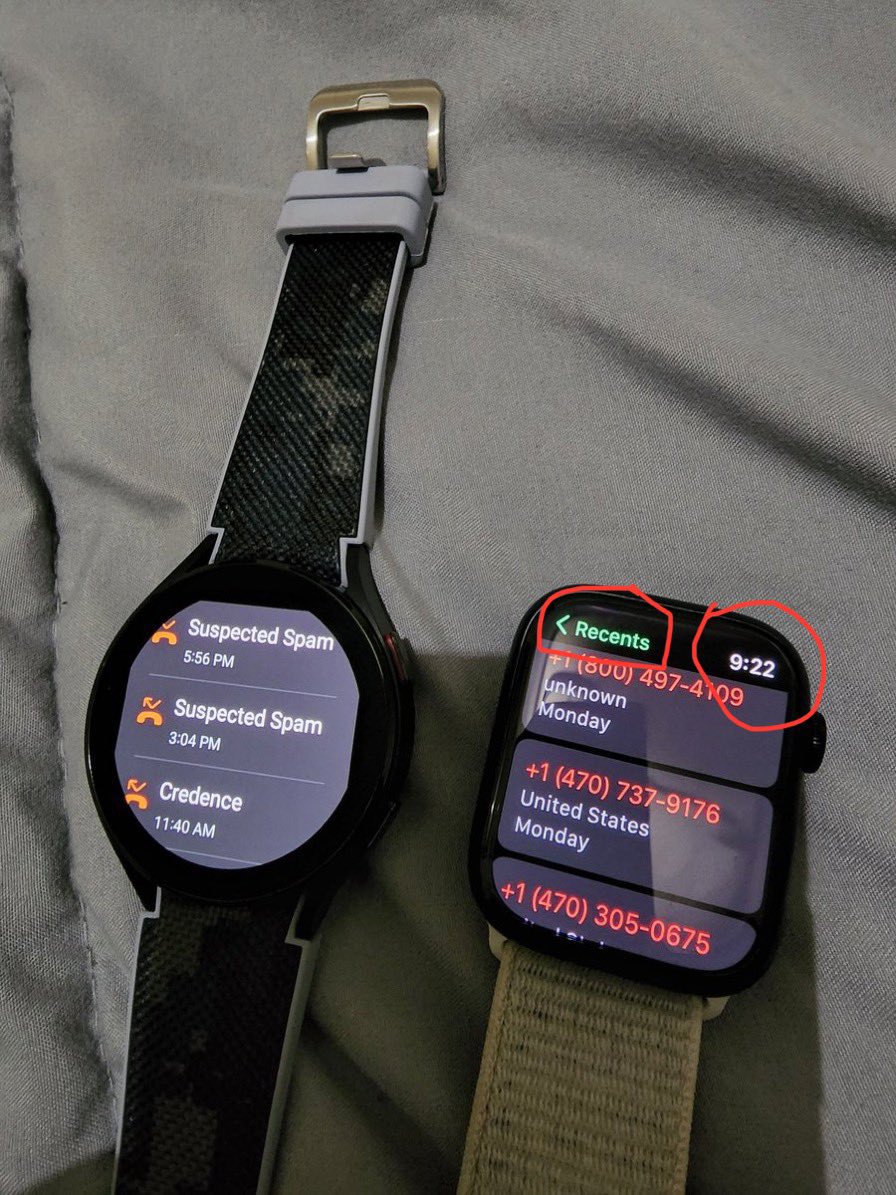
Why round smartwatches absolutely SUCK - UI of round smartwatches is actually designed for square smartwatches which makes the UI area extremely small
UI of round smartwatches shows that its makers like Google and Samsung DON'T CARE about their watches and their users
🧵 Switching from iPhone 16 Pro Max to Pixel 9 Pro – a breakdown of why Gemini AI & Google’s Pixel ecosystem blew me away.
1/ I switched from iPhone 16 Pro Max to Pixel 9 Pro, and even I was surprised. The iPhone is a beast, no doubt. But the Pixel 9 Pro? It brought something fresh to the table that I didn't expect, especially with Google’s new AI, Gemini.
2/ Disclaimer: Google sent me the Pixel 9 Pro, but they didn’t ask for content or feedback—what I’m sharing is 100% my experience and opinions.
3/ I wasn’t even planning on switching! I’ve been an iPhone user for years, but sometimes a device changes your perspective. The Pixel didn’t have just one standout feature; it was the complete experience, and Gemini AI was a big part of that.
4/ Google’s Gemini Advanced is a game-changer. This isn’t your standard voice assistant, it’s built to understand context and work as a real productivity tool. The Tensor G4 chip optimizes Gemini, making it more powerful than any assistant I’ve used before. It’s not just for reminders or quick searches, it’s a real workflow enhancer.
5/ Real-world example: Let’s say I’m scripting for a video. I can ask Gemini to open my last draft, and it remembers exactly where I left off. Editing sections, switching between drafts, and pulling in other relevant docs from my recent activity all without touching the screen. It’s like having a dedicated assistant who knows my workflow.
6/ Emails? Gemini’s integration with Gmail is on another level. It gives me quick response options for each email, and if none of them work, I just give it a prompt. It crafts a professional email based on what I want to say. A task that used to take me hours now takes minutes.
7/ When I’m traveling, Gemini’s context awareness really shines. I can ask for flight updates, and it’ll proactively give me traffic, gate changes, and even nearby event updates without needing to ask. It’s these small, intuitive assists that streamline my day.
8/ Need to set up a meeting? Gemini checks my calendar, suggests the best times, and can even draft an email with the invite. For someone who juggles a lot, this AI assistant anticipates needs I didn’t even know I had, making my day way more efficient.
9/ Then there’s ‘Pixel Studio’ an AI-powered creative tool that lets me create graphics on the fly using text prompts. Need a quick thumbnail idea or visuals for social? Gemini can help generate concepts and visuals in seconds, giving me fresh ideas or quick visuals to enhance content.
10/ Another big use case is call management. With Gemini’s ‘Call Notes’ feature, I can get real-time transcriptions during calls. It organizes the important details so I have them ready afterward, which is clutch for podcast interviews or client meetings. (not available in Canada)
11/ And then there’s the ‘At a Glance’ widget. It’s way more than weather updates; it’s context-based info that’s relevant to my day. If I’m at the airport, it shows gate changes; if I have an appointment nearby, it reminds me automatically. No digging through apps, just the right info at the right time.
12/ Let’s talk camera. Pixel 9 Pro’s AI-powered image processing feels like Gemini is helping me behind the lens too. The 48MP camera optimizes lighting, dynamic range, and even skin tones in real-time, making sure my photos look incredible, especially on social media.
13/ Battery life? Solid. Google’s smart battery management knows when to prioritize power-hungry tasks and when to hold back. I’m getting a full day with heavy usage, and the Pixel learns my patterns to save energy without me noticing.
14/ Now, I’m not saying the iPhone ecosystem isn’t great; it’s unbeatable if you’re all-in with Apple products. But Google’s open approach to integration? It lets me use devices like my Galaxy Ring seamlessly without needing a Samsung phone, and that flexibility is refreshing.
@ar7work Я очень люблю пиксель. Но мне настолько не понравился 8про что купил 15 про мах и доволен. Сейчас вышла 9 серия, стоит ли попробовать снова или по факту все тоже самое?)
@Vangelfeld1@ar7work Я с 8 про перешел на 15 про мах. 0 проблем было для меня) Ну клавиатура странная конечно. А так видео, софт камеры, на высоком уровне. И самое главное что очень плавная работа, пиксель намного хуже работал по плавности интерфейса и приложений. Так же автономность лучше.