Huge thanks to Unsloth for the great work. This is wonderful news for the community! 🥳Qwen3.8-27B, smaller and sharper than ever. Let's try it! @UnslothAI
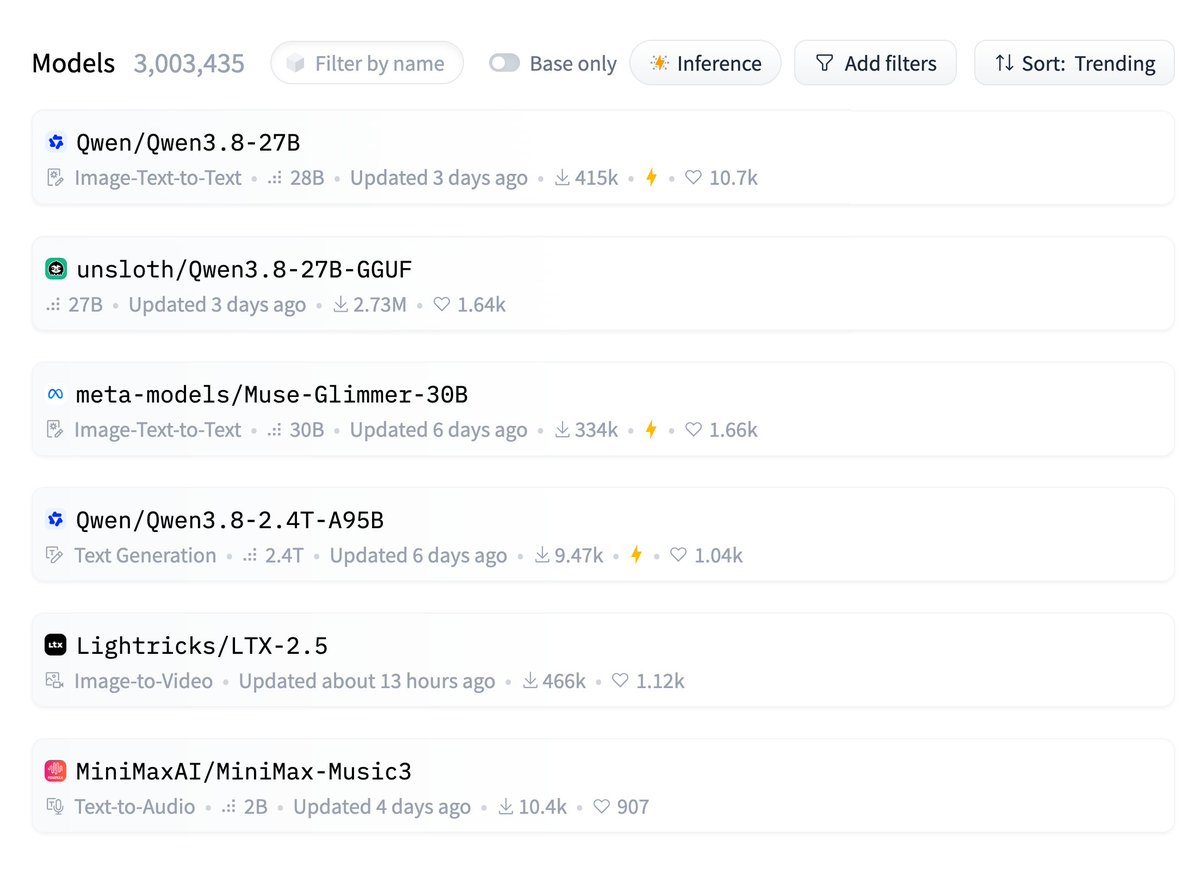
Qwen3.8-27B Unsloth GGUF is now the #2 trending model on Hugging Face with 2.7M downloads! 💗
Unsloth also reached #3 trending on GitHub!
Thanks so much for the love!
Model: https://t.co/xIdNwm7CLQ
GitHub: https://t.co/aZWYAtakBP
I will teach you how to run Qwen 3.8 27B Dense at its optimal configuration.
If you have an RTX 3090, 4090, or 5090, you can now have frontier-level AI on your desk.
The model is free, open source, Apache 2.0. But the defaults are not the optimum. The community spent the first 24 hours digging the real config out of it, and a handful of flags now separate "it runs" from "it runs right." Here is each one and why it exists.
The one that matters most.
--spec-type draft-mtp
Qwen trained a draft head directly into the weights. A small attached brain guesses the next couple of tokens, the big model checks all guesses in one pass, every accepted guess is a free token. The head already ships inside the GGUF you downloaded. You do not download a drafter, you do not build anything. Someone found unused tensors in the server logs at 2am, tried to build the draft file, and discovered there was nothing to build. One flag connects what is already there (sudoingX found this, paired A/B, open sourced the probe before sunrise).
The depth cap. The head has exactly one layer. n=4 breaks it.
--spec-draft-n-max 2
n=2 is the sweet spot. n=3 is the ceiling. The model has one MTP layer, so pushing the draft depth to 4 or 5 crashes the head and it starts emitting junk tokens. People hit this on the Spark and documented the whole ladder: n=1 gives 1.75x, n=2 gives 2.37x, n=3 gives 2.85x, n=4 does not exist. Respect the cap.
The memory flags. MTP brings its own luggage.
--cache-type-k q8_0 --cache-type-v q8_0
--spec-draft-type-k q8_0 --spec-draft-type-v q8_0
-np 1
Three flags, one purpose: fit it on 24GB.
The KV cache is the model's running memory of your conversation, and it is the thing that eats your card at long context. q8_0 halves it with no visible quality cost.
The second line does the same for the draft head's own cache, which defaults to full fat and quietly eats 2GB.
And parallel slots set to 1 means requests queue instead of reserving a second pool. Single card, single lane, everything fits (AJ runs this exact trio on a 3090).
The quality flag. Past 100K the model gets dumb, this is the fix.
--kv-cache-dtype bfloat16
The quantized cache saves memory but degrades reasoning at long context. One person ran it all day past half the window and called the full precision fix night and day. Slight tok/s cost, real quality gain. If your sessions stay short, skip it. If you live past 100K, do not.
The trap that generates "this quant is broken" reports.
--jinja
Qwen 3.8 ships its own chat template. Load the model without this flag and there is no reliable marker for where your turn ends and its answer begins. Two failure modes: it rambles past the stop token, or it answers clipped and loses the thread between turns. Both look like a broken quant. It is not the quant. Several packs now ship a corrected template file because the official one nests empty think blocks across turns.
The Blackwell lane, if you own a 50-series or a Spark.
NVFP4 instead of GGUF. The MTP flag translates to --speculative-config '{"method":"mtp","num_speculative_tokens":3}', same cap. FP8 KV cache doubles your context window (a full 1M token session costs about 32GB of cache).
Two gotchas documented in the first 24 hours: stock vLLM cannot load this model's MTP architecture on a Spark, you need the community GB10 build. And FP8 KV requires a specific attention backend on the Spark, the default one silently cannot serve it.
Set reasoning to medium unless you want it thinking at maximum depth on every reply. Default is xhigh and it burns your tokens.
None of these came from the model card. Every one came from someone's server log, 2am session, or paired benchmark. Flip the flags, then come tell the community table what your card did.
Drop in parameter flags and sources for your technical DD in reply 👇
We promised open weights for Qwen3.8. Now, time to meet them! 🎉
⚡ Qwen3.8-27B:
- A native multimodal dense model. With just 27B parameters, it outperforms Qwen3.7-Plus overall and shines in real-world coding & office workflows.
- 262K native context, easily extendable to 1M tokens via YaRN.
- Built for builders. Highly efficient, high-quality, and licensed under Apache 2.0.
🚀 The open weights for Qwen3.8-2.4T-A95B (Max-level) have also been released recently.
Whether you're shipping lightweight applications with Qwen3.8-27B locally or building agents with Qwen3.8-2.4T-A95B, they're yours now!
Download, deploy, and build something we haven't imagined yet. 👀👇
- Hugging Face:
https://t.co/4kaAcqYEVj
- ModelScope:
https://t.co/eRIMZCGkhC
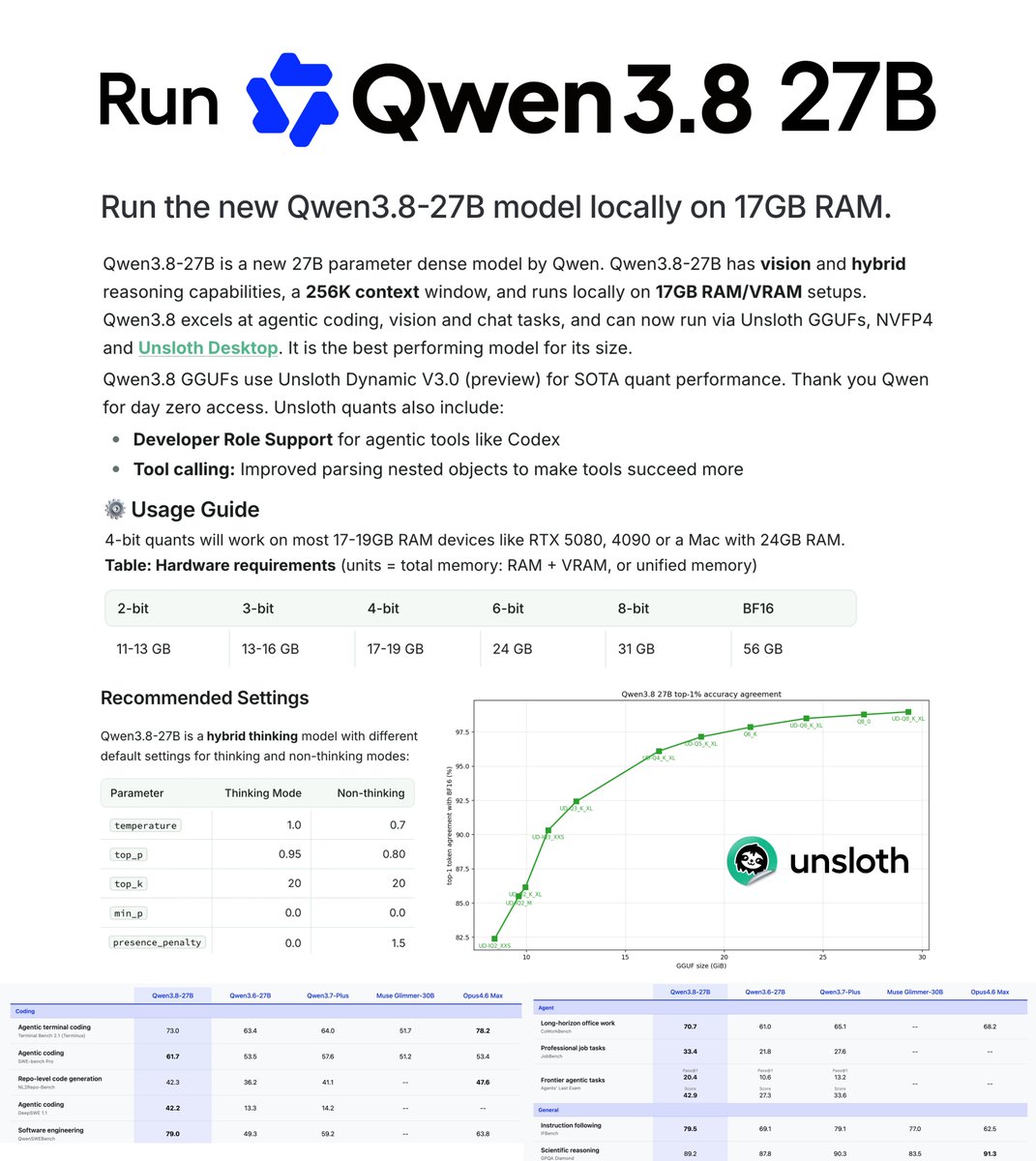
Qwen3.8-27B can now be run locally! ✨
Run on 17GB RAM via Unsloth Dynamic GGUFs.
Qwen3.8-27B is by far the strongest model for its size. We also uploaded NVFP4 quants.
GGUF: https://t.co/xIdNwm7CLQ
Guide: https://t.co/J2PwgMP6GZ
Alibaba acaba de abrir Zvec, su base de datos vectorial in process (se ejecuta dentro de tu aplicación).
Es como el SQLite de las bases de datos vectoriales: ligera, rapidísima y sin necesidad de servidores.
Para qué sirve?
- RAG local (el caso de uso más potente ahora mismo)
- Búsqueda semántica
- Recomendaciones
- Búsqueda de imágenes o código
- Memoria para agentes de IA
Ventajas principales:
- No necesitas servidores ni configuraciones complicadas
- Se instala con un solo comando: `pip install zvec`
- Búsquedas extremadamente rápidas (miles de millones de vectores en milisegundos)
- Soporta vectores densos + dispersos + búsqueda híbrida
- Totalmente open source (Apache 2.0)
- Probado en producción dentro de Alibaba durante años
Funciona en Linux, macOS, Windows e incluso iOS.
Ideal si estás haciendo RAG en local, aplicaciones de escritorio o quieres evitar costos de servicios en la nube.
Ya lo probaste?? Repo en los comentarios👇
🖥️ Best Local LLMs for Consumer GPUs — llama.cpp Guide (June 2026)
What I actually run on consumer hardware right now. Every model below runs via llama.cpp with a simple one-liner — no Docker, no Python env, no cloud.
━━━ 8-16GB VRAM ━━━
🔹 Gemma 4-12B (Google)
• Smartest model in this size class — competes with stuff 2× bigger
• Unsloth's MTP GGUFs: 162 tok/s vs 52 tok/s normal (3× speedup)
• Minimum 8GB VRAM recommended for Q4_K_M quant
• GGUF → https://t.co/VWp818MB3D
🔹 LFM2.5-8B-A1B (LiquidAI)
• Hybrid MoE, only 1B active params — absurdly fast for its size
• Perfect for 8-12GB cards, MacBooks, or anyone on a tight budget
• GGUF → https://t.co/ZbOs4mXJDq
━━━ 16-32GB VRAM ━━━
🔹 Qwen3.6-27B (Qwen)
• Scored 1.00 on tool-efficiency benchmarks — best local agent available
• 40 deterministic tasks, 32k/128k context needle tests — all passed
• GGUF → https://t.co/n7K3sPvliE
• MTP version (faster) → https://t.co/gwdfnJTzcy
🔹 Qwopus3.6-27B-v2 (Jackrong)
• Best quantization of Qwen3.6-27B — topped 5 agent & coding benchmarks (1200 samples)
• If you're running Q4, this is the one to grab
• GGUF → https://t.co/tV1DFqXnOD
• MTP version → https://t.co/PMqz7V5ewv
🔹 Gemma 4-31B QAT (Google/Unsloth)
• QAT variant with MTP draft head: 76-125 tok/s (1.67× speedup)
• Excellent for multi-agent / subagent workflows
• GGUF → https://t.co/FgVsUX0YOB
🔹 Nex-N2-Mini (Nex AGI)
• Post-train of Qwen3.5-35B-A3B — MoE with only 3B active params
• Fits on 16GB+ VRAM, overflow loads from system RAM
• Adaptive thinking saves ~20% tokens with no quality loss
• For deep multi-step reasoning, nothing in this size comes close
• GGUF → https://t.co/oyC522a8Eh
━━━ Quick Picks ━━━
• 16GB all-rounder → Gemma 4-12B with MTP GGUFs
• 32GB all-rounder → Qwen3.6-27B / Qwopus-v2
• Agents & tool use → Qwen3.6-27B or Qwopus Q4
• Deep reasoning → Nex-N2-Mini (MoE, fits 16GB+)
• Tight budget → LFM2.5-8B-A1B
• Cheapest full build: 1× used RTX 3090 (24GB) + rest of PC ≈ $1000-1500
━━━ Setup on Windows ━━━
1. Download llama.cpp → https://t.co/et0J7Swua7 (latest .zip)
2. Extract to any folder (e.g. C:\llama.cpp)
3. Download a .gguf from the links above (Q4_K_M or Q5_K_M for best quality/speed balance)
4. Run one of the commands below depending on your hardware
━━━ Launch Commands ━━━
SINGLE GPU — Standard model (no MTP):
llama-server.exe ^
-m C:\models\Qwen3.6-27B-Q5_K_M.gguf ^
--ctx-size 180000 ^
--flash-attn on ^
--cache-type-k q4_0 ^
--cache-type-v q4_0 ^
--batch-size 1024 --ubatch-size 512 ^
-ngl 100 ^
-np 1 ^
--port 8080 ^
--jinja
SINGLE GPU — MTP model (faster inference):
llama-server.exe ^
-m C:\models\Qwen3.6-27B-MTP-Q5_K_M.gguf ^
--ctx-size 180000 ^
--flash-attn on ^
--cache-type-k q4_0 ^
--cache-type-v q4_0 ^
--batch-size 1024 --ubatch-size 512 ^
--spec-type draft-mtp ^
--spec-draft-n-max 3 ^
-ngl 100 ^
-np 1 ^
--port 8080 ^
--jinja
DUAL GPU — Split across two cards:
llama-server.exe ^
-m C:\models\Qwen3.6-27B-Q5_K_M.gguf ^
--ctx-size 180000 ^
--flash-attn on ^
--cache-type-k q4_0 ^
--cache-type-v q4_0 ^
--batch-size 1024 --ubatch-size 512 ^
-ngl 100 ^
--tensor-split 0.55,0.45 ^
--main-gpu 0 ^
-np 1 ^
--port 8080 ^
--jinja
DUAL GPU + MTP + Vision (multimodal):
llama-server.exe ^
-m C:\models\Qwen3.6-27B-MTP-Q5_K_M.gguf ^
--ctx-size 180000 ^
--flash-attn on ^
--cache-type-k q4_0 ^
--cache-type-v q4_0 ^
--batch-size 1024 --ubatch-size 512 ^
--spec-type draft-mtp ^
--spec-draft-n-max 3 ^
-ngl 100 ^
--tensor-split 0.60,0.40 ^
--main-gpu 0 ^
-np 1 ^
--port 8080 ^
--jinja ^
--mmproj C:\models\mmproj-F16.gguf
━━━ Parameter Breakdown ━━━
-m <path>
Path to your .gguf model file. Change this to wherever you downloaded it.
--ctx-size 180000
Context window in tokens. 180k = huge context for long conversations or big codebases.
Reduce to 32768 or 65536 if you don't need long context — uses less VRAM.
--flash-attn on
Flash Attention — dramatically speeds up inference and reduces VRAM usage.
Works on RTX 30xx/40xx/50xx. Always enable this.
--cache-type-k q4_0 / --cache-type-v q4_0
Quantizes the KV cache (key/value attention cache) to 4-bit.
This is what makes 180k context fit in VRAM. Without it, huge contexts eat all your memory.
Quality impact is minimal — this is a free performance win.
--batch-size 1024 / --ubatch-size 512
batch-size = how many tokens are processed in one forward pass (throughput).
ubatch-size = micro-batch actually sent to the GPU per step.
Higher = faster prompt processing but needs more VRAM.
If you run out of VRAM, lower these (e.g. 512/256).
-ngl 100
Number of layers to offload to GPU. 100 = all layers on GPU (full offload).
This is what you want if the model fits in your VRAM.
If it doesn't fit, reduce this (e.g. -ngl 40) — remaining layers run on CPU/RAM.
--tensor-split 0.55,0.45
How to split model layers across multiple GPUs. Values are ratios.
0.55,0.45 = GPU 0 gets 55% of layers, GPU 1 gets 45%.
Adjust based on your VRAM — give more to the card with more memory.
Example: 0.70,0.30 for a 24GB + 12GB setup.
Not needed for single GPU setups.
--main-gpu 0
Which GPU handles the batch computation (the "orchestrator").
Set to 0 (your primary GPU). The other GPU(s) handle their assigned layers.
Minor performance impact — usually just leave it at 0.
-np 1
Number of parallel slots (concurrent requests). 1 = one user at a time.
Increase to 2-4 if you want multiple clients connected simultaneously.
Each extra slot uses additional VRAM for its own KV cache.
--port 8080
Which port the server listens on. Change if port 8080 is busy.
--jinja
Enables Jinja2 template processing — required for proper chat formatting.
Most modern models expect this. Always include it.
--spec-type draft-mtp
Enables Multi-Token Prediction (MTP) speculative decoding.
Only works with MTP GGUF models (downloaded separately).
The model predicts multiple tokens at once and verifies them — big speed boost.
--spec-draft-n-max 3
How many tokens the MTP draft head proposes per step.
3 is a good default. Higher = potentially faster but more VRAM and may reduce quality.
--mmproj <path>
Path to the multimodal projector file (for vision models).
Enables image understanding — paste screenshots into the web chat.
Only needed if you want vision capabilities. Omit for text-only use.
━━━ Your Hardware → Your Command ━━━
Single GPU (8-24GB VRAM):
Use the "Single GPU" command. Change -m to your model path.
8GB card → Gemma 4-12B Q4 or LFM2.5-8B
12GB card → Gemma 4-12B Q5/Q6
16GB card → Gemma 4-31B QAT Q4 or Nex-N2-Mini
24GB card → Qwen3.6-27B Q4/Q5, Qwopus-v2, Gemma 4-31B QAT Q5/Q6
Dual GPU:
Use the "Dual GPU" command. Adjust --tensor-split based on your VRAM ratio.
24GB + 24GB → --tensor-split 0.50,0.50
24GB + 12GB → --tensor-split 0.70,0.30
24GB + 8GB → --tensor-split 0.75,0.25
Want speed? Use MTP versions of models with the "MTP" commands.
Want vision? Add --mmproj with the projector file from the model's HuggingFace repo.
5. Once running, you get:
• Web chat UI → http://localhost:8080
• OpenAI-compatible API → http://localhost:8080/v1
• Playground → http://localhost:8080/playground
━━━ Why /v1 API Is the Killer Feature ━━━
One local endpoint replaces your entire cloud API bill. The /v1 endpoint is drop-in OpenAI-spec compatible — every tool that speaks OpenAI just works. No custom code, no glue layer.
Works out of the box with:
• IDEs: Cursor, Continue, Windsurf, Cline, Roo Code
• CLI tools: aider, Open Interpreter, OpenCode
• Frameworks: LangChain, LlamaIndex, LiteLLM
• Any OpenAI SDK (Python, Node, Go, Rust)
Why this beats cloud APIs:
• 100% private — code never leaves your machine
• $0 per token — no rate limits, no quotas, no surprise bills
• Works fully offline
• Zero telemetry, no training on your data
• Swap models by dropping in a different .gguf — no app changes needed
• Run 32k–128k context windows without burning money
Good combos:
• Cursor + Qwopus-v2 → near-frontier quality, zero API cost
• Continue + Qwen3.6-27B → best local coding agent
• aider + Gemma 4-12B MTP → 162 tok/s, feels instant
• OpenCode + Nex-N2-Mini → deep reasoning on 16GB
Set any OpenAI-compatible client to your local endpoint:
set OPENAI_API_KEY=sk-dummy (any non-empty string works)
set OPENAI_BASE_URL=http://localhost:8080/v1
# every OpenAI-compatible tool now hits your local GPU
Shoutouts: @0xSero@rS_alonewolf@witcheer@UnslothAI@LottoLabs
🇷🇺 Happy #RussiaDay, Dear All!
💬 Love you, O Russia mine,
Like a song's own word,
The forests, rivers, endless fields.
Love all that heart's embrace
By one vast and timeless name: #Русь.
#Russia1Love#RussiaDay2026
🚀PP-OCRv6 is officially released!
🔥PaddleOCR’s new OCR model series scales from 1.5M to 34.5M parameters, bringing stronger accuracy, faster inference, and broader deployment options — from browsers and edge devices to servers.
📊What’s new:
🔸Tiny / Small / Medium models: 1.5M, 7.7M, 34.5M params
🔸+4.9% detection accuracy and +5.1% recognition accuracy over PP-OCRv5
🔸Up to 5.2× faster CPU inference with OpenVINO
🔸50 languages in one unified model
🔸New scenarios: PCB, CAD drawings, digital tubes, dot-matrix text
🔸Apache 2.0 open source
✨Lightweight OCR, built for the AI data era.
🔗Try it:
🌐 https://t.co/qf6cyafiqY
💻 https://t.co/oNOfB6hbSY
🤗https://t.co/ZwKUuz2n3P
#PaddlePaddle #PaddleOCR #OCR #AI #ComputerVision #OpenSource #EdgeAI