Standard MFA does not stop token theft. Phishing-resistant MFA does, and that distinction is the whole thing.
Adversary-in-the-middle kits like Evilginx do not mirror your Entra ID login page. They reverse-proxy the real one. The content is genuine because it is genuine, so telling users to watch for something that looks off achieves nothing here.
The flow is clean.
The user authenticates against real Entra ID and solves the genuine MFA challenge. Entra issues session cookies, and the proxy keeps a copy on the way past to the victim’s browser. ESTSAUTHPERSISTENT is the valuable one, because “stay signed in” makes it survive a browser close.
The attacker loads those cookies on their own machine. No password prompt, no MFA prompt. The session already satisfied both, and sign-in evaluation does not run a second time.
Note what that does and does not mean. Conditional Access built on push or SMS does not help. Conditional Access requiring a compliant or Hybrid joined device does, because the attacker’s machine fails the device check when the token is redeemed.
Device compliance is a CA control. The problem was never Conditional Access. It is which controls you picked.
What works, in order:
1. FIDO2, passkeys, or certificate-based auth
Origin-bound, so the proxy cannot relay the challenge, and no token is ever issued. Only works if weaker methods are actually blocked. Enrolment alone changes nothing, because the attacker will phish whatever the user is still allowed to pick. That means an authentication strength policy in CA, or removing the weak methods outright.
2. Require compliant or Hybrid joined device
Breaks replay from unmanaged machines.
3. CAE Strict Enforcement
Precision matters, because this gets reported wrong constantly. CAE is already on by default in your tenant. Strict Enforcement is not, and it needs every egress IP for both Entra and the resource providers enumerated in named locations first. Check the CAE insights workbook before you touch a policy.
4. Token Protection does not apply here
It binds refresh tokens for native Windows clients hitting Exchange and SharePoint. Browsers are unsupported, and AiTM is a browser attack.
Response step, because this gets missed: a password reset only revokes password-based artifacts. Passwordless and FIDO tokens survive it. Use Revoke-MgUserSignInSession, or revoke sessions in the portal.
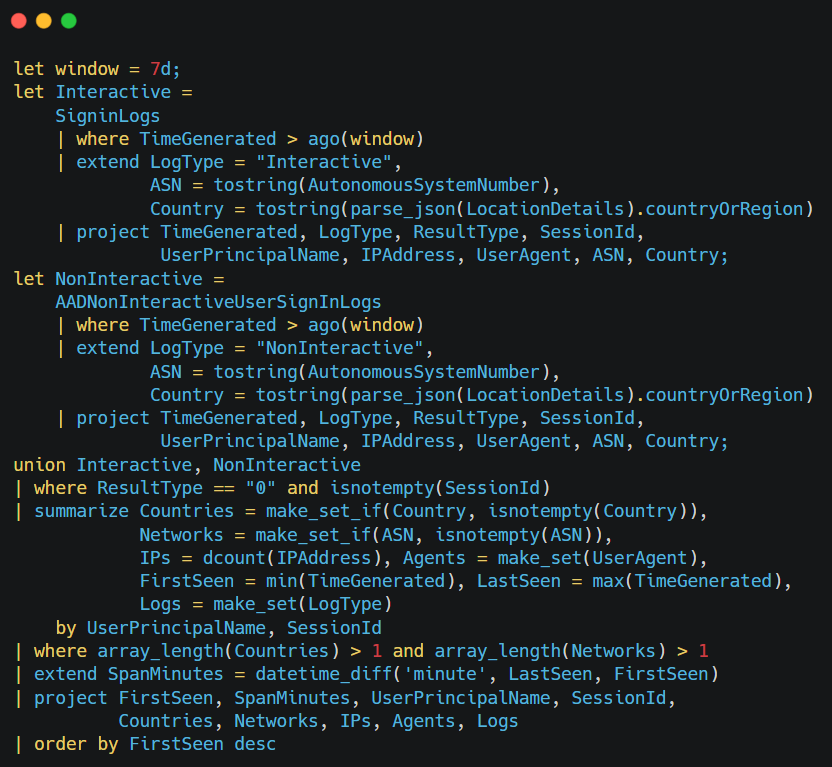
Hunting it: replay produces successful sign-ins, not failures, and lands mostly in the non-interactive sign-in log. The signal is one session appearing from two networks inside its own lifetime.
For proportion, AiTM is an addition to password attacks, not a replacement. Password spray is still far higher volume. This is what gets through once you have handled that.
What does your MFA method mix look like right now? I suspect most tenants are still majority push and have not framed that as the gap.
See the comment for a copy of the query
This is probably the most detailed explanation I’ve ever seen how #WHfB aka Windows Hello works. Many of the #ITSecurity folks might have picked up this document from @BSI_Bund already, but thus far this 170 page behemoth is a good read!
https://t.co/8gWI7Xbtt0
NIST releases SP 1326 : NIST Cybersecurity Supply Chain Risk Management: Due Diligence Assessment Quick-Start Guide
https://t.co/X5ftnrgGZM
Teaches you how to do due diligence (vet) your vendors (and their products) so that your supply chain is more secure and aligned with cybersecurity best practices.
Please, if you have not already done so, get started on making a Vendor Vetting checklist at your org.
I am available for light questions here on X, if need be. Just be patient with me if I do not reply straight away.
This is important. Get on it. Be well.
Explore new skilling resources across Frontier Transformation Engineering, agents, Copilot, Microsoft Foundry, security, governance, and go-to-market execution.
Read the update: https://t.co/S3SzQoeArN
#MSPartner
With Copilot Cowork GA I wanted to walk through understanding non-Cowork vs Cowork capabilities, when to use, then for the usage-based billing how to plan, control and observe.
https://t.co/AUeuKDdawa
00:00 - Introduction
00:16 - M365 Copilot USL
03:39 - Copilot Cowork
07:53 - Usage based billing
09:21 - Planning
13:54 - Control
19:49 - Payment
20:30 - Observe and track
24:10 - Summary
25:44 - Close
#MicrosoftCopilot #CopilotCowork #M365Copilot #AIInTheEnterprise #AIArchitecture #AIGovernance #AIObservability #UsageBasedBilling #MicrosoftUSL #TechLeadership #AITutorials #YouTubeTech
SAML really is so poorly supported by many vendors, and it usually costs extra... if they offer it at all :-/
Microsoft does recommend using your own PKI certs, set up your own monitoring, and automation to update them
Unfortunately, it's not native, you have to build it 👇
I stole this idea and now use it with every single employee.
It’s the best illustration I’ve seen of teaching someone to be high agency.
It says there are 5 levels of work:
Level 1: “There is a problem.”
Level 2: “There is a problem, and I’ve found some causes.”
Level 3: “Here’s the problem, here are some possible causes, and here are some possible solutions.”
Level 4: “Here’s the problem, here’s what I think caused it, here are some possible solutions, and here’s the one I think we should pick.”
Level 5: “I identified a problem, figured out what caused it, researched how to fix it, and I fixed it. Just wanted to keep you in the loop.”
Using this framework, here’s what I say to every new employee…
You will live at Level 4 from Day 1 and as we build trust you will rise to Level 5.
Being high agency doesn’t just mean tackling problems in this way. It means your entire way of working should be oriented to being a Level 4+ employee.
Plz feel free to steal it as well.
And ty @stephsmithio for the framework!
🛡️ Harden Windows Security – Windows Hardening Using Native Microsoft Security Features
Harden Windows Security is an open-source project focused on maximizing Windows security without relying on third-party security software. Instead, it leverages built-in Microsoft technologies such as Microsoft Defender, WDAC (Windows Defender Application Control), Attack Surface Reduction (ASR) rules, Secure Boot, SmartScreen, Windows Hello, and other enterprise-grade security controls.
Key highlights:
• Harden System Security app for automated Windows hardening
• AppControl Manager for managing Windows Application Control policies
• Focus on defense-in-depth and zero-trust principles
• Uses official Microsoft-supported security configurations
• Suitable for personal users, enterprises, and security professionals
• Extensive documentation, security recommendations, and deployment guides
A valuable resource for anyone interested in Windows security, blue teaming, system hardening, endpoint protection, or cybersecurity operations.
🔗 https://t.co/7avOUl1ByR
#CyberSecurity #WindowsSecurity #BlueTeam #Defender #ZeroTrust #SysAdmin #Microsoft #SecurityHardening
Surface what matters, cut the noise. Purview agents triage Insider Risk and DLP automatically. That and 22 more E7 deep dives in our playlist: https://t.co/5YkNdsrY1c
Blocked the app in Intune, and the app is actually blocked everywhere are two different events.
Sometimes minutes apart, sometimes a full day.
Here's what's happening in between.
Windows desktop policies ride OMA-DM.
Assign one, and Intune fires a push to trigger a check-in, usually landing in 5 to 10 minutes. But that push only works if the device is awake, online, and reachable.
If it's asleep, offline, or the push fails, it falls back to the 8-hour maintenance sync. That's where devices go dark on you.
Win32 app blocking and custom scripts don't ride that channel at all. They run through the Intune Management Extension, a separate agent with its own pipeline and a roughly 60-minute cycle. The Sync button in the admin center only wakes OMA-DM.
It does not touch the IME. So you hit Sync, policies move, and the app block just sits there waiting on its own clock.
Network and reputation enforcement goes through Defender for Endpoint, a third independent path.
Three surfaces, three mechanisms, three clocks.
The web version in a browser, or the app on iOS or Android, often answers to none of the above. Those need their own controls: Defender for Cloud Apps, App Protection Policies, Conditional Access, browser policies.
Most common failure mode: admin blocks it, tests on their own awake and synced Windows box, sees it work, declares victory. Then it shows up in an unmanaged browser, on a phone in a different profile, or on a device that hasn't checked in yet.
If you need it gone now:
Force the IME by restarting the IntuneManagementExtension service or syncing from Company Portal, not the admin center Sync button.
Verify enforcement on each surface separately.
Confirm your targeting actually covers every platform and context that matters.
For anything critical, layer it. WDAC or AppLocker, plus ASR rules, plus MDE indicators, instead of trusting a single path.
What's the longest you've watched a policy show "Succeeded" in Intune before it actually landed everywhere?
Policies fail when exceptions become permanent, ownership is unclear, and requirements cannot be tested.
Jul 21, learn how to diagnose policy drift and rebuild review as a governance control system.
🔗 https://t.co/QzeO4B4I5R
#GRC#SecurityPolicy
Secure the Cloud. Secure AI.
The SANS Cloud Security Exchange comes to the Summit stage in San Francisco this August ft. speakers from AWS, Google, Microsoft, Anthropic, SANS & more.
Agentic AI. Zero Trust. AI governance.
⬇️ https://t.co/1qCUlJ7rMm
#CloudSecurity#AISecurity
From planning to execution: see what cloud and AI partners should know heading into FY27.
Explore priorities, events, Build updates, Marketplace resources, and go-to-market planning next steps.
Read the blog: https://t.co/KpjMCntbWs
#MSPartner
Most enterprises treat modernization as a technology-only problem. That's why most programs stall.
The pressure is real. Customers expecting digital self-service. Operations buried in manual workflows. Legacy systems slowing decision-making. Leadership asking why the pace of change isn't faster.
The temptation is to solve it with technology.
New platforms. New tools. Better infrastructure.
But the constraint is usually the operating model.
When you upgrade the technology without redesigning how work is organized, you get the same results from a newer system. Ownership, delivery structure, and decision-making all stay the same.
The organizations that break through this treat modernization as a system redesign problem. They organize work around business domains rather than projects. They form cross-functional teams with clear, durable ownership. They replace manual processes with digital workflows built around actual user needs. They design software to stay adaptable as requirements evolve.
Face-to-face teams with clear ownership consistently outperform distributed equivalents. That gap comes from how the system is designed: clear ownership, direct accountability, and the ability to make decisions without crossing organizational boundaries.
Systems get the results they're designed to get. If your modernization isn't moving at the pace leadership expects, the constraint may not be the technology.
Before a different approach can work, leadership has to align on what they're actually trying to achieve. They also have to be willing to change how work is organized, not just what tools the organization uses.
Is your modernization program designed to change the tools, or to change the system that produces results?
🗺️ 𝗥𝗕𝗔𝗖𝗠𝗮𝗽 - 𝗜𝗻𝘁𝗲𝗿𝗮𝗰𝘁𝗶𝘃𝗲 𝗺𝗮𝗽 𝗼𝗳 𝗠𝟯𝟲𝟱 𝗥𝗕𝗔𝗖 𝗿𝗼𝗹𝗲𝘀
Just came across this cool tool built by 𝗝𝗮𝗰𝗼𝗯 𝗦𝗵𝗲𝗿𝗶𝗱𝗮𝗻 (𝗦𝗲𝗻𝗶𝗼𝗿 𝗠𝗶𝗰𝗿𝗼𝘀𝗼𝗳𝘁 𝗣𝘂𝗿𝘃𝗶𝗲𝘄 𝗘𝗻𝗴𝗶𝗻𝗲𝗲𝗿) and sharing it with fellow defenders.
𝗥𝗕𝗔𝗖𝗠𝗮𝗽 𝗰𝗼𝘃𝗲𝗿𝘀 𝟵 𝘀𝗲𝗿𝘃𝗶𝗰𝗲𝘀 𝗮𝗻𝗱 𝟯𝟮𝟳 𝗿𝗼𝗹𝗲𝘀: Entra, Purview, Intune, Exchange, SharePoint, Defender XDR, Fabric, Power Platform, and Security Copilot.
For each role you get:
• Permissions and scope
• Use cases and when to assign it
• Prerequisites, best practices, and security considerations
• Service-specific gotchas and related roles
Tool's link:🫡
https://t.co/U7u3emEmsn
#Cybersecurity #RBACMap #RBAC
Building agents takes more than prompts. Microsoft Certification Exam AB-620 helps you prove it.
Develop in-demand skills with Microsoft 365 Copilot, earn a Microsoft Applied Skills credential, and get a chance to win a free Certification exam voucher (AB-620),* proving your ability to design and manage secure, enterprise-ready agents in Copilot Studio.
✅ Build practical, job-ready AI skills
✅ Validate your real-world expertise
✅ Stand out with verifiable credentials
Enter the Microsoft AI Agent Skills Sweepstakes from June 15 – July 15.
Let's go: https://t.co/9eRHgZVumE
*#Sweepstakes. 18+. Ends 7/15.