@JohnS_AZ@jhalbrecht Besides that, I've had no problems with it. I'm also using a cable to my own router + NAT and that all works fine. I haven't checked regarding blocked ports.
@JohnS_AZ@jhalbrecht The issue I have is that a Wireguard protocol VPN to my VPS seems to be unusually slow on Verizon, but not with other ISPs. A couple days ago I talked with support about it and got escalated with a ticket filed with level 3 tech support, but no clue if anything will come of it
@craig_jbishop From our conversation you may find this interesting. The bit interleaving mentioned a few comments down is like what I mentioned.
https://t.co/KpoDEA7OXX
@wireengineer Nice, glad to hear it's working! Best of luck with the porting!
(Tonight I'll update my guide to make sure it's better proofed against the issues that came up 🙂)
@wireengineer Hmm, can you run "which cmake"? Either you have the wrong cmake running (removed the wrong one maybe?), or maybe you missed step 7 of the msys2 installation instructions in which case "pacman -S --needed base-devel mingw-w64-x86_64-toolchain"
@wireengineer@JohnS_AZ Hm, not sure what that could mean. What sort of things are blank specifically? Quite sure nothing is required except for what I had in the steps I listed.
What do you get from the commands:
arm-none-eabi-gcc --version
and
echo ${PICO_SDK_PATH}
?
@wireengineer@JohnS_AZ You didn't need to do that pacman command, the required version of cmake was already covered by "mingw-w64-x86_64-cmake" in the earlier command.
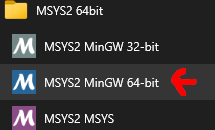
The "cmake was not found" you had means you had the "MSYS2 MSYS" terminal open, instead of the "MSYS2 MinGW 64-bit" that was noted.
@ShawnHymel@wireengineer@JohnS_AZ No typo. The line uf2.h:44 now has a static_assert on it and looks likely to indicate that the MinGW GCC compiler is a version that doesn't support C++11 by default, I think that means a pre-5.0 version but I may be wrong. Either installed the wrong version, or old stuff in PATH.
@wireengineer@JohnS_AZ (I'm having a bit of a toolchain minded time the last few days, lots of GCC/crosstool-ng/WSL2/MSYS2 dabbling, so feeling pretty opinionated bout best approaches, *but* ultimately the best approach in practical terms when new to something is that which has the best instructions🙂)
@wireengineer@JohnS_AZ Using the MSYS2-based approach I'd tend to go with? Not that I can find in a quick search.
If I got a Pico some time writing such a tutorial would probably be the first thing I'd do after getting it blinking. It'd surely be a bit shorter and simpler to follow.
@JohnS_AZ@wireengineer I mostly like that tutorial... but the "MinGW-w64 GCC Tools" package is quite out-of-date.
I tend to recommend using MSYS2 (https://t.co/RFNO0G1rjQ) instead which as a bonus makes it's just "pacman -S git python cmake" to install those tools in one fell swoop, simplifying things.