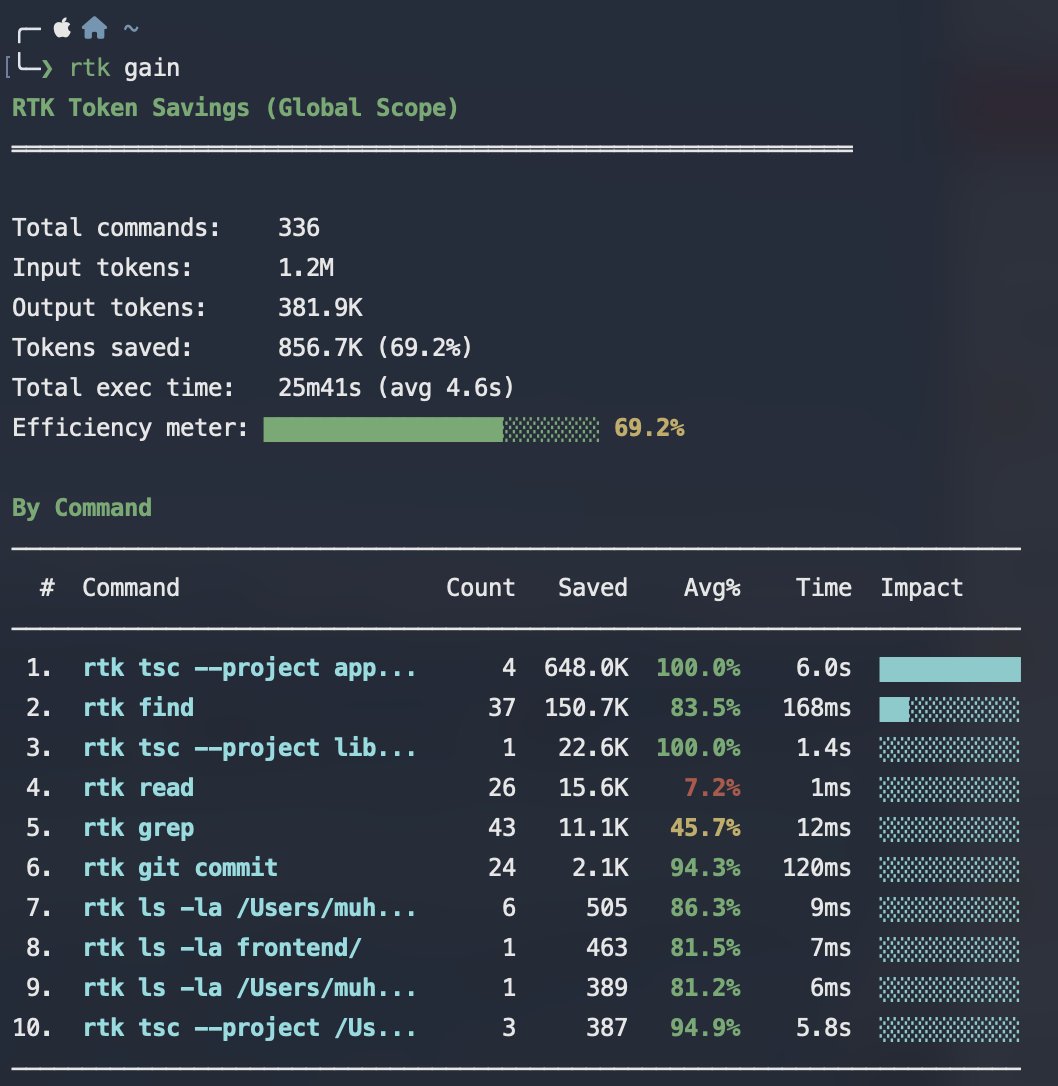
Gilaaa mantep bangeet, baru berapa hari pake tool ini savings token di Claude Code udah banyak bangeeet wkwkwkwk.
Kenapalahhh diriku ga pake ini dari duluu, haelahhh.
Beneran nonstop kerja, tapi token masih awet bangeeeet wkwkwk. Ternyata kehemat banyak bangeet.
Cobain gaisss
#InterviewTips
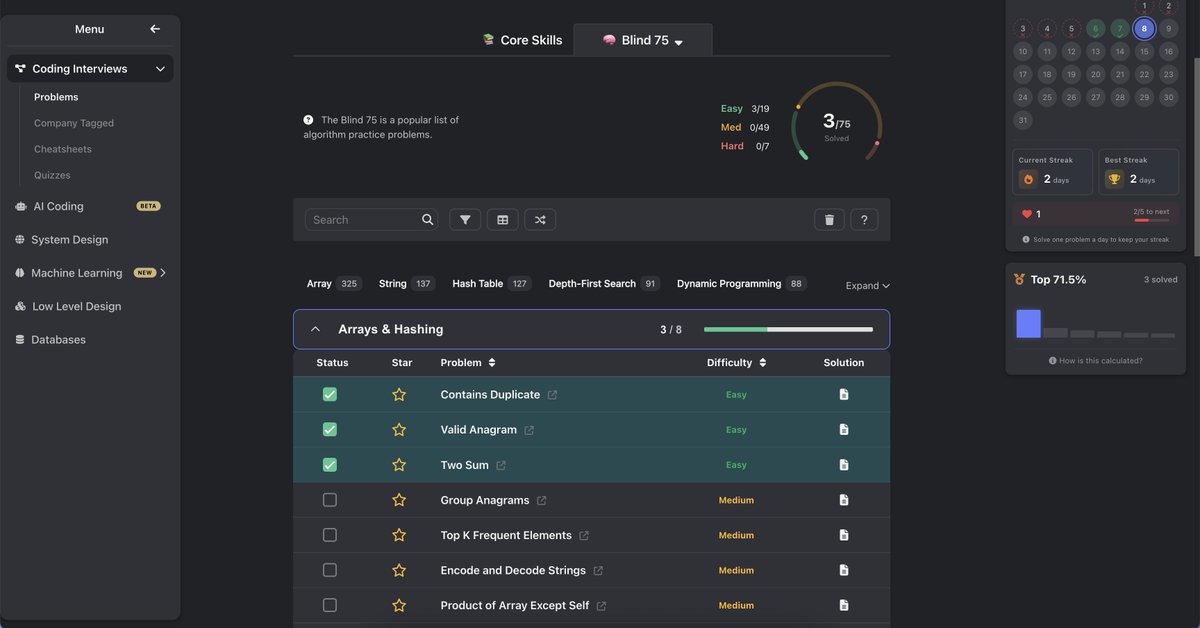
kalau kalian bakal ada coding interview dan waktu belajarnya mepet, kalian bisa latihan ini aja
https://t.co/1NKTdJKlJL
ini kumpulan soal yang paling sering keluar di interview
jadi kalau tahun depan kalian ada interview lagi, reset progres dan kerjain lagi
kalian bisa ikutin cara aku ini atau jadikan referensi terserah kalian yang penting kita rungkad bareng
cara pemula jadi tradeur amateur
1. risk management
ku sebut kalian crazy rich kalo gada risk management
ini point penting
- tau entry dimana
- stop loss dimana
- take profit dimana
aku jarang pake ini karna udah crazy dan belum rich 💩
better 1-4% dari dari modal
jangan all in jangan ngaco
2. arah market
kalo kamu cenayang, dukun, punya tuyul, merem aja
lihat dulu trend marketnya apa
you follow the trend bukan bikin trend sendiri..
- UPTREND (cenderung naik)
- DOWNTREND (cenderung turun)
- SIDEWAYS (harga bolak balik gada kepastian mau turun atau naik)
aku si benci banget karna sering miskin di sideways 😞👄🫦😹
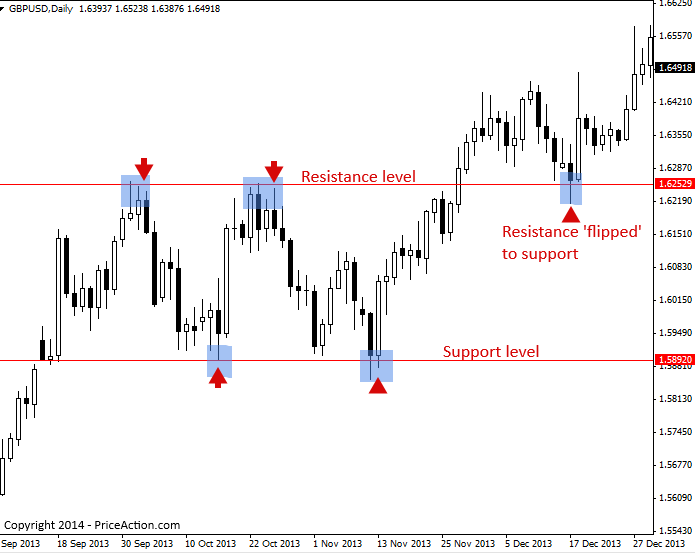
3. support & resistance
- support : harga bawah yang sering di sentuh
- resistance : harga sering brenti naik
contoh super simple aja ni
token $ALANAA setiap turun ke
$100 selalu mantul ke atas = itu support
setiap nyentuh $200 selalu turun lagi = itu resistance
buy di support
sell di resistance
jangan di balik 🤣🫵🏿
emang ada token $ALANAA ? yah gatau.. aku ga di endorse BTC jadi gamau mention lagi
4. lihat Volume
volume liatin seberapa kuat pergerakan harga
5. pelajarin tools di Cex yang kamu mau pake, jangan asal klik
takutnya nanti malah klik kirim ke aku 🫰🏿
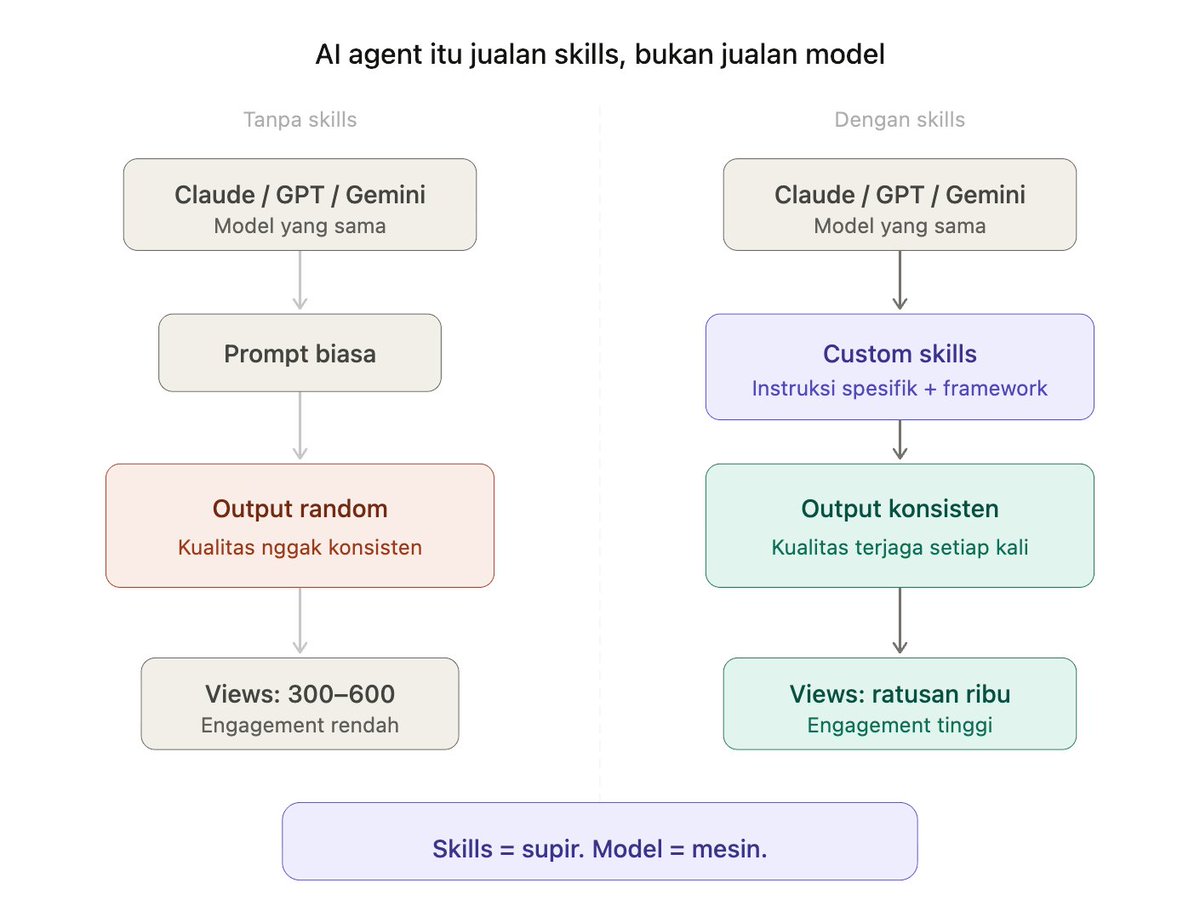
Semua orang bisa akses Claude, GPT, Gemini.
Tapi kenapa hasilnya beda-beda?
Karena AI agent itu cuma se-powerful instruksi yang lu kasih ke dia.
Model = mesin.
Skills = supir.
Mesin boleh sama. Tapi supir yang ngerti jalan → yang sampai duluan.
Tadi @cipherwebthree yang buktiin ini pakai skill buatan gue, tweet-nya tembus ratusan ribu views.
i deleted half my Claude setup last week and every output got BETTER
sounds backwards, but anthropic's own team just explained exactly why it works.
here's the one prompt that tells you what to cut (and you don't even have to paste anything):
this is what happens to everyone...
you get a bad output, so you add a rule to your skills. "be more concise."
next week, another bad output. another rule. "use a casual tone."
but a month later, something else breaks. "always explain technical terms."
you keep stacking, and it feels productive because you're fixing problems as they come up.
but 3 months in, you've got 30 rules piled on top of each other.
some of them contradict each other ("be concise" and "always explain your reasoning" are fighting).
some of them fix problems that the model doesn't even have anymore.
and the model is trying to follow all of them at once, which means it's doing none of them well.
it's like handing a chef a 47-step recipe when they only need 12.
the extra 35 steps slow the chef down, make them second-guess the parts they already know, and the dish comes out worse than if you'd just let them cook.
that's what over-prompting does.
anthropic just published a piece on how they build claude code (the ai coding agent).
their own engineering team found that their scaffolding was making the ai worse
which means your custom instructions are almost certainly doing the same thing.
so here's the actionable move...
instead of manually reading through your setup line by line, just tell claude to audit itself.
if you're in claude's desktop app, claude already has access to your:
claude[.]md (the file where your preferences and rules live), your skills folder (where your reusable instruction files are stored), your context files, everything.
just open claude code/cowork and say this:
—
"read my entire setup before responding. check my claude .md, every skill in my skills folder, every file in my context folder, and any other instruction files you can find.
then go through every rule, instruction, and preference you found. for each one, tell me:
1. is this something you already do by default without being told?
2. does this contradict or conflict with another rule somewhere else in my setup?
3. does this repeat something that's already covered by a different rule or file?
4. does this read like it was added to fix one specific bad output rather than improve outputs overall?
5. is this so vague that you'd interpret it differently every time? (ex: 'be more natural' or 'use a good tone')
then give me a list of everything you'd cut with a one-line reason for each, a list of any conflicts you found between files, and a cleaned up version of my claude.md with the dead weight removed."
—
one message. claude goes and reads your entire setup, audits it, and comes back with exactly what to cut and why.
you don't dig through files, you don't read every rule yourself. it does the whole thing.
once you get the results, don't just blindly delete everything it flags.
here's the process:
1. read what it flagged and why
2. delete the flagged rules
3. run your 3 most common tasks with the trimmed setup
4. did the output stay the same or get better? the deleted rules were dead weight
5. did something specific break? add back just that one rule
the goal is to find the minimum viable setup that gets you the output you want.
your ai setup should be getting simpler over time.
addition by subtraction baby
Ruben just dropped the best Claude Code guide for non-coders.
Here's the 15-minute setup:
MINUTE 1-3: Get the tools
→ Download Claude desktop: claude. com/download
→ Get Pro ($20/mo)
→ Create free GitHub account: github. com
MINUTE 4-6: Connect GitHub
→ Claude Settings → Connectors
→ Browse connectors → Search "GitHub"
→ Connect it
MINUTE 7-10: Install VS Code (the speed hack)
→ Download VS Code: code.visualstudio. com
→ Extensions → Search "Claude" → Install Anthropic's
→ Sign in with your Claude account
MINUTE 11-12: Enable bypass mode
→ VS Code Settings → Find "Skip Permissions"
→ Turn it ON
→ This is the magic. No more clicking "Allow" 20x per session.
MINUTE 13-15: Create your memory file
→ After your first build, prompt:
"Create a CLAUDE.md file. Write down everything you learned about this project: structure, fonts, colors, preferences."
Now Claude remembers your project across sessions.
Full send. Go build something this weekend.
⚡️🚨BREAKING NEWS: A new international group called "Earthquake Faction" burns an Israeli weapons factory in the Czech Republic :
The Earthquake Faction is launched.
On 20th March 2026, the Earthquake Faction struck the epicenter of the Israeli weapons industry in Europe. In Pardubice, Czech Republic, Elbit Systems' "Centre of Excellence" was newly built in collaboration with LPP, to service the global expansion of Israel's biggest weapons producer.
Whilst the development, production and training center was empty, The Earthquake Faction intervened to destroy its equipment and set the factory ablaze. No one was harmed.
The site is used to develop weaponry used by the Zionist entity to massacre people daily in Palestine, Lebanon, Iran, and across West Asia.
The Earthquake Faction is an internationalist underground network that targets key sites critical to the Zionist entity. We aim to destroy all limbs of empire from within, by any means effective.
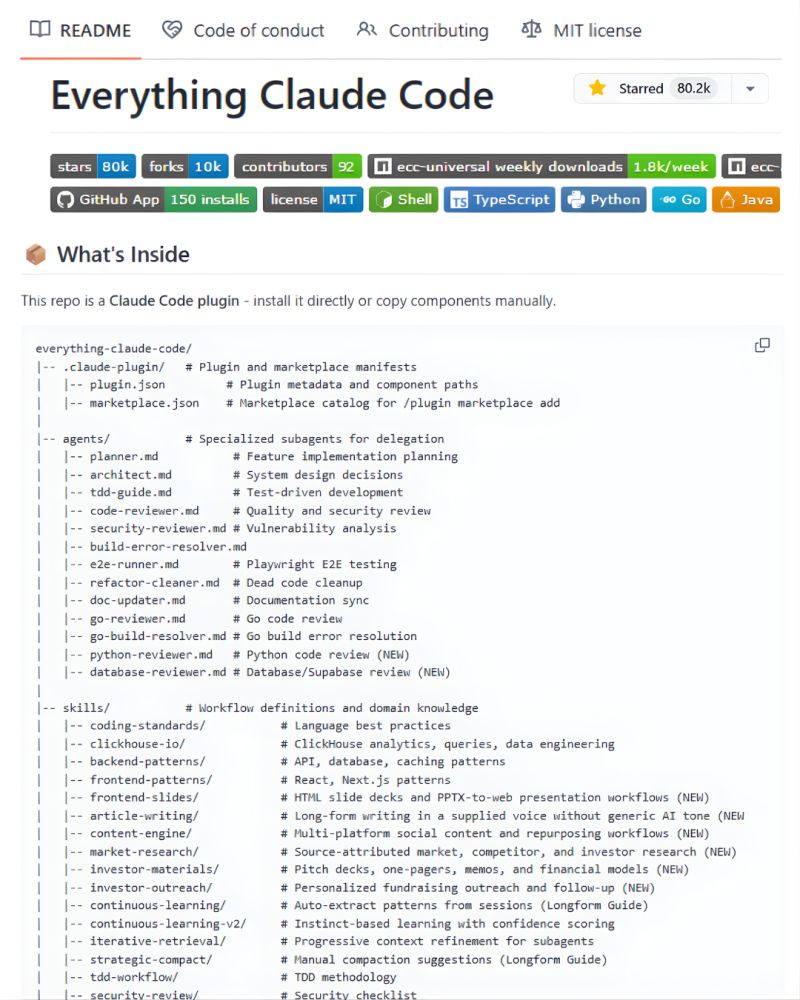
Stop burning tokens on Claude Code.
Use this instead 👇
A free GitHub repo (80K⭐) that turns your CLI into a high-performance AI coding system.
Link → https://t.co/JMxCkTjHP7
Why it’s different:
→ Token optimization
Smart model selection + lean prompts = lower cost
→ Memory persistence
Auto-save/load context across sessions
(No more losing the thread)
→ Continuous learning
Turns your past work into reusable skills
→ Verification loops
Built-in evals to make sure code actually works
→ Subagent orchestration
Handles large codebases with iterative retrieval
Most people think Claude struggles with complex repos.
It doesn’t.
They’re just not using the right setup.
This fixes that.
Bookmark this for your AI stack. ♻️
#AI #Claude #AIAgents #LLM #GenAI #DevTools
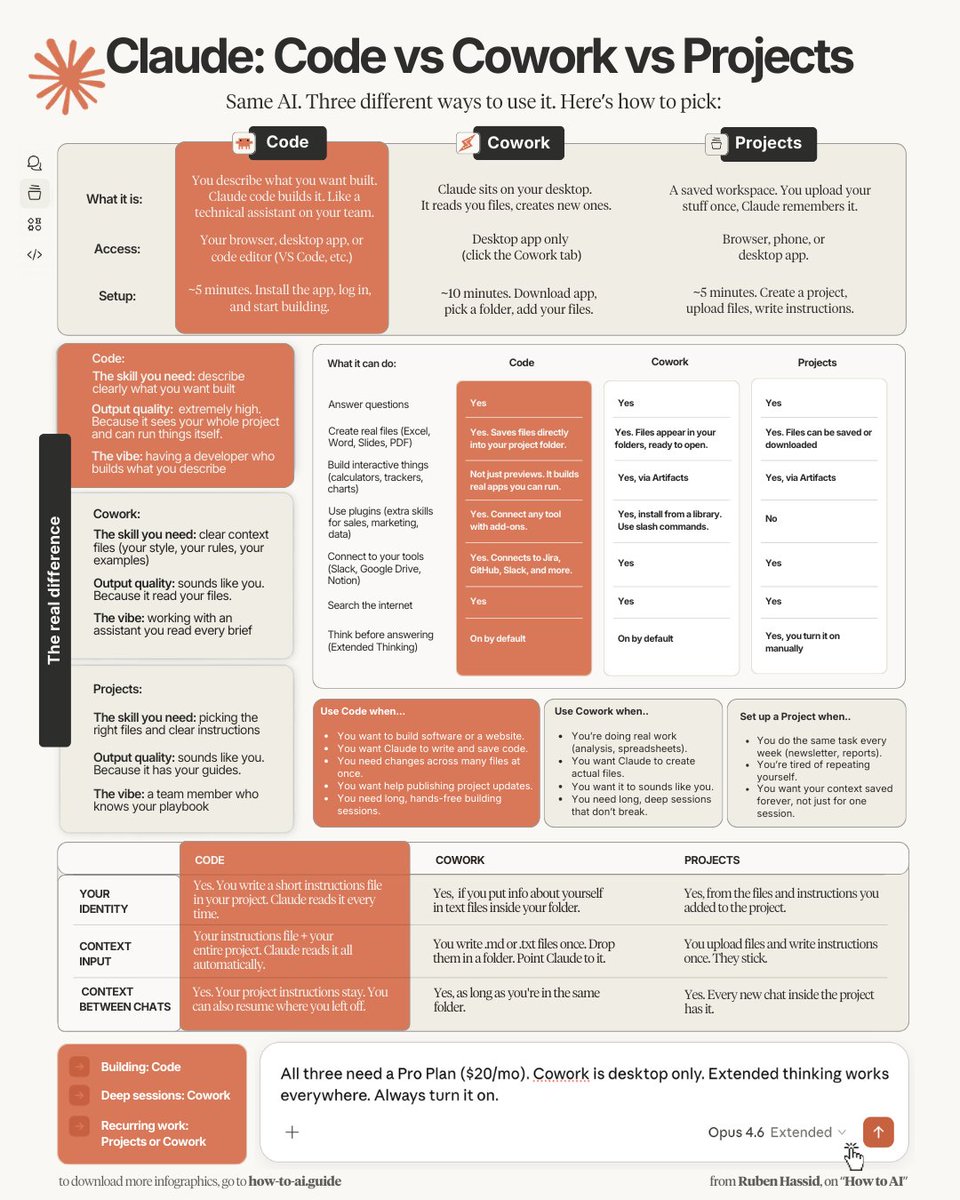
How to pick the right Claude for the job:
(because there are 3 now, and you're only using 1)
1 - Download this infographic. Send it to your team.
2 - Stop defaulting to Chat for everything.
3 - Pro tip: Use Code when you're building. Cowork when you're working. Projects when you're repeating.
I just wrote my full Claude Code breakdown. It covers setup, real examples, and the mistakes I see everyone making.
Read it here, below.
To download all of my Claude infographics:
Step 1. Go to https://t.co/psB7XxAv8w.
Step 2. Subscribe for free. Don't pay anything.
Step 3. Open my welcome email (most skip this).
Step 4. Hit the automatic reply button inside.
Step 5. Download my infographics from my Notion.
♻️ RT this to save your team 10 hours a week.
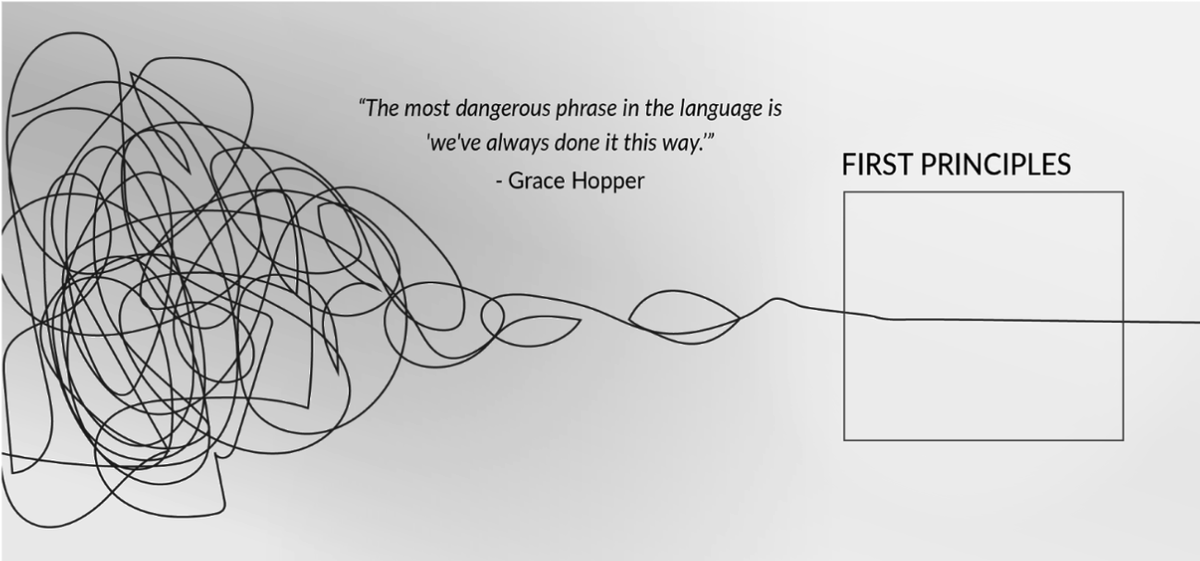
🚨BREAKING: Claude has a secret mode called "First Principles Breakdown."
It strips any complex topic down to its raw fundamentals like Elon Musk thinks through problems.
Here's how to activate it:




![itsolelehmann's tweet photo. i deleted half my Claude setup last week and every output got BETTER
sounds backwards, but anthropic's own team just explained exactly why it works.
here's the one prompt that tells you what to cut (and you don't even have to paste anything):
this is what happens to everyone...
you get a bad output, so you add a rule to your skills. "be more concise."
next week, another bad output. another rule. "use a casual tone."
but a month later, something else breaks. "always explain technical terms."
you keep stacking, and it feels productive because you're fixing problems as they come up.
but 3 months in, you've got 30 rules piled on top of each other.
some of them contradict each other ("be concise" and "always explain your reasoning" are fighting).
some of them fix problems that the model doesn't even have anymore.
and the model is trying to follow all of them at once, which means it's doing none of them well.
it's like handing a chef a 47-step recipe when they only need 12.
the extra 35 steps slow the chef down, make them second-guess the parts they already know, and the dish comes out worse than if you'd just let them cook.
that's what over-prompting does.
anthropic just published a piece on how they build claude code (the ai coding agent).
their own engineering team found that their scaffolding was making the ai worse
which means your custom instructions are almost certainly doing the same thing.
so here's the actionable move...
instead of manually reading through your setup line by line, just tell claude to audit itself.
if you're in claude's desktop app, claude already has access to your:
claude[.]md (the file where your preferences and rules live), your skills folder (where your reusable instruction files are stored), your context files, everything.
just open claude code/cowork and say this:
—
"read my entire setup before responding. check my claude .md, every skill in my skills folder, every file in my context folder, and any other instruction files you can find.
then go through every rule, instruction, and preference you found. for each one, tell me:
1. is this something you already do by default without being told?
2. does this contradict or conflict with another rule somewhere else in my setup?
3. does this repeat something that's already covered by a different rule or file?
4. does this read like it was added to fix one specific bad output rather than improve outputs overall?
5. is this so vague that you'd interpret it differently every time? (ex: 'be more natural' or 'use a good tone')
then give me a list of everything you'd cut with a one-line reason for each, a list of any conflicts you found between files, and a cleaned up version of my claude.md with the dead weight removed."
—
one message. claude goes and reads your entire setup, audits it, and comes back with exactly what to cut and why.
you don't dig through files, you don't read every rule yourself. it does the whole thing.
once you get the results, don't just blindly delete everything it flags.
here's the process:
1. read what it flagged and why
2. delete the flagged rules
3. run your 3 most common tasks with the trimmed setup
4. did the output stay the same or get better? the deleted rules were dead weight
5. did something specific break? add back just that one rule
the goal is to find the minimum viable setup that gets you the output you want.
your ai setup should be getting simpler over time.
addition by subtraction baby](https://pbs.twimg.com/media/HEGNR64boAA8x4U.jpg)