@ManfredSteyer
I don't know who to ask but you. :)
Is there a way to listen on an Angular Signal if there is a new listener attached to that signal (or if there is a first listener for that matter)?
I don't want the backend call to be performed, if the signal gets created and assigned to a component field but that field is only used within an *ngIf and that *ngIf is never true.
Context: I want to provide a signal that contains the result of a backend call. Of course, I only want to perform the backend call, if the signal actually gets displayed in the template (or if some code is trying to get the data via `mySignal()`)
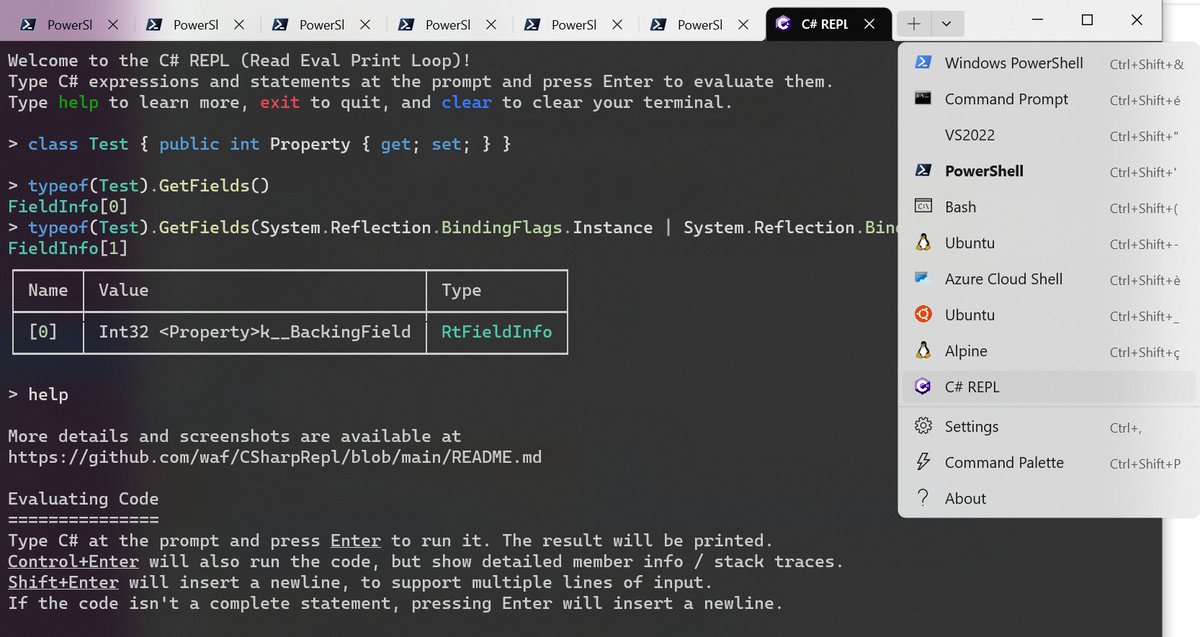
A tip from a coworker that seems obvious in hindsight and yet blew my mind: you can add a profile to Windows Terminal to run C# REPL (https://t.co/IBoymcuuJn). Great for quickly testing/prototyping stuff when you have a doubt. #dotnet
Software estimates are one of the oldest lies we tell ourselves.
We all know they don't work, but pretend they mean something and later feel enraged when shit hits the fan.
I focused a big part of my undergrad on software estimation.
After graduating, I wrote plenty about the topic.
Then, I started working for a company where I spent years researching how to make better estimates. We sold multiple millions of dollars of software using the tools I built.
I read everything there's to read. I could recite Steve McConnel's "Software Estimation" book from top to bottom.
Here is the most important lesson I learned:
People can't estimate software. It doesn't matter who they are or how much experience they have.
Estimating software reliably is science fiction.
And the best part:
They will ask you to estimate something. They will tell you they understand it's not exact. They will promise they won't hold you accountable.
And then they will. They always do.
There are two solutions for this. Let's start with my recommendations for those who don't have a choice:
1. Remove "quick," "simple," "straightforward," "easy," and every similar word from your dictionary. Never use them. Don't let others use them when referring to your work.
2. Never volunteer an estimate. Everything you say will be used against you.
3. When forced, estimate work you know you can complete today. Always estimate with a range: "It will take me 2 - 4 hours."
4. Estimate anything you won't do today in days and weeks. Say, "I should finish that feature sometime this week." Do not estimate future work in hours.
But we all know your manager will force you to give an estimate. Here is what you should do:
1. Estimate how long you think it will take you to complete the task.
2. Multiply the number by 3. This will be the lower range of your estimate.
3. Double the lower range of the estimate. This will be the upper range.
Example: If you think something will take you 1 day of work, say "between 3 and 6 days."
Here is the funny part:
It won't take you between 3 - 6 days. This is as much bullshit as any other method you can think of.
The true solution for this problem:
Work for a company that doesn't care about estimates.
F# to C# in-memory references in Rider 2023.2
The F# compiler service now always looks at the actual C# sources, in addition to the already working C# to F# in-memory references. This means you no longer need to build #csharp projects for referencing #fsharp code to see the changes!
Learn more: https://t.co/uMS9LQYkaG #dotnet
Finally! Here's my last post in my three-part series about Angular Signals and how we use them:
https://t.co/HYYtxsfHjR
This time, it's about effect and computed and when we use each of them.
As always, I'm looking forward to receiving feedback.
#Angular#Signals
As promised, here is my second post about how we use Signals in our Angular app:
https://t.co/El7QR9AjH6
It turned out to be longer than expected, so I've decided there will be a third post completing the series...stay tuned!
#Angular#Signals
A simple introduction into Angular Signals: https://t.co/O7QJmf2avC
I know, I'm late to the party with this one...
But there will be a follow-up with how specifically our team uses them! Stay tuned...
#Angular