I could lie to you and say "AI is so hard to master" to get more clicks, but models are now too good. You must forget old tricks, but remember:
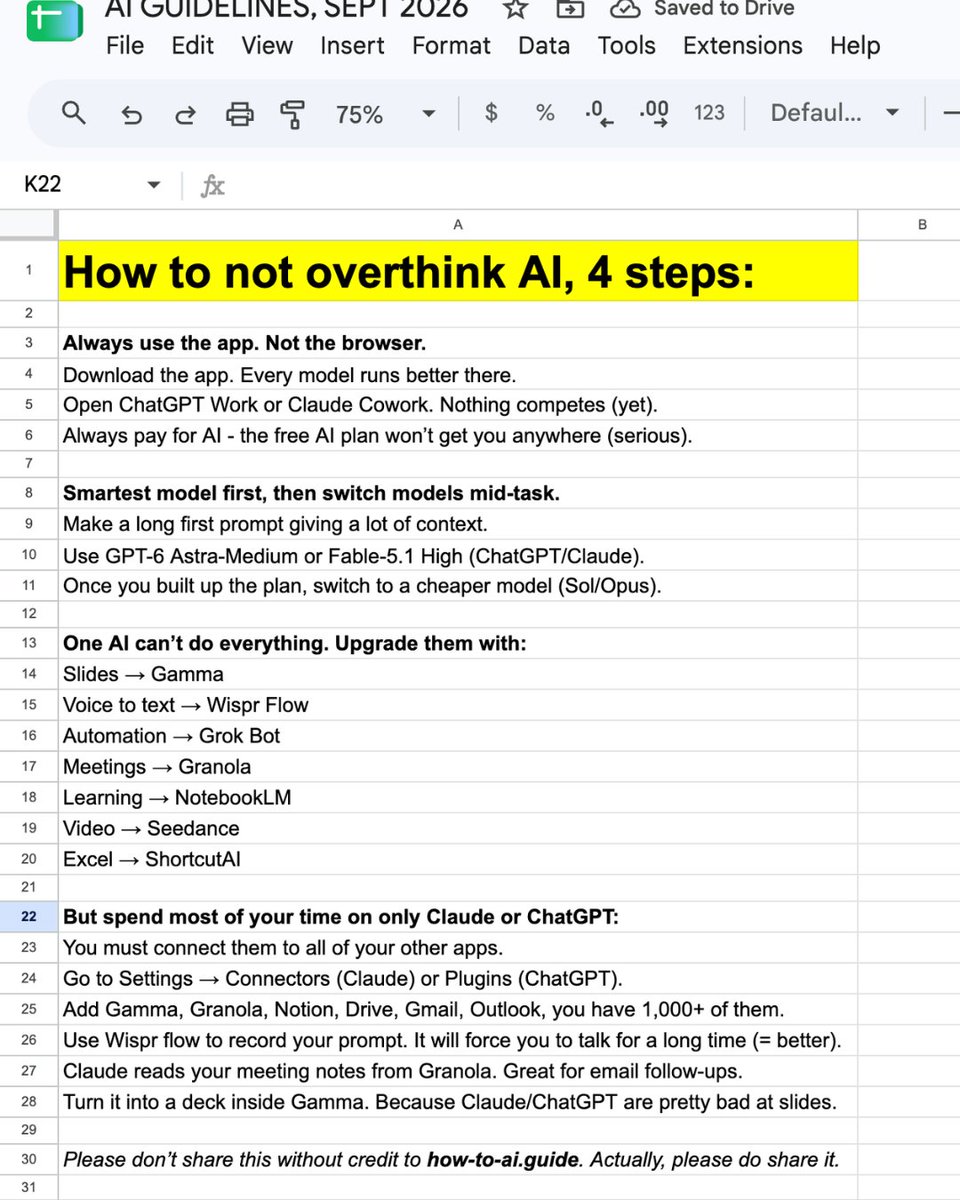
1. Always use the app. Not the browser.
Download the app.
Every model runs better there.
Open ChatGPT Work or Claude Cowork.
Nothing competes (yet).Always pay for AI - the free AI plan won’t get you anywhere (serious).
2. Smartest model first, then switch models mid-task.
Make a long first prompt giving a lot of context.
Use GPT-6 Astra-Medium or Fable-5.1 High (ChatGPT/Claude).
Once you built up the plan, switch to a cheaper model (Sol/Opus).
3. One AI can’t do everything. Upgrade them with:
Slides → Gamma
Voice to text → Wispr Flow
Automation → Grok Bot
Meetings → Granola
Learning → NotebookLM
Video → Seedance
Excel → ShortcutAI
4. But spend most of your time on only Claude or ChatGPT:
You must connect them to all of your other apps.
Go to Settings → Connectors (Claude) or Plugins (ChatGPT).
Add Gamma, Granola, Notion, Drive, Gmail, Outlook, you have 1,000+ of them.
Use Wispr flow to record your prompt.
It will force you to talk for a long time (= better).
Claude reads your meeting notes from Granola.
Great for email follow-ups.Turn it into a deck inside Gamma.
Because Claude/ChatGPT are pretty bad at slides.
Now if you insist on overthinking AI - but I won't show you how, this post is too long - you must:
1 - Upgrade to Claude Code or ChatGPT Codex.
2 - Connect data platforms to it (I love Apify for eg.)
3 - Prompt it with a mix of /plan and /goal.
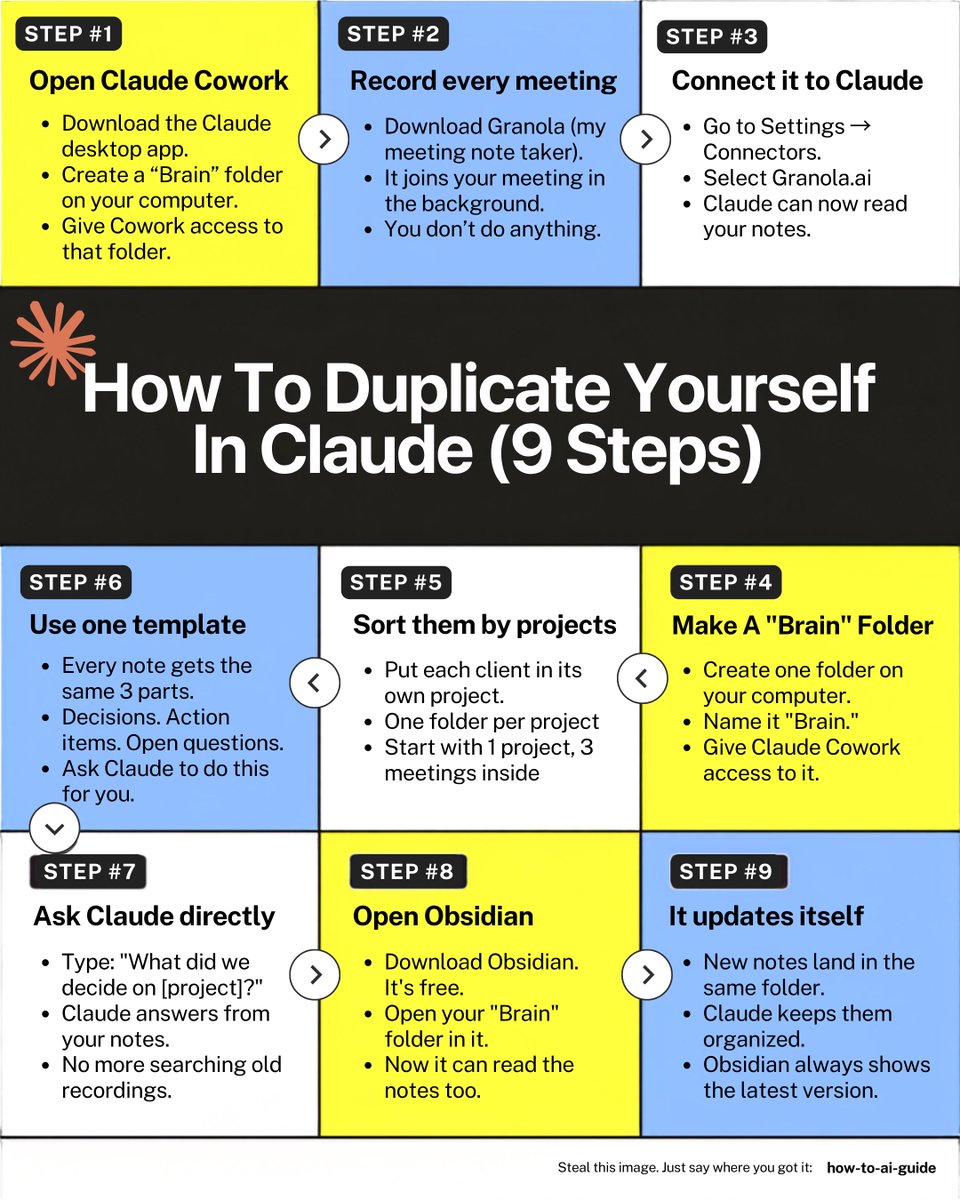
How to duplicate yourself in Claude (and stop explaining things twice):
1. Open Claude Cowork
Download the Claude desktop app.
Create a “Brain” folder on your computer and give Cowork access to it.
2. Record every meeting
I use Granola to capture every meeting notes. It joins the call in the background.
3. Connect it to Claude
Go to Settings → Connectors → Granola. Connect your account so Claude can read your notes.
4. Make a “Brain” folder
Use the folder you created in step 1 to keep your project notes together. Make sure Cowork has access to it.
5. Sort them by project
Create one folder per project. Ask Claude to organize the notes into that folder.
6. Use one template
Every note gets the same three parts:
> Decisions.
> Action items.
> Open questions.
Ask Claude to apply that structure to each meeting.
7. Ask Claude directly
“What did we decide on [project]?”. Claude can use your notes to answer. You don’t have to find the call and listen through it again.
8. Open Obsidian
Download Obsidian. It’s free. Open your “Brain” folder in it so you can read the saved notes yourself.
9. Keep it updated
After each meeting, ask Claude to add the new notes and organize them in the same folder. Open that folder in Obsidian to see the updates.
I never have to explain myself twice. Claude gets my meeting notes and knows what we agreed on and what I need to do next.
I could have made this much longer, but I won't. If you need help connecting apps to claude, go to: → https://t.co/TSAQqOpDeV
Ignore this entire post if you don't care about your privacy with AI. But if you want basic privacy with AI, do this:
1. Open ChatGPT or Claude.
2. Copy-paste Prompt 1 from https://t.co/qbjmGGs7cN.
3. It will make the AI list your personal details & accessible memory that you did not know about.
4. Now send Prompt 2 from the same link. It finds a sensitive detail that you should not share.
5. Lastly, send Prompt 3 to get a copy-paste version of your pwn information with identifying details removed to protect you from getting exposed.
I highly recommend you send Prompt 3 before sharing any conversation with anyone. It creates a separate version you can review & copy.
It's that simple. This makes it hard for your private chats to end up in a data pile-up or Google search.
One thing to know: temporary chats are still retained for safety. The steps above just reduce exposure. It doesn't make your chats completely invisible to your company workspace.
To copy the prompts (run them in order, same chat), go to: https://t.co/qbjmGGs7cN
----
Bonus prompt - TURN OFF TRAINING
I use [ChatGPT / Claude] on [web / iPhone / Android / desktop], with a [plan name] account. Using current official documentation, show me how to turn off the use of my conversations for model training. Give me the exact setting to check and explain any feedback-related exceptions. Don’t claim you changed anything for me. Wait for me to confirm before continuing.
----
Don't even bother to do all this if you are fine with your boss reading your private ChatGPT chats. But if you do, I recommend you run prompt 1 tonight.
If you are confused about why 𝗝𝗲𝘃 is being called the "Internet" moment for the AI industry. This is 100% worth your time. In fact, you should watch it:
It tells LLMs what to do next, in milliseconds & at almost zero cost. If you set it up correctly, you will have the AI engineer’s setup for 2028.
How to set up & use Jev (to actually get the 100x):
1. Join the waitlist; it's fairly quick: typesafe .ai.
2. Then go to Claude Code or Codex.
3. Choose Opus 5-Low or Sol-Low.
4. Copy and paste this prompt:
"[claude or codex] plugin marketplace add typesafe-ai/skills
[claude or codex] plugin install typesafe@typesafe-ai"
5. When you type /typesafe, the skill shows up.
6. Paste your API key once and click "Allow"
7. Start with $5 in free credit. It's hard to spend more.
-----
Now, here are the 3 ways to actually use Jev:
1. Jev for Linkedin
I have 38,000 connections & invitations on LinkedIn.
I have a new company to launch. I need to find a couple of hundred people to message. to do while saving time:
> Export your LinkedIn connections and invitations.
> Connect Claude to GitHub, Vercel & Apify.
> Create an Apify API key to enrich your data.
> Go to LinkedIn Settings → Data privacy.
> Get a copy. LinkedIn will email you a ZIP file.
> Open the file & find the Connections CSVs.
> Upload the files to Jev.
> Use Jev to classify your contacts.
> Review the shortlist.
2. Jev for Gmail
To go through all of my Gmail contacts and email the right people.
> Go to Google Contacts. Open Other contacts.
> Select all contacts. Export them.
> Upload the file to Claude Code or Codex.
> Use Jev to sort them into:
Keep, Review, Remove and Review everything before removing anything.
3. You got lost in Claude Code, GitHub, Vercel, Apify, Jev, Typesafe.
I feel you.
It is overwhelming.
That’s why I included the entire copy-and-paste prompt for each use case in the newsletter: https://t.co/DCK7Xe5aIE
A 45-second TL;DR by @MatijaSosic.
This AI is going viral, but it CANNOT even write a single sentence. And I can't believe what Jev just did:
I have 38,000 connections & invitations on LinkedIn.
I need to find a couple of hundreds of people to message.
I could ask Claude/ChatGPT to filter them all, but it would take too long & cost too much.
So I uploaded my LinkedIn connections on Jev, sent this big fat prompt: https://t.co/bzXpdnId4O.
Told Jev which roles I wanted: CEOs, COOs, Chiefs of Staff.
Then I watched it go through the list, live.
18,064 connections. Under 6 minutes. $0.70.
399 connections kept. 348 to review.
And I can filter them by role, company type, and how confident Jev is.
Actually so cheap you will hardly find a way to spend $5.
If you’re in sales, the sky is the limit to rank potential leads.
jev + opus 5.5... i simply can't comprehend why everyone isn't building this yet.
in my workflow, this cut costs and time by ~80%. i think it's one of the best ways to use it.
→ pick relevant project notes before loading the context
→ route suitable tasks to a faster worker
→ choose a recovery path when a tool fails
→ run focused checks before the full test suite
opus handles the hard reasoning. jev picks from options the harness prepares and validates.
i explain how to build the decision layer in the article below:
I built a Photoshop-like image editor. It’s called Compositor.
https://t.co/5EMXCgaWI1
I originally built it for myself to get off my Adobe subscription, but decided to release it for free and make it open source. It has all the essential tools I need for compositing, with none of the BS.
I know this workflow is kind of archaic in 2026, but I’m still using it until AI can actually get pixel-perfect on some of the details.
The entire app is 12MB. Photoshop is 6,455MB on my machine.
Two months ago I was testing Grok @imagine to make the Battle of Red Cliffs (赤壁之戰).
Now in Grok @bot you can spin up a director, screenwriter, music producer, and cinematographer to create a cinematic movie trailer in one shot.
Attached the only prompt I gave to Grok @bot and the rest was autonomous.
Reduce el uso de tokens de Claude Code en un 90%
Filtró los métodos exactos. La mayoría de las personas pasarán de largo.
Nada complicado.
Guárdalo para no perderlo.
Introducing Expert Intelligence ✨
A cross-@Google initiative that helps you engage with your trusted sources, starting with eligible @GooglePlay ebooks in Gemini Notebook. You can now combine expertise from your favorite authors with other sources and engage with your books in brand new ways!
Try it out here: https://t.co/So7CQPf3ba
China simulated 1 million American Voters to predict any election with terrifying accuracy.
They call it ElectionSim.
Instead of calling humans on the phone, they built a massive, multi-agent framework powered by large language models.
They fed the AI 171 million real social media posts, mapped complex demographic features like income, education, geography, and political history, and constructed a digital mirror of the entire American electorate.
1 million distinct AI voter agents. Each with its own history, biases, and ideology.
Then, they ran the simulation.
They tested it against the U.S. presidential election to see if synthetic people would behave like real ones.
The system mapped out state-by-state outcomes with terrifying precision. At the individual voter level, it hit an 81% Micro-F1 score. At the macro level, it correctly predicted the winner in nearly every single battleground state.
Think about what this means.
You no longer need to spend months running expensive focus groups or waiting for lagging poll results.
You can spin up an entire nation in a server rack, test a political campaign, change a policy message, or run a simulated economic shock, and watch how millions of digital citizens react in real time.
🚨ESTO ES UNA LOCURA
Un desarrollador chino acaba de lanzar una herramienta GRATUITA capaz de crear vídeos automáticamente para TikTok, Reels y YouTube Shorts.
Se llama MoneyPrinterTurbo.
Ya ha superado las 100.000 estrellas en GitHub.
Y ya hay gente ganando +4.000$/mes con canales faceless a partir de este sistema.
Así funciona:
1. Introduces un tema o una palabra clave
2. La IA genera el guion, la narración y los subtítulos
3. Busca el material visual, edita el vídeo y te entrega el resultado final
Todo ocurre en un único flujo de trabajo.
Guárdate esta herramienta.
Estoy seguro de que puedes sacarle muchísimo partido.
Enlace abajo👇
I turned Claude into an entire company.
128 skills, organised like a real org chart (links below):
(Bookmark this before everyone notices it)
Here's every department, and exactly where to get each one:
1. Developers
Superpowers → https://t.co/g0ILgjUyXK
Context7 → https://t.co/BP1l4NNyE3
Skill Creator → https://t.co/WsnqtEd2Up
MCP Builder → https://t.co/WsnqtEd2Up
Webapp Testing → https://t.co/WsnqtEd2Up
Claude-Mem → https://t.co/hSAK8nSFMe
2. Designers
UI/UX → https://t.co/jf4OhVtQhz
Taste → https://t.co/wAMqef6rwt
Frontend Design → https://t.co/WsnqtEd2Up
Transitions → https://t.co/gdAT7Avybo
Web Artifacts → https://t.co/WsnqtEd2Up
Brand Guidelines → https://t.co/WsnqtEd2Up
3. Marketing
Copywriting, SEO, CRO, lead magnets, all in one repo
→ https://t.co/YwCKcynT9P
4. Social Media
Post writing, Reels scripting, thumbnails, all in one repo
→ https://t.co/Kky5WfFeJ3
5. Finance
Statements, reconciliation, audits, built by Anthropic
→ https://t.co/wyXNuyZTkQ
6. Small Business
Cash flow, payroll, invoicing, built by Anthropic
→ https://t.co/Y2MXYmJx2I
7. Legal
Contract review, NDAs, compliance, built by Anthropic
→ https://t.co/DmtYDSE9H2
By the way, to get the full breakdown with setup steps for each department:
Step 1. Go to https://t.co/XZmlWQ3gEs
Step 2. Subscribe to my newsletter on Substack
Step 3. Get the full guide inside
Which department are you installing first? Drop it below.
♻️ Repost this because you are early reading this stuff (no one knows about this)
https://t.co/Fhg1GRnH9k
🚨 شركة Anthropic لسه منزلة 13 شهادة وكورس رسمي ومجاني بالكامل لـ Claude..
والموضوع ده حرفياً لسه محدش بيتكلم عنه!
دي مش تجميعة فيديوهات على يوتيوب، ولا كورس من طرف ثالث.. دي شهادات ومناهج رسمية ومعتمدة من الشركة اللي صنعت Claude بنفسها. مجانية.. وللأبد.
احفظ البوست ده عندك فوراً (Save & Bookmark) 🔖 لأن الكلام ده هو اللي هيوفر عليك آلاف الدولارات في كورسات ملهاش لازمة.
📚 الدليل الكامل للمناهج والروابط (ابدأ من هنا):
أولاً: للبداية والأساسيات (Start Here)
Claude 101 — لتعلم استخدام كلوود في المهام اليومية: https://t.co/ue8owlNPCI
AI Fluency — أساسيات ومفاهيم الذكاء الاصطناعي: https://t.co/Gnhj7vgY0e
Introduction to Agent Skills — مقدمة في مهارات الـ Agents:
https://t.co/qX4LunFBYX
ثانياً: للمطورين والمبرمجين (For Developers)
Building with the Claude API — بناء التطبيقات باستخدام الـ API الخاص بكلوود: https://t.co/DbEJZphY2G
Claude Code in Action — التطبيق العملي واحتراف Claude Code:
https://t.co/B7jsmNmuHP
Intro to Model Context Protocol — مقدمة في بروتوكول الـ MCP لربط البيانات:
https://t.co/tkNX7O3Dvs
MCP Advanced Topics — المواضيع المتقدمة في الـ MCP:
https://t.co/7Ml6dMHVev
ثالثاً: للتعليم والشركات (Enterprise & Education)
08 إلى 11: كورسات مخصصة للطلاب، المعلمين، والمنظمات غير الربحية لفهم الـ AI Fluency وتطبيقاته.
12 و13: كورسات متقدمة لربط كلوود مع السحابة (Amazon Bedrock و Google Cloud Vertex AI).
13 كورس.. 6 مستويات مهارية.. و100% مجاني للأبد.
💡 نصيحة سريعة (Pro Tip): المهندسين اللي بيتوظفوا بمرتبات بتوصل من 150 ألف لـ 300 ألف دولار عشان يشتغلوا بـ Claude على أعلى مستوى، بيدرسوا الماتريال دي بالظبط. أسرع طريق ليك كـ Builder هو إنك تبدأ بـ Claude 101 وتدخل بعدها فوراً على كورس Claude Code in Action.
99% من الناس هيعملوا لايف وسيف للبوست ده، ويقولوا "هنشوفه بعدين"، ويرجعوا بعد شهور يدفعوا فلوس في كورسات تافهة مابتشرحش ربع الكلام ده..
الـ 1% بس هما اللي هيقفلوا السوشيال ميديا دلوقتي، ويفتحوا أول رابط، ويبدأوا يحجزوا مكانهم في سوق الشغل الجديد كـ Certified AI Engineers.
لايك وفولو عشان يوصلك كل جديد في عالم التقنية والـ Tech Architecture!