My dear front-end developers (and anyone who’s interested in the future of interfaces):
I have crawled through depths of hell to bring you, for the foreseeable years, one of the more important foundational pieces of UI engineering (if not in implementation then certainly at least in concept):
Fast, accurate and comprehensive userland text measurement algorithm in pure TypeScript, usable for laying out entire web pages without CSS, bypassing DOM measurements and reflow
🦀 Microsoft just open-sourced a comprehensive Rust training curriculum and it's impressive.
The microsoft/RustTraining repository on GitHub offers 7 structured books covering Rust from beginner to expert level, designed for developers coming from different backgrounds:
🟢 Bridge Books (start here):
• Rust for C/C++ Programmers
• Rust for C# Programmers
• Rust for Python Programmers
🔵 Deep Dive: Async Rust (Tokio, streams, cancellation)
🟡 Advanced: Rust Patterns (Pin, allocators, lock-free structures)
🟣 Expert: Type-Driven Correctness (type-state, phantom types)
🟤 Practices: Rust Engineering (CI/CD, cross-compilation, Miri)
Each book includes 15–16 chapters, Mermaid diagrams, interactive Rust playgrounds, and exercises.
Whether you're a systems programmer migrating from C++, a .NET developer exploring performance-critical code, or a Pythonista tired of the GIL, there's a path for you.
⭐ Already at 500+ stars. Fully open source (MIT + CC-BY-SA-4.0).
👉 https://t.co/VrI8IDPqdd
Rust is becoming a serious part of the industry stack. If you've been waiting for a structured way to learn it, this might be it.
#Rust #Programming #OpenSource #Microsoft #SoftwareEngineering #SystemsProgramming #Learning
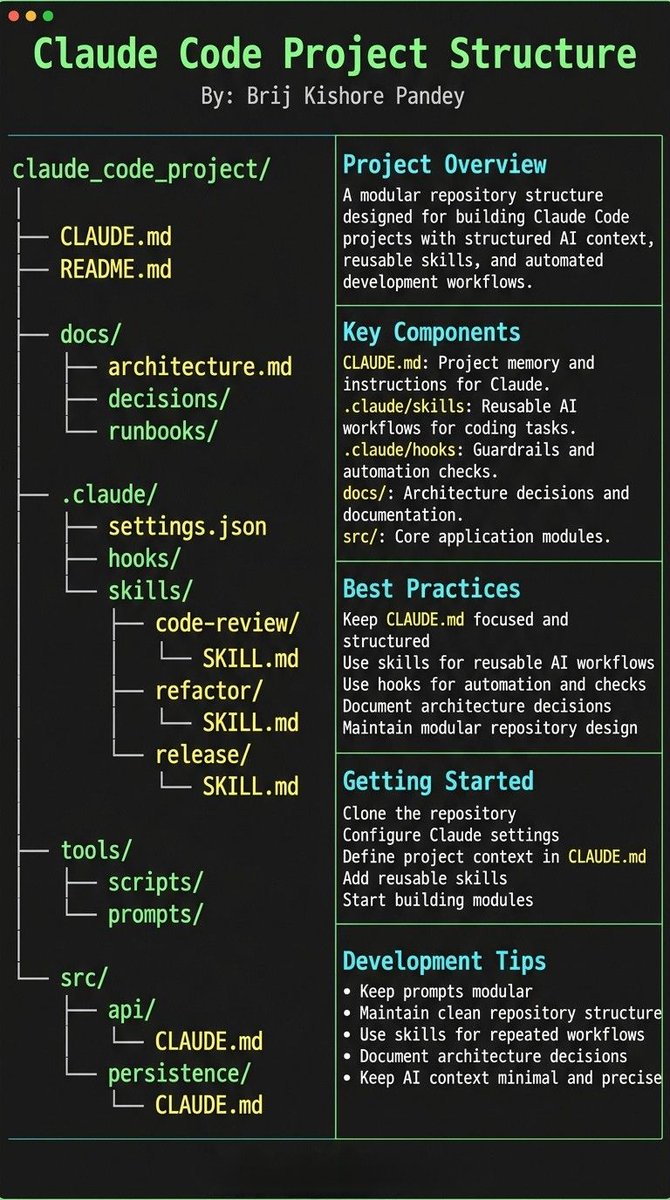
Most people treat CLAUDE.md like a prompt file.
That’s the mistake.
If you want Claude Code to feel like a senior engineer living inside your repo, your project needs structure.
Claude needs 4 things at all times:
• the why → what the system does
• the map → where things live
• the rules → what’s allowed / not allowed
• the workflows → how work gets done
I call this:
The Anatomy of a Claude Code Project 👇
━━━━━━━━━━━━━━━
1️⃣ CLAUDE.md = Repo Memory (keep it short)
This is the north star file.
Not a knowledge dump. Just:
• Purpose (WHY)
• Repo map (WHAT)
• Rules + commands (HOW)
If it gets too long, the model starts missing important context.
━━━━━━━━━━━━━━━
2️⃣ .claude/skills/ = Reusable Expert Modes
Stop rewriting instructions.
Turn common workflows into skills:
• code review checklist
• refactor playbook
• release procedure
• debugging flow
Result:
Consistency across sessions and teammates.
━━━━━━━━━━━━━━━
3️⃣ .claude/hooks/ = Guardrails
Models forget.
Hooks don’t.
Use them for things that must be deterministic:
• run formatter after edits
• run tests on core changes
• block unsafe directories (auth, billing, migrations)
━━━━━━━━━━━━━━━
4️⃣ docs/ = Progressive Context
Don’t bloat prompts.
Claude just needs to know where truth lives:
• architecture overview
• ADRs (engineering decisions)
• operational runbooks
━━━━━━━━━━━━━━━
5️⃣ Local CLAUDE.md for risky modules
Put small files near sharp edges:
src/auth/CLAUDE.md
src/persistence/CLAUDE.md
infra/CLAUDE.md
Now Claude sees the gotchas exactly when it works there.
━━━━━━━━━━━━━━━
Prompting is temporary.
Structure is permanent.
When your repo is organized this way, Claude stops behaving like a chatbot…
…and starts acting like a project-native engineer.
Our Neural Irradiance Volume (Eurographics 2026) permits real-time rendering of large scenes with dynamic objects and moving lights, while providing a higher quality at a given memory budget (10x improvement over probe grids!). Project page: https://t.co/IHI1URC0WU.
This 𝗖𝗟𝗔𝗨𝗗𝗘.𝗺𝗱 file will make you 10x engineer 👇
It combines all the best practices shared by Claude Code creator:
Boris Cherny (creator of Claude Code at Anthropic) shared on X internal best practices and workflows he and his team actually use with Claude Code daily. Someone turned those threads into a structured 𝗖𝗟𝗔𝗨𝗗𝗘.𝗺𝗱 you can drop into any project.
It includes:
• Workflow orchestration
• Subagent strategy
• Self-improvement loop
• Verification before done
• Autonomous bug fixing
• Core principles
This is a compounding system. Every correction you make gets captured as a rule. Over time, Claude's mistake rate drops because it learns from your feedback.
If you build with AI daily, this will save you a lot of time.
prediction cone/safe triangle — this is something we take so much for granted in modern day native UIs.
but it's not the same for most web-based dropdown menus. it took me a while to implement this here.
Amazon, macOS, Windows all implement some version of this.
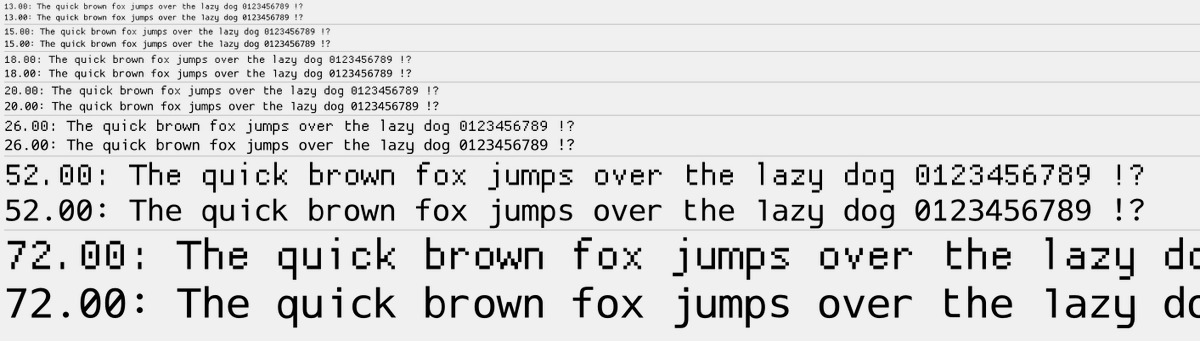
Releasing today: 'ProggyForever': a new MIT-licensed scalable font designed to closely match ProggyClean which happily served as Dear ImGui default font for 10+ years: https://t.co/zeRxpGR9WI
The new font is now embedded by default in Dear ImGui (compressed down to ~14 KB).
fal/Qwen-Image-Edit-2511-Multiple-Angles-LoRA
角度変更、めちゃくちゃ精度高くてすごい
Qwen Image Multiple Angles 3D Camera - a Hugging Face Space by multimodalart https://t.co/i4VOra0kbt
Part 2 (a year later!)
Again, not big into fancy animation tricks/effects.
I'm more of an opacity, position, scale, rotation, color kind of guy - keeping it simpler w/an emphasis on layering smaller details, nuance, & timing.
Had some fun w/ the naming convention on these ◻️👾