Released dprint 0.55—a pluggable and configurable code formatting platform that unifies all your formatters behind a single command.
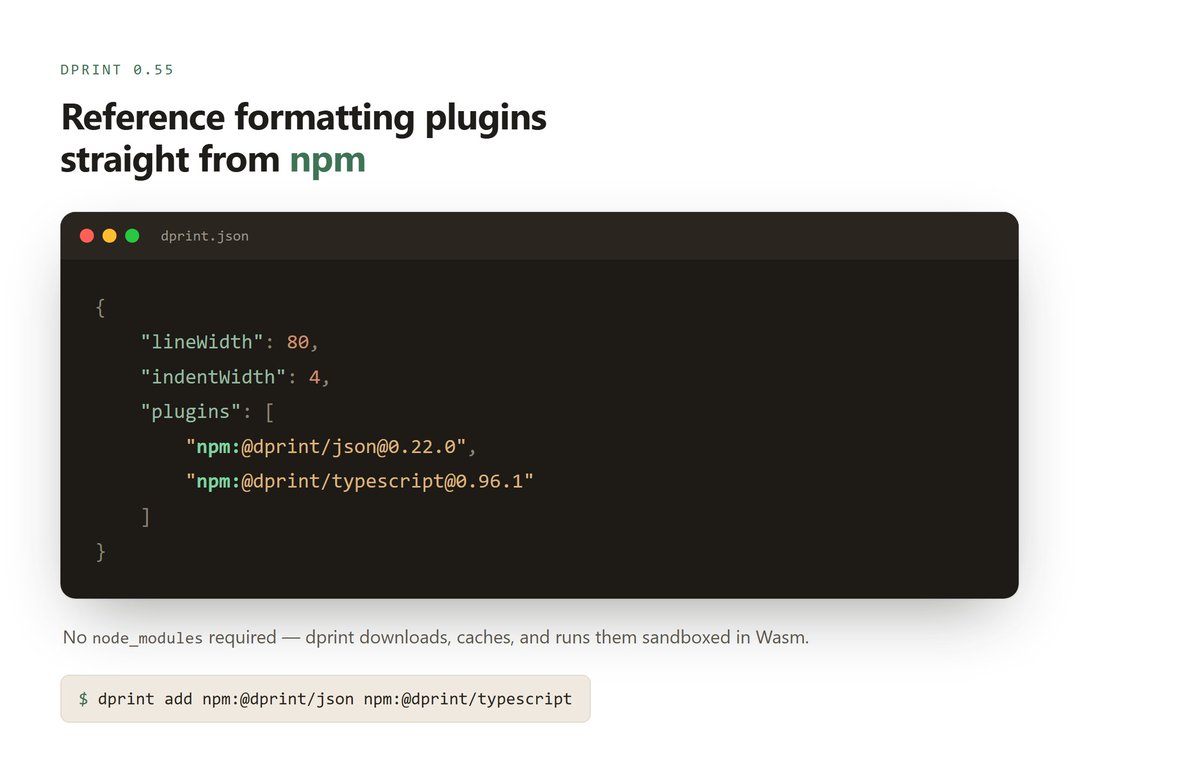
This substantial release lets you specify formatting plugins from npm.
dprint-plugin-dockerfile has been significantly improved with a Dockerfile parser written from scratch. The previously relied-on parser hadn't been updated in years.
Run `dprint add dockerfile` to use it, or `dprint config update` to update your existing plugin.
Due to terrible GitHub availability, dprint formatting plugins on https://t.co/1woJCf9myF are now served directly instead of redirecting to GH assets.
Additionally, the plugins are now cached indefinitely by the server, which eliminates the risk of a repo disappearing.
You can switch to dprint to use them all, or easily swap whatever formatter is the latest hype.
Plus use non-JS ecosystem formatters all from the same `dprint fmt` command instead of a separate tool per language.
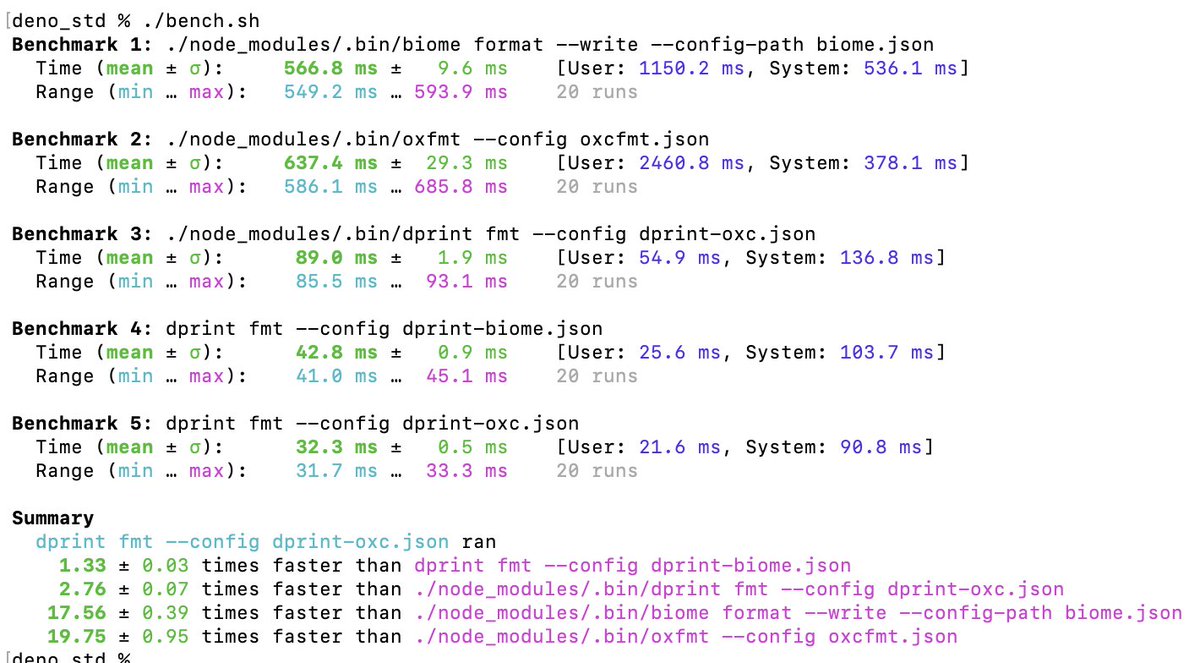
dprint's incremental formatter is incredibly fast and happens without needing an opt-in.
You can use both oxc and biome via dprint for faster performance.
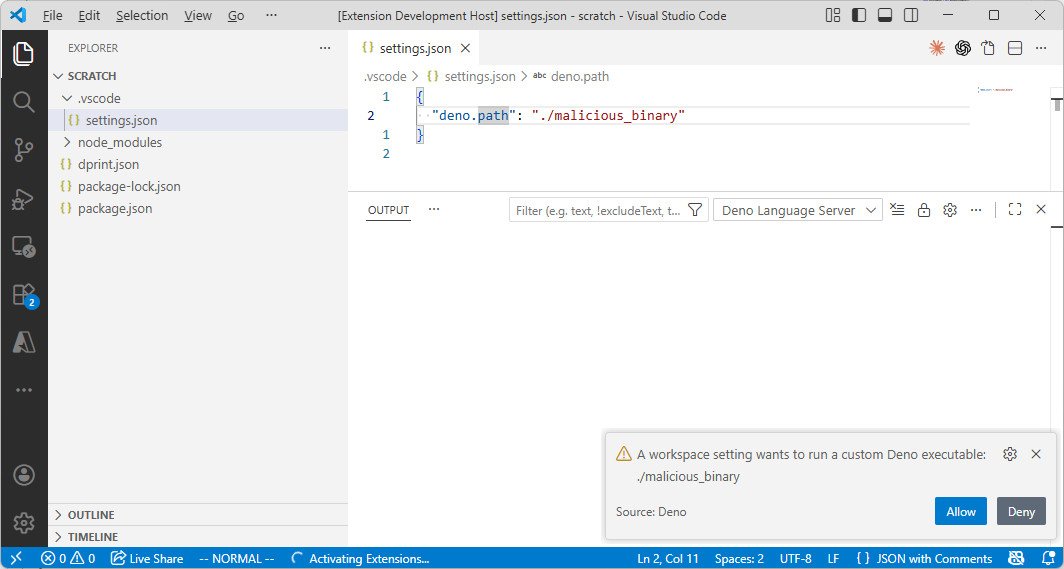
The deno and dprint vscode extensions now prompt when a custom executable path is set in the workspace configuration.
I believe this should help reduce the chance of malicious config launching an executable in a trusted workspace.
Oxc: https://t.co/uC0JSLVzOI
Mago: https://t.co/79NMBCF6IB
They are also available to use from JavaScript via https://t.co/Ae9AeiHf7r and the plugins' npm packages.
dprint now has Oxc (JS/TS) and Mago (PHP) code formatting plugins.
Add them to your project by running:
dprint config add oxc
dprint config add mago
These plugins run sandboxed in WebAssembly, like most dprint plugins.
dprint 0.50 was released with a new --config-discovery=<mode> flag/environment variable along with Vim keybinding support for selections. https://t.co/H0oiTWXxch
You can also use them in dprint via Wasm plugins (ex. dprint config add g-plane/pretty_yaml). See malva, markup_fmt, and pretty_yaml at https://t.co/7PnKT8xLN8
These support YAML, CSS, SCSS, Sass, Less, HTML, Vue, Svelte, Astro, Angular, Jinja, Twig, Nunjucks, and Vento files.
dprint 0.47 was released with a new --staged flag to only format git staged files, support for ${configDir} config template variable, and a new Wasm plugin interface (the old version is still supported and current plugins will migrate in a few months) https://t.co/efRXdIMxhP
Probably 95% of GitHub sponsors for dprint has been from Canva, they maintain the intellij plugin, and they did the initial implementation of the exec dprint plugin. dprint wouldn't be where it is today without the feedback and support from Canva. Thanks for the sponsorship!
New post ~ Definitely Formatted! 🧹
How we migrated the massive DefinitelyTyped repository from using a linter for formatting to the dprint formatter.
It was joyously fun working w/ @andhaveaniceday, @DavidSherret, @johnny_reilly, @sanders_n & more! ❤️🔥
https://t.co/z8FeZkmnPw
Note that if you install via npm it actually runs the dprint binary via Node, which has an additional startup cost. I'll look at improving that in https://t.co/3CuYHlHvgP but if you have any pointers/suggestions, please let me know.
dprint-plugin-toml 0.6.0 now sorts workspace members and dependencies in Cargo.toml files (can be disabled by setting "cargo.applyConventions" to false).
For an example of this in action, see this PR in Deno's repository https://t.co/VLiNYSMMez
dprint 0.45.0 was released with a new experimental `dprint lsp` sub command. This will make it easier to use dprint in non-vscode/intellij editors.
You can try it out in vscode by adding "dprint.experimentalLsp": true to your vscode settings. https://t.co/GYcP5R3kId