Anthropic just dropped a 13-page PDF on Agent Memory - 5 layers that cut token cost 90% and make your agent actually learn:
here's the 5-layer memory architecture:
layer 1 → working memory - the context window. everything the agent sees right now. when it fills up, old context dies. most agents stop here and wonder why they're broken
layer 2 → episodic memory - what happened. full interaction logs with timestamps. the agent recalls that the deploy failed Tuesday at 3am because the migration script had a typo
layer 3 → semantic memory - what is true. facts, entities, relationships stored as a knowledge graph. "user prefers TypeScript" lives here. doesn't expire when the session ends
layer 4 → procedural memory - how to do things. the agent tried 3 approaches, one worked. that method becomes a reusable skill. next time it skips straight to what worked
layer 5 → forgetting - what to delete. an agent that never forgets accumulates contradictions. old preferences override new ones. the user moved cities but the agent still recommends restaurants in the old one
the result: Mem0 stores 1,800 tokens per query instead of 26,000. Snowflake added one ontology layer - 20% better accuracy, 39% fewer tool calls. memory pays for itself on day one
this 13-page PDF is what separates a chatbot from an agent that actually learns
don't scroll past this one ↓
$77k bitcoin is squeezed between two giant walls:
🟠 1M BTC sitting at $62–65k
🔵 1M BTC sitting at $84–87k
Which way does it break $65k or $84k?
Live interactive version of this chart 100% free (full history, daily updates, alerts, CSV/XLS/JSON data):
https://t.co/2WM9TfT8Mm
RIP JSON.
AI just got a data format that doesn’t waste tokens, doesn’t confuse models, and doesn’t bury structure under a pile of punctuation and it’s called TOON.
If you work with LLMs, this is the part where everything you thought was “good enough” starts looking ancient.
JSON was built for humans.
TOON is built for machines.
And the difference shows instantly:
• 40–60% fewer tokens
• Cleaner reasoning
• Higher retrieval accuracy
• Zero syntactic clutter
• Perfect round-trip back to JSON
Here’s what structured data looks like in 2025:
users[2]{id,name,role}:
1,Alice,admin
2,Bob,user
LLMs understand it faster. Your context budget lasts longer. Agents stop hallucinating field names. And Pipelines get cheaper overnight.
JSON won the web era.
TOON is about to win the AI era.
And this is 100% open source (link below)
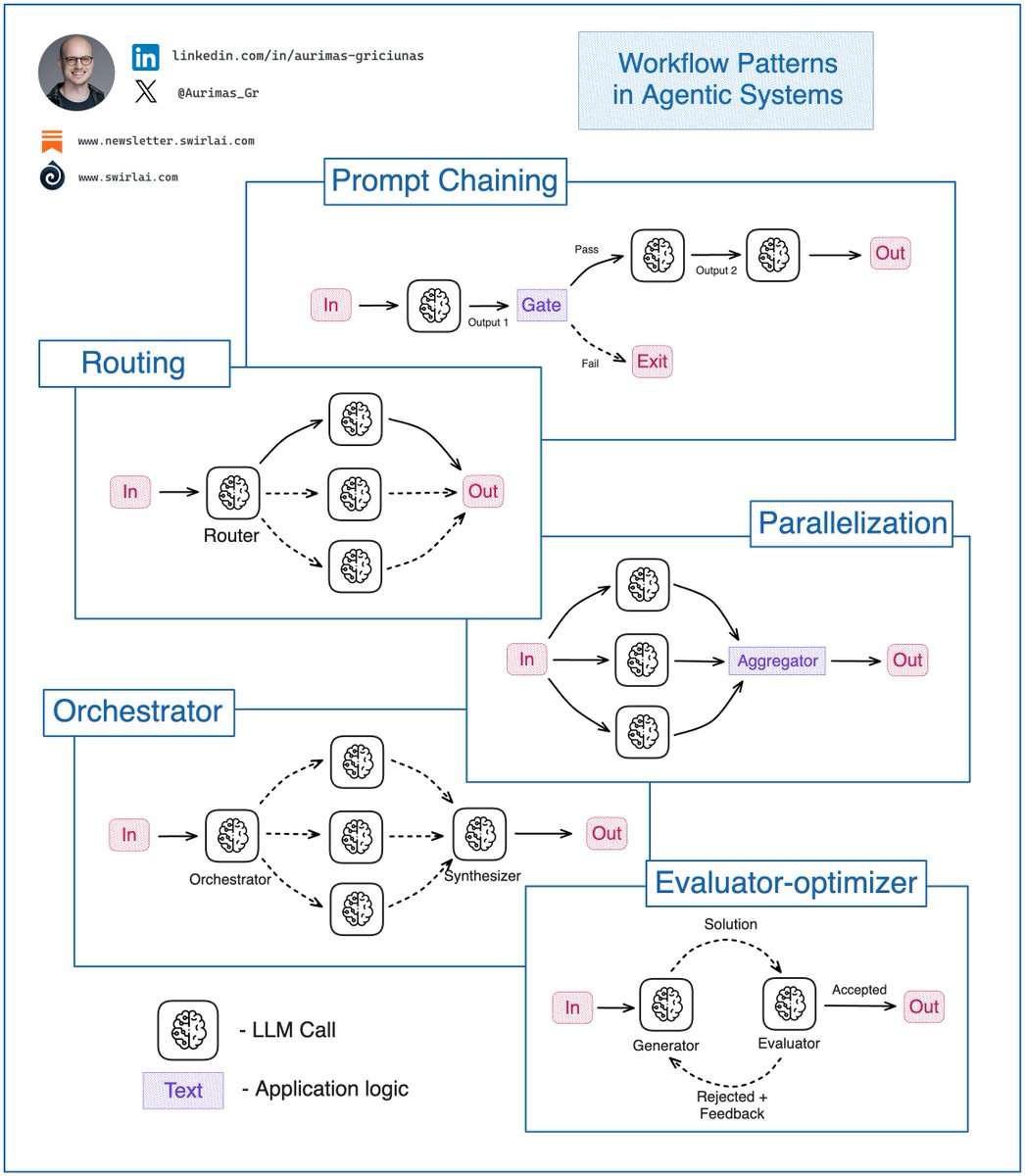
You must know these 𝗔𝗴𝗲𝗻𝘁𝗶𝗰 𝗦𝘆𝘀𝘁𝗲𝗺 𝗪𝗼𝗿𝗸𝗳𝗹𝗼𝘄 𝗣𝗮𝘁𝘁𝗲𝗿𝗻𝘀 as an 𝗔𝗜 𝗘𝗻𝗴𝗶𝗻𝗲𝗲𝗿.
If you are building Agentic Systems in an Enterprise setting you will soon discover that the simplest workflow patterns work the best and bring the most business value.
At the end of last year Anthropic did a great job summarising the top patterns for these workflows and they still hold strong.
Let’s explore what they are and where each can be useful:
𝟭. 𝗣𝗿𝗼𝗺𝗽𝘁 𝗖𝗵𝗮𝗶𝗻𝗶𝗻𝗴: This pattern decomposes a complex task and tries to solve it in manageable pieces by chaining them together. Output of one LLM call becomes an output to another.
✅ In most cases such decomposition results in higher accuracy with sacrifice for latency.
ℹ️ In heavy production use cases Prompt Chaining would be combined with following patterns, a pattern replace an LLM Call node in Prompt Chaining pattern.
𝟮. 𝗥𝗼𝘂𝘁𝗶𝗻𝗴: In this pattern, the input is classified into multiple potential paths and the appropriate is taken.
✅ Useful when the workflow is complex and specific topology paths could be more efficiently solved by a specialized workflow.
ℹ️ Example: Agentic Chatbot - should I answer the question with RAG or should I perform some actions that a user has prompted for?
𝟯. 𝗣𝗮𝗿𝗮𝗹𝗹𝗲𝗹𝗶𝘇𝗮𝘁𝗶𝗼𝗻: Initial input is split into multiple queries to be passed to the LLM, then the answers are aggregated to produce the final answer.
✅ Useful when speed is important and multiple inputs can be processed in parallel without needing to wait for other outputs. Also, when additional accuracy is required.
ℹ️ Example 1: Query rewrite in Agentic RAG to produce multiple different queries for majority voting. Improves accuracy.
ℹ️ Example 2: Multiple items are extracted from an invoice, all of them can be processed further in parallel for better speed.
𝟰. 𝗢𝗿𝗰𝗵𝗲𝘀𝘁𝗿𝗮𝘁𝗼𝗿: An orchestrator LLM dynamically breaks down tasks and delegates to other LLMs or sub-workflows.
✅ Useful when the system is complex and there is no clear hardcoded topology path to achieve the final result.
ℹ️ Example: Choice of datasets to be used in Agentic RAG.
𝟱. 𝗘𝘃𝗮𝗹𝘂𝗮𝘁𝗼𝗿-𝗼𝗽𝘁𝗶𝗺𝗶𝘇𝗲𝗿: Generator LLM produces a result then Evaluator LLM evaluates it and provides feedback for further improvement if necessary.
✅ Useful for tasks that require continuous refinement.
ℹ️ Example: Deep Research Agent workflow when refinement of a report paragraph via continuous web search is required.
𝗧𝗶𝗽𝘀:
❗️ Before going for full fledged Agents you should always try to solve a problem with simpler Workflows described in the article.
What are the most complex workflows you have deployed to production? Let me know in the comments 👇
#LLM #AI #MachineLearning
Google just open-sourced LangExtract Python library!
It uses LLMs to extract entities, attributes, and relations—with exact source grounding—from unstructured documents.
Flexible LLM support (Gemini, OpenAI, Ollama)
100% open-source.
Una tienda online con Next.js de código abierto:
✓ Web Performance de 100 puntos por defecto
✓ Optimizado para SEO y metadatos
✓ Diseño moderno y minimalista
✓ Integración con Shopify
→ https://t.co/89Cl3o6w5X
If I had to set up an API, here are 6 protocols I'd consider:
1 REST (Representational State Transfer)
↳ A stateless, resource-based API protocol using standard HTTP methods
↳ Best for: CRUD operations in web and mobile apps
↳ Risk: over-fetch or under-fetch data because of fixed endpoints
——
2 gRPC (Google Remote Procedure Call)
↳ A high-performance, contract-based protocol using a binary format
↳ Best for: internal microservices communication
↳ Risk: limited browser support
——
3 GraphQL
↳ An API query language for clients to request specific data
↳ Best for: frontend-heavy apps with complex data fetching needs and faster response needs
↳ Risk: performance issues from overly flexible queries
——
4 SOAP (Simple Object Access Protocol)
↳ A protocol using XML for messaging with strict standards
↳ Best for: enterprise applications that need high security
↳ Risk: verbose and complex because of XML specifications
——
5 WebSockets
↳ A bidirectional, real-time protocol over a persistent TCP connection
↳ Best for: real-time apps, such as chat or sports updates
↳ Risk: extra logic needed to handle connection states and reconnections
——
6 MQTT (Message Queuing Telemetry Transport)
↳ A lightweight, publish-subscribe protocol
↳ Best for: IoT and sensor devices
↳ Risk: complex queries and large payloads may not work well
——
What else should make this list?
If I wanted to get into AI, I'd spend my time learning these:
• Python
• LangChain
• OpenAI API
I think this is the minimum stack you need to start building some serious AI applications.
If you're looking for a good book recommendation, "Generative AI with LangChain" was recently released, and it's a cheff-kiss:
• How to use LangChain
• How to use LangGraph
• How to build smart RAG systems
• How to build agents
• How to build multi-agent systems
Here is the link: https://t.co/H5qBGLBONt
Fundamentals of a 𝗩𝗲𝗰𝘁𝗼𝗿 𝗗𝗮𝘁𝗮𝗯𝗮𝘀𝗲.
With the rise of GenAI, Vector Databases skyrocketed in popularity. The truth - Vector Databases are also useful outside of a Large Language Model context.
When it comes to Machine Learning, we often deal with Vector Embeddings. Vector Databases were created to perform specifically well when working with them:
➡️ Storing.
➡️ Updating.
➡️ Retrieving.
When we talk about retrieval, we refer to retrieving set of vectors that are most similar to a query in a form of a vector that is embedded in the same Latent space. This retrieval procedure is called Approximate Nearest Neighbour (ANN) search.
A query here could be in a form of an object like an image for which we would like to find similar images. Or it could be a question for which we want to retrieve relevant context that could later be transformed into an answer via a LLM.
Let’s look into how one would interact with a Vector Database:
𝗪𝗿𝗶𝘁𝗶𝗻𝗴/𝗨𝗽𝗱𝗮𝘁𝗶𝗻𝗴 𝗗𝗮𝘁𝗮.
1. Choose a ML model to be used to generate Vector Embeddings.
2. Embed any type of information: text, images, audio, tabular. Choice of ML model used for embedding will depend on the type of data.
3. Get a Vector representation of your data by running it through the Embedding Model.
4. Store additional metadata together with the Vector Embedding. This data would later be used to pre-filter or post-filter ANN search results.
5. Vector DB indexes Vector Embedding and metadata separately. There are multiple methods that can be used for creating vector indexes, some of them: Random Projection, Product Quantization, Locality-sensitive Hashing.
6. Vector data is stored together with indexes for Vector Embeddings and metadata connected to the Embedded objects.
𝗥𝗲𝗮𝗱𝗶𝗻𝗴 𝗗𝗮𝘁𝗮.
7. A query to be executed against a Vector Database will usually consist of two parts:
➡️ Data that will be used for ANN search. e.g. an image for which you want to find similar ones.
➡️ Metadata query to exclude Vectors that hold specific qualities known beforehand. E.g. given that you are looking for similar images of apartments - exclude apartments in a specific location.
8. You execute Metadata Query against the metadata index. It could be done before or after the ANN search procedure.
9. You embed the data into the Latent space with the same model that was used for writing the data to the Vector DB.
10. ANN search procedure is applied and a set of Vector embeddings are retrieved. Popular similarity measures for ANN search include: Cosine Similarity, Euclidean Distance, Dot Product.
How are you using Vector DBs? Let me know in the comment section!
#LLM #AI #MachineLearning