How high should a straight leg raise be before I’m happy for a patient with sciatica to run? 🤔
My answer: It depends.
Consider this athlete who is 14/52 post-microdiscectomy and still has a limited SLR of approx 75° on the affected left leg compared to 90° on the unaffected side.
I would NOT be happy for this patient to run. 🚫🏃
Why?
⚠️ Too close to surgery for my liking (potential re-herniation risk)
⚠️ Neural symptoms still need time to settle (risk of a radicular flare)
⚠️ Symptoms remain too irritable
Therefore, I would restrict running based on symptom irritability and the need to protect the surgical site.
Now consider a different scenario with the same 75 degrees of SLR with this presentation:
✅ Long-standing issue
✅ Stable disc findings on MRI
✅ Low symptom irritability in daily life
✅ Good overall function
In that case, I WOULD consider a return to running. 🏃♂️
My point? 👇
SLR range is only ONE factor in the return-to-running decision with sciatica.
We also need to consider:
🔹 Symptom irritability
🔹 Pathology
🔹 Expected healing timelines
🔹 Previous training history
🔹 Global fitness and capacity
A 75° SLR doesn’t automatically mean “no running”��and a 90° SLR doesn’t automatically mean “yes.” 🎯
Clinical decisions require context, not just measurements
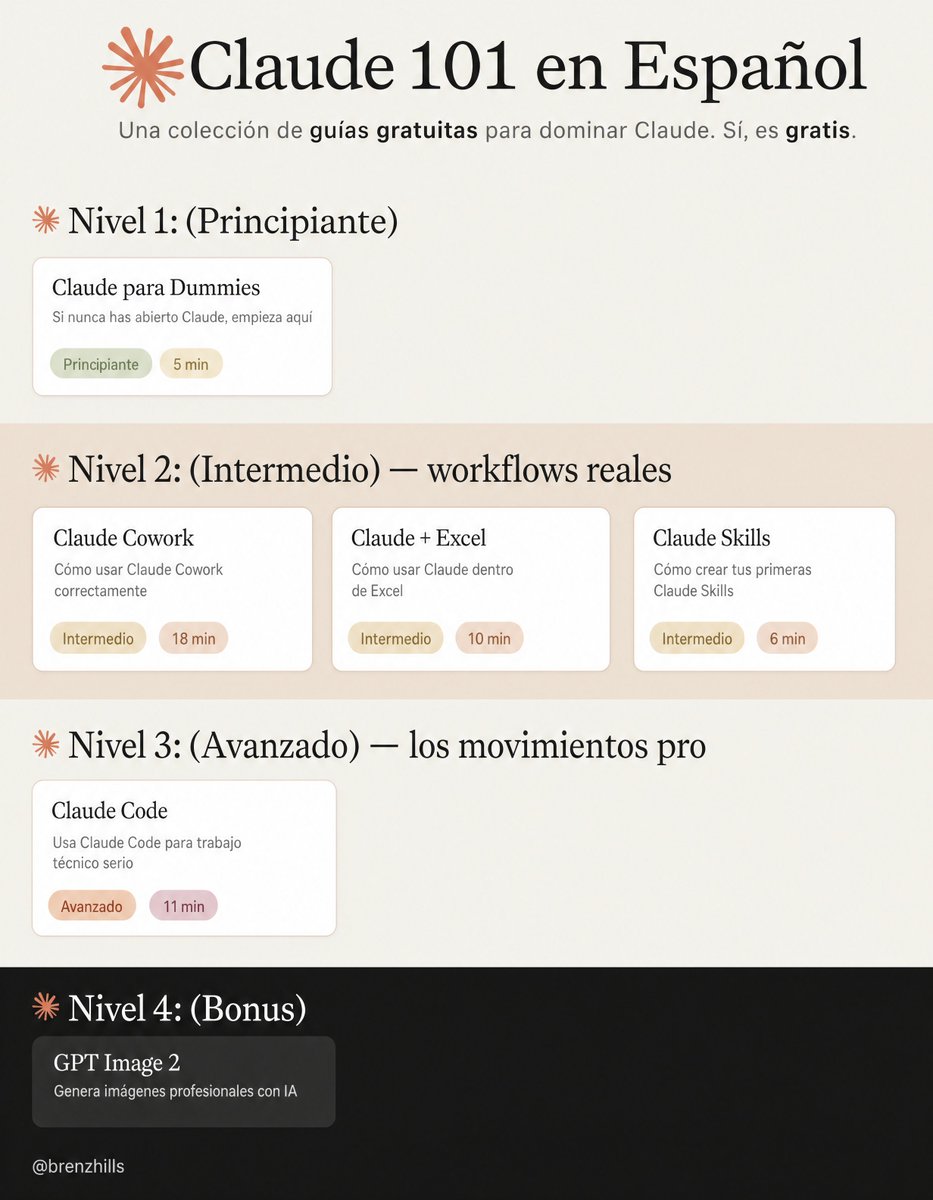
En vez de ver Netflix esta noche,
dedica unas horas a aprender Claude de verdad:
→ Nivel 1: los básicos.
Claude para Dummies: https://t.co/zA2DI11i3J
→ Nivel 2: workflows reales.
Claude Cowork: https://t.co/vECrgD1Ieu
Claude Skills: https://t.co/Dj7byk7ATQ
Claude + Excel: https://t.co/tB0GVFAoag
→ Nivel 3: los movimientos pro.
Claude Code: https://t.co/KFDGVJj68b
→ Bonus: generación de imágenes.
(OpenAI) GPT Image 2: https://t.co/egFFsvT6i5
Consejo: un nivel por sesión.
Aplica cada guía antes de pasar a la siguiente.
How to set up Claude Cowork in 20 min:
(even if you've never touched a prompt file)
→ 0-5 min: Download the desktop app. Get the paid plan. Create one folder: "Claude Cowork." Inside it, 3 subfolders: ABOUT ME, OUTPUTS, TEMPLATES.
→ 5-8 min: Build your 3 core files in ABOUT ME/.
To download mine, go here: https://t.co/psB7XxAv8w.
Don't pay anything. It's free in the welcome email.
→ 8-10 min: Paste your Global Instructions.
Settings → Cowork → Edit Global Instructions.
Instructions: "Read my ABOUT ME/ before every task. Never touch OUTPUTS/ or TEMPLATES/ unless I say so."
→ 10-12 min: Install Wispr .ai. Hold a key, talk, release. You type at 60 words per minute. You speak at 150. The bottleneck in Cowork is you.
→ 12-20 min: Run your first real task. Speak: "Read my folder and help me write [something you actually need this week]." Answer the questions by talking. Review the output.
Pro tip: Keep your files under 6,000 tokens total.
If they're bloated, Cowork summarizes them loosely instead of reading them carefully.
——
To download all of my Claude infographics:
Step 1. Go to https://t.co/psB7XxAv8w.
Step 2. Subscribe for free. Don't pay anything.
Step 3. Open my welcome email (most skip this).
Step 4. Hit the automatic reply button inside.
Step 5. Download my infographics from my Notion.
Bonus. Enjoy my best copy-paste prompts, too.
This 30-min workshop by the creator of Claude Code will teach you more about vibe-coding than 100 YouTube video guides.
Bookmark it & give it 30 minutes today. This video will change the way you use Claude forever.
How to set up Claude Skills completely in 1 hour:
(duplicate my exact folder, skills, and prompts)
1. Open the Claude desktop app.
2. Click the Cowork tab at the top.
3. You need a Pro plan ($20/mo). Worth it.
4. Start with this (free) guide: https://t.co/6cHYYfjpP2
-----
→ 0-10 min: Open Cowork. Find the skill-creator.
Select your folder. Opus 4.6 + Extended thinking.
Prompt: "Use the skill-creator to help me build a skill for [your most repeated task]."
→ 10-25 min: Answer the interview. Build the Skill.
The skill-creator asks you questions. Be specific.
Useless: "I write reports."
Skill that works: "Weekly reports, headline metric first, 3 sections max, next steps at the end."
It generates a folder + SKILL .md with your trigger & instructions. (Be specific or it won't fire)
→ 25-35 min: Run the evaluation.
Claude creates an eval to validate your Skill.
Click "View the eval results" to test before downloading. (Write this once. It runs every time)
→ 35-45 min: Install and test.
Save the Skill folder.
Go to Settings → Capabilities → Skills → Upload.
Type a request that should trigger the Skill.
Download my skills hacks here: https://t.co/6cHYYfjpP2
→ 45-55 min: Iterate and debug.
Try 5 phrasings. Does the Skill fire each time?
Try 3 unrelated requests. Does it stay quiet?
Ask: "When would you use this skill?" It quotes the description back. (You instantly see what's broken)
→ 55-60 min: Browse plugins. Download more Skills
Desktop app → Customize → Personal plugins → Browse plugins.
A plugin = a bundle of Skills. Download & test.
Or go to makemyskill .com.
Describe it, download it and upload it.
Pro tip: Always add "Do NOT use for…" lines to your description. Negative triggers matter more than positive ones. Skills are portable. Same SKILL .md works on Claude, Gemini, ChatGPT.
To download all of my other Claude infographics:
Step 1. Go to https://t.co/psB7XxAv8w.
Step 2. Subscribe for free. Don't pay anything.
Step 3. Open my welcome email (most skip this).
Step 4. Hit the automatic reply button inside.
Step 5. Download my infographics from my Notion.
Bonus. Enjoy my best copy-paste prompts, too.
Si estás usando Claude Code, mirá este workshop.
Boris (uno de los creadores) te cuenta cómo lo usa en el día a día.
Te va mostrando:
- por dónde empezar → usarlo para hacer preguntas y entender el código
- cómo pedirle cosas → enfocarse en el objetivo, no en los pasos
- por qué a veces falla → no tiene suficiente contexto
- cómo mejorar lo que genera → darle una forma de validar (tests, checks) y que itere
- cómo escalar su uso → sumar contexto con CLAUDE.md y usar varias sesiones
recomiendo.
How to set up Claude so it never forgets you:
Prompts → Projects → Skills (explained in 3 mins)
Prompts = telling a stranger your job every morning.
Projects = giving a new hire a binder on day one.
Skills = training an employee once. For forever.
Step 1: Start with a Prompt (but don't stay there)
✦ Open Claude. Type your task. Get an answer.
✦ It works. But tomorrow? Claude forgot everything.
✦ You re-explain. Again. Every. Single. Chat.
✦ That's Level 1. Most people never leave it.
Step 2: Move to a Project
✦ Go to Claude .ai → Create a Project.
✦ Upload your voice file. Upload your instructions.
✦ Now every chat inside that Project knows you.
✦ Your context, style, and tone stick.
But you still have to open the right Project.
You still have to say "read my file first."
Step 3: Graduate to Skills
✦ Open Claude Cowork.
✦ Select Opus 4.7 + Extended Thinking.
✦ Prompt: "Use the skill-creator to help me build a skill for [your most repeated task]."
Claude interviews you. Answer extensively.
"I write reports" is useless.
"I write weekly reports that start with the headline metric, 3 sections max, next steps as bullets" is a Skill.
The specificity is the skill.
Step 4: Install and test
✦ Save the Skill folder.
✦ Go to Settings → Capabilities → Skills → Upload.
✦ Open a new chat. Type your task normally.
✦ The Skill fires on its own. No slash command.
✦ Claude just knows.
I just wrote my full Claude Skills breakdown. It covers setup, the skill-creator walkthrough, and the 7 hacks I found buried in Anthropic's docs.
Read it here: https://t.co/6cHYYfjpP2
To download all of my Claude infographics:
Step 1. Go to https://t.co/psB7XxAv8w.
Step 2. Subscribe for free. Don't pay anything.
Step 3. Open my welcome email (most skip this).
Step 4. Hit the automatic reply button inside.
Step 5. Download my infographics from my Notion.
♻️ Repost this to help someone on your team stop re-explaining themselves to Claude every morning.
No es común que los traumatólogos publiquen ensayos en @TheLancet. Los ortopedas infantiles, menos.
Os recomiendo este hilo del primer autor de un ensayo que cambiará cómo tratamos niños con fracturas de antebrazo.
Publicado hoy, coincidiendo con el congreso europeo #EPOS.
Claude can now control your entire computer with one prompt. forever. read that again.
you tell it “scan my email every morning” once. it just does it, forever.
it can also open apps, edit spreadsheets, move files, batch process 150 photos in Photoshop, export PDFs. all of it.
you can also start a task from your phone, go to dinner, come back to finished work like nothing happened.
anthropic is giving us the full desktop agent that uses the actual screen, mouse, and keyboard. not a sandbox. not a simulation. your real jarvis.
this is absolutely insane. the LLM era is over.
¿Acaso es Navidad? Nuevas guías Surviving Sepsis 2026, tanto adultos como niños.
Lectura obligada para los profesionales de la salud 🔥🔥🔥🔥
Acceso gratuito.
Referencia: https://t.co/33vJ0a3iut
i am no Tucker Carlson super fan, but this is one of the most important interviews in American history
all citizens who care about the future of the republic should watch it
he will be demonized ad nauseam by the powers that be, but Joe Kent is thoughtful, and he is a patriot who has given everything to his country
¿Podemos hablar de biología y emocionarnos al mismo tiempo?
La respuesta es sí, y más en fechas tan importantes como estas. ¿Cómo funcionan los genes? ¿Cómo se aplicó esto a las Abuelas de Plaza de Mayo?
En vísperas del 24 de marzo, la columna de Alberto Kornblihtt en Gelatina.










![rubenhassid's tweet photo. How to set up Claude Cowork in 20 min:
(even if you've never touched a prompt file)
→ 0-5 min: Download the desktop app. Get the paid plan. Create one folder: "Claude Cowork." Inside it, 3 subfolders: ABOUT ME, OUTPUTS, TEMPLATES.
→ 5-8 min: Build your 3 core files in ABOUT ME/.
To download mine, go here: https://t.co/psB7XxAv8w.
Don't pay anything. It's free in the welcome email.
→ 8-10 min: Paste your Global Instructions.
Settings → Cowork → Edit Global Instructions.
Instructions: "Read my ABOUT ME/ before every task. Never touch OUTPUTS/ or TEMPLATES/ unless I say so."
→ 10-12 min: Install Wispr .ai. Hold a key, talk, release. You type at 60 words per minute. You speak at 150. The bottleneck in Cowork is you.
→ 12-20 min: Run your first real task. Speak: "Read my folder and help me write [something you actually need this week]." Answer the questions by talking. Review the output.
Pro tip: Keep your files under 6,000 tokens total.
If they're bloated, Cowork summarizes them loosely instead of reading them carefully.
——
To download all of my Claude infographics:
Step 1. Go to https://t.co/psB7XxAv8w.
Step 2. Subscribe for free. Don't pay anything.
Step 3. Open my welcome email (most skip this).
Step 4. Hit the automatic reply button inside.
Step 5. Download my infographics from my Notion.
Bonus. Enjoy my best copy-paste prompts, too.](https://pbs.twimg.com/media/HGWXxXYboAAtn8I.jpg)
![rubenhassid's tweet photo. How to set up Claude Skills completely in 1 hour:
(duplicate my exact folder, skills, and prompts)
1. Open the Claude desktop app.
2. Click the Cowork tab at the top.
3. You need a Pro plan ($20/mo). Worth it.
4. Start with this (free) guide: https://t.co/6cHYYfjpP2
-----
→ 0-10 min: Open Cowork. Find the skill-creator.
Select your folder. Opus 4.6 + Extended thinking.
Prompt: "Use the skill-creator to help me build a skill for [your most repeated task]."
→ 10-25 min: Answer the interview. Build the Skill.
The skill-creator asks you questions. Be specific.
Useless: "I write reports."
Skill that works: "Weekly reports, headline metric first, 3 sections max, next steps at the end."
It generates a folder + SKILL .md with your trigger & instructions. (Be specific or it won't fire)
→ 25-35 min: Run the evaluation.
Claude creates an eval to validate your Skill.
Click "View the eval results" to test before downloading. (Write this once. It runs every time)
→ 35-45 min: Install and test.
Save the Skill folder.
Go to Settings → Capabilities → Skills → Upload.
Type a request that should trigger the Skill.
Download my skills hacks here: https://t.co/6cHYYfjpP2
→ 45-55 min: Iterate and debug.
Try 5 phrasings. Does the Skill fire each time?
Try 3 unrelated requests. Does it stay quiet?
Ask: "When would you use this skill?" It quotes the description back. (You instantly see what's broken)
→ 55-60 min: Browse plugins. Download more Skills
Desktop app → Customize → Personal plugins → Browse plugins.
A plugin = a bundle of Skills. Download & test.
Or go to makemyskill .com.
Describe it, download it and upload it.
Pro tip: Always add "Do NOT use for…" lines to your description. Negative triggers matter more than positive ones. Skills are portable. Same SKILL .md works on Claude, Gemini, ChatGPT.
To download all of my other Claude infographics:
Step 1. Go to https://t.co/psB7XxAv8w.
Step 2. Subscribe for free. Don't pay anything.
Step 3. Open my welcome email (most skip this).
Step 4. Hit the automatic reply button inside.
Step 5. Download my infographics from my Notion.
Bonus. Enjoy my best copy-paste prompts, too.](https://pbs.twimg.com/media/HGR8vIKbEAAM1H1.jpg)
![rubenhassid's tweet photo. How to set up Claude so it never forgets you:
Prompts → Projects → Skills (explained in 3 mins)
Prompts = telling a stranger your job every morning.
Projects = giving a new hire a binder on day one.
Skills = training an employee once. For forever.
Step 1: Start with a Prompt (but don't stay there)
✦ Open Claude. Type your task. Get an answer.
✦ It works. But tomorrow? Claude forgot everything.
✦ You re-explain. Again. Every. Single. Chat.
✦ That's Level 1. Most people never leave it.
Step 2: Move to a Project
✦ Go to Claude .ai → Create a Project.
✦ Upload your voice file. Upload your instructions.
✦ Now every chat inside that Project knows you.
✦ Your context, style, and tone stick.
But you still have to open the right Project.
You still have to say "read my file first."
Step 3: Graduate to Skills
✦ Open Claude Cowork.
✦ Select Opus 4.7 + Extended Thinking.
✦ Prompt: "Use the skill-creator to help me build a skill for [your most repeated task]."
Claude interviews you. Answer extensively.
"I write reports" is useless.
"I write weekly reports that start with the headline metric, 3 sections max, next steps as bullets" is a Skill.
The specificity is the skill.
Step 4: Install and test
✦ Save the Skill folder.
✦ Go to Settings → Capabilities → Skills → Upload.
✦ Open a new chat. Type your task normally.
✦ The Skill fires on its own. No slash command.
✦ Claude just knows.
I just wrote my full Claude Skills breakdown. It covers setup, the skill-creator walkthrough, and the 7 hacks I found buried in Anthropic's docs.
Read it here: https://t.co/6cHYYfjpP2
To download all of my Claude infographics:
Step 1. Go to https://t.co/psB7XxAv8w.
Step 2. Subscribe for free. Don't pay anything.
Step 3. Open my welcome email (most skip this).
Step 4. Hit the automatic reply button inside.
Step 5. Download my infographics from my Notion.
♻️ Repost this to help someone on your team stop re-explaining themselves to Claude every morning.](https://pbs.twimg.com/media/HGQUfwtbAAE75yi.jpg)


