Meituan's LongCat-2.0 reportedly lands near GPT-5.5 on SWE-bench. So I threw 5 HTML canvas animation prompts at both.
🥷 Paper sliced fruit-ninja style.
💧 An ink drop diffusing in water.
🔥 A letter burning.
🗑️ Paper crumpling into a ball.
✂️ A strip-cut shredder.
Here's how they did 👇
Some of you guessed right. 👀
Owl Alpha on @OpenRouter — that's us.
Since going live, it has reached Top 3 globally by daily volume — and #1 on Hermes Agent, #2 on Claude Code, #3 on OpenClaw by monthly volume.
Thank you to everyone who tested and used Owl Alpha during stealth — you helped shape what's coming next.
Owl Alpha will be retiring soon. But this isn't an ending — stay tuned!
gemma-4-12B-agentic-fable5-composer2.5 V2 is out.
the agentic upgrade to the model trained on Fable 5's reasoning. Running it now with TurboQuant llama.cpp on a single RTX 4060( 8 GB VRAM) at 30 tokens/second with full 25000 context and reasoning:
# The benchmarks
v2 is built for coding + agentic work. writing code, running commands, using tools, debugging, multi step technical tasks. The clearest signal is tau2 bench telecom, an agentic tool use benchmark whose diagnose → fix → verify loop mirrors real terminal/debugging work:
tau2 bench telecom numbers:
base Gemma 4 12B: ~15%
this finetune: ~55%. (Self reported)
thats a huge jump
# TheTom/llama-cpp-turboquant flags:
llama-server.exe -m gemma4-v2-Q4_K_M.gguf -ngl 99 -c 25000 --cache-type-k q8_0 --cache-type-v turbo3 --port 8080
Flag breakdown:
-ngl 99 → full GPU offload
-c 25000 → 25K context
--cache-type-k q8_0 --cache-type-v turbo3 → mixed-precision KV cache — K at 8-bit, V at ~3-bit via TurboQuant (Walsh Hadamard rotated polar quant, Google's own KV-compression research).
Not even merged into mainline llama.cpp. running it off a fork.
No API. No cloud. Just llama.cpp. well, a fork of it and any 6gb+ GPU.
If you tried yuxinlu1/gemma-4-12B-coder-fable5-composer2.5-v1-GGUF, check this out and share your experience with the models
Local AI hardware = capacity × bandwidth × software stack
- Capacity tells you what fits
- Bandwidth tells you how hard the box can breathe
- The software stack tells you how much of the spec sheet you can actually cash out.
Hardware by Memory Bandwidth
- Mac Studio M3 Ultra: up to 512GB @ 819 GB/s
- RTX PRO 6000 Blackwell: 96GB @ 1792 GB/s
- RTX 5090: 32GB @ 1792 GB/s
- RTX 4090: 24GB @ 1008 GB/s
- RX 7900 XTX: 24GB @ 960 GB/s
- Radeon PRO W7900: 48GB @ 864 GB/s
- AMD Radeon AI PRO R9700: 32GB @ 640 GB/s
- Intel Arc Pro B65: 32GB @ ~608 GB/s
- Tenstorrent Wormhole n300: 24GB @ 576 GB/s
- Tenstorrent Blackhole p150: 32GB @ 512 GB/s + 800G
- MacBook Pro M5 Max: 460-614 GB/s
- MacBook Pro M5 Pro: 307 GB/s
- DGX Spark: 128GB @ 273 GB/s (coherent + CUDA)
- Mac mini M4 Pro: 273 GB/s
- Ryzen AI Max / Strix Halo: ~256 GB/s (~96GB usable GPU)
- MacBook Air M5: 153 GB/s
- Snapdragon X2 Elite: 152-228 GB/s
- Intel Lunar Lake: 136 GB/s
- Snapdragon X Elite: 135 GB/s
- Mac mini M4: 120 GB/s
- Arc Pro B60: 24GB @ ~456 GB/s
Verdict
- GPUs are still the bandwidth kings
- Apple wins: stupid amounts of memory, don’t want to shard across GPUs
- Apple loses: when raw tokens/sec & concurrency matter more
- DGX Spark: coherent memory + NVIDIA stack
- Strix Halo / Ryzen AI Max: first real x86 unified-memory contender
- Tenstorrent: fully OSS stack, excited to see this mature
Fitting ≠ serving
Even if it fits, you still pay for
- bandwidth during decode
- KV cache growth
- dequantization
- batching + concurrency
- scheduler quality
- framework overhead
The only mental model that matters:
1. What must fit?
2. What bandwidth tier do I need?
3. What software stack can actually deliver it?
In short:
- NVIDIA → fastest raw speed
- Apple Studio M3 Ultra → biggest one-box memory
- Strix Halo → first real x86 unified
- DGX Spark → coherent NVIDIA dev appliance
- AMD / Intel Arc → rising alternatives
- Tenstorrent → fully opensource stack
Do ask: “which bottleneck am I buying?”
Not: “which hardware is best?”
that nvidia 1080 (or any 8gb vram card) collecting dust in your drawer?
pull it out.
right now.
- run Unsloth Gemma 4 12B QAT MTP (dense) Q4_K_M → 15+ tokens/sec
- run Unsloth Gemma 4 26B QAT MTP (MoE) Q4_K_M → 15+ tokens/sec
these quants by google and unsloth are optimized for delivering maximum intelligence while being memory efficient. achieve high throughput with Multi Token Prediction support.
(model's huggingface links in the comments)
rtx 1080 8GB VRAM. $100 on eBay. a GPU from 2016.
a dual 1080 16 GB VRAM setup would just cost $200, letting you to run even larger models.
i'm running a full hermes agent on a single Nvidia RTX 4060, 8GB VRAM, 64k context, zero KV cache quantization. no compromise. vision + reasoning. (check out the comments for video)
people are paying for API access to intelligence that your old gaming GPU can run locally, privately, for free, right now.
and here's the part that should genuinely excite you:
this is the FLOOR. not the ceiling.
every model drop, your hardware gets smarter. same GPU. same VRAM. more capability. the intelligence comes to you.
if you have a single GTX 1070, GTX 1070 Ti, GTX 1080, RTX 2060 Super, RTX 2070, RTX 2070 Super, RTX 3060 Ti, RTX 3070, RTX 3070 Ti, RTX 4060, RTX 4060 Ti, RTX 5050, RTX 5060, RTX 5060 Ti or any 8 GB VRAM GPU
this is for you. you are not behind. you are early.
llama.cpp / ollama / lm studio. pick one. 30 minutes.
you're running local AI that would've seemed impossible 6 months ago.
Gemma 4 12B QAT + MTP on 8GB VRAM. llama.cpp flags included. let's run it.
20+ tok/sec decode. 700+ tok/sec prefill. on a single RTX 4060.
copy these exact flags:
-m gemma-4-12B-it-qat-UD-Q4_K_XL.gguf \
--spec-type draft-mtp \
--spec-draft-n-max 4 \
--spec-draft-p-min 0.7 \
--spec-draft-model gemma-4-12B-it-qat-assistant-MTP-Q8_0.gguf \
-c 48000 -ngl 38 -v
→ -ngl 99 if you're on 12–24GB VRAM (RTX 3090, 4090, 4080, 3080, 4070 Ti, 3080 Ti)
→ -ngl 38 for 8GB setups with 48k context (RTX 4060, 3060, 2080, 2070, 3070) → drop it (or the context) lower if you're squeezing on 4–6GB (RTX 2060, 3050, 1660)
my rig: RTX 4060 8GB · i7H · 16GB RAM
MTP is giving me 25–40% decode throughput gains across Gemma 4 models. nearly zero VRAM cost for that bump. the draft assistant GGUF is only ~300–400MB depending on quant.
one thing to know (architectural catch): unlike Qwen3.6 and Qwen3.5 models which bakes MTP heads straight into the base GGUF, Gemma 4 needs a separate draft assistant model downloaded alongside. not a big deal. just don't forget it or MTP won't run.
draft assistant GGUF link → comments
while you wait for anthropic mythos release, test this and drop your decode numbers below, curious how it scales across different setups.
Run Gemma 4 26b MTP on 8 GB VRAM GPUs at 25+ tokens/second. Flags included!
local llm space is moving at terminal velocity. only 3 days ago google released gemma 4 26b a4b qat quants. more efficient than before, ran on 8gb vram at 20 tok/sec.
and now just a few hours ago, mainline llama.cpp merged a massive update and we just shattered our own record. decode throughput went 25-40% up on the same 8 GB VRAM setup!
Before MTP: 20 tps -> After MTP: 28 tps!
llama.cpp just officially merged PR #23398 ("add Gemma4 MTP"), bringing native Multi-Token Prediction (MTP) support to Gemma 4 models.
By running speculative drafting on the same 8GB VRAM RTX 4060 setup, my decode throughput on a 64k context instantly leaped to a blistering 25–27 tokens/sec thats 25-30% increase with the same hardware.
Here is the architectural catch you need to know: Unlike the Qwen 3.5 and 3.6 series, which bake the MTP heads directly into the base GGUF, the Gemma 4 MTP head is not built in.
You must download a separate, specialized MTP drafter GGUF (the assistant model) to act as the speculator. (I've dropped the download link in the replies).
copy and try the exact flags:
-m gemma-4-26B-A4B-it-qat-UD-Q4_K_XL.gguf --spec-type draft-mtp --spec-draft-n-max 6 --spec-draft-p-min 0.7 --spec-draft-model gemma-4-26b-A4B-it-assistant-Q4_0.gguf -c 64000 -v
n-max 4 and p-min 0.7 is also worth checking out. benchmark on your setup and workflow.
if you have a single 8 gb vram nvidia rtx 4060, 3060, 3070, 2080, 2070, grab the MTP drafter GGUF link in the comments and try it yourself.
Check it out even if you have asmaller or a larger gpu, such as a single rtx 3090, 4090, 3060, 2060.
MTP works for all gemma 4 sizes such as gemma 4 12b, gemma 4 31b etc. but remember to grab the correct mtp draft assistant models respectively.
what are you benchmarking today
🖥️ Best Local LLMs for Consumer GPUs — llama.cpp Guide (June 2026)
What I actually run on consumer hardware right now. Every model below runs via llama.cpp with a simple one-liner — no Docker, no Python env, no cloud.
━━━ 8-16GB VRAM ━━━
🔹 Gemma 4-12B (Google)
• Smartest model in this size class — competes with stuff 2× bigger
• Unsloth's MTP GGUFs: 162 tok/s vs 52 tok/s normal (3× speedup)
• Minimum 8GB VRAM recommended for Q4_K_M quant
• GGUF → https://t.co/VWp818MB3D
🔹 LFM2.5-8B-A1B (LiquidAI)
• Hybrid MoE, only 1B active params — absurdly fast for its size
• Perfect for 8-12GB cards, MacBooks, or anyone on a tight budget
• GGUF → https://t.co/ZbOs4mXJDq
━━━ 16-32GB VRAM ━━━
🔹 Qwen3.6-27B (Qwen)
• Scored 1.00 on tool-efficiency benchmarks — best local agent available
• 40 deterministic tasks, 32k/128k context needle tests — all passed
• GGUF → https://t.co/n7K3sPvliE
• MTP version (faster) → https://t.co/gwdfnJTzcy
🔹 Qwopus3.6-27B-v2 (Jackrong)
• Best quantization of Qwen3.6-27B — topped 5 agent & coding benchmarks (1200 samples)
• If you're running Q4, this is the one to grab
• GGUF → https://t.co/tV1DFqXnOD
• MTP version → https://t.co/PMqz7V5ewv
🔹 Gemma 4-31B QAT (Google/Unsloth)
• QAT variant with MTP draft head: 76-125 tok/s (1.67× speedup)
• Excellent for multi-agent / subagent workflows
• GGUF → https://t.co/FgVsUX0YOB
🔹 Nex-N2-Mini (Nex AGI)
• Post-train of Qwen3.5-35B-A3B — MoE with only 3B active params
• Fits on 16GB+ VRAM, overflow loads from system RAM
• Adaptive thinking saves ~20% tokens with no quality loss
• For deep multi-step reasoning, nothing in this size comes close
• GGUF → https://t.co/oyC522a8Eh
━━━ Quick Picks ━━━
• 16GB all-rounder → Gemma 4-12B with MTP GGUFs
• 32GB all-rounder → Qwen3.6-27B / Qwopus-v2
• Agents & tool use → Qwen3.6-27B or Qwopus Q4
• Deep reasoning → Nex-N2-Mini (MoE, fits 16GB+)
• Tight budget → LFM2.5-8B-A1B
• Cheapest full build: 1× used RTX 3090 (24GB) + rest of PC ≈ $1000-1500
━━━ Setup on Windows ━━━
1. Download llama.cpp → https://t.co/et0J7Swua7 (latest .zip)
2. Extract to any folder (e.g. C:\llama.cpp)
3. Download a .gguf from the links above (Q4_K_M or Q5_K_M for best quality/speed balance)
4. Run one of the commands below depending on your hardware
━━━ Launch Commands ━━━
SINGLE GPU — Standard model (no MTP):
llama-server.exe ^
-m C:\models\Qwen3.6-27B-Q5_K_M.gguf ^
--ctx-size 180000 ^
--flash-attn on ^
--cache-type-k q4_0 ^
--cache-type-v q4_0 ^
--batch-size 1024 --ubatch-size 512 ^
-ngl 100 ^
-np 1 ^
--port 8080 ^
--jinja
SINGLE GPU — MTP model (faster inference):
llama-server.exe ^
-m C:\models\Qwen3.6-27B-MTP-Q5_K_M.gguf ^
--ctx-size 180000 ^
--flash-attn on ^
--cache-type-k q4_0 ^
--cache-type-v q4_0 ^
--batch-size 1024 --ubatch-size 512 ^
--spec-type draft-mtp ^
--spec-draft-n-max 3 ^
-ngl 100 ^
-np 1 ^
--port 8080 ^
--jinja
DUAL GPU — Split across two cards:
llama-server.exe ^
-m C:\models\Qwen3.6-27B-Q5_K_M.gguf ^
--ctx-size 180000 ^
--flash-attn on ^
--cache-type-k q4_0 ^
--cache-type-v q4_0 ^
--batch-size 1024 --ubatch-size 512 ^
-ngl 100 ^
--tensor-split 0.55,0.45 ^
--main-gpu 0 ^
-np 1 ^
--port 8080 ^
--jinja
DUAL GPU + MTP + Vision (multimodal):
llama-server.exe ^
-m C:\models\Qwen3.6-27B-MTP-Q5_K_M.gguf ^
--ctx-size 180000 ^
--flash-attn on ^
--cache-type-k q4_0 ^
--cache-type-v q4_0 ^
--batch-size 1024 --ubatch-size 512 ^
--spec-type draft-mtp ^
--spec-draft-n-max 3 ^
-ngl 100 ^
--tensor-split 0.60,0.40 ^
--main-gpu 0 ^
-np 1 ^
--port 8080 ^
--jinja ^
--mmproj C:\models\mmproj-F16.gguf
━━━ Parameter Breakdown ━━━
-m <path>
Path to your .gguf model file. Change this to wherever you downloaded it.
--ctx-size 180000
Context window in tokens. 180k = huge context for long conversations or big codebases.
Reduce to 32768 or 65536 if you don't need long context — uses less VRAM.
--flash-attn on
Flash Attention — dramatically speeds up inference and reduces VRAM usage.
Works on RTX 30xx/40xx/50xx. Always enable this.
--cache-type-k q4_0 / --cache-type-v q4_0
Quantizes the KV cache (key/value attention cache) to 4-bit.
This is what makes 180k context fit in VRAM. Without it, huge contexts eat all your memory.
Quality impact is minimal — this is a free performance win.
--batch-size 1024 / --ubatch-size 512
batch-size = how many tokens are processed in one forward pass (throughput).
ubatch-size = micro-batch actually sent to the GPU per step.
Higher = faster prompt processing but needs more VRAM.
If you run out of VRAM, lower these (e.g. 512/256).
-ngl 100
Number of layers to offload to GPU. 100 = all layers on GPU (full offload).
This is what you want if the model fits in your VRAM.
If it doesn't fit, reduce this (e.g. -ngl 40) — remaining layers run on CPU/RAM.
--tensor-split 0.55,0.45
How to split model layers across multiple GPUs. Values are ratios.
0.55,0.45 = GPU 0 gets 55% of layers, GPU 1 gets 45%.
Adjust based on your VRAM — give more to the card with more memory.
Example: 0.70,0.30 for a 24GB + 12GB setup.
Not needed for single GPU setups.
--main-gpu 0
Which GPU handles the batch computation (the "orchestrator").
Set to 0 (your primary GPU). The other GPU(s) handle their assigned layers.
Minor performance impact — usually just leave it at 0.
-np 1
Number of parallel slots (concurrent requests). 1 = one user at a time.
Increase to 2-4 if you want multiple clients connected simultaneously.
Each extra slot uses additional VRAM for its own KV cache.
--port 8080
Which port the server listens on. Change if port 8080 is busy.
--jinja
Enables Jinja2 template processing — required for proper chat formatting.
Most modern models expect this. Always include it.
--spec-type draft-mtp
Enables Multi-Token Prediction (MTP) speculative decoding.
Only works with MTP GGUF models (downloaded separately).
The model predicts multiple tokens at once and verifies them — big speed boost.
--spec-draft-n-max 3
How many tokens the MTP draft head proposes per step.
3 is a good default. Higher = potentially faster but more VRAM and may reduce quality.
--mmproj <path>
Path to the multimodal projector file (for vision models).
Enables image understanding — paste screenshots into the web chat.
Only needed if you want vision capabilities. Omit for text-only use.
━━━ Your Hardware → Your Command ━━━
Single GPU (8-24GB VRAM):
Use the "Single GPU" command. Change -m to your model path.
8GB card → Gemma 4-12B Q4 or LFM2.5-8B
12GB card → Gemma 4-12B Q5/Q6
16GB card → Gemma 4-31B QAT Q4 or Nex-N2-Mini
24GB card → Qwen3.6-27B Q4/Q5, Qwopus-v2, Gemma 4-31B QAT Q5/Q6
Dual GPU:
Use the "Dual GPU" command. Adjust --tensor-split based on your VRAM ratio.
24GB + 24GB → --tensor-split 0.50,0.50
24GB + 12GB → --tensor-split 0.70,0.30
24GB + 8GB → --tensor-split 0.75,0.25
Want speed? Use MTP versions of models with the "MTP" commands.
Want vision? Add --mmproj with the projector file from the model's HuggingFace repo.
5. Once running, you get:
• Web chat UI → http://localhost:8080
• OpenAI-compatible API → http://localhost:8080/v1
• Playground → http://localhost:8080/playground
━━━ Why /v1 API Is the Killer Feature ━━━
One local endpoint replaces your entire cloud API bill. The /v1 endpoint is drop-in OpenAI-spec compatible — every tool that speaks OpenAI just works. No custom code, no glue layer.
Works out of the box with:
• IDEs: Cursor, Continue, Windsurf, Cline, Roo Code
• CLI tools: aider, Open Interpreter, OpenCode
• Frameworks: LangChain, LlamaIndex, LiteLLM
• Any OpenAI SDK (Python, Node, Go, Rust)
Why this beats cloud APIs:
• 100% private — code never leaves your machine
• $0 per token — no rate limits, no quotas, no surprise bills
• Works fully offline
• Zero telemetry, no training on your data
• Swap models by dropping in a different .gguf — no app changes needed
• Run 32k–128k context windows without burning money
Good combos:
• Cursor + Qwopus-v2 → near-frontier quality, zero API cost
• Continue + Qwen3.6-27B → best local coding agent
• aider + Gemma 4-12B MTP → 162 tok/s, feels instant
• OpenCode + Nex-N2-Mini → deep reasoning on 16GB
Set any OpenAI-compatible client to your local endpoint:
set OPENAI_API_KEY=sk-dummy (any non-empty string works)
set OPENAI_BASE_URL=http://localhost:8080/v1
# every OpenAI-compatible tool now hits your local GPU
Shoutouts: @0xSero@rS_alonewolf@witcheer@UnslothAI@LottoLabs
I used to run everything through ollama and LM Studio. wrappers handle the complexity, one click, it works.
then I needed the -ncmoe flag for MoE partial offload on my 4060 Ti and neither wrapper exposed it.
so i compiled llama.cpp from source in WSL2. cmake, ninja, cuda toolkit, 40 minutes. 629 build targets, zero errors.
turboquant KV cache types (turbo2, turbo3) exist in forks right now. wrappers get them weeks later, if ever.
every flag is yours. -ncmoe, --cache-type-v turbo3, -DCMAKE_CUDA_ARCHITECTURES=89 targeting only your GPU’s architecture. the binary is smaller and faster because it’s built for your exact hardware.
debugging is possible. when hermes decode dropped from 31 to 9 tok/s, I could trace it to graph splits jumping from 62 to 82. in a wrapper that’s a black box.
ollama and LM Studio are the right starting point. once you’re running agents 24/7 and hitting limits, compile from source. the complexity is worth it because the control is real.
~~~
cmake -B build -DGGML_CUDA=ON \
-DCMAKE_CUDA_ARCHITECTURES=89 -G Ninja
cmake --build build -j$(nproc)
~~~
"You need a 24 GB GPU for serious local LLMs in 2026."
Everyone repeats this. It's not true anymore.
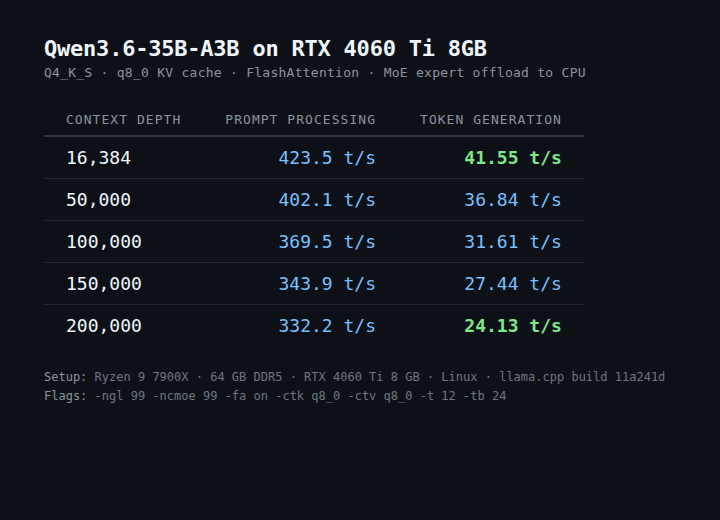
Just ran a 35B-parameter model on an RTX 4060 Ti 8 GB: • 41 tok/s at 16k context • 24 tok/s at 200k context
Recipe + benchmarks below 🧵
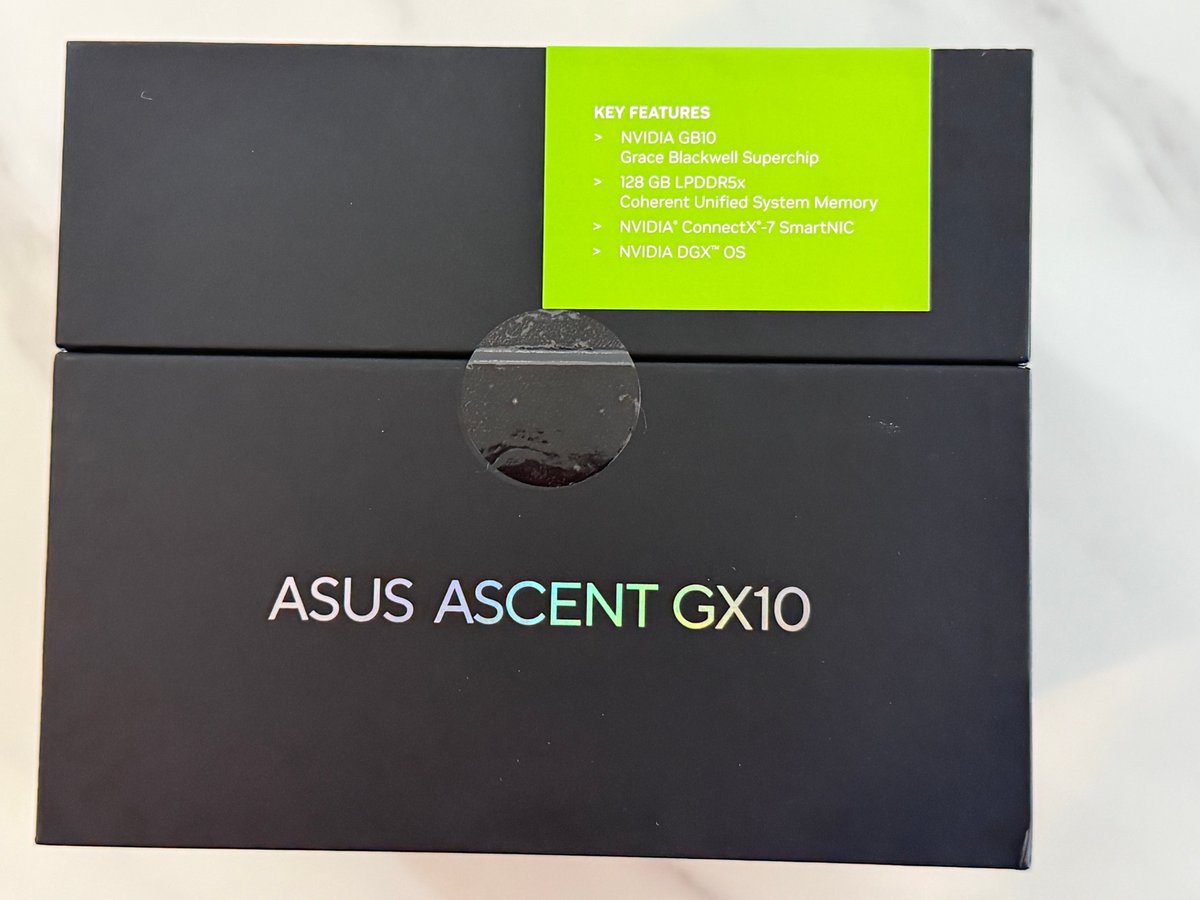
Honest opinion after 2 months of using DGX Spark (GB10)
---
The Good:
1. you get to use most of the software compatible with CUDA, which is really powerful
2. when dflash and turbo quant are out, I get to try all these optimizations (it will take a while for mlx, amd, intel to catch up)
3. Huge VRAM: you get to benchmark and test many more models. I feel I've learned a lot about hosting LLMs, optimization, etc
4. Currently I only have 1, but you can stack them with the QSFP port, which makes it really powerful. You can run SOTA models like DeepSeek V4 Flash and MiniMax 2.7
5. Really shines when running MoE models, which most single consumer cards (3090/4090/5090) cannot do
6. ComfyUI runs very easily and quite fast on it
just from 2 months of owning it. Really worth it if you want to deep dive into any new models
---
The Bad:
1. Mac Studio is probably better value for money. The throughput is bad (273GB/s) compared to Mac Studio or even the 5yo RTX 3090
You're basically paying a Nvidia premium
2. Price keeps going up, my supplier told me the next batch of GB10 is going up another $500 because of demand and RAM prices
3. Tokens per second is really disappointing out of the box, the RTX 3090 has better tps.
Even Qwen3.6-27b before optimization only gets 3-5 tokens decoding
(I managed to contribute to @pupposandro's lucebox-hub to optimize Qwen3.6-27B to 35 tok/s on a GB10 DGX, but out of the box experience running it was bad)
4. For development work I'd want 60-80 tps, which this can't deliver without serious optimization work
Footnote: From everything I learned with the DGX Spark, I ended up buying an RTX Pro 6000 Blackwell, which is much more suitable for fine-tuning and good tps setups.
How Apple mfrs think this goes
>be me
>drop $1600 on two RTX 3090s used off eBay
>"48GB VRAM, I'm basically a datacenter now"
>they arrive in anti-static bags that look like they've been through a war
>plug them into my motherboard and it sounds like a jet engine taking off
>neighbors probably think I'm mining crypto again
>install llama.cpp, download qwen3.6-27b quantized
>"Q4_K_M, only 16GB, totally fits"
>start LM Studio on port 1234
>type "hello" into the chat box
>GPU fans spin up to 100% instantly
>wait 8 seconds for a response
>>"Hello! How can I assist you today?"
>I've seen faster responses from my grandma reading a text aloud
>try Q8_0 quantization because "quality matters"
>OOM error, obviously
>spend three hours tweaking n_gpu_layers and n_ctx like it's some kind of dark art
>finally get it running at 4 tokens per second
>ask it to write me a poem about my GPUs
>>"Two cards of silicon and light / They hum through the endless night"
>"bro this is actually fire"
>show it to someone on Discord
>”why are you running LLMs locally when you could just use an API for free"
>explain that the joy isn't in the output, it's in watching 94% VRAM usage and knowing nobody else has access to my model
>they don't understand
>close Discord, open LM Studio again
>"let's try a longer context window"
>crash
OpenClaw 2026.3.22 🦞
🏪 ClawHub plugin marketplace
🤖 MiniMax M2.7, GPT-5.4-mini/nano + per-agent reasoning
💬 /btw side questions
🏖️ OpenShell + SSH sandboxes
🌐 Exa, Tavily, Firecrawl search
This release is so big it needs its own table of contents. https://t.co/XvRbXEduGC
Everyone running 20 agents pulling in £1,000 every minute with OpenClaw while I struggle to tell PicoClaw + Qwen3.5:4b to send me an actual daily weather report instead of a two-word text reminder “weather report”.