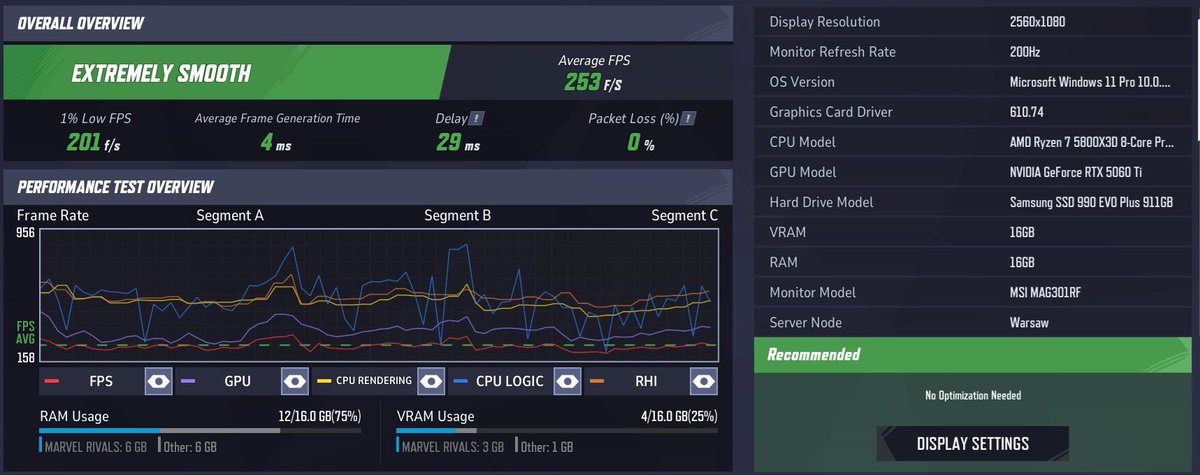
@AhStream24573@Plansh03@flyg1st 5800X3D, 5060Ti 16GB
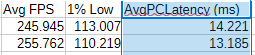
top row is DLSS Performance (50% resolution upscaled)
bottom row is AA off 50% resolution
DLSS only adds 1ms while improving the visual clarity massively, without upscaling the game looks like from early 2000s with how blurry it is, can't even read text
@AhStream24573@Plansh03@flyg1st I can show PC Latency numbers that make DLSS a viable option, I just run NVIDIA FrameView to measure latency during the benchmark
and if you say most people do X, well most people are technologically clueless and have no idea about any nuance
@flyg1st I'm experienced in squeezing every bit of juice out of computers so I may know if you need to do anything
this is 5800X3D CO-30; 16GB dual-channel 3600MHz 18-20-20-40; 5060Ti 16GB +350 core, +3000MHz memory
@flyg1st your cpu can't keep up with gpu, what cpu you have? you might need to upgrade or learn debloating/overclocking, Rivals on old hardware is often stuttery garbage
@AhStream24573@Plansh03@flyg1st in Rivals you have to use it tho otherwise 99% GPU usage, I measured all of this during benchmarks and I stick with DLSS Performance, maybe you could get lower latency with AA off and custom render resolution, but it just looks terrible and blurry
@mel0nFPS my main game is OW and I can only enjoy Rivals if I don't take it seriously, think of it as an arcade game, it's when you just want to autopilot and shoot red pixels