A $10,000 Lottery Ticket Draw is now live on Herond Point 🎰
The rules are simple:
• 1 Daily Check-In = 1 Lottery Ticket
• Stay active 5 out of 7 days = +1 Bonus Ticket
• 1 Ticket = 1 Entry for Grand Draw
Every ticket enters 2 draws:
• Weekly Draw: Every Monday
• Grand Draw: At the end of Season 1
Level up your chances: Create a Keyless Wallet + complete one transaction to unlock +15% bonus tickets.
The more tickets you collect, the higher your chances of winning.
Join now: https://t.co/YcVxpuQEKI
Introducing Herond Point, your Proof of Contribution on the Internet, built directly into Herond Browser!
→ Complete quests & Browse-to-Earn Herond Point daily
→ Redeem rewards, vouchers & on-chain badges
→ Collect Lottery Tickets & enter the $10,000 Lottery Draw
→ Join Grand Launch Season 1 with $50,000+ in rewards 🎁
Every Herond Point you earn becomes part of your growing contribution record within the Herond ecosystem.
Start earning today: https://t.co/IQ8fOqIqBc
Nói thật đi... 👀
Bạn có muốn thấy Messi nâng cúp thêm một lần nữa không? 🏆🇦🇷
Còn ở Herond Cup, team Quinn cũng đang tăng tốc từng ngày.
Anh em nào muốn chiến cùng một đội vui vẻ, nhiệt huyết và máu lửa thì vào team nhé. Hiện tại thì đang cố giữ TOP 1 ạ :">
Welcome aboard! 💙
@HerondBrowser
⚽ Two weeks into the Herond Cup!
The top teams are holding their ground, while the individual leaderboard has seen some fresh moves.
The race is getting louder and way more exciting.
Join the Herond Discord to catch every key moment: https://t.co/fYepsJc3qU
Live standings and join the race: https://t.co/jhHewyw0mb
I’ve been using @HerondBrowser for months because it fits the way I actually live and work; smart AI features, strong privacy, and clean web3 tools all in one place.
So when version 2.6.6 dropped for desktop, I updated immediately.
𝗪𝗵𝗮𝘁’𝘀 𝗡𝗲𝘄 𝗶𝗻 𝘃𝟮.𝟲.𝟲
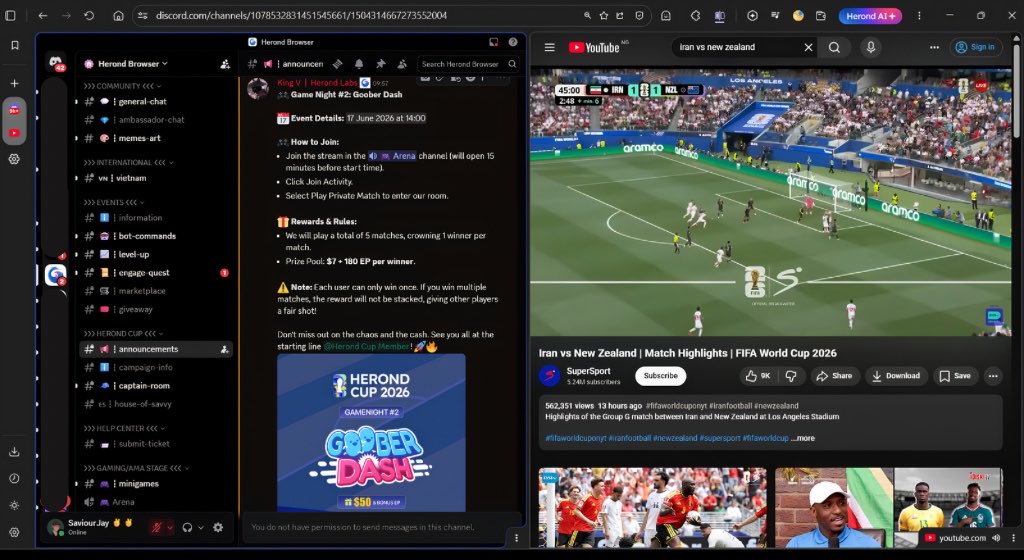
• Split View: Browse two pages side-by-side in one window. Less tab switching, more productivity.
• Native Desktop Notifications: Stay updated without keeping tabs open.
👉🏽 𝗠𝘆 𝗙𝗮𝘃𝗼𝗿𝗶𝘁𝗲 𝗙𝗲𝗮𝘁𝘂𝗿𝗲: 𝗦𝗽𝗹𝗶𝘁 𝗩𝗶𝗲𝘄
The moment I opened the browser after updating, I dove straight into Split View and I’ve been hooked ever since.
One half of my screen had Discord open, where I was bouncing between servers: catching up with friends in one, checking work channels in another, and staying active in community groups.
On the other half, I had YouTube playing World Cup highlights from matches I completely missed.
Everything was right there, side by side, flowing naturally. I could react in Discord while the highlights kept rolling without interruption.
I really enjoyed the Split View feature from the first minute I tried it. I’ve been flexing it all day.
It genuinely feels like the browser is working with me instead of against me. Less tab switching, more actually getting things done.
Out of everything new in this update, Split View has quickly become my favorite feature so far.
————
Overall, v2.6.6 is a thoughtful step forward for Herond.
The browser already excels at privacy, ad-blocking, and seamless web3 access with its built-in wallet. These new tools just make the whole experience smoother and more enjoyable for real life.
Split View especially has changed how I multitask, and I’ve been showing it off to friends all day because it’s that satisfying.
If you already use Herond, update right now, you’ll love the difference.
And if you haven’t tried it yet, this version is a great place to start.
👉🏽https://t.co/LoGN5uFy27
Thrilled to announce our partnership with @iqwiki, the world's largest blockchain and crypto encyclopedia!
Herond Browser now has an official page on https://t.co/uBMSUV9BtM. Whenever you want to learn about Herond, there's now a place that's accurate, neutral, and verifiable by anyone. That's the kind of presence that matters in Web3.
👇