Un desarrollador ucraniano creó un agujero negro en su terminal para obligarse a tomar descansos.
Cuanto más trabajas sin parar, más crece y deforma tu código con su lente gravitacional. Descansas y se encoge.
🚨 ¡BOMBAZO de Google!
Acaban de soltar un curso GRATIS de solo 1 hora sobre Ingeniería Agentiva que destroza a la mayoría de cursos de pago que cuestan cientos de dólares 🔥
En 60 minutos vas a aprender más que en 10 cursos caros.
Timestamps clave:
00:00 → Cómo construir tu primer agente de IA
08:24 → Memoria de agente (corta, persistente y larga)
28:34 → Bucles agentivos y agentes de larga duración
40:04 → MCP vs API (esto solo ya vale todo el curso)
1:00:22 → Sistemas multiagentivos
Míralo hoy.
¿Lo vas a ver ahora o lo guardas para “después”? 👀
Un chico de 21 años de Shanghái gastó sus últimos $3,000 en cinco Mac minis.
Sus padres pensaron que se había vuelto loco.
Cinco computadoras diminutas.
Sin mejora en el apartamento.
Sin ahorros restantes.
No las compró para juegos ni criptomonedas.
Las usa para ejecutar agentes de IA privados para pequeñas firmas contables:
leyendo facturas, buscando contratos, redactando informes, respondiendo correos rutinarios de clientes.
Las firmas pagan $450/mes porque sus documentos nunca salen de sus máquinas locales.
> 8 firmas x $450 = $3,600/mes
> $3,000 costo de hardware
> pagado antes de la segunda factura de alquiler
Una configuración de GPU en la nube le habría costado 10 veces más.
Un SaaS de IA normal seguiría cobrándole cada vez que un cliente ejecutara otro flujo de trabajo.
Cinco Mac minis no son un centro de datos.
Pero para un chico de 21 años sin inversores y sin capital de maniobra, son cinco empleados que trabajan mientras él duerme.
🚨 ¡BOMBA para devs!
Anthropic acaba de soltar un curso 100% GRATIS sobre Loop Engineering con Fable 5 y está rompiéndola.
Este curso reemplaza cualquier tutorial de pago de Claude Code que exista ahora mismo.
Mira lo que te enseñan (con timestamps):
00:00 → Cómo funciona Claude Code por dentro
05:01 → El agentic loop explicado (esto sí que vale oro)
16:21 → La función que el 99 % de los devs ignora
19:01 → Por qué la voz le gana a escribir
32:34 → Revisión automática de código con Draft PRs
58:39 → Fable 5 para trabajo que NO es código
Guárdalo YA. Míralo completo. Y compártelo con quien esté perdiendo tiempo pagando cursos.
El que lo vea entero va a tener ventaja brutal los próximos meses 🔥
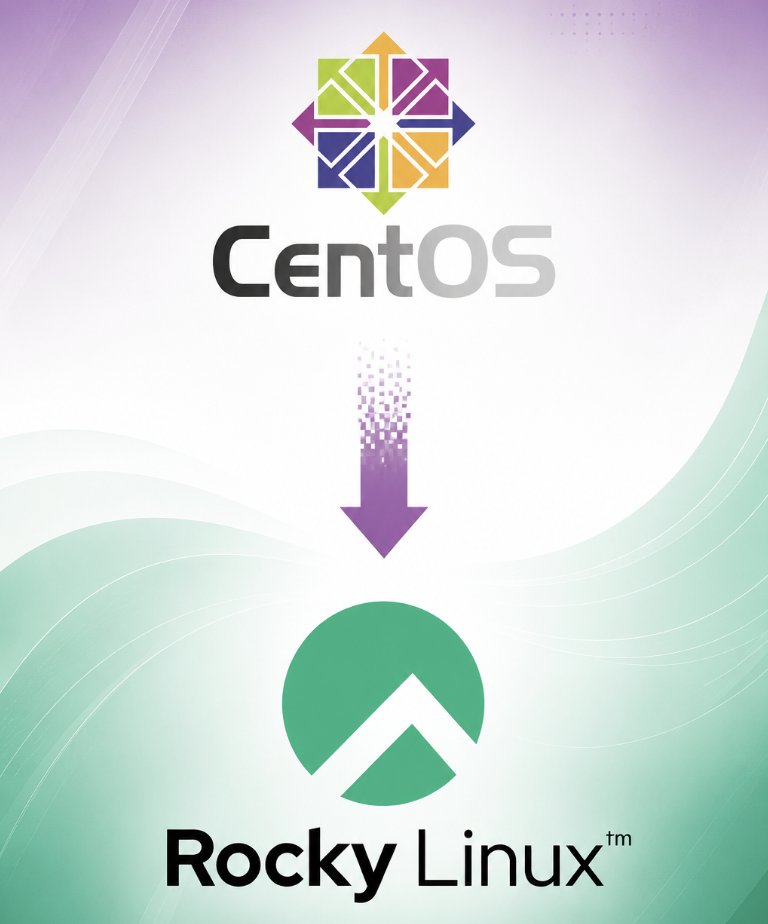
Red Hat might have committed the biggest open source betrayal in Linux history.
CentOS had been the backbone of enterprise Linux since 2004. Disney, Toyota, Verizon, GoDaddy. All running on it. All completely free.
In December 2020, Red Hat announced CentOS 8 would die eight years earlier than promised.
Gregory Kurtzer, the original co-founder of CentOS, was still watching.
Hours after the announcement he committed to building a replacement. He named it after Rocky McGaugh, his CentOS co-founder who died in 2004 without ever seeing the project succeed.
He called it Rocky Linux.
Within two months Rocky Linux had 10,000 contributors. Within half a day of its first stable release, it was downloaded over 10,000 times. AWS backed the build infrastructure. Within a year it was running in production across the industry.
Red Hat did not stop there.
In 2023 they restricted access to RHEL's source code entirely, aiming directly at Rocky Linux and its rival AlmaLinux. Without the source, neither project could stay compatible.
The community's response was bigger than one distro this time.
Oracle, SUSE and Rocky's parent company CIQ formed an entirely new alliance called OpenELA specifically to keep enterprise Linux source code public. Their actual tagline: "No subscriptions. No passwords. No barriers. Freeloaders welcome."
Red Hat tried to kill CentOS once. The community rebuilt it.
Red Hat tried to cut off the replacement. The community built an alliance to protect it.
Some companies think open source means you can take it back whenever you want.
The community keeps proving them wrong.
Someone turned Kubernetes trauma into a video game.
It is called K8sQuest. 50 levels. Each one breaks something real in a local cluster. CrashLoopBackOff. ImagePullBackOff. Pending pods. Broken services. RBAC failures.
Your job is to fix it using real kubectl commands on a real local cluster. No cloud. No AWS bill. No risk of actually taking down production while you learn.
- 5 worlds, beginner to advanced, 10,200 total XP
- Real-time monitoring so you watch your fix take effect live
- Progressive hints that unlock only when you are actually stuck
- Post-mission debriefs explaining why the fix worked, with real production incident examples
- Built-in safety guards so you cannot nuke your own cluster by mistake
- Level 50 throws 9 simultaneous failures at you at once
This is not a tutorial. This is a flight simulator for the exact 2am panic every Kubernetes engineer has lived through.
1.2k stars. 126 forks. Apache-2.0. Free.
Repo here: https://t.co/j2mzCduLlN
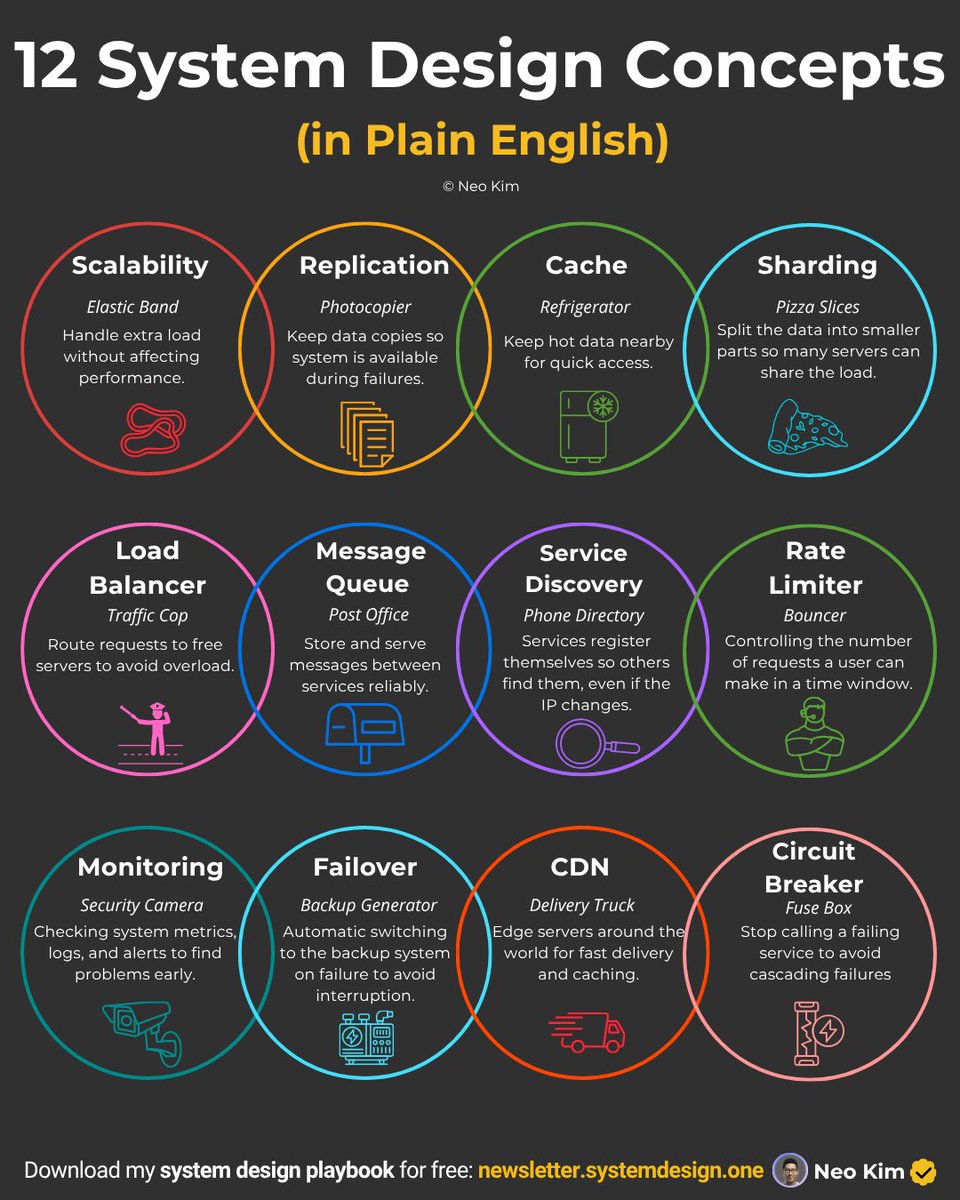
Six books that will teach you system design properly, not just for the interview.
Start here if you want to truly understand how real systems work (Save this for later): ↓
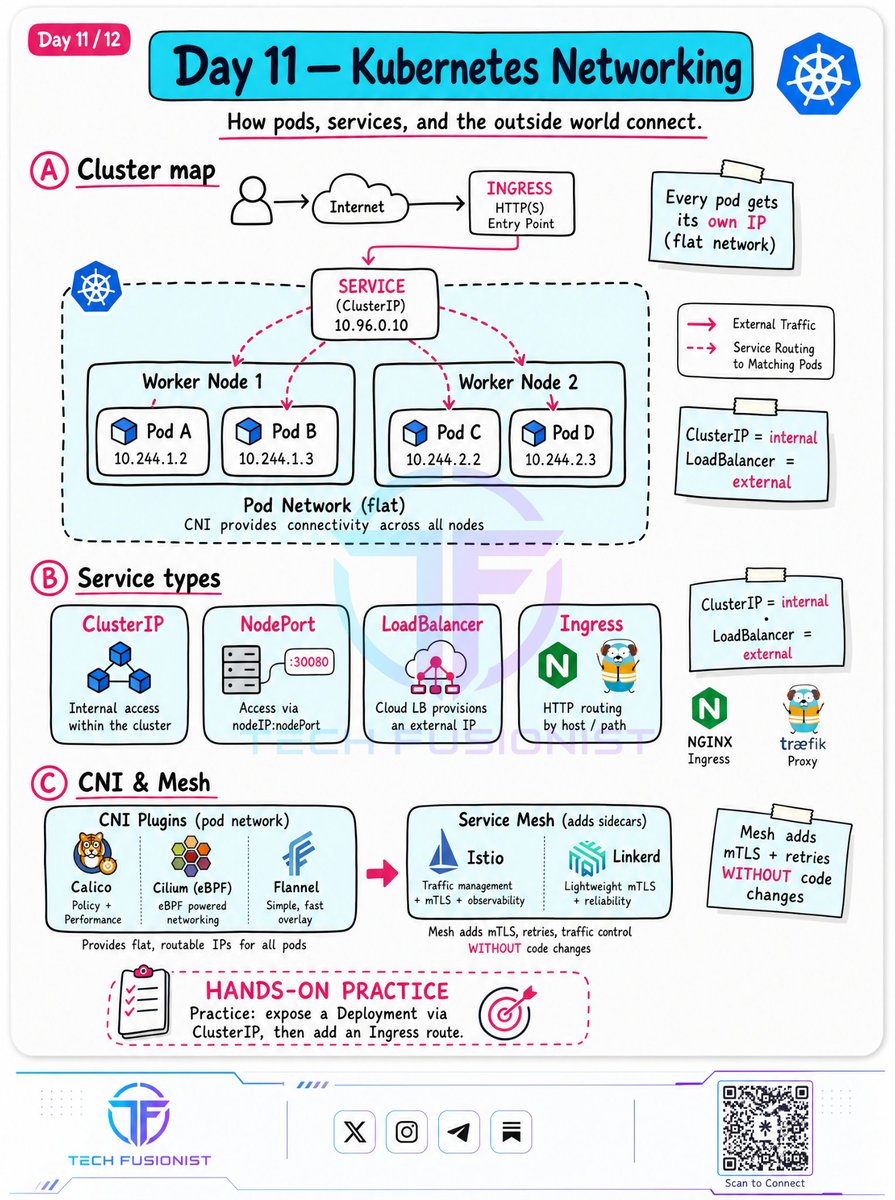
Day 11 - Kubernetes Networking (K8s Networking)
Kubernetes introduces a dynamic, flat-network paradigm that every DevOps engineer must master.
> The Flat Network:
Every single pod in a cluster gets its own unique, routable internal IP address. Pods can talk to all other pods across nodes without NAT.
> Service Types:
Core primitives to expose your workloads:
- ClusterIP: Internal access restricted within the cluster.
- NodePort: Exposes the service on a static port across each Node’s IP.
- LoadBalancer: Automatically provisions a cloud provider’s external load balancer.
- Ingress: Manages external HTTP/S routing to services via host or path matching.
> CNIs & Service Meshes:
Research Container Network Interface (CNI) plugins like Calico or Cilium (powered by eBPF), and see how a Service Mesh (like Istio) can inject sidecars to provide advanced features like mutual TLS (mTLS) and retries without changing a single line of application code.
¡ALGUIEN ACABÓ CON EL DOLOR DE BUSCAR TORRENTS EN 2026!
Olvídate de las páginas llenas de anuncios, botones falsos que abren 17 pestañas y resultados muertos con 0 seeders. Alguien se hartó y creó la herramienta definitiva.
Se llama torlink y es un cliente torrent para terminal que hace exactamente lo que todos queremos:
• Escribes tu búsqueda y ataca al mismo tiempo a un montón de trackers confiables
• Los resultados llegan en tiempo real, ordenados por fuente, tamaño y seeders
• Flecha arriba/abajo → Enter o aprieta “d” → descarga directa al disco
• Si un sitio está caído, lo salta automáticamente y sigue con los demás
• Las descargas van en segundo plano y retoman solas si cierras la terminal
Todo en un solo comando:
npx torlink
Solo necesitas Node.js. Sin instalar nada, sin navegador, sin cuentas raras, sin basura en tu máquina. Código abierto y licencia MIT.
Es simple, rápido, limpio y hace una sola cosa… pero la hace jodidamente bien.
Si estás cansado de sufrir buscando torrents, esto es lo que estabas esperando. ¿Ya lo probaste? Comparte si te salvó la vida (o al menos la paciencia).
Microsoft finally lets you install WSL Containers.
It just went live in public preview today.
Developers are already celebrating in the comments. One wrote: "The days of Docker Desktop are numbered, I hope."
Here is what actually shipped:
→ A new CLI called wslc.exe ships directly with WSL. Same commands you already know. Just type wslc instead of docker.
→ A full developer API lets Windows apps run Linux containers as part of their own code in C, C++ and C#.
→ File access on the new virtiofs filesystem is 2x faster than before.
→ Works with VS Code Dev Containers, Microsoft Defender and Intune out of the box.
→ Install today with one command: wsl --update --pre-release
Docker Desktop costs $9 to $24 per user per month for commercial use. WSL Containers is built into Windows and free.
General availability lands this fall.
Full announcement here: https://t.co/ns7AWUjMBf
Adiós Frontend, Backend y Diseño. Según el creador de Claude Code estos son los roles del futuro:
① Prototipador → crea ideas locas
② Builder → construye los productos
③ Sweeper → limpia, simplifica y borra slop
④ Grower → hace crecer el producto
⑤ Mantainer → seguridad y rendimiento
Una persona podría tener asignado 2 o 3 roles.
Según él, la idea es dejar de pensar por dominio específico y más por capacidades. ¿Qué te parece?
El padrino de la inteligencia artificial: "Si duermes bien esta noche, puede que no hayas entendido esta conferencia".
Esta conferencia de 47 minutos es lo mejor que he visto sobre inteligencia artificial en los últimos meses.
Definitivamente te ayudará a entender cómo funciona realmente y hacia dónde se dirige.
Geoffrey Hinton construyó las redes neuronales que hay detrás de cada inteligencia artificial actual y luego dejó Google para advertir al mundo sobre ello.
La parte que nadie quería escuchar:
La inteligencia artificial ya está desarrollando habilidades que sus creadores no tenían previstas.
En la mayoría de las tareas cognitivas ya está por delante de nosotros.
La pregunta ya no es si nos superará, sino cuándo.
La única decisión que queda es de qué lado de esa línea te encuentras.
Ahora mismo, la persona promedio abre Claude, escribe algo, obtiene una respuesta y cierra la pestaña.
Creen que están utilizando inteligencia artificial. Quizás estén usando un 10% de ella.
Repasé toda su conferencia y construí conceptos prácticos a partir de lo que estaba describiendo.
La brecha no estará entre las personas que usan inteligencia artificial y las que no.
Estará entre las personas que la entienden y las que no.
Empieza hoy con estos 20 conceptos de inteligencia artificial.
El CEO de Atlassian, después de despedir al ingeniero que construyó una infraestructura valorada en 1.790 millones de dólares...
...y descubrir que el tipo acaba de publicar un video de 38 minutos mostrando, en detalle, todo lo que construyó.
Gratis.
Para que cualquiera lo vea.
Y lo copie. 💀