Most businesses don’t have an AI problem.
✓ They have a systems problem.
✓They have leads falling through the cracks.
✓Customer questions being answered manually.
✓Employees spending hours on repetitive tasks.
✓Data sitting across different tools.
✓Reports being created manually.
✓Follow-ups being forgotten.
And opportunities being lost simply because the business doesn't have the right systems in place.
Yet the usual response is:
“Let’s buy another AI tool.”
We think there’s a better way.
Meet EDGE AI @edge_agen .
We’re building an AI-native technology company focused on one thing:
✓Turning real business problems into intelligent systems that actually work.
✓We don't believe AI should exist just because it's trending.
✓We don't believe businesses need dozens of disconnected AI subscriptions.
✓And we definitely don't believe adding “AI” to a product automatically makes it innovative.
AI should solve problems.
So we build:
✓AI Agents that can reason, use tools and complete real tasks.
✓AI Automations that eliminate repetitive workflows and connect the systems businesses already use.
✓AI Growth Systems that help businesses capture leads, improve customer experiences and increase operational efficiency.
✓AI Consulting that identifies where AI can create the most measurable value.
✓Intelligent Products designed around AI from the ground up.
√ Our approach is simple:
✓Find the bottleneck.
✓Understand the workflow.
✓Design the system.
✓Deploy the intelligence.
✓Measure the outcome.
✓Improve continuously.
Because the goal isn't to make a business look innovative.
The goal is to make it run better.
Imagine a business where:
A new lead gets an immediate response.
An AI agent qualifies that lead and updates the CRM.
Customer questions are handled instantly, while complex issues reach a human.
Reports are generated automatically.
Follow-ups happen without someone remembering to send them.
And the team spends more time on work that actually requires human judgment.
That's the kind of future we're building toward.
Not AI for hype.
Not AI for demos.
Not AI because everyone else is doing it.
AI that does the work.
And this is only the beginning.
✓ We're building EDGE AI in public experimenting, building systems, testing ideas, learning from failures, and turning what we learn into practical solutions for businesses.
If you're a founder, business owner, developer, agency, or simply interested in what happens when AI moves from conversation to execution, you're in the right place.
The next generation of businesses won't simply use AI.
They'll be built around it.
Welcome to EDGE AI.
We don't just use AI.
We engineer it to solve real problems.
EDGE AI — Build the AI-native business.
🌐 https://t.co/9rVJ3GrD7f
Follow the journey. We're just getting started.
ChatGPT is only the front door to AI.
Behind that simple chat interface is an entire technology stack.
✓Models.
✓Agents.
✓Data.
✓Retrieval.
✓Memory.
✓Tools.
✓Security.
✓Evaluation
.
✓Observability.
✓Automation.
And each layer solves a different problem.
THE MODERN AI STACK:
✓LLMs
OpenAI, Claude, Gemini, Llama, Mistral
→ The reasoning and generation layer.
✓AI Agents
LangGraph, CrewAI, AutoGen, Agno
→ Turn models into systems that can reason, use tools and execute tasks.
✓RAG
LangChain, LlamaIndex, Haystack, GraphRAG
→ Give models access to relevant external knowledge.
✓Embeddings
OpenAI, Cohere, Voyage, BGE
→ Convert information into
representations machines can search and compare.
✓MCP & Tools
→ Connect AI to databases, APIs, applications and external systems.
✓Memory
Redis, Mem0, Zep, Neo4j, Chroma
→ Give AI systems the ability to maintain useful state and context.
✓Security & Guardrails
→ Control what the system can access, generate and execute.
✓Evals & Observability
LangSmith, Langfuse, Phoenix, Ragas
→ Measure performance, trace failures and understand what happened inside the system.
✓Automation & Orchestration
n8n, Make, Zapier, Airflow, Prefect
→ Connect AI capabilities to real business workflows.
But here's the part people often miss:
These aren't separate tools sitting on a checklist.
They're components of a system.
Your model can be excellent and your retrieval can still be terrible.
Your RAG can retrieve the right information and your agent can still misuse it.
Your agent can make the right decision and your tool permissions can still create a serious problem.
And you can have all of it working in a demo while having no idea why it breaks in production.
That's why AI engineering isn't simply:
“Which model should I use?”
It's:
How should all these components work together?
A production AI system has to answer questions like:
→ Where does the data come from?
→ What context does the model receive?
→ Which tools can it access?
→ What actions is it allowed to take?
→ What happens when a tool fails?
→ How do we evaluate the output?
→ How do we monitor the system?
→ When should a human take over?
More AI tools ≠ a better AI system.
The real advantage is understanding the architecture behind them.
Because the future isn't just about people who know how to use AI.
It's about people who know how to engineer AI systems that actually work.
EDGE AI — Build the AI-native business.
What layer of the AI stack are you currently learning? 👇
#AI #AIEngineering #AIAgents #GenAI #LLM #MachineLearning
🧵 10 FREE LLMs YOU SHOULD BE USING IN 2026
You don't need a $200/month AI stack to build with LLMs.
There are powerful models you can access for free through chat apps, APIs, or open-weight releases.
The trick isn't finding one best model.
It's knowing which model fits the job. 👇
1. Gemini
Great all-rounder for reasoning, coding, research and multimodal tasks.
Use it for:
→ Research
→ Coding
→ Documents
→ Images
→ Prototyping
2. DeepSeek
A strong option when you're looking for reasoning, mathematics and coding without paying upfront.
Use it for:
→ Complex reasoning
→ Math
→ Coding
→ Technical analysis
3. Qwen
One of the models worth knowing if you're building software.
Use it for:
→ Coding
→ Multilingual tasks
→ Agents
→ Long-context workflows
Qwen has become a major open-model family with models spanning coding, language and vision.
4. Llama
Meta's Llama family remains one of the biggest ecosystems for developers working with open-weight models.
Use it for:
→ Local AI
→ Fine-tuning
→ Chatbots
→ AI applications
→ Experimentation
5. Mistral
Fast, efficient models that are particularly interesting for developers who want capable models without enormous infrastructure requirements.
Use it for:
→ Text generation
→ Coding
→ RAG
→ Local deployments
→ AI applications
6. Gemma
Google's smaller open-weight model family.
Great when you want to experiment locally without requiring a massive AI infrastructure setup.
Use it for:
→ Local AI
→ Lightweight applications
→ Research
→ Prototyping
7. GLM
A model family worth exploring for coding and agentic workflows.
Especially interesting if you're experimenting beyond the usual ChatGPT/Claude ecosystem.
8. Kimi
Interesting for developers working with long-context and agentic workflows.
Use it for:
→ Large-context tasks
→ Research
→ Agents
→ Complex workflows
9. Phi
Microsoft's smaller model family.
The interesting part?
Small models can be surprisingly capable.
They're useful when you care about:
→ Local inference
→ Lower compute requirements
→ Edge applications
→ Experimentation
10. OLMo
If you care about genuinely open AI research, OLMo deserves attention.
Unlike many models marketed as “open source,” OLMo releases substantially more of the underlying research artifacts.
Use it for:
→ AI research
→ Experimentation
→ Understanding model development
→ Open AI research
Here's the real hack 👇
Don't build your AI application around one model.
Build a system that can route tasks.
For example:
Simple task → Fast model
Complex reasoning → Reasoning model
Coding → Coding-focused model
Huge context → Long-context model
Private workload → Local model
High-volume workload → Low-cost model
That's how you move from:
I use AI.
to
I engineer AI systems.
And you don't necessarily need to pay for every model to start experimenting. Free API tiers and model gateways can give developers access to multiple models, although limits and terms vary by provider.
Save this list. 🔖
Then send it to a developer who thinks building with LLMs automatically means paying for expensive APIs.
Which free LLM are you building with right now? 👇
🧵 10 AI VIDEO TOOLS YOU SHOULD KNOW IN 2026
Stop scrolling through “50 AI tools” lists.
If you're creating content, ads, product demos, cinematic videos or social media clips, these are the AI video tools worth putting on your radar.
And no , you don't need all of them.
You need the right tool for the right job.
1. Google Veo 3.1
For cinematic AI video with native audio, speech, realism and strong creative control.
Great for: → Cinematic scenes
→ Storytelling
→ Ads
→ Product visuals
→ Dialogue
2. Runway
More than a generator, it's becoming an AI video production environment.
Great for:
→ Image-to-video
→ Text-to-video
→ Video editing
→ Character consistency
→ Creative control
3. Kling AI
Strong option for realistic motion, cinematic clips and high-volume generation.
Great for:
→ Product videos
→ Social content
→ Characters
→ Dynamic scenes
→ Image-to-video
Kling 3.0 currently supports text/image-to-video, start/end frames, multishot generation and audio/speech in its Pro model.
4. Luma Dream Machine
Excellent when you want to turn still images into dynamic cinematic sequences.
Great for:
→ Image-to-video
→ Camera movement
→ Product shots
→ Visual storytelling
→ Creative experiments
5. Pika
Built for fast, creative and social-first video generation.
Great for:
→ TikTok/Reels
→ Visual effects
→ Memes
→ Quick experiments
→ Short-form content
6. Hailuo AI
A useful option for creators who want fast AI-generated clips without building a complicated workflow.
Great for:
→ Short-form content
→ Character shots
→ Story concepts
→ Visual experimentation
7. HeyGen
Different lane entirely.
Instead of generating cinematic scenes, HeyGen focuses heavily on AI avatars and presenter-style videos.
Great for:
→ Marketing videos
→ Tutorials
→ Training
→ Sales videos
→ Multilingual content
8. Synthesia
Built around AI-presenter videos for businesses and teams.
Great for:
→ Corporate training
→ Internal communication
→ Tutorials
→ Presentations
→ Educational content
9. Grok Imagine Video
xAI's video generation option is another one worth watching, particularly if you're already inside the Grok ecosystem.
10. Wan 3.0
Worth knowing if you're interested in more technical/open model workflows.
Current implementations support text/image-to-video, native audio and multiple video resolutions/durations.
Here's the part most people get wrong:
Don't ask:
✓Which AI video generator is the best?
Ask:
What am I trying to create?
Cinematic film? → Veo / Runway / Kling
Image → video? → Luma / Kling / Runway
Social experiments? → Pika / Hailuo
AI presenter? → HeyGen / Synthesia
Technical/open workflows? → Wan
The AI video market isn't about finding one magical tool.
It's about building a video generation stack.
And the creators who understand that will move much faster than the ones constantly searching for the best AI tool.
Save this. 🔖
And send it to the creator who is still using only one AI video tool.
EDGE AI — Build the AI-native business.
What AI video tool are you currently using? 👇
Most people are learning how to build AI agents.
The next skill is learning how to engineer the systems around them.
Because an LLM + prompt + tools isn't a production agent.
It's the beginning.
Here's what agent engineering actually looks like: 🧵👇
ChatGPT, Claude & Grok are cooking… 🔥🔥🔥
But Gemini?
Don’t sleep on it.
The AI race is getting ridiculous.
Every time you think one model has pulled ahead, another drops an update and changes the conversation.
✓ChatGPT has its strengths.
✓Claude has its strengths.
✓Grok has its strengths.
✓Gemini has its strengths.
The real advantage isn't picking a “winner.”
It’s knowing which model to use for which job.
We’re entering an era where AI engineers won't just use one model.
They'll route the right task to the right model.
And that changes everything. 👀
The model isn't the moat.
The system you build around it is.
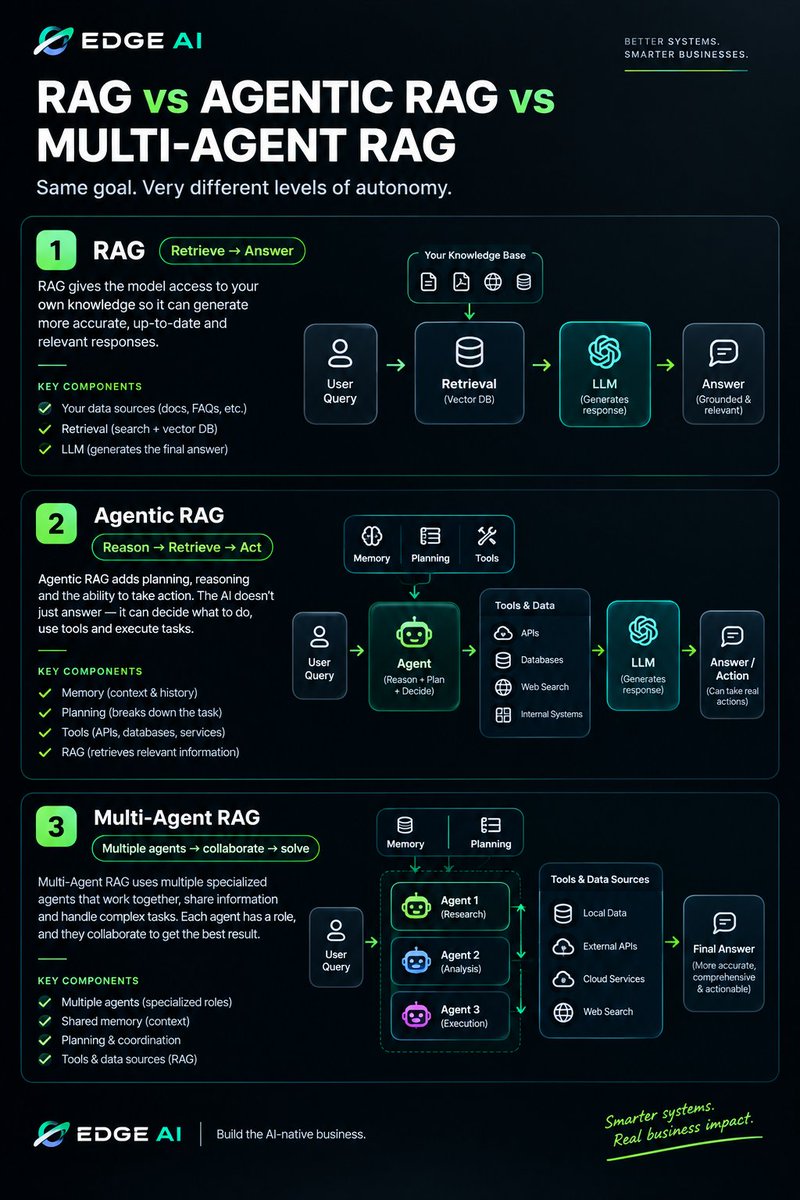
RAG can answer from your knowledge base.
But what happens when it can reason, plan, use tools and take action?
That’s where Agentic RAG enters.
And when multiple specialized agents work together?
Multi-Agent RAG.
Same foundation.
Very different capabilities.
The question isn't “Which one is better?”
It’s “Which architecture does the problem actually need?”
We broke it down below. 👇
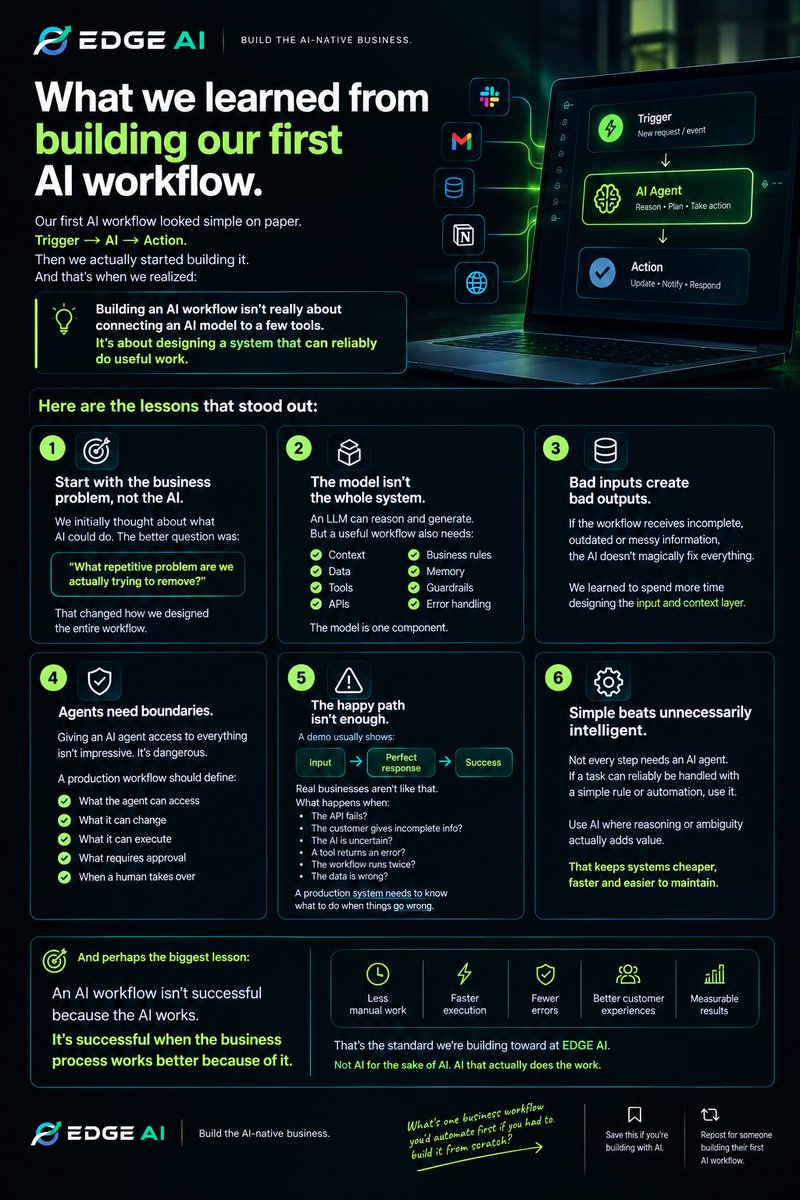
What we learned from building our first AI workflow.
Our first AI workflow looked simple on paper.
✓ Trigger → AI → Action.
Then we actually started building it.
And that's when we realized:
Building an AI workflow isn't really about connecting an AI model to a few tools.
It's about designing a system that can reliably do useful work.
Here are the lessons that stood out:
1. Start with the business problem, not the AI.
We initially thought about what AI could do.
The better question was:
“What repetitive problem are we actually trying to remove?”
That changed how we designed the entire workflow.
2. The model isn't the whole system.
An LLM can reason and generate.
But a useful workflow also needs:
→ Context
→ Data
→ Tools
→ APIs
→ Business rules
→ Memory when necessary
→ Guardrails
→ Error handling
The model is one component.
3. Bad inputs create bad outputs.
If the workflow receives incomplete,
outdated or messy information, the AI doesn't magically fix everything.
We learned to spend more time designing the input and context layer.
4. Agents need boundaries.
Giving an AI agent access to everything isn't impressive.
It's dangerous.
A production workflow should define:
→ What the agent can access
→ What it can change
→ What it can execute
→ What requires approval
→ When a human takes over
5. The happy path isn't enough.
A demo usually shows:
Input → Perfect response → Success.
Real businesses aren't like that.
What happens when:
The API fails?
The customer gives incomplete information?
The AI is uncertain?
A tool returns an error?
The workflow runs twice?
The data is wrong?
A production system needs to know what to do when things go wrong.
6. Simple beats unnecessarily intelligent.
Not every step needs an AI agent.
If a task can reliably be handled with a simple rule or automation, use it.
Use AI where reasoning or ambiguity actually adds value.
That keeps systems cheaper, faster and easier to maintain.
And perhaps the biggest lesson:
An AI workflow isn't successful because the AI works.
It's successful when the business process works better because of it.
Less manual work.
Faster execution.
Fewer errors.
Better customer experiences.
Measurable results.
That's the standard we're building toward at EDGE AI.
Not AI for the sake of AI.
AI that actually does the work.
EDGE AI — Build the AI-native business.
What's one business workflow you'd automate first if you had to build it from scratch? 👇
🔖 Save this if you're building with AI.
🔁 Repost for someone building their first AI workflow.
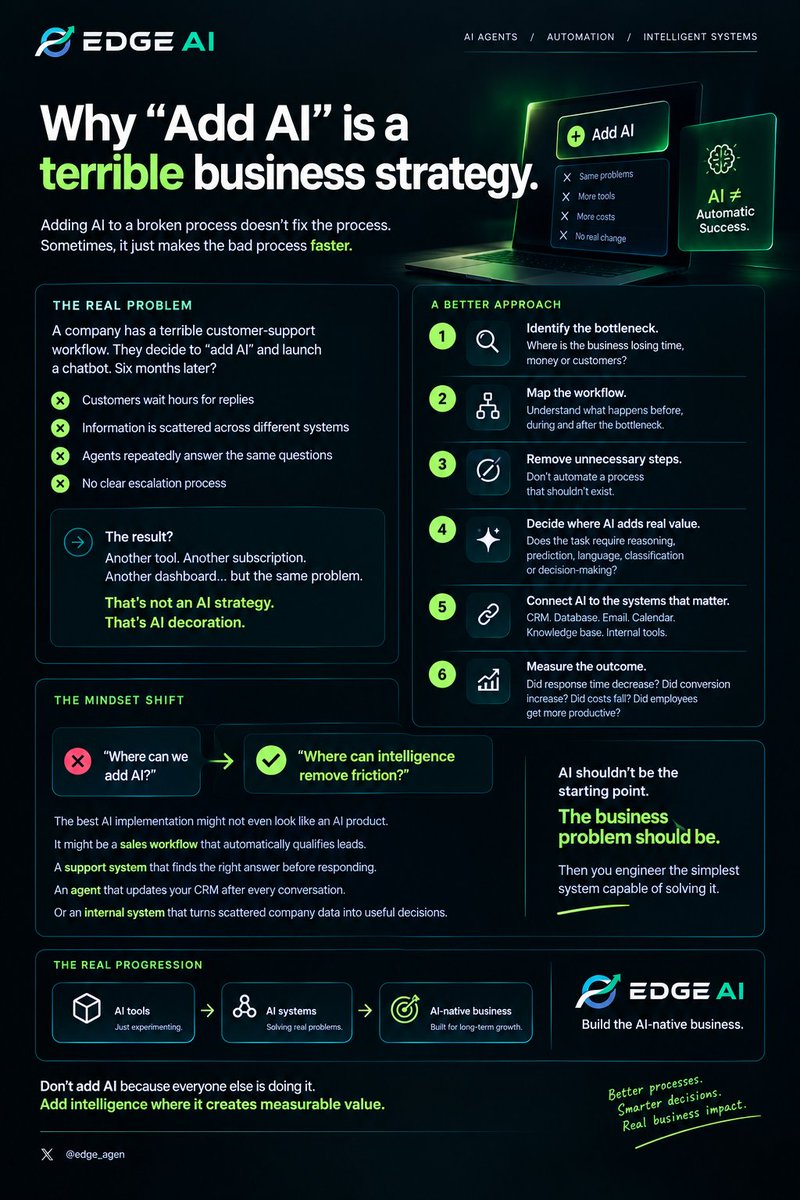
Why “Add AI” is a terrible business strategy.
A company finds a problem.
The first question shouldn't be:
“Where can we add AI?”
It should be:
“What is actually broken?”
Because adding AI to a bad process doesn't automatically fix the process.
Sometimes it just makes the bad process faster.
Imagine a company has a terrible customer-support workflow:
→ Customers wait hours for replies
→ Information is scattered across different systems
→ Agents repeatedly answer the same questions
→ No clear escalation process
They decide to “add AI.”
They launch a chatbot.
Six months later, they have:
another tool, another subscription, another dashboard…
But the underlying problem remains.
That's not an AI strategy.
That's AI decoration.
A better approach:
1. Identify the bottleneck.
Where is the business losing time,
money or customers?
2. Map the workflow.
Understand what happens before
during and after the bottleneck.
3. Remove unnecessary steps.
Don't automate a process that shouldn't exist.
4. Decide where AI actually adds value.
Does the task require reasoning,
prediction, language, classification or decision-making?
5. Connect AI to the systems that matter.
CRM. Database. Email. Calendar.
Knowledge base. Internal tools.
6. Measure the outcome.
Did response time decrease?
Did conversion increase?
Did costs fall?
Did employees get more productive?
If you can't measure the change, you don't really know whether the AI worked.
Here's the mindset shift:
❌ “Where can we add AI?”
✅ “Where can intelligence remove friction?”
The best AI implementation might not even look like an AI product.
It might be a sales workflow that automatically qualifies leads.
A support system that finds the right answer before responding.
An agent that updates your CRM after every conversation.
Or an internal system that turns scattered company data into useful decisions.
AI shouldn't be the starting point.
The business problem should be.
Then you engineer the simplest system capable of solving it.
That's how you move from:
AI tools → AI systems → AI-native business.
EDGE AI — Build the AI-native business.
Don't add AI because everyone else is doing it.
Add intelligence where it creates measurable value.
RAG vs Fine-tuning
This distinction matters.
Fine-tuning is generally about changing how a model behaves or performs a task through additional training.
RAG is about giving the model relevant external information at inference time.
If your problem is:
“I want the model to respond in a particular style or follow a particular pattern.”
Fine-tuning may be worth considering.
If your problem is:
“I need the AI to answer using our latest company information.”
RAG is often the more natural starting point.
And sometimes you use both.
The real business value of RAG
RAG can turn an AI chatbot from:
“I know a lot of things.”
into:
“I can answer questions using your company's knowledge.”
That opens the door to systems like:
Customer support agent
→ searches product docs → answers customer
Sales agent
→ searches product information → recommends the right solution
HR assistant
→ searches company policies → answers employee questions
Legal knowledge assistant
→ retrieves relevant documents → summarizes them with source references
Internal company assistant
→ searches thousands of internal documents → finds the information employees need
The model provides the reasoning and language.
Your knowledge base provides the context.
RAG connects the two.
The simplest way to remember it:
LLM = intelligence
Knowledge base = information
Retriever = finds what matters
RAG = brings the right information to the intelligence at the right time
And that's the real idea behind RAG.
You're not trying to make the AI magically know everything.
You're building a system that can find the right information before it answers.
That's a much better way to build useful AI for real businesses.
EDGE AI — Build the AI-native business.
If you were building a RAG system for a business today, what would you connect first: customer support, sales, HR, or internal company knowledge? 👇
🔖 Bookmark this if you're learning AI engineering.
🔁 Repost it for someone building with RAG.
RAG explained through a real business problem
A company can have the smartest AI model in the world and still give customers the wrong answer.
Why?
Because intelligence isn't the same as access to the right information.
Imagine you run an e-commerce company with:
✓50,000 products
✓Shipping policies
✓Return policies
✓Warranty documents
✓Customer records
✓Internal SOPs
Thousands of support conversations
A customer asks:
“Can I return this laptop after 14 days if I’ve already opened the box?”
A normal LLM might know what returns are.
But it doesn't automatically know your company's current return policy.
That's where RAG comes in.
RAG = Retrieval-Augmented Generation
Instead of asking the AI to answer purely from what it learned during training, you give it access to your own knowledge at the moment it needs it.
The basic flow looks like this:
Customer question
↓
Search your knowledge base
↓
Retrieve the relevant information
↓
Give that information to the AI model
↓
Generate an answer based on the retrieved context
↓
Return the answer
So when the customer asks about the laptop return:
The system searches your company documents.
It finds:
“Opened laptops can be returned within 14 days only if they meet the specified return conditions…”
The model then uses that information to formulate the response.
The important part is this:
The AI isn't guessing your policy.
It's being given the relevant source material before answering.
Here's where it gets powerful.
Imagine your company changes its return policy tomorrow.
With a traditional AI application, you don't want to retrain the entire model every time your policy changes.
With RAG, you can update the knowledge base.
The next customer asks the same question.
The system retrieves the new policy and generates an answer from it.
That's why RAG is so useful for businesses with information that changes frequently.
RAG isn't just “AI + documents”
A production RAG system typically has several moving parts.
1. Your knowledge
✓PDFs.
✓Web pages.
✓Product information.
✓SOPs.
✓FAQs.
✓Databases.
✓Internal documentation.
✓Customer records.
These become your knowledge sources.
2. Ingestion
The system collects and processes those sources.
Large documents are usually broken into smaller pieces called chunks.
Why?
Because you don't want to send an entire 300-page manual to the model for every question.
3. Embeddings
The chunks can be converted into numerical representations called embeddings.
These help the system compare the meaning of a user's question with the meaning of stored information.
4. Vector database
Those embeddings can be stored in a vector database.
When a customer asks a question, the system searches for the most relevant pieces of information.
5. Retrieval
The system retrieves the relevant context.
For example:
Question:
“Can I return an opened laptop after 14 days?”
✓Retrieved context:
✓Return policy
✓Laptop warranty policy
✓Electronics return conditions
6. Generation
The retrieved information is passed to the LLM.
The model then generates the final response.
So the architecture becomes:
USER
↓
QUERY
↓
RETRIEVAL
↓
RELEVANT CONTEXT
↓
LLM
↓
ANSWER
And here's the misconception I see a lot:
People think RAG means:
“Put all your company PDFs into a vector database and connect GPT.”
That's not enough.
A poor retrieval system can retrieve the wrong information.
And if you give the model bad context, you can still get a bad answer.
Production RAG requires thinking about:
→ Chunking
→ Metadata
→ Retrieval quality
→ Ranking
→ Permissions
→ Freshness
→ Citations
→ Access control
→ Evaluation
→ Monitoring
→ Hallucination handling
For example, an employee should be able to retrieve internal HR information they are authorized to see.
A customer shouldn't.
Retrieval isn't just a technical problem.
It's also a security and business logic problem.
What happens when you connect an AI agent to a CRM?
Most CRMs are good at storing information.
An AI agent can turn that information into action.
That's where things get interesting.
Imagine a new lead fills out your website form.
Without an AI agent:
Lead → CRM → Human checks it → Human researches → Human follows up
Hours can pass.
With an AI agent:
Lead → CRM → AI researches → AI qualifies → AI updates CRM → AI follows up → Human takes over when needed
Now the CRM isn't just a database.
It becomes part of an intelligent workflow.
Here's what the agent can actually do:
1. Capture & understand leads
A new lead enters the CRM.
The agent can analyze:
→ Name
→ Company
→ Industry
→ Message
→ Budget
→ Intent
→ Previous interactions
Then determine what the lead is actually looking for.
2. Qualify the lead
Instead of treating every lead equally, the agent can score them based on your criteria.
For example:
High intent → 92/100
Medium intent → 64/100
Low intent → 21/100
The sales team knows where to focus first.
3. Research the prospect
The agent can gather relevant information from connected sources.
It could identify:
→ What the company does
→ Its industry
→ Potential needs
→ Relevant products/services
→ Previous interactions
Then add useful context to the CRM.
4. Personalize the follow-up
Instead of:
“Hi, just checking in.”
The agent can generate a message based on the lead's actual situation.
Relevant context → Relevant message → Better conversation
5. Keep the CRM updated
This is one of the biggest advantages.
The agent can update:
→ Lead status
→ Contact information
→ Lead score
→ Notes
→ Follow-up date
→ Sales stage
→ Conversation summaries
So your CRM doesn't slowly become a graveyard of outdated information.
6. Know when to involve a human
A good AI agent shouldn't try to handle everything.
If a customer:
requests a refund,
has a complex problem,
is a high-value prospect,
or asks something outside its authority...
the agent can escalate the conversation to a human.
AI handles the routine.
Humans handle the important exceptions.
And here's the bigger shift:
A traditional CRM mainly answers:
“What do we know about this customer?”
An AI-powered CRM system can start answering:
“What should we do next?”
That's a completely different level of value.
You're moving from:
Database → Intelligence → Action
And that's why connecting AI agents to existing business systems is so powerful.
You don't necessarily need to replace your CRM.
You can make the systems you already use more intelligent.
But there's one important rule:
Don't give an agent unlimited access just because you can.
Define:
→ What it can read
→ What it can change
→ What it can send
→ What it can approve
→ When it must ask a human
→ What actions require confirmation
→ How every action is logged
AI + CRM without guardrails = risk.
AI + CRM + tools + permissions + guardrails = a production system.
That's the difference between an impressive AI demo and something a real business can actually depend on.
Don't just connect AI to your CRM.
Connect intelligence to your workflow
If your CRM could automatically handle one part of your sales process tomorrow, what would you give it? 👇
🔖 Save this.
🔁 Repost for a founder building with AI.
A simple framework for calculating AI ROI.
✓ Most businesses ask:
“How much does AI cost?”
That's the wrong starting point.
✓ The better question is:
“How much value will this AI system create?”
You don't need a complicated financial model to get a useful first estimate.
Start with 5 numbers.
1. Find the time you're spending
How many hours does your team spend on the task every month?
Example:
500 hours/month
2. Calculate the cost of that time
If the average fully loaded cost of the employee's time is ₦3,000/hour:
500 × ₦3,000 = ₦1.5M/month
That's your current labour cost for that workflow.
3. Estimate what AI can eliminate
Suppose an AI system can reliably automate 60% of the work.
₦1.5M × 60% = ₦900k/month
Potential monthly value:
₦900k
But don't stop at labour savings.
AI can also create value through:
→ More leads converted
→ Faster response times
→ Fewer errors
→ More appointments
→ Higher customer retention
→ Lower operational costs
4. Add the AI investment
Suppose implementation costs:
₦2M
And ongoing AI infrastructure/software costs:
₦100k/month
Your first-year investment:
₦2M + (₦100k × 12) = ₦3.2M
5. Calculate the ROI
The basic formula:
ROI = (Value Generated − AI Cost) ÷ AI Cost × 100
If the system generates:
₦900k × 12 = ₦10.8M/year
Then:
ROI = (₦10.8M − ₦3.2M) ÷ ₦3.2M × 100
= 237.5% estimated ROI
And your simple payback period would be roughly:
₦2M ÷ ₦800k net monthly value ≈ 2.5 months
But here's the important part:
Don't manufacture an ROI number just to sell AI.
Measure the baseline before implementation.
✓Track:
Time → Cost → Output → Revenue → Errors → Conversion
Then measure them again after deployment.
Because if you can't answer:
“What changed because we implemented AI?”
You haven't really measured AI ROI.
You're just measuring AI activity.
And that's a mistake businesses are going to make a lot in the next few years.
Don't buy AI because it's impressive.
Buy/build it because the economics make sense.
Problem → Baseline → AI intervention → Measurable outcome → ROI
That's a simple way to think about AI investment.
EDGE AI — Build the AI-native business.
Would you invest ₦2M in an AI system if you could reasonably prove it could generate/save ₦10M a year? 👇
🔖 Save this framework.
🔁 Repost it for a founder evaluating AI.
🚨 ChatGPT Images 2.5 is out now.
It’s up to 50% faster, can edit one part of an image without ruining the rest, and keeps details consistent across multiple edits.
Peak editing without tampering
> GPT Image 2 : cube center jumps ~5-8px every frame, size swings up to 15%, even the background color drifts
> GPT Image 2.5 : ~0.8px jitter, size swings 3x smaller, background basically locked
not deterministic yet btw, 2.5 still jitters ~3% in size. but that's the real 2 → 2.5 delta, not "sharper details" 🧐
Not all AI agents are built the same.
One of the biggest mistakes people make when building with AI is treating every agent like the same thing.
They aren't.
✓Some agents follow simple rules.
✓Some understand context.
✓Some work toward goals.
✓Some make decisions based on the best outcome.
✓Some learn from feedback.
The real skill isn't just knowing how to build an AI agent.
It's knowing which architecture fits the problem.
Here are 5 major types of AI agents + where you can actually use them:
1️⃣ Simple Reflex Agents
How they work:
Input → Rule → Action
They respond to specific conditions using predefined rules.
Best for: predictable, repetitive tasks.
Use cases: → FAQ automation
→ Password-reset systems
→ Basic customer support
→ Spam filtering
→ Order-status responses
→ Website chat routing
Example:
✓Customer says: “I want to reset my password.”
✓Agent detects the intent → sends the reset instructions.
No complex reasoning required.
Simple problem. Simple agent.
2️⃣ Model-Based Agents
These agents maintain an internal representation of the environment.
They use current information + previous context to decide what to do next.
Best for: situations where context matters.
Use cases: → Customer support
→ Personal assistants
→ Smart home systems
→ Inventory management
→ IT troubleshooting
→ User personalization
Example:
A customer previously reported a billing problem.
When they return, the agent remembers the previous interaction and continues from there instead of starting from zero.
Context makes the difference.
3️⃣ Goal-Based Agents
These agents are given an objective and determine the steps required to achieve it.
Goal → Plan → Execute → Result
Best for: multi-step tasks.
Use cases: → Travel planning
→ Lead qualification
→ Recruiting
→ Research
→ Sales outreach
→ Appointment booking
→ Project planning
Example:
Goal:
“Find qualified leads for our software.”
The agent can:
Research companies → identify decision-makers → evaluate fit → rank prospects → update CRM.
You give it the destination.
The agent works out the route.
4️⃣ Utility-Based Agents
These agents don't just ask:
“Can I achieve the goal?”
✓They ask:
“What's the best way to achieve it?”
They evaluate different options based on defined criteria.
Best for: optimization and decision-making.
Use cases: → Delivery optimization
→ Dynamic pricing
→ Investment analysis
→ Resource allocation
→ Supply-chain optimization
→ Recommendation systems
→ Scheduling
Example:
A delivery agent needs to choose a shipping option.
It evaluates:
Cost + speed + reliability + customer preference
Then selects the option with the best overall outcome.
The goal isn't simply a solution.
It's the best solution.
5️⃣ Learning Agents
These agents use feedback and experience to improve their behavior.
Act → Observe → Learn → Improve
Best for: environments that change over time.
Use cases: → Personalized recommendations
→ AI tutors
→ Fraud detection
→ Adaptive customer support
→ Sales optimization
→ Content recommendations
→ Autonomous systems
⚠️ But here's the part people get wrong:
More advanced ≠ better.
If a simple rule-based agent can solve the problem reliably, don't build an unnecessarily complex autonomous system.
The right question isn't:
“How advanced can we make this agent?”
Ask:
“What does this problem actually require?”
Does it need:
Rules? → Simple Reflex
Context? → Model-Based
A goal? → Goal-Based
Optimization? → Utility-Based
Continuous improvement? → Learning Agent
And in modern production systems, you can combine these ideas with LLMs, tools, memory, APIs, workflows and multi-agent architectures to build much more capable systems.
Architecture should follow the problem.
Not the hype.
That's the difference between building an AI demo and engineering an AI system.
Which type of AI agent would you use to automate a real business process?
GEO vs SEO vs AEO: The search game has changed.
✓For years, businesses fought to rank #1 on Google.
Now, that's only part of the game.
People are also asking:
✓Which company should I use?”
✓“What's the best tool for this?”
✓“Who offers this service near me?”
✓And increasingly, they're asking AI.
That creates 3 different optimization games:
✓SEO — Search Engine Optimization
You optimize your website so traditional search engines can find, understand and rank your content.
Focus on:
→ Search intent
→ Keywords & topics
→ Technical SEO
→ Backlinks & authority
→ Helpful content
→ Internal linking
→ Page experience
Goal: Get discovered in search results.
✓AEO — Answer Engine Optimization
You optimize your content so answer engines can extract and present your information when someone asks a question.
Instead of only asking:
✓“How do I rank for 'best AI agency'?”
You ask:
✓“Can an AI answer engine confidently understand and recommend my business?”
Focus on:
→ Direct answers
→ Clear structure
→ FAQs
→ Question-based content
→ Entity clarity
→ Factual consistency
→ Concise, authoritative explanations
Goal: Become the answer.
✓GEO — Generative Engine Optimization
This is about making your brand understandable, trustworthy and mentionable inside generative AI experiences.
Think:
✓ChatGPT.
✓Gemini.
✓Claude.
✓Perplexity.
✓AI search.
If someone asks:
“What are the best AI automation companies for SMEs?”
You don't just want your website to appear.
You want your brand to be understood and considered as a relevant answer.
Focus on:
→ Strong brand/entity signals
→ Authoritative content
→ Consistent information across the web
→ First-hand expertise
→ Reviews and reputation
→ Relevant mentions
→ Structured, machine-readable information
→ Content that directly answers real questions
Goal: Become part of the AI-generated answer.
Here's the important part:
SEO gets you discovered.
AEO gets you answered.
GEO gets you mentioned and considered by generative systems.
And they aren't completely separate.
A strong digital presence can support all three.
For example, if you run an AI agency:
Don't just publish:
❌ “5 Reasons You Need AI Automation”
Create content like:
✓SEO:
“AI Automation for Nigerian SMEs: Complete Guide”
✓AEO:
“What is AI automation and how much does it cost for a small business?”
✓GEO:
“Best AI automation companies for SMEs in Nigeria”
Then build the supporting signals around your expertise, services, experience and reputation.
Because here's the uncomfortable truth:
You can rank #1 and still lose the customer.
Why?
Because the customer may never click.
They might ask an AI instead.
And if the AI doesn't understand your brand, your expertise or why you are relevant...
you may not even enter the consideration set.
The future of search isn't:
Google vs AI.
It's a world where people discover businesses through search engines, answer engines and generative engines.
So don't optimize only for algorithms.
Optimize to be understood.
Optimize to be trusted.
Optimize to be recommended.
That's the new search strategy.
SEO + AEO + GEO = visibility across the entire discovery journey.
Save this. 🔖
Repost it for the marketer who is still optimizing only for blue links. 🔁
EDGE AI — Build the AI-native business.