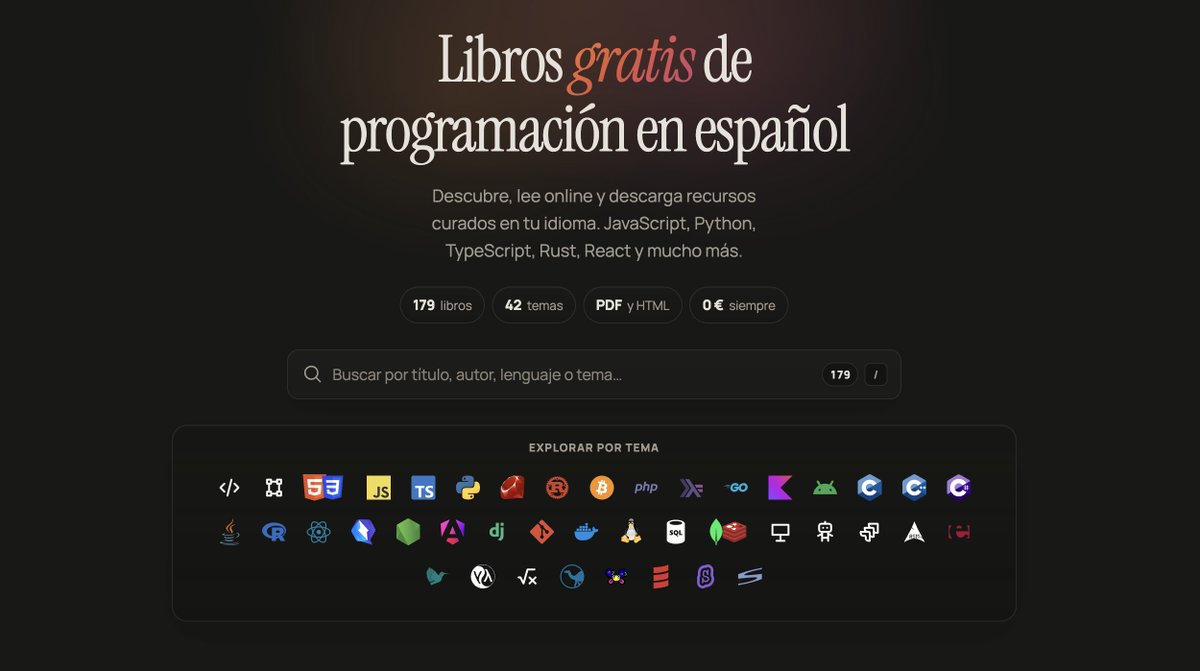
He recopilado 179 libros gratis de programación en español.
PDF, HTML y EPUB. 42 temas: JavaScript, Python, TypeScript, React, Rust, Git, SQL…
Sin registro, sin pagos, sin sorpresas:
→ https://t.co/OhHoYuehXp
🚀Day 4/15 - Deployment Strategies
How do you release a new version without putting all users at risk?👀
🔄Rolling
🔵🟢Blue-Green
🐤Canary
The best strategy depends on the risk.
Don’t just deploy.
Deploy safely.🏭
#DevOps#AWS#Kubernetes#CICD
🚨El ex presidente de Google salió y confesó el secreto que cambiará la forma del mundo en los próximos años por culpa de la inteligencia artificial
El tipo confesó que crear riqueza y construir un negocio propio ahora es mucho más fácil, pero con una condición: si entras en este campo y entiendes el juego correctamente.
Si solo tienes 30 días por delante para empezar y ejecutar este consejo e ingresar a este campo con fuerza, aquí está el mapa completo y las herramientas que necesitarás desde cero, todas 100% gratuitas:
🔖Guarda este post inmediatamente porque literalmente es una base de datos a la que volverás todos los días.
Fase 1: Entender la arquitectura y los fundamentos
Arquitectura de los Agents: Para que entiendas cómo construir un agente de inteligencia artificial inteligente e independiente que tome decisiones y las ejecute.
https://t.co/AzLXpOyari🔗https://t.co/wTjXT9LxEq
Curso Claude Code 101: El comienzo básico para manejar la herramienta de programación aterradora de Anthropic dentro de la Terminal.
🔗 https://t.co/OzKCrQzuWm
Aplicación práctica (Claude Code en acción): Experimentos en vivo de la herramienta mientras construye proyectos reales para que veas su poder por ti mismo.
🔗 https://t.co/QOemWoSVgI
Fase 2: Dominar el direccionamiento y el Contexto
Ingeniería de Prompts (oficial): La guía oficial de Anthropic para escribir prompts profesionales que te saquen la máxima calidad del modelo.
🔗 https://t.co/vEwds2DixO
Curso de Prompts Interactivos: Entrenamiento práctico e interactivo en GitHub para desarrollar tus habilidades de Prompting.
🔗 https://t.co/LnRNf0hLTi
Archivo CLAUDE.md y adición de memoria: El secreto que hace que Claude recuerde el contexto y las reglas completas de tu proyecto y no se olvide con el tiempo.
🔗https://t.co/AzLXpOyari
Fase 3: Automatización y conexión con la realidad
Protocolo MCP: La verdadera revolución... Conecta Claude con tus herramientas diarias y bases de datos como Slack, GitHub y Google.
🔗 https://t.co/JLwnfK4YnM
Habilidades (Skills): Enséñale a Claude pasos repetitivos y funciones personalizadas para que las reutilice en tu proyecto de manera inteligente.
🔗 https://t.co/QpjTVjsKW7
Habilidades (Skills): Enséñale a Claude pasos repetitivos y funciones personalizadas para que las reutilice en tu proyecto de manera inteligente.
🔗 https://t.co/QpjTVjsKW7
Fase 4: Guías de la comunidad de desarrolladores y profesionalismo
Guía completa de Claude Code: Una guía masiva y de código abierto de la comunidad de desarrolladores llena de secretos y trucos.
🔗https://t.co/anLlZh0CdR
Biblioteca Awesome Claude Code: Una colección legendaria de los mejores scripts, Skills y complementos listos para usar.
🔗https://t.co/bcg42HI2U1
Academia de Anthropic: Todos los 13 cursos oficiales de la compañía con certificados completamente gratuitos.
🔗 https://t.co/HdGMUKSYWT
Documentación oficial completa: La referencia exhaustiva y final para todo lo pequeño y grande en Claude.
🔗 https://t.co/B1T8FgByI6
Todos estos recursos son COMPLETAMENTE gratuitos y no te costarán ni un dólar, pero te darán una habilidad que te permitirá terminar el trabajo de un equipo completo tú solo y con la misma calidad.
Ingeniera de Anthropic:
"No se supone que debas hacer prompts a Claude. Se supone que debes construir un sistema que haga prompts por sí mismo."
En 45 minutos muestra exactamente cómo crear un agente que se mejora a sí mismo.
La mayoría de la gente todavía hace todo esto manualmente.
Mira la sesión y luego guarda la guía de abajo.
How to become an AI Engineer in 6 months 🚀
MONTH 1 — Foundations 🐍
Learn:
• Python properly
• NumPy + Pandas
• SQL
• Git/GitHub
• APIs + JSON
• Linux/CLI basics
• Linear algebra
• Probability + statistics
Build:
→ Data analysis project
→ ML API with FastAPI
Goal: Become comfortable writing production-ish Python, not just notebooks.
---
MONTH 2 — Machine Learning 🧠
Master:
• Linear + logistic regression
• Decision trees
• Random Forest
• XGBoost
• SVM
• KNN
• Clustering
• Feature engineering
• Train/validation/test
• Cross-validation
• Precision/Recall/F1/AUC
• Hyperparameter tuning
Learn:
→ scikit-learn
Build:
→ End-to-end ML prediction system
Goal: Understand WHY a model works, not just ".fit()" it.
---
MONTH 3 — Deep Learning 🔥
Learn:
• Neural networks
• Backpropagation
• Activation functions
• Loss functions
• Optimizers
• Regularization
• CNNs
• Sequence models
• Attention
• Transformers
Learn:
→ PyTorch
Build:
→ Image/text classification system
Then understand:
Attention → Transformers → LLMs
This is the bridge into modern AI engineering.
---
MONTH 4 — LLM Engineering 🤖
Now go deep into GenAI:
• Tokens
• Embeddings
• Transformers
• LLM APIs
• Prompting
• Structured outputs
• Function/tool calling
• Streaming
• Model selection
• Context windows
• Cost + latency optimization
• Hugging Face
Then learn:
RAG
→ Chunking
→ Embeddings
→ Vector databases
→ Retrieval
→ Reranking
→ Grounded generation
→ RAG evaluation
Build:
🔥 “Chat with your documents” system
But don't stop at a basic chatbot.
---
MONTH 5 — Agents + Production ⚙️
Learn how modern AI systems actually DO things.
• Tool calling
• Agent loops
• Planning
• Memory
• Workflows
• Multi-step agents
• Agent evaluation
• Guardrails
• Context engineering
• MCP
• LangGraph / equivalent orchestration
Build:
🔥 An autonomous research/automation agent
Example:
User → Agent → Search → Tools → Data → Reason → Final answer
The important skill is not “using LangChain.”
It's understanding the architecture underneath it.
---
MONTH 6 — Production AI Engineer 🚀
Learn:
• FastAPI
• Docker
• Cloud deployment
• CI/CD
• MLflow
• Logging
• Monitoring
• Model evaluation
• LLM observability
• Rate limiting
• Caching
• Authentication
• Security
• Cost optimization
Deploy everything.
Your GitHub should now contain:
1️⃣ Classical ML project
2️⃣ Deep learning project
3️⃣ Production RAG application
4️⃣ Agentic AI application
At least 2 should be genuinely impressive.
---
EVERY WEEK
Don't spend 100% of your time watching courses.
Use:
30% → Learning
50% → Building
10% → Reading papers/docs
10% → Interview preparation
And code EVERY DAY.
---
THE INTERVIEW STACK 🎯
Alongside AI, keep your SWE fundamentals alive:
• DSA
• OOP
• DBMS
• OS
• Computer Networks
• SQL
• System design basics
• Python
AI Engineer ≠ “person who knows ChatGPT.”
You still need to be an engineer.
---
WHAT NOT TO DO ❌
Don't spend 6 months collecting:
• 20 certificates
• 50 prompt-engineering courses
• 15 frameworks
• 100 tutorials
• Copy-pasted GitHub projects
Instead:
Learn → Build → Break → Debug → Deploy → Explain
Repeat.
---
YOUR 6-MONTH END GOAL 🎯
You should be able to:
→ Train an ML model
→ Build a neural network
→ Understand Transformers
→ Work with LLM APIs
→ Build RAG systems
→ Build AI agents
→ Evaluate AI systems
→ Deploy AI applications
→ Monitor production systems
→ Explain your architecture in an interview
That's the difference between:
“I know AI”
and
“I can build AI systems.”
6 months is enough to become job-ready, not an AI research scientist.
The roadmap is simple.
The execution isn't. 🔥
¡BRUTAL! La Universidad de Harvard ha publicado CS50x doblado al ESPAÑOL.
Uno de los mejores cursos de Introducción a la Ingeniería de Software que existen. Sin coste.
12 clases completas, desde cero, con certificado:
→ https://t.co/7H82kFv3RI
Impartido por el grandísimo David J. Malan.
Te enseñan C, Python, Algoritmos, Python, SQL, JavaScript y mucho más.
Un ingeniero de Google Cloud acaba de mostrar cómo construir una aplicación completa con Claude desde cero.
Pasó 26 minutos en vivo en el escenario haciendo lo que la mayoría de los equipos tardan semanas en hacer.
Vale más que cualquier curso de codificación por vibras de $500, sin equipo, sin configuración, solo Claude y un objetivo.
Los que aprenden lo que Claude realmente hace están lanzando lo que todos los demás subcontratan a un equipo.
¡Este proyecto clona cualquier voz en segundos!
Se llama Voicebox, es Open Source y corre en local
✓ 23 idiomas
✓ 5 motores TTS disponibles
✓ Rendimiento Top: Tauri + Rust
Privacidad real y mucho potencial para apps con voz
→ https://t.co/7GnJ3kMEU3
Aquí tienes el curso COMPLETO de CLAUDE CODE 2026 actualizado en español: desde cero hasta dejar 8 proyectos funcionando.
6 horas, 17 módulos. Todo gratis.
Va sin cortes, incluidos los momentos donde algo NO sale a la primera (ahí es donde se aprende de verdad).
Claude is offering 18 official AI courses with certificates.
And it's 100% free:
1 - Claude 101. Learn Claude for everyday work.
https://t.co/bDOyCx5XBn
2 - Master Claude Cowork. Build powerful agentic workflows right on your desktop.
https://t.co/nKDBN23cIA…
3 - Claude Code 101. Master vibe coding with Claude Code.
https://t.co/zjRedHizhQ
4 - AI Fluency: Core concepts for AI literacy
https://t.co/ldjsozKIQ7…
5 - Introduction to Agent Skills.
https://t.co/nKDBN23cIA…
6 - Building with the Claude API.
https://t.co/UHdneFiJgk…
7 - Claude Code in Action. Integrate Claude Code into your dev workflow. Hands-on, practical, ship-focused.
https://t.co/Yi4H24ghtD…
8 - Intro to Model Context Protocol. Connect Claude to your local data. The ultimate game changer for context.
https://t.co/nKDBN23cIA…
9 - MCP: Advanced Topics. Build custom integrations and MCP servers. For heavy-duty scaling.
https://t.co/Go8K4uOriL…
10 - AI Fluency for Students. Use AI to study and research smarter. The ultimate cheat code for academics.
https://t.co/EMe7qLE09X…
11 - AI Fluency for Educators.
https://t.co/EMe7qLE09X…
12 - Teaching AI Fluency.
https://t.co/06CiCsyUrm…
13 - AI Fluency for Nonprofits. Maximize your mission's impact. Do way more with way less.
https://t.co/EMe7qLE09X…
14 - Claude with Amazon Bedrock. Deploy Claude on AWS infrastructure. Enterprise-grade scaling made easy.
https://t.co/IUujlJO2Qg…
15 - Claude with Google Cloud's Vertex AI. Deploy Claude on Google Cloud infrastructure. Seamless cloud integration for scaling apps.
https://t.co/lHzd3IPgGO…
16 - AI Fluency for Small Businesses
https://t.co/EMe7qLE09X…
17 - AI Capabilities and Limitations
https://t.co/9nRWRu86Cd…
18 - Introduction to subagents
https://t.co/nKDBN23cIA…
Follow me @abir35627 for more AI IDEA.
Claude becomes even more powerful with the right integrations.
Here are 6 integrations worth exploring:
🎙️ Wispr Flow: Turn your voice into prompts.
📊 Gamma: Build presentations in minutes.
📝 Granola: Transform meetings into structured notes.
📚 Notion: Manage your knowledge without switching apps.
📧 Gmail: Search, summarize, and draft emails faster.
Slack: Stay on top of conversations with AI-powered context.
Explore these FREE CERTIFICATION Courses to upgrade your skills:
1. Mastering Claude Code: From Setup to Real Projects
https://t.co/f5mFQS33KJ
2. Claude Code: Software Engineering with Generative AI Agents
https://t.co/nP77DcubI2
3. Claude Cowork for Automating Processes
https://t.co/1erwaNE4G4
4. Mastering Claude AI: Prompting, APIs, RAG, and MCP Specialization
https://t.co/EmqCOEcv33
5. Intro to Claude AI
https://t.co/rrIuuULtvv
6. Anthropic: AI Automation with Claude
https://t.co/d8HPIJxlr3
7. AI Automation with Claude
https://t.co/d8HPIJxlr3
8. Anthropic: AI Collaboration with Claude
https://t.co/tRgtklsslG
9. AI Fundamentals with Claude
https://t.co/M5oyaDe5vf
10. Anthropic: Building with the Claude API
https://t.co/gzH7C0VOiH
11. Claude Code in Action
https://t.co/vdqnFPCbj1
Follow @Mohiniuni for more!
People think learning Claude takes days. It doesn't.
I wrote 17 free guides that teach it in hours:
Claude 101: https://t.co/Y6flEfGfJq…
Claude Code: https://t.co/yVZ9zzBRS3…
Claude Skills: https://t.co/JDeVpBN6AT
Claude Design: https://t.co/OHPyXldpzX
Claude for Excel: https://t.co/sEYxs64Hvw…
How to Prompt: https://t.co/gVJqnYuagY
Claude + Linkedin: https://t.co/nuKrARflHy…
Be good at Claude: https://t.co/Yh6gmjBPkd
Stop writing like AI: https://t.co/8EMZp60xax…
Claude Certificates: https://t.co/GdY9vGBzz7…
Claude for your team: https://t.co/OZ4vHR5xJv…
Claude Connectors: https://t.co/LOpEryDOhI…
Set up Claude Cowork: https://t.co/jQOJpRMwvN…
Stop Prompting Claude: https://t.co/NOJ8eJ1xNQ…
Claude to sound like you: https://t.co/4oH7kYn2DI…
Stop hitting Claude limits: https://t.co/t04nAc9rim…
Stop using Claude at work: https://t.co/d2lpVQtcdK…
___
If you’d love to see more content like this, don’t forget to follow for more AI magic.
Claude Code just became dramatically cheaper to use.
You can keep the same coding workflow while routing simpler builds through free AI models.
Here’s the setup:
→ Use the Claude Code agent harness
→ Connect it to OmniRoute
→ Access 90+ free API providers
→ Add N Router as a backup
→ Switch routes when one gets rate-limited
→ Preview every build inside Agent OS
→ Save paid Claude tokens for difficult projects
You are not replacing the workflow.
You are simply giving Claude Code more engines to choose from.
Save this video, you’ll build more without watching every token.
Want the SOP? DM me. 💬
CLAUDE CODE NO FUNCIONABA BIEN.
Hasta que instalé este plugin:
claude-code-setup
Analiza tu proyecto y te dice exactamente qué deberías configurar:
→ Skills
→ Hooks
→ Subagentes
→ MCP Servers
→ Automatizaciones
Te explica cómo configurarlos paso a paso para convertir Claude Code en una auténtica máquina.
Instálalo con este comando:
/plugin install claude-code-setup@claude-plugins-official
Guarda este post antes de perderlo 📩
How to understand every Claude feature in 5 mins:
(even if you've only ever used the basic chat)
Chat = texting a stranger who forgets you.
Features = hiring a team that already knows the job.
Full Setup = training Claude that runs without you.
Layer 1: The basics you already know
✦ Chat: Open Claude. You type. You get an answer.
✦ High Effort: It reasons deeper.
✦ Fable 5: The smartest model (for complex tasks).
✦ That's where 95% of people stop.
✦ Claude 101: https://t.co/jw2qdIbLxJ.
Layer 2: The features that remember you
✦ Projects: Upload file & instructions. It remembers.
✦ Scoped Memory. Prompt "do like & it knows it.
✦ Context Files: Drop everything you know into files
✦ about-me .md: A Skill with what you do & think.
✦ Download my Skills at https://t.co/psB7XxAv8w (for free).
✦ Don't pay anything. It's free in the welcome email.
Layer 3: The features that work for you
✦ Skills: Long instructions living inside the AI.
✦ Skill Creator: It interviews you to build the Skills.
✦ SKILL .md: Trigger file, description & instructions.
✦ Negative Triggers: The "Do NOT use for..." lines.
✦ Claude Skills 101: https://t.co/9d5stC5IBO
Layer 4: The features that replace your workflow
✦ Cowork: It reads, creates, and executes.
✦ Cowork Projects: Memory that persists.
✦ Global Instructions (I personally left it empty).
✦ Scheduled Tasks: Claude runs tasks automatically
✦ Dispatch: Control Claude from your phone.
✦ Claude Cowork 101: https://t.co/uWTpOI3oyE
Layer 5: The features that connect everything
✦ Connectors: Plug into Granola, Calendar & Gmail.
✦ Plugins: Build and upload your own app.
✦ Claude Computer: Clicks, browse & operates Mac
✦ Claude Code: English is the new code to ship fast
✦ AskUserQuestion: Interactive form to prompt you.
✦ Gamma: Claude for brief. Gamma for slides.
✦ CLAUDE .md: A memory file for Claude Code.
✦ Claude Code 101: https://t.co/WYZd5ltnXo
That's all 25 features. On one page.
I turned this into a full visual infographic you can save, print, or send to your team.
To download all of my Claude infographics:
Step 1. Go to https://t.co/psB7XxAv8w.
Step 2. Subscribe for free. Don't pay anything.
Step 3. Open my welcome email (most skip this).
Step 4. Hit the automatic reply button inside.
Step 5. Download my infographics from my Notion.
♻️ Repost this to help someone use Claude in 2026.