Here's one free month of Starlink service! Starlink high-speed internet is great for streaming, video calls, and gaming in even the most remote locations on Earth. https://t.co/bYyuzjVwUM
Generate FULLY CONTROLLABLE 3D assets from a SINGLE image, locally on your PC.
Made a 1-click launcher for the official Anigen Gradio app, and a dedicated viewer.
Crazy this is now possible. What you're seeing here came from one image.
Requires: NVIDIA GPU 6GB VRAM
🚨 800 FREE CREDITS — 24 HOURS ONLY
We just launched LTX-2.3, our most powerful video model yet. High-res. Fast. Cinematic. Native lip-sync.
Follow + Retweet this post to get 800 credits sent to your DMs.
Turns out scanned objects have…her opinions😝
Feed one into KIRI’s rig pipeline and it collapses the mesh, pulls out the structural lines, cleans the graph, and turns them into a bone chain you can actually animate🦴✨
Sometimes you get a usable rig.
Sometimes you get this surreal, spine-like motion that looks like the object is trying to evolve👀🫠
Either way — it’ s fun watching geometry show a side it never had in 2D🎥💛
Ubisoft La Forge open-sourced its PBR material model CHORD, together with ComfyUI custom nodes for end-to-end AI material generation.
This is a real step toward generative AI in AAA game pipelines and demonstrates how ComfyUI has grown from an open-source community tool to a production platform.
Huge thanks to the @Ubisoft La Forge team for giving back real production-grade tools to the open source community.
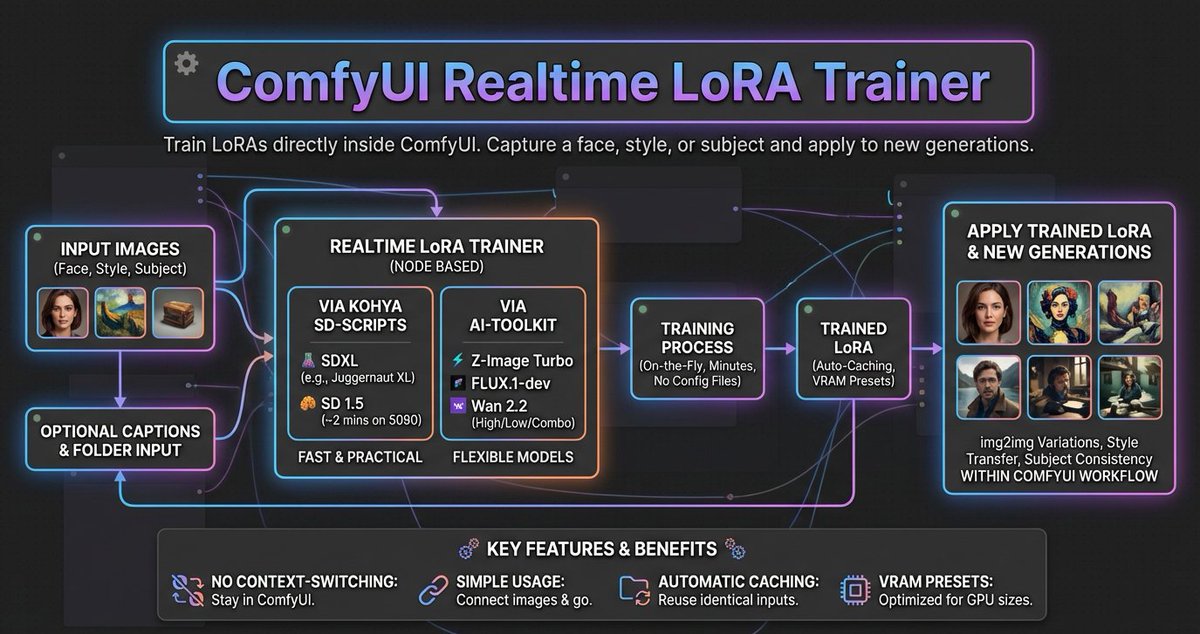
Train LoRAs on-the-fly inside ComfyUI; a wrapper for sd-scripts & AI-Toolkit;
- SDXL, SD1.5, Z-Image, FLUX & Wan2.2;
- no config files, just connect images & train.
https://t.co/UJweVGixmb
ComfyUI-Mesh2Motion
Bring another popular open-source projects into ComfyUI, today it’s Mesh2Motion, from @scottpetrovic often called the open-source alternative to Mixamo.
I spent some time integrating it into ComfyUI.
It supports opening Mesh2Motion directly within ComfyUI, uploading your own models for rigging, and previewing with four built-in models.
The code and plugin will be uploaded later today.
This is an absolute GIFT to the Blender community! 🔥✨
Daniel Bystedt dropping a FREE cloth simulation addon with readymade assets AND collision characters? The generosity from top-tier artists like this is incredible! 💪
STEAL THIS PROMPT VOL 2:
"What's inside SPLIT"
The rules are simple: You can STEAL this prompt but only if you write you created it. Do NOT credit me. Say you did it, and then use it as much as you like.
PROMPT:
Create a high-quality, realistic 3D render of exactly one instance of the object: [Orange iPhone 17 Pro].
The object must float freely in mid-air and be gently tilted and rotated in 3D space (not front-facing).
Use a soft, minimalist dark background in a clean 1080×1080 composition.
Left Half — Full Realism
The left half of the object should appear exactly as it looks in real life
— accurate materials, colors, textures, reflections, and proportions.
This half must be completely opaque with no transparency and no wireframe overlay.
No soft transition, no fading, no blending.
Right Half — Hard Cut Wireframe Interior
The right half must switch cleanly to a wireframe interior diagram.
The boundary between the two halves must be a perfectly vertical, perfectly sharp, crisp cut line, stretching straight from the top edge to the bottom edge of the object.
No diagonal edges, no curved slicing, no gradient.
The wireframe must use only two line colors:
Primary: white (≈80% of all lines)
Secondary: a color sampled from the dominant color of the realistic half (<20% of lines)
The wireframe lines must be thin, precise, aligned, and engineering-style.
Every wireframe component must perfectly match the geometry of the object.
Strict Single-Object Rule
Render only ONE object in the entire frame. Render only one physical object.
Do NOT show a second object from any angle. Do NOT show a second object as a reflection, shadow, silhouette, outline, ghost image, or transparency. Do NOT show a second object for comparison or display purposes. Do NOT show both the front and the back separately.
Do NOT show an extra device behind, beside, underneath, or partially hidden.
Only one single object is allowed in the entire frame.
No duplicate objects, no mirrored back-and-front pairings, no reflections showing a second object.
The object must appear alone, floating.
Pose & Lighting:
Apply a natural, subtle tilt + rotation in 3D to make it look like a floating product visualization.
Use soft, neutral global illumination and no shadows under the object.
No extra props, no text, no labels unless explicitly requested.







![michalmalewicz's tweet photo. STEAL THIS PROMPT VOL 2:
"What's inside SPLIT"
The rules are simple: You can STEAL this prompt but only if you write you created it. Do NOT credit me. Say you did it, and then use it as much as you like.
PROMPT:
Create a high-quality, realistic 3D render of exactly one instance of the object: [Orange iPhone 17 Pro].
The object must float freely in mid-air and be gently tilted and rotated in 3D space (not front-facing).
Use a soft, minimalist dark background in a clean 1080×1080 composition.
Left Half — Full Realism
The left half of the object should appear exactly as it looks in real life
— accurate materials, colors, textures, reflections, and proportions.
This half must be completely opaque with no transparency and no wireframe overlay.
No soft transition, no fading, no blending.
Right Half — Hard Cut Wireframe Interior
The right half must switch cleanly to a wireframe interior diagram.
The boundary between the two halves must be a perfectly vertical, perfectly sharp, crisp cut line, stretching straight from the top edge to the bottom edge of the object.
No diagonal edges, no curved slicing, no gradient.
The wireframe must use only two line colors:
Primary: white (≈80% of all lines)
Secondary: a color sampled from the dominant color of the realistic half (<20% of lines)
The wireframe lines must be thin, precise, aligned, and engineering-style.
Every wireframe component must perfectly match the geometry of the object.
Strict Single-Object Rule
Render only ONE object in the entire frame. Render only one physical object.
Do NOT show a second object from any angle. Do NOT show a second object as a reflection, shadow, silhouette, outline, ghost image, or transparency. Do NOT show a second object for comparison or display purposes. Do NOT show both the front and the back separately.
Do NOT show an extra device behind, beside, underneath, or partially hidden.
Only one single object is allowed in the entire frame.
No duplicate objects, no mirrored back-and-front pairings, no reflections showing a second object.
The object must appear alone, floating.
Pose & Lighting:
Apply a natural, subtle tilt + rotation in 3D to make it look like a floating product visualization.
Use soft, neutral global illumination and no shadows under the object.
No extra props, no text, no labels unless explicitly requested.](https://pbs.twimg.com/media/G7LmGCYWQAASxD9.jpg)
![michalmalewicz's tweet photo. STEAL THIS PROMPT VOL 2:
"What's inside SPLIT"
The rules are simple: You can STEAL this prompt but only if you write you created it. Do NOT credit me. Say you did it, and then use it as much as you like.
PROMPT:
Create a high-quality, realistic 3D render of exactly one instance of the object: [Orange iPhone 17 Pro].
The object must float freely in mid-air and be gently tilted and rotated in 3D space (not front-facing).
Use a soft, minimalist dark background in a clean 1080×1080 composition.
Left Half — Full Realism
The left half of the object should appear exactly as it looks in real life
— accurate materials, colors, textures, reflections, and proportions.
This half must be completely opaque with no transparency and no wireframe overlay.
No soft transition, no fading, no blending.
Right Half — Hard Cut Wireframe Interior
The right half must switch cleanly to a wireframe interior diagram.
The boundary between the two halves must be a perfectly vertical, perfectly sharp, crisp cut line, stretching straight from the top edge to the bottom edge of the object.
No diagonal edges, no curved slicing, no gradient.
The wireframe must use only two line colors:
Primary: white (≈80% of all lines)
Secondary: a color sampled from the dominant color of the realistic half (<20% of lines)
The wireframe lines must be thin, precise, aligned, and engineering-style.
Every wireframe component must perfectly match the geometry of the object.
Strict Single-Object Rule
Render only ONE object in the entire frame. Render only one physical object.
Do NOT show a second object from any angle. Do NOT show a second object as a reflection, shadow, silhouette, outline, ghost image, or transparency. Do NOT show a second object for comparison or display purposes. Do NOT show both the front and the back separately.
Do NOT show an extra device behind, beside, underneath, or partially hidden.
Only one single object is allowed in the entire frame.
No duplicate objects, no mirrored back-and-front pairings, no reflections showing a second object.
The object must appear alone, floating.
Pose & Lighting:
Apply a natural, subtle tilt + rotation in 3D to make it look like a floating product visualization.
Use soft, neutral global illumination and no shadows under the object.
No extra props, no text, no labels unless explicitly requested.](https://pbs.twimg.com/media/G7LmGCWWcAA9fNy.jpg)
![michalmalewicz's tweet photo. STEAL THIS PROMPT VOL 2:
"What's inside SPLIT"
The rules are simple: You can STEAL this prompt but only if you write you created it. Do NOT credit me. Say you did it, and then use it as much as you like.
PROMPT:
Create a high-quality, realistic 3D render of exactly one instance of the object: [Orange iPhone 17 Pro].
The object must float freely in mid-air and be gently tilted and rotated in 3D space (not front-facing).
Use a soft, minimalist dark background in a clean 1080×1080 composition.
Left Half — Full Realism
The left half of the object should appear exactly as it looks in real life
— accurate materials, colors, textures, reflections, and proportions.
This half must be completely opaque with no transparency and no wireframe overlay.
No soft transition, no fading, no blending.
Right Half — Hard Cut Wireframe Interior
The right half must switch cleanly to a wireframe interior diagram.
The boundary between the two halves must be a perfectly vertical, perfectly sharp, crisp cut line, stretching straight from the top edge to the bottom edge of the object.
No diagonal edges, no curved slicing, no gradient.
The wireframe must use only two line colors:
Primary: white (≈80% of all lines)
Secondary: a color sampled from the dominant color of the realistic half (<20% of lines)
The wireframe lines must be thin, precise, aligned, and engineering-style.
Every wireframe component must perfectly match the geometry of the object.
Strict Single-Object Rule
Render only ONE object in the entire frame. Render only one physical object.
Do NOT show a second object from any angle. Do NOT show a second object as a reflection, shadow, silhouette, outline, ghost image, or transparency. Do NOT show a second object for comparison or display purposes. Do NOT show both the front and the back separately.
Do NOT show an extra device behind, beside, underneath, or partially hidden.
Only one single object is allowed in the entire frame.
No duplicate objects, no mirrored back-and-front pairings, no reflections showing a second object.
The object must appear alone, floating.
Pose & Lighting:
Apply a natural, subtle tilt + rotation in 3D to make it look like a floating product visualization.
Use soft, neutral global illumination and no shadows under the object.
No extra props, no text, no labels unless explicitly requested.](https://pbs.twimg.com/media/G7LmGCQWYAAfp47.jpg)






![michalmalewicz's tweet photo. STEAL THIS PROMPT VOL 2:
"What's inside SPLIT"
The rules are simple: You can STEAL this prompt but only if you write you created it. Do NOT credit me. Say you did it, and then use it as much as you like.
PROMPT:
Create a high-quality, realistic 3D render of exactly one instance of the object: [Orange iPhone 17 Pro].
The object must float freely in mid-air and be gently tilted and rotated in 3D space (not front-facing).
Use a soft, minimalist dark background in a clean 1080×1080 composition.
Left Half — Full Realism
The left half of the object should appear exactly as it looks in real life
— accurate materials, colors, textures, reflections, and proportions.
This half must be completely opaque with no transparency and no wireframe overlay.
No soft transition, no fading, no blending.
Right Half — Hard Cut Wireframe Interior
The right half must switch cleanly to a wireframe interior diagram.
The boundary between the two halves must be a perfectly vertical, perfectly sharp, crisp cut line, stretching straight from the top edge to the bottom edge of the object.
No diagonal edges, no curved slicing, no gradient.
The wireframe must use only two line colors:
Primary: white (≈80% of all lines)
Secondary: a color sampled from the dominant color of the realistic half (<20% of lines)
The wireframe lines must be thin, precise, aligned, and engineering-style.
Every wireframe component must perfectly match the geometry of the object.
Strict Single-Object Rule
Render only ONE object in the entire frame. Render only one physical object.
Do NOT show a second object from any angle. Do NOT show a second object as a reflection, shadow, silhouette, outline, ghost image, or transparency. Do NOT show a second object for comparison or display purposes. Do NOT show both the front and the back separately.
Do NOT show an extra device behind, beside, underneath, or partially hidden.
Only one single object is allowed in the entire frame.
No duplicate objects, no mirrored back-and-front pairings, no reflections showing a second object.
The object must appear alone, floating.
Pose & Lighting:
Apply a natural, subtle tilt + rotation in 3D to make it look like a floating product visualization.
Use soft, neutral global illumination and no shadows under the object.
No extra props, no text, no labels unless explicitly requested.](https://pbs.twimg.com/media/G7LmOTvXkAAlNNG.jpg)




