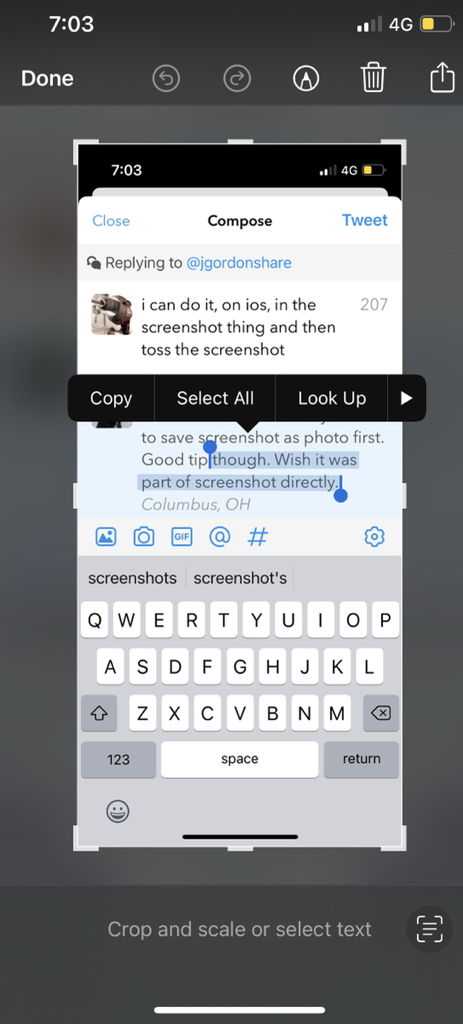
@elasticthreads Was driving me nuts but I figured it out. When I open a screenshot the markup/drawing tools are active. To see the Live Text widget I need to tap the tool palette toggle icon at the top (circled here). When the palette is off I get to see the Live Text icon at bottom left.
Live Text is amazing for many reasons but my low key most common use is when an app has unselectable text (hi Google Maps, Instagram, FB Messenger): screenshot, tap little corner popover, select unselectable text, copy, and discard screenshot
@uliwitness @pmjordan You can change the kb shortcut for "Enter Full Screen" and "Exit Full Screen" in System Prefs>>Keyboard for "All Applications". It's cmd-ctrl-F in Big Sur and before.
So glad Safari 15.1 got the good tabs. But, at least on Big Sur, the location/search field gets all squished. You have to open prefs, switch to Compact tabs and then switch back to One True Tabs (aka "Separate") to fix the search field.
And do that every time Safari launches...
Even though those CAPTCHA online security tests might be good at filtering out the robots, I'm not sure they're great at letting in the humans. Or at least letting in humans who are not weeping in the process…
Global warming is revealing hundreds of historical artefacts from the ice of the Norwegian mountains.
Check out @brearkeologi and follow to stay updated.
https://t.co/K9si7NUEmv
Some of the finds;
A Viking age mitten;