1. The 30 Minute Dashboard Blueprint
Act as a premium UI design specialist. I want a dashboard for [my app or product] looking like a $30,000 SaaS build, done in 30 minutes. Design my complete blueprint: my layout, my data visualization style, and my exact build sequence.
your claude subscription now has 𝗼𝗻𝗲 𝗳𝗿𝗲𝗲 𝗳𝘂𝗹𝗹 𝗿𝗲𝘀𝗲𝘁, plus the free fable resets. every model limit, back to full in one go.
now's the perfect time to have fable 5.2 run a full ui/ux audit on your product, with the model acting as 𝗮 𝘀𝗲𝗻𝗶𝗼𝗿 𝗱𝗲𝘀𝗶𝗴𝗻𝗲𝗿 𝘄𝗶𝘁𝗵 𝗿𝗲𝗮𝗹 𝗮𝘂𝘁𝗵𝗼𝗿𝗶𝘁𝘆.
full prompt 👇
act as a senior product designer with real authority over this codebase: you can redesign and restructure, not just patch. your own design judgment is the primary tool.
derive a taste baseline before touching anything:
1. infer product intent in 3 lines: who uses this, for what, what character (tool? editorial? playful? premium?)
2. read the existing design docs, tokens and components as hypotheses to test, not law
3. from 1+2, derive what this product should feel like at its best. judge everything against that, not against trends. gradients, glassmorphism, emoji, decorative motion only if the product's character earns them
walk the core user paths in a real browser at desktop, tablet and phone widths. evaluate on two levels:
A. correctness floor, fix unconditionally: overlap, overflow, clipping, horizontal scroll, contrast, 200% text zoom, keyboard nav, visible focus, modal focus trap and return, labels and roles, touch target size, missing loading/empty/error/disabled states, layout shift
B. design ceiling, use taste to find what works but feels cheap: no focal point, elements fighting for the same weight, copy that explains the system instead of helping the user act, border+shadow+background stacked on one element, drifting type scale, broken spacing rhythm, inconsistent radii, lifeless interactions
three levels of authority:
L1 just do: spacing, type, color token fixes, copy trims, micro-interactions, deleting redundancy
L2 do but isolate: section-level restructures, component merges, one revertible commit each with before/after screenshots
L3 propose only: navigation model changes, removing features, changing the design language itself
if the audit shows the documented design system is itself the problem, revise the docs too, citing the specific page that triggered each change.
deliver a report ranked by impact: the taste baseline you derived, what you improved and why, L2 evidence, L3 proposals, and a correctness table (page, viewport, issue, severity, status).
& thank me later
Anthropic just published a 𝗽𝗿𝗼𝗺𝗽𝘁𝗶𝗻𝗴 𝗴𝘂𝗶𝗱𝗲 𝗳𝗼𝗿 𝗙𝗮𝗯𝗹𝗲 𝟱.𝟮. You can ask Fable 5.2 to use it to review the old rules in your project.
In the guide's own test, Fable 5.2 had a dozen notes from earlier sessions in context, and just one of them said "never retry." That one line cut its retries after a busy tool from nearly every time to 𝗮𝗯𝗼𝘂𝘁 𝟰 𝗶𝗻 𝟭𝟬. The rules you hard-coded to stop older models from doing dumb things now work against the new one and burn tokens for nothing.
Send this prompt and the link below to Fable 5.2 👇
“Read Anthropic's official Prompting Claude Fable 5.2 guide and review my project's CLAUDE.md, AGENTS.md, skills, subagent files and memory files. Identify standing instructions that tell you to delegate work to subagents, lines that tell you to think less or answer directly, hard-coded style limits, 'never' rules and old notes that have piled up, and approval rules that don't name the exact actions they cover.
For each issue, quote the original instruction, explain its potential impact, and suggest the smallest change needed. List any proposals involving safety, permission boundaries, or reduced verification separately for me to decide. Show me the recommendations first. Don't modify anything yet.”
https://t.co/LIDJoKzOmB
Dumb Fable 5.2 UI/UX prompts:
>"make my dashboard look modern"
>"improve this form"
>"make it work on mobile"
>"make it accessible"
Good Fable 5.2 UI/UX prompts 👇
Every time you let Fable 5.2 run a long task on its own, have it vibe-code a quick 𝗛𝗧𝗠𝗟 𝗱𝗮𝘀𝗵𝗯𝗼𝗮𝗿𝗱 like this first.
Then give it 𝗮 𝘀𝘂𝗯𝗮𝗴𝗲𝗻𝘁 𝘁𝗵𝗮𝘁 𝗼𝗻𝗹𝘆 𝗯𝘂𝗶𝗹𝗱𝘀 𝗱𝗮𝘀𝗵𝗯𝗼𝗮𝗿𝗱𝘀:
→ Name it dashboard-builder, run it on Opus 5.5 at medium effort, and preload a design skill
→ The first time, it asks what style you like and saves it to memory. After that, every dashboard fits your taste and the task at hand
→ Call it before every long task. It builds the dashboard in the background in a minute or two, and the main session keeps coding without stopping
→ The dashboard shows four things: task progress, what's stuck, questions waiting on you, and what it'll do by default if you don't answer
Send this prompt to Claude Code 👇
"Set up a subagent that only builds progress dashboards:
1. Create dashboard-builder in ~/.claude/agents: model: opus, effort: medium, memory: user. Preload the design skills I have installed (for example impeccable). It can only read and write the .dashboard/ folder and its own memory.
2. Ask me now what style I like: dark or light, dense or airy, and one accent color. Save my answer to its memory so it follows it every time. It picks the panels for the current task; no template.
3. The dashboard is one HTML file showing tasks and their status, questions waiting for me with the default action, the latest deliverables, and anything stuck. Use the real clock for every time. It opens with a double-click and refreshes itself every 10 seconds.
4. Add a rule to ~/.claude/CLAUDE.md: for any task with more than 5 steps or that should take longer than 30 minutes, have dashboard-builder set up the dashboard before starting; update it after every step; when you need a decision from me, add it to the questions list and keep going with the default; anything that can't be undone, like deleting or publishing, waits for my answer.
Show me the contents of the files you'll create or change, then explain the whole flow in words a 10-year-old could follow. Don't write anything until I confirm."
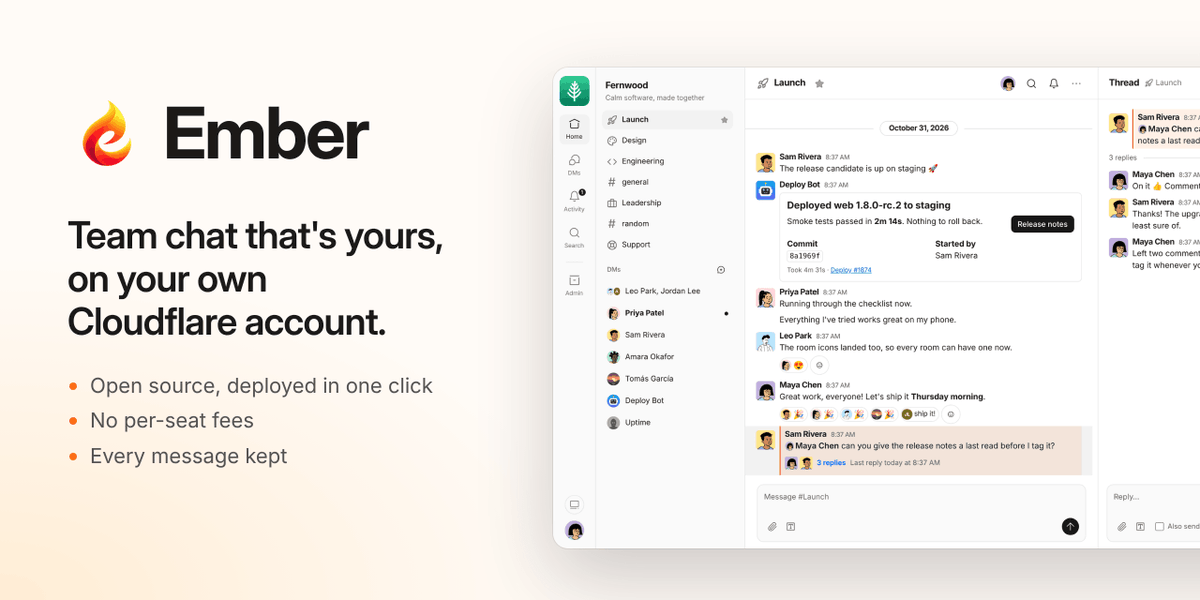
Want your own Slack for $0? I open-sourced Ember. It deploys to @Cloudflare’s free tier in about a minute, works with Slack-compatible payloads, and includes an AI assistant and media attachments.
Um dos piores sentimentos da vida é sentir a inveja, maldade e emboscadas de quem a gente menos espera. De pessoas que no fundo só fazemos ajudar... Entrego em tuas mão Senhor!!!
Someone turned 𝟭𝟰𝟱,𝟬𝟬𝟬+ 𝗿𝗲𝗮𝗹 𝗽𝗿𝗼𝗱𝘂𝗰𝘁 𝘀𝗰𝗿𝗲𝗲𝗻𝘀 into a library Claude Code / Codex can search. It's called Refero.
Also inside:
→ 2,000+ design systems, colors, type and spacing broken down
→ 12,000+ user flows, sign-up and checkout end to end
→ 1,000+ marketing websites, the newest section
→ Like a screen? It finds lookalikes
Setup and prompt below 👇
@Da7_Tech Anthropic being Anthropic. Great models—even better than all the others—until the company itself degrades them. Unfortunately, it’s a company you can’t trust. Whatever gains we get from their models, over time the models themselves begin to regress in every way, leading to bugs..
HOLY FU**K!!! 🤯🔥
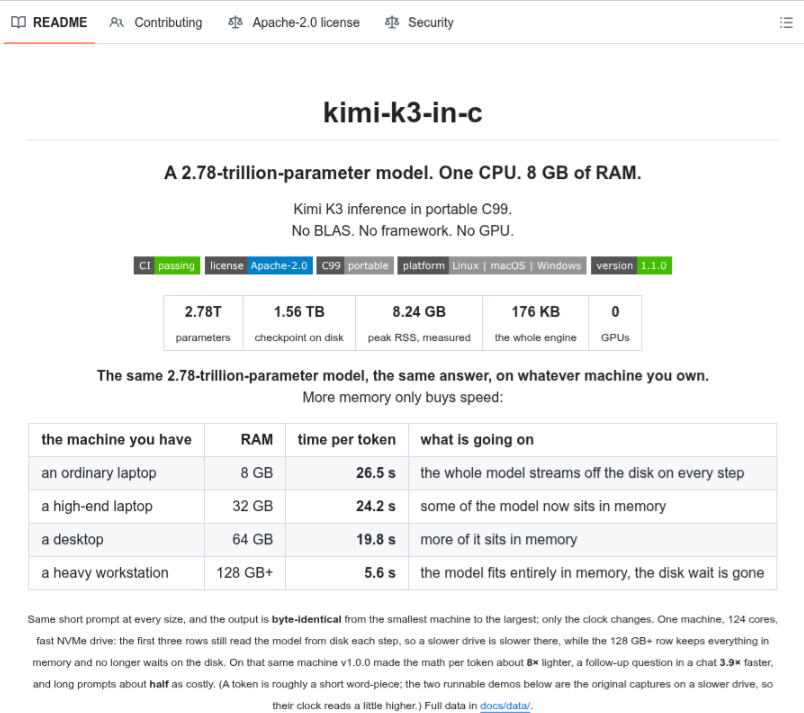
A 2.78 TRILLION parameter AI model running on just 8.24 GB of RAM.
Meet kimi-k3-in-c CPU-only, no GPU, no BLAS, no heavy frameworks.
Over 11K GitHub stars. This is wild.
GitHub: https://t.co/cu02zl24RR
I've used Claude Code and Codex since they came out, almost two years now, and they've changed how I build products.
Here are the 5 prompts I paste into almost every project. I've posted the first 4 before, saved 𝗼𝘃𝗲𝗿 𝟮𝟬,𝟬𝟬𝟬 𝘁𝗶𝗺𝗲𝘀 combined 👇
(Save this 🔖)