Best swap rate is useless if your funds get frozen!
Most swap apps show you the best rate. Unstoppable does that and shows you the risk too!
For every swap quote you see the provider risk profile because the best rate means nothing if your funds get frozen.
Risk labels:
AUTO
→ pure DEX execution
→ no intermediary
→ no one can freeze your swap
Flexible
→ provider uses its own liquidity
→ freezes extremely unlikely
Pre-Check
→ provider screens your address before the swap
→ if there's an issue, the swap is rejected
→ funds never leave your wallet
Controlled
→ provider runs AML checks
→ operates with external liquidity
→ freezes or KYC may be possible
Best rate. Best risk transparency.
That’s what a real swap engine looks like.
Here's another RCE that works on the "patched" Windows @telegram client.
Even if individual bugs get patched, allowing (unsandboxed!) QuickJS in messages massively opens up the attack surface.
New Fingerprinting Tests!
I'm excited to announce a major addition to https://t.co/idG6bBISDR: we have developed two dozen new fingerprinting resistance tests to obtain an objective head-to-head comparison of how different browsers protect you against fingerprinting.
Our results show that no browser has perfect fingerprinting defenses. The strongest protections are seen in LibreWolf, Mullvad Browser, and Tor Browser, but every browser has room for improvement!
Fingerprinting is a common method that online trackers use to uniquely identify your computer and track you invisibly as you browse the web. Browsers can protect you against fingerprinting, but the current level of protection varies greatly between browsers.
Our fingerprinting resistance tests, currently run on desktop browsers, are organized in two sections: Device tests and Settings tests.
The "Device" tests measure whether your browser is leaking detailed information about your computer hardware. Fingerprintable properties of your computer that we measure include audio processing, GPU, memory, CPU cores, math processing, chip architecture, and OS version.
The "Settings" tests measure whether system settings are leaking through your browser. Fingerprintable settings that we measure include screen resolution, system toolbar dimensions, display preferences, keyboard layout, timezone location, and user-installed fonts.
Traditionally, services such as https://t.co/6RNrQJYxog, https://t.co/3wVLF2kHsw, and https://t.co/giRyIl4IRj survey a population of browser visitors and analyze the uniqueness of your browser's fingerprint.
https://t.co/idG6bBISDR's fingerprinting tests take a different, complementary approach across browsers. These tests directly measure whether each browser is leaking characteristics of the computer it is running on.
For example, to check if the number of CPU cores is leaked, our test runs the same browser on virtual machines with different numbers of CPU cores and asks: does the browser spoof or randomize the value? If so, the browser passes the test (✅)! If, instead, it leaks the true value, then the browser has failed the test (❌)!
We apply this approach to many system settings and device properties that are commonly used by tracking scripts to fingerprint your computer.
The fingerprinting test results shown here are part of the larger context of browser privacy protections reflected in our many other categories of privacy test results, all presented at https://t.co/idG6bBISDR.
We hope these fingerprinting test results are useful to everyone looking to switch to a browser that respects and protects their privacy. We also hope they are galvanizing to any browser engineering team working to improve their browser's privacy.
We'll keep testing over time! ✅❌
Reality of our days:
1. I am sitting on a set of vulns (4+) that allows me to remotely take over a consumer home automation device I have (3+ diff ways).
2. The vendor doesn't only serve consumers, but also critical infra (announced partnerships include pharma manufacturing plants, airport logistics, hospitals, etc) across various locations in Europe and the US (not the same product line, ofc, so maybe moot).
3. Claude and Astra refuse to help me explore even my own device, so now I'm using Chinese hosted models for investigating.
4. The vendor (with a revenue of $0.75B) does not maintain any security disclosure practice whatsoever, nor does respond to emails.
So, to recap, I need to outsource vulnerability hunting of (potentially, I don't know) critical western infrastructure to Chinese models, because the western models refuse; and the vendor doesn't give a shit. Fun timeline.
PS: The vendor is Swiss.
You know this feeling when you aren't sure if you can trust an attachment, let's say a PDF, right?
There is a tool called 'Dangerzone', which aims to solve this problem, converting (potentially) dangerous PDFs, office documents, or images, into a safe file that you can open and read.
I spent the last two-three months scanning Bitcoin open source repositories. After talking with a lot of people about how they approach their scan procedures, I realized there's a lot to talk about. The pace is surreal, and it's very hard to keep up.
Therefore, here's my first attempt: a practical guide to scanning things!
I intentionally kept it focused on things that are **simple and cheap** - many people simply do not have the same power, money, resources, or time as a frontier lab or a professional red teamer.
However, there're a lot of practical things to reduce this barrier, and I hope this article helps you realize the world we're going to have and easy wins you can apply to be prepared more.
Hope it helps!
THORChain dropping a 3.21.1 update that literally lists which nodes haven't upgraded yet, keeps risky chains paused, and casually hints at Monero integration, my personal estimate is EoY. 😂
No PR spin, no corporate excuses -- just raw github commits and state machine consensus.
Well, you have to respect it, at least I do.
@kyc_rip still monitors the `XMR.XMR` pool every half hour for (since forever...), yeah, until it becomes real.
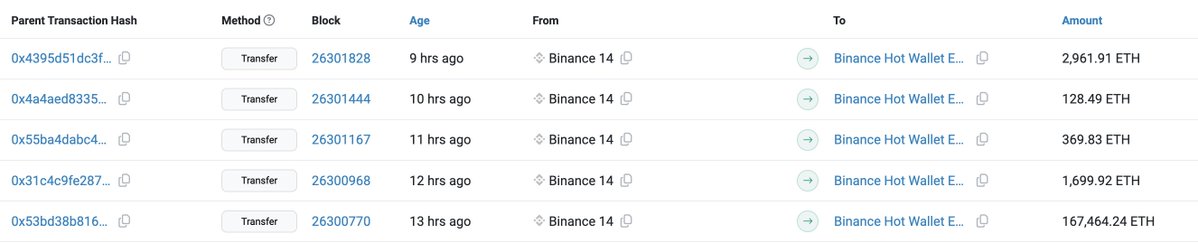
Draining $370 million in native ETH and 63 separate ERC-20 tokens in a single atomic transaction.
Total gas cost? $0.92.
- Zero `approve` calls—executing straight `transfer()` inside the hot wallet's own context.
- `staticcall` + `continue` error isolation so a single blacklisted token doesn't brick the whole $6B batch.
- Leaves exactly 1 ETH behind so hot wallet queues don't error out early.
- All executed in one block for less than a buck.
State-sponsored engineering makes retail smart contract optimization look like amateur hour. Lazarus wrote cleaner, more gas-efficient routing code in their sweeper contract than 99% of DeFi protocols on CoinMarketCap.
Breathtaking efficiency.
Agreed. I was also considering KeePassium for ios since it has an option to disable network access. But ios doesn't really give you much control over individual network access, unlike Graphene.
So I think KeePassDX on Graphene should be enough for me, hopefully haha.
Also did a quick, superficial security review of both apps using Hermes, but nothing too in-depth. I should probably start using Kimi for this kind of stuff too.
1/ Thought it might be helpful to translate this for crypto folks so you know who is hacking you.
tl;dr the word "Lazarus" doesn't mean anything anymore, it's just a collective name used to describe various North Korean cyber operations. The (relevant) clusters are as follows: