Open source risk rarely shows up at install time. It shows up later—when versions age, patches lag, and security vulnerabilities surface. Lifecycle planning matters.
https://t.co/y7q0E6DxDx
#OpenSource#OSSSecurity#SoftwareLifecycle
Happy to announce that my latest book, hashtag#JakartaEE Application Development, is part of the Humble Tech Book Bundle: App Development Best Practices.
https://t.co/1LiDvfZIDN
Read what you can find in our latest podcast episode featuring David Heffelfinger @ensode. Learn about his new book, 'Jakarta EE Application Development' and gain valuable insights into the world of #Java and #JakartaEE app development: https://t.co/Kq1YZM8hH5
A new #PayaraPodcast episode is out! Catch up on our conversation with @ensode as he discusses his latest book, 'Jakarta EE Application Development'. Gain insights into Java development and discover the inspiration behind David's new publication: https://t.co/Dus1PJtQrz
How to Use the Payara @netbeans Plugin
Apache NetBeans is a popular IDE for Java development, offering a wide range of features for streamlining the development process. Find out how to use it with Payara 6!
https://t.co/bWzSrLQTo7
https://t.co/EU2H5lM4Ku
My first ever article! Because everyone should write extensively somewhere, even if it's globally embarrassing. It's very long, but give it a chance, as you might learn something... or fall asleep.
#Programming#History#Math
@iamdvr@Java_EE@JakartaEE That's a unique problem. I'm afraid I don't have much experience with that particular situation.
Perhaps instead of bytecode manipulation, run a script at build time to change the imports, then use maven profiles to change the dependencies.
Been migrating some @Java_EE projects to @JakartaEE recently.
For the most part, all it takes is a global search and replace:
Replace all occurrences of "import javax" with "import jakarta"
And stuff "just works".
Now featuring multiple profiles geared towards producing microservices or full stack applications, the #JakartaEE Platform provides flexibility for developing applications of all sizes. Learn more in our new video: https://t.co/IX4FL882hM #opensource#JavaEE
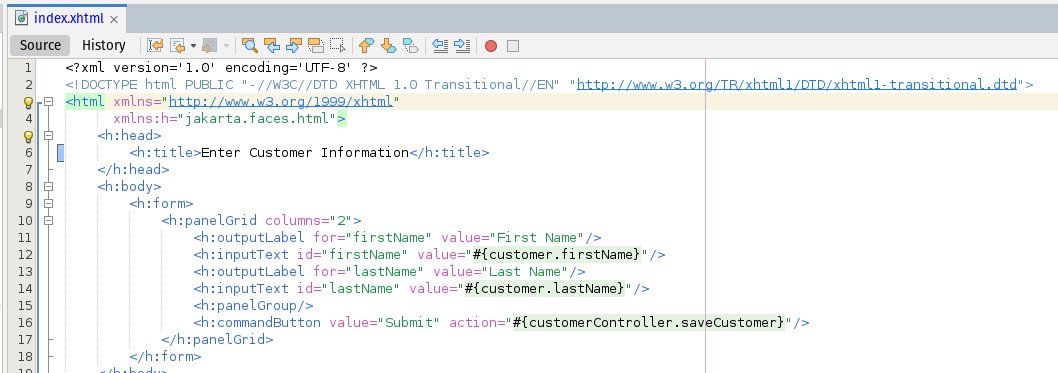
When migrating your JSF pages to @JakartaEE Faces, don't forget to update your XML namespaces
<html xmlns="https://t.co/pnU1TFl0aG"
𝘅𝗺𝗹𝗻𝘀:𝗵="𝗷𝗮𝗸𝗮𝗿𝘁𝗮.𝗳𝗮𝗰𝗲𝘀.𝗵𝘁𝗺𝗹"
𝘅𝗺𝗹𝗻𝘀:𝗳="𝗷𝗮𝗸𝗮𝗿𝘁𝗮.𝗳𝗮𝗰𝗲𝘀.𝗰𝗼𝗿𝗲">
@seinecle@JakartaEE@netbeans@OmniFaces Works for me.
I'm on @NetBeans 18, try upgrading if you are on an earlier version.
Also make sure your @ASFMavenProject / @gradle dependencies are for Jakarta EE
<groupId>jakarta.platform</groupId>
<artifactId>jakarta.jakartaee-web-api</artifactId>
When migrating to @JakartaEE , don't forget to update your JPA propertis in persistence.xml
<properties>
<property name="𝗷𝗮𝗸𝗮𝗿𝘁𝗮.persistence.schema-generation.database.action" value="create"/>
</properties>