@maryrosecook Copyright Credit: Edna St. Vincent Millay, “Figs from Thistles: First Fig” from Poetry 8, issue 3. (Chicago: Poetry Magazine, June 1918)
Thx, now I _finally_ know where the expression comes from
@willmcgugan Only slightly related: used your tree widget from Textual for the first time last weekend, and was FLOORED by how simple/well/performant it works.
⚡️ Lacking superlatives to praise your work... 👏
@ikbendaf But when you store and share these kinds of lists, you also have to manage those. And keep them secret, etc. otherwise you create another vulnerability.
And there is a technical way to not share these lists, but a sort-of "fingerprint" aka Bloomfilter...
/3
Made some Python to convert MIDI signals from a Yamaha FGDP-50 to play Hang Drum samples:
https://t.co/7NBHpjc1ax
Very satisfying dulcet sounds wafting through the house on this summer evening.
@wheretheroad Not quite sure what you mean with being on the fence.
Did you see that I wrote the LinkedIn item I shared?
Feel free to ask, if something seems unclear.
@Liekevdeinsen @lisakuitert @trude_dijkstra @DieterCammaerts Is er een link die ik kan opslaan for future reference?
Alleen een plaatje delen om rond te sturen is lastig.
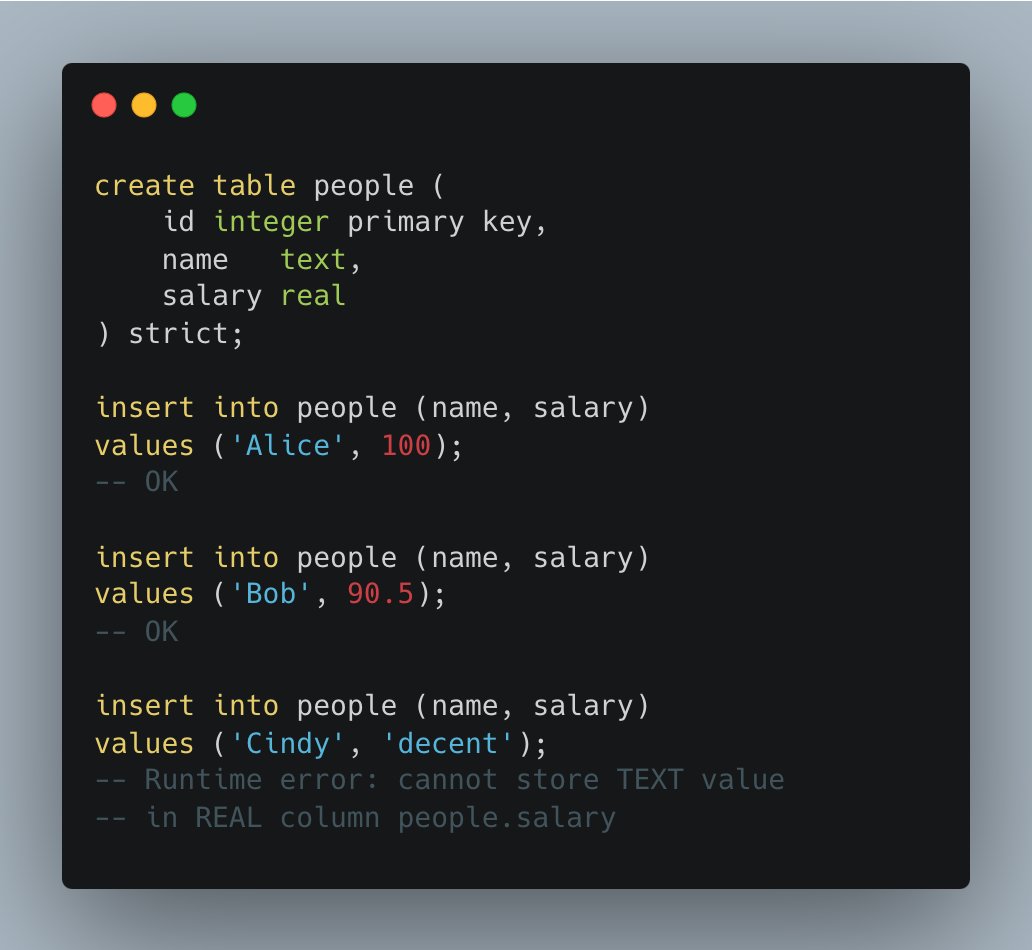
Modern SQLite #1: STRICT Tables
I'm starting a series of short notes about handy SQLite features you may not have heard about.
And the first one is "strict" tables.
As you probably know, SQLite's type system is very flexible (some people even call SQLite the JavaScript of databases) — you can store any value in any column type (e.g. create an INTEGER column and store text values there, or a REAL with blob values).
Some people love SQLite for its flexibility, others hate it for the same reason. So at some point the SQLite authors introduced STRICT tables. They check types the same way other DBMS do (see the screenshot).
Even with strict tables, you can still explicitly declare a column as ANY — such columns can hold values of any type. So you can have the best of both worlds — strict type checking and type flexibility.
Available since SQLite 3.37 (Nov 2021).
Super happy to see this announcement. I have been considering making a super-simple read-only *.ipynb viewer for the console in Textual for months now.
But voila! The cool froods over here have done one better. I am not the only one wanting this...
Just like JupyterLab, jpterm now has a top bar in the notebook editor. In the future it will have buttons to run cells, interrupt execution, restart the kernel, etc. But for now there is only the kernel busy indicator. Still, I think it's kind of neat 😄