🎁 ¡Último sorteo del año!
El 2025 se va, ¡pero los regalos siguen llegando! Participa y podrás ser uno de los ganadores de una tarjeta regalo de 50 € a tu elección 💳✨
Para entrar:
❤️ Like
🔁 Retweet
👉 Síguenos
Anunciaremos a los ganadores el viernes 2 🍀 ¡Suerte!
🚀 Usa tu propio ChatGPT local con Ollama 🚀
🦙 Ollama es el programa (cliente). Puedes descargarlo desde su página oficial (Win/Mac/Linux).
🦙 Su última versión incorpora una interfaz similar a ChatGPT (Win/Mac), donde puedes elegir el modelo a usar y tener historiales con las conversaciones.
🦙 Para usar Ollama, necesitas cargar un modelo LLM. Los más populares son: Gemma3 (Google), Llama (Meta), GPT-OSS (OpenAI), DeepSeek (HF) o Qwen3 (Alibaba), entre otros.
¡Esta web es una mina de oro para programadores!
+1500 plantillas HTML gratuitas + componentes de UI.
¡Hay para React, Angular, Vue, Astro, Next.js y más!
→ https://t.co/FOZ38oNVyf
Hola @QualitasAuto_es
Llevo mas de una hora intentando contactar por teléfono y Whatsapp y no hay manera. .
¿Me podéis dar un correo electrónico de atención al cliente?
Una cosa es estudiar de manera autodidacta, y otra muy distinta es hacerlo sin seguir un camino que te ayude a aprender con un orden lógico.
Esta es la plataforma más famosa de roadmaps:
https://t.co/3SDhYjAlXl
🐍 #htmx is a small JavaScript library that extends HTML markup to make web pages more dynamic. Check out how to add htmx to your #Django project! https://t.co/cYdsA8w5Ed
Si eres programador necesitas conocer esta web.
Decenas de hojas de referencia rápida y trucos para lenguajes de programación y herramientas de desarrollo.
quickref․me
¿Sabes que puedes enviar emails gratis desde código con cualquier lenguaje de programación y sin tu propio servidor de email?
Te lo explico en 10 minutos para que puedas añadirlo a tus proyectos.
▶️ https://t.co/rVzeDNBuRw
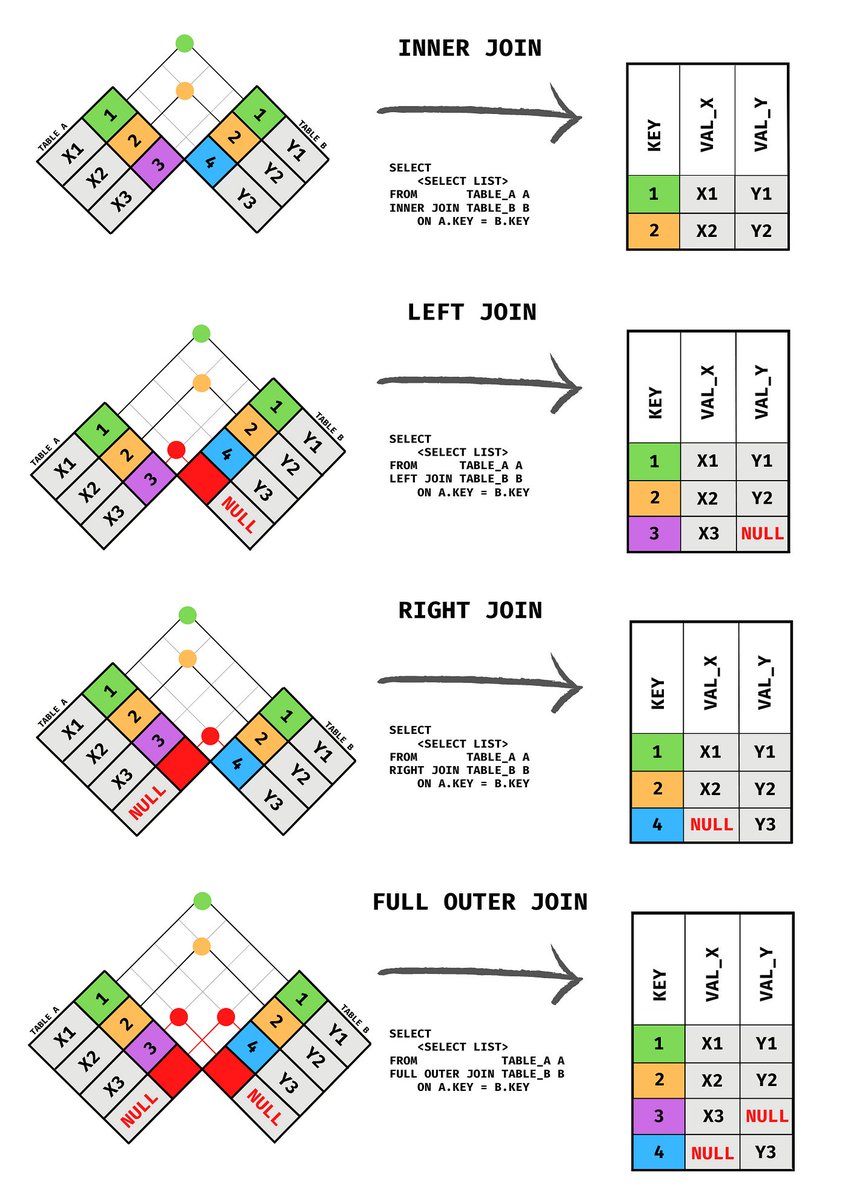
𝗪𝗵𝗮𝘁 𝗶𝘀 𝘁𝗵𝗲 𝗗𝗶𝗳𝗳𝗲𝗿𝗲𝗻𝗰𝗲 𝗕𝗲𝘁𝘄𝗲𝗲𝗻 𝗜𝗻𝗻𝗲𝗿, 𝗟𝗲𝗳𝘁, 𝗥𝗶𝗴𝗵𝘁, 𝗮𝗻𝗱 𝗙𝘂𝗹𝗹 𝗝𝗼𝗶𝗻?
🔹 (INNER) JOIN - return all rows with matching values in both tables.
🔹 LEFT (OUTER) JOIN - return all rows from the left table and those that meet the condition from the right table.
🔹 RIGHT (OUTER) JOIN - return all rows from the right table and those that meet the condition from the left table.
🔹 FULL (OUTER) JOIN - return all rows with a match in either table.
Image credits: Andreas Martinson.
#technology #softwareengineering #data #techworldwithmilan #sql
Learn these 13 Git commands because you'll be using them 99% of the time:
1. `git init`
Initialize a new Git repository.
This creates a new subdirectory named ".git" in the current directory, where Git stores all the metadata for the repository.
2. `git clone`
Clone an existing repository.
This creates a local copy of the repository, including all of its history and branches.
`git clone <repo-link>`
3. `git add`
Stage changes for the next commit.
This adds the specified file(s) to the staging area, where they will be included in the next commit.
`git add file1.txt file2.txt`
4. `git commit`
Create a new commit.
This records the staged changes and any additional changes made since the last commit, along with a commit message describing the changes.
`git commit -m "Add new feature"`
5. `git push`
Push commits to a remote repository.
This sends the local commits to the specified remote repository, updating the branch on the remote with the new commits.
`git push origin main`
6. `git pull`
Fetch and merge changes from a remote repository.
This retrieves the latest commits from the specified remote repository and merges them into the current branch.
`git pull origin main`
7. `git branch`
List, create, or delete branches.
This command can be used to list the available branches in a repository, create a new branch, or delete an existing branch.
`git branch new-branch`
8. `git checkout`
Switch to a different branch.
This command allows you to switch to a different branch in the repository and make it the current working branch.
`git checkout main`
9. `git merge`
Merge one branch into another.
This command combines the changes from one branch into another branch, creating a new commit that reflects the merged changes.
`git merge new-branch`
10. `git status`
Show the status of the repository.
This command displays the current branch, any staged or unstaged changes, and any untracked files.
`git status`
11. `git rebase`
Incorporate changes from one branch into another branch.
Let's say you have made some changes on an "XYZ" branch that you want to incorporate into the "main" branch. You can use git rebase to reapply your changes on top of the main branch.
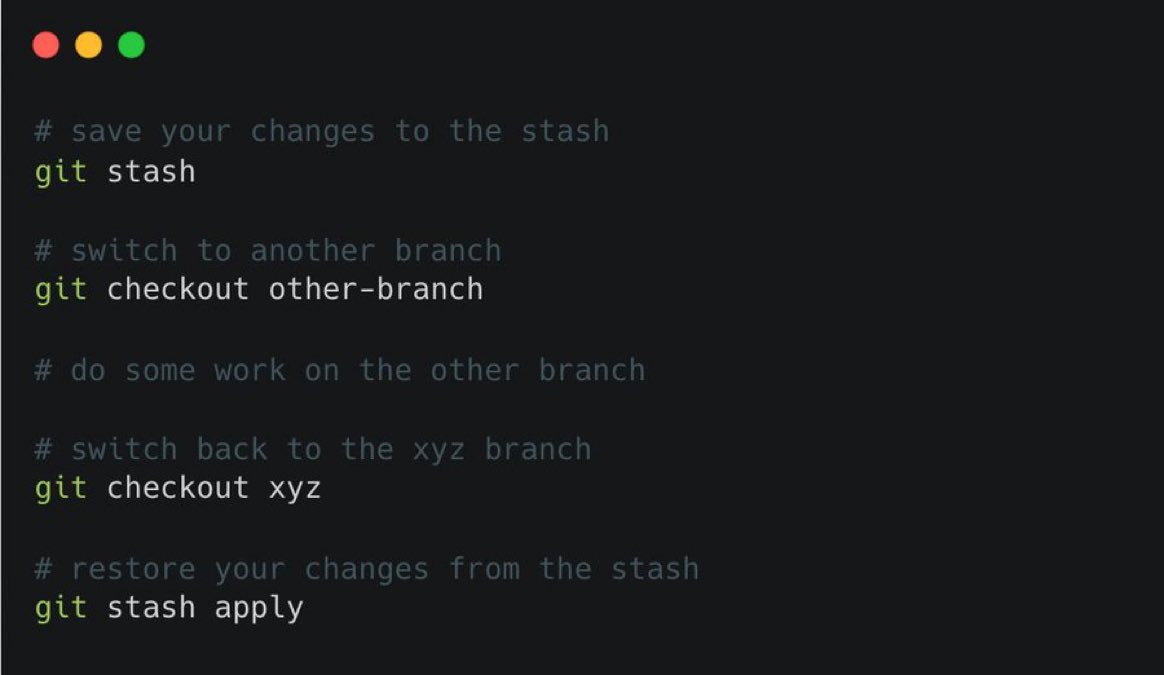
12. `git stash`
Temporarily save changes that you are not yet ready to commit.
If your changes are not ready to commit but you want to work on a different branch, you can temporarily save your changes for later use and switch branches without losing your progress.
13. `git revert`
Let's say you have made a mistake in a previous commit and you need to undo it. You can use git revert to create a new commit that undoes the changes introduced by the previous commit.
`git revert <commit1>..<commit2>`
🐍 #htmx is a small JavaScript library that extends HTML markup to make web pages more dynamic. Check out how to add htmx to your #Django project! https://t.co/cYdsA8wDtL
sqlcoder is an open-source LLM that converts natural language to high-quality SQL queries, making it easy to query data for even complex schemas and questions
Run it locally with Ollama:
https://t.co/ZUQXX3gaLg
Python Tip: How to Generate a License Key
When generating a license key, we often want a combination of uppercase letters and digits.
In Python, you can use the string module to access these sets of characters easily.
Note: Using the secrets module is recommended over random for security reasons. The secrets module is designed to be cryptographically strong, which ensures that the generated keys are unpredictable and cannot be easily guessed.
Here's a step-by-step example:
1. Import the necessary modules:
from secrets import choice
from string import ascii_uppercase, digits
2. Combine the character sets and determine the structure of your license key:
alphabet = ascii_uppercase + digits
3. Make the license key
For this example, we want a license key with 4 parts of 8 characters.
First define a helper to define a part containing 8 random characters:
def generate_part():
return ''.join(choice(alphabet) for _ in range(8))
Then join 4 of those 8 character parts together using the join() method on the "-" separator:
license_key = '-'.join(generate_part() for _ in range(4))
Result:
print(license_key) # Outputs something like DJIJV3K0-17KN23XR-8NW9K4SB-YI7CCUOT
This approach ensures your license key is random / difficult to predict and cryptographically strong.
#python #pythontips