@bdam555@systemofdoom@jaymmichaud Would be better for MS to offer a solution in top of Windows Server instead which can be used Standalone and with ConfigMgr, instead of forcing all customers to pay for ConfigMgr.
Crazy ConfigMgr/ARM Lab Saturday: PXE Booting an ARM64 Qemu VM from a Hyper-V ConfigMgr Lab Environment on Windows 11 x64 NUC System ;-) #ConfigMgr#ARM
@TheBobPony Where do i place the WindowsCodecs.dll exaclty? The Powershell Script mentions some source_23h2 directory in the Working Directory but im not sure. Thanks!
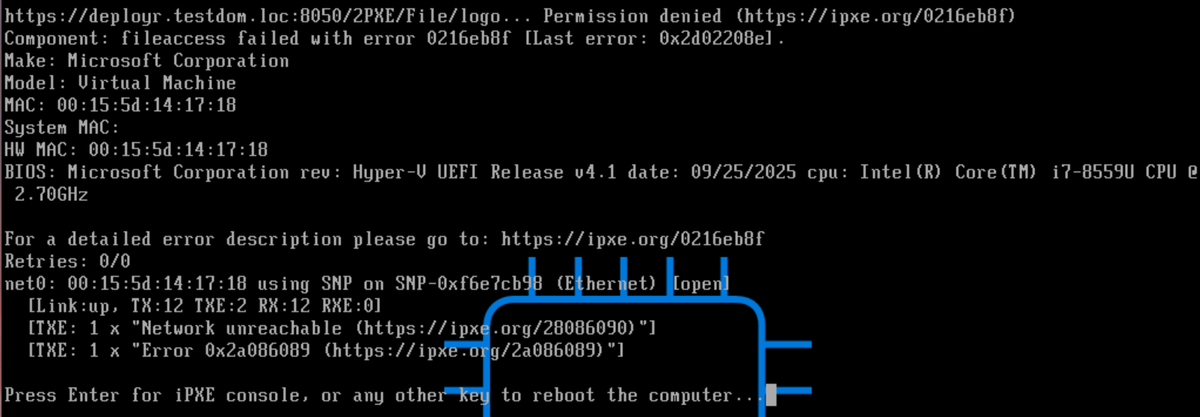
@miketerrill@mniehaus Can you maybe implement SHA512 Certificate Support for iPXE in DeployR? In my testing it doesnt work also if the Server Auth Certificate (which is bind to all Services) is SHA256 only - the SHA512 Root CA is in the Boot Image. Thanks for Community Edition!
@miketerrill@mniehaus No my systems are in a internal Hyper-V Lab. Yes the auto generated 2PXE Root and Server Auth Cert are working. What would be the the steps for cross signing with the 2PXE Root Cert (never done something like that before) ?
@mniehaus@miketerrill i mixed two things which don't belong togther... the iPXE and the Certs inside the Boot Image ;-) I need to find the place where i can add my Root CA Cert to the iPXE Service if its not enough that the Root CA Cert is on the Trusted Root Certs on the iPXE itself...
@mniehaus@miketerrill I tested now again with a single file content item and in the logs i can see he picks the folder with the Root Certificate File, but in the end i don't see it in the iPXE Console again...
@mniehaus@miketerrill The boot image does not see my Root CA Certificate too, also if it was included in the same folder i integrated...i will try to integrate this again and check the boot image update log for any errors...
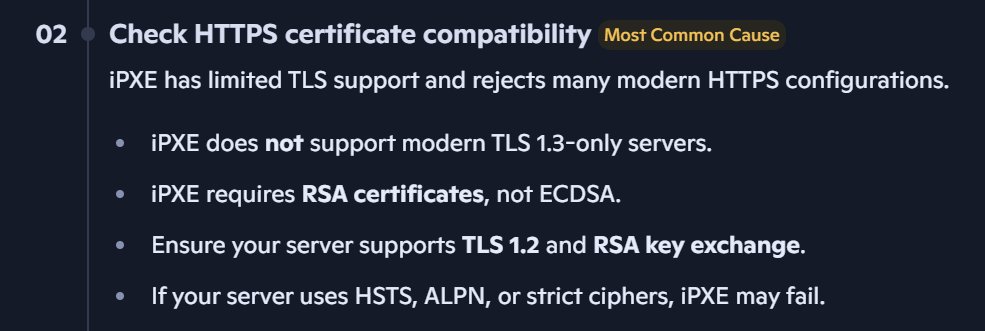
@mniehaus@miketerrill I checked these most common issues Copilot tells me. I dont force TLS 1.3 and the Certificate is RSA. CA is using the Key Storage Provider (maybe this is an Issue too if iPXE cannot handle CNG Certificates).