🚀 Expenses 2026.10.0 is here!
This update brings opening balances, proper transfers between accounts, 12 new languages, bank notification imports on iOS 27, and more.
- https://t.co/VSyLhH3PD6
- https://t.co/lGTyry6cV7
#PersonalFinance#Finance#IndieApps#IndieDevs#iOSApps
Expenses 2026.9.0 is here!
Ask questions about your money with the new AI assistant, create custom reports, scan payment screenshots into transactions, and explore a redesigned Analytics tab.
See the full update at https://t.co/fJFvnGqTQg
#PersonalFinance#iOSApps#IndieDev
Expenses 2026.7.0 was released to the App Store!
In this release:
- iPad support
- Bugfixes
👉 App Store: https://t.co/RyqS8xymz9
👉 Website: https://t.co/Kv4TnN7uB7
#PersonalFinance#iOSApps#iPadOS#IndieDev
Expenses 2026.4.0 was released to the App Store! 🚀
In this release
- Support for automated import of Apple Wallet transactions
- iCloud Sync status view
- Improved accounts & categories forms
- Calculator bug fix
Release notes:
https://t.co/p4ee1pAAvf #iOS#AppUpdate#Finance
Effective Expenses 1.3.0 is out with
- a redesigned built-in calculator
- redesigned form suggestions
- recurring transactions with confirmation
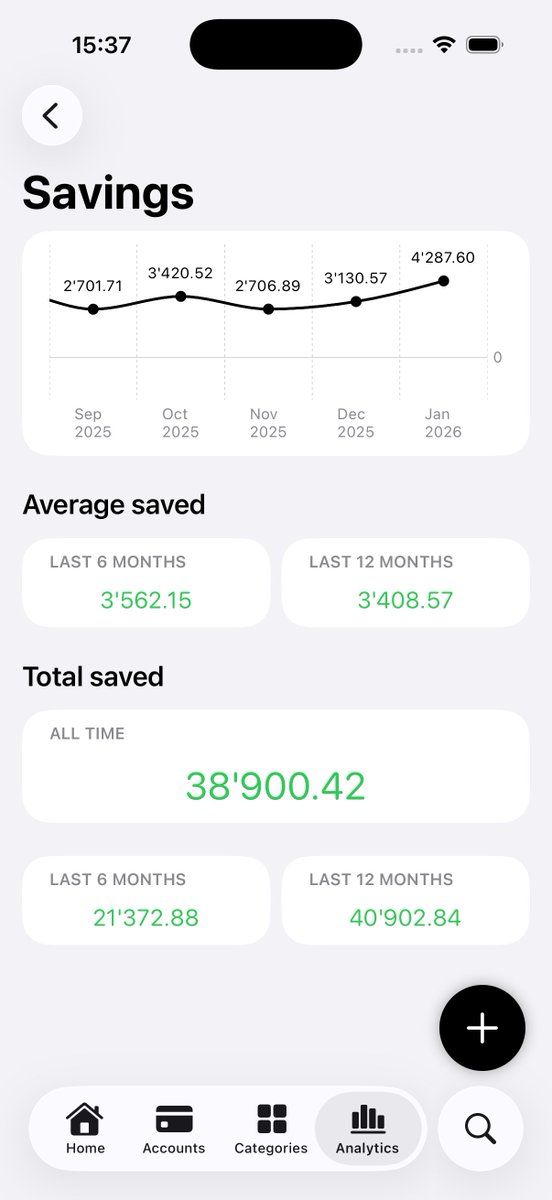
- new analytics section and widget for savings
- support for Shortcuts
👉 https://t.co/W7bdoMiABg
#PersonalFinance#iOSApps#IndieDev
This is my first iOS app as an indie developer. I’ve already learned a lot building it, but this is just the beginning.
I’d really appreciate any feedback (good or bad) on:
- The app itself (if you want to try it 🙂)
- The App Store page
- The website
- Etc.
#iOSDev#IndieDev
🚀 My first iOS app is live on the App Store!
After struggling with ugly or overly complex expense trackers, I built this app as a simple way to track expenses and income.
👉 App Store: https://t.co/W7bdoMiABg
👉 Website: https://t.co/jzbCxNGKTq
#iOSApps#PersonalFinance
Just wasted half an hour because I was passing a
SectionedFetchResults.Section directly to a function taking an array. All Xcode gave me was "The compiler is unable to type-check this expression in reasonable time". The state of this IDE is embarassing.
#SwiftUI#Xcode#iOSDev
Working on an update for the analytics of my expense tracker.
You will now be able to see how much you're spending during the current week and month, along with a comparison to the previous week or month.
Let me know what you think!
#iOSDev#SwiftUI#IndieDev
Here is the TestFlight link for my new app "Effective Expenses". If you're curious or want to help shape the direction, I’d really appreciate your input!
https://t.co/RPX8l9xJnG
#iOSDev#TestFlight#PersonalFinance#IndieDev
Over the past month, I’ve been diving back into a SwiftUI project I started a while ago to learn the latest technologies in iOS development.
#iOSDev#TestFlight#PersonalFinance#IndieDev
Looking for ideas I just went for what I needed: an expense tracker. Nothing groundbreaking, I know, but I hope I was able to give it my own twist: clean, minimal, powerful.
The app is still in early stages, but I’m at a point where I’d love to start gathering feedback!
Am I missing something or the only way to have some screenshots on a TestFlight beta is to actually publish the app on the App Store?
#iOSDev#TestFlight#IndieDev
Even worse, my “Following” timeline has in average 2 ads every 3 posts. I understand advertising for monetisation and incentivising premium subscriptions but this seems too much.
This is extra annoying when the first app already opened in one half of the screen is YouTube. Then the extra step of first opening the second app full screen, also stops playback.
What I really miss with iPadOS 26 on my iPad is being able to drag an app icon from the dock or spotlight into one half of the screen. You can drag the window after having opened the app but this is an annoying extra step.
#iPadOS26#beta3