Do you actually understand what $20,000 a month looks like when you build it properly?
Not 20 clients at $1,000. Not 100 clients at $200.
8 clients. $2,500 each. Agents doing the work. Him maintaining the system.
Lead qualification running 24 hours a day. Support tickets handled in seconds. Invoices chased automatically on day 7, day 14, day 21. Meeting briefs landing in inboxes 60 minutes before every call. Competitor reports delivered every Friday at 3pm.
Total tool cost on his side: $200 a month.
He built the system once. Packaged it. Now he's selling the codebase to people who want to do the same.
The agents were always the product. He just figured it out earlier than most.
Bottom line: That is the difference between freelancing and business.
While most people waste their time just "pressing buttons" in Claude, he realized that the product isn't your time—it's a finished, autonomous process. You set it up once, package it into a template, sell it, and then simply maintain the infrastructure.
The numbers in this post aren't magic; they are just the math of automation. Either you build systems that earn money while you sleep, or you continue trading your time for a fixed paycheck.
The choice is yours
Aaron Levie (box ceo) say just read these business books:
Seven Powers, Positioning, Innovator's Dilemma and its sequel Innovator's Solution, Blue Ocean Strategy, Crossing the Chasm.
He said if you got locked in a room and read them, you'd predict 100% of what happens in technology without fail (kinda joking...)
@levie
Jacob Bank, former Google product lead:
"I built up this team of 40 AI marketing agents to work with me. I'm the only marketing person."
In a 15-minute talk, he shows what one person with the right setup now runs alone.
Forty agents. One human. His AI bill is $500 a month, against the $50,000 a human team would cost.
That's the math quietly minting the first solo fortunes of the AI era.
Watch the talk, then read the piece below.
Bookmark this one.
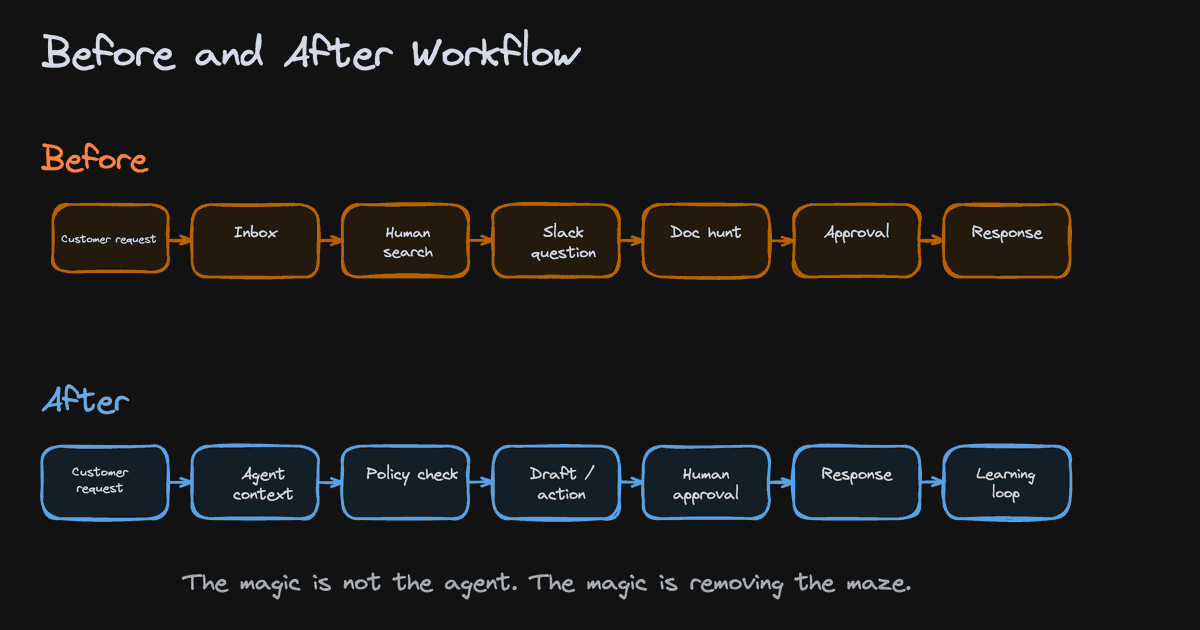
A friend asked me how to actually build a company that runs on AI agents.
I drew him 4 simple diagrams and this is what I told him:
For this to work, a few things have to be true.
- The humans move up to strategy, taste, and judgment while agents handle the execution.
- The whole business becomes readable to agents. Your data, SOPs, pricing, permissions, and decisions all live in one shared context layer.
- And you point it at the right work. Repetitive enough for an agent, complex enough that the incumbents never bothered. That's the goldmine.
In the old world, the company was the people. They held the knowledge, made the calls, did the work.
In this new world, the people become the creatives, the agents become the labor, and the company itself becomes the context layer.
That shared brain is the actual company now. The humans and the agents are just plugging into it.
Which means the most valuable thing you can build in 2026 is a business so well-documented that an agent can run it.
I see it everyday with @MeetLCA. I don't talk about it much publicly, but we've built a SWAT team for building AI-native orgs and AI-native products.
The moat is how legible your company is.
I drew it all out below.
luckily bookmark rot is an easy problem to fix now
here's how to turn every X bookmark you've ever saved into a second brain your agent has full context on:
1. export your bookmarks. i use twitter-web-exporter (free userscript) or the BookmarkSave extension. you get one file with every bookmark + the full text + the author + the link
2. drop that file into a folder. if you already run an llm wiki / obsidian vault, drop it straight in so your bookmarks join the rest of your knowledge
3. point your agent at the folder (claude code, codex, hermes, whatever you run) and tell it: "read this export and turn every bookmark into its own markdown note with the original link and a couple of topic tags"
that's it, your agent has read all of it.
now you can ask "what have i saved about pricing" or "pull everything i bookmarked on claude code" and it answers across the whole pile
takes maybe 10 minutes
after that they actually get used, and every new bookmark folds into the same brain instead of rotting in a tab you never open again
you face 2 choices every week:
1: open claude, do your tasks, occasionally automate something, close it, repeat
2: have claude watch your entire week and automate ALL the repetitive tasks for you (on autopilot)
most people don't even know option 2 exists
full setup here (takes 60 seconds):
Most people want AI to sound like them.
But no one does this first (and it takes 47 mins):
Step 1. Download Claude (claude. com/ download)
Open 'Cowork'. Create a folder for your voice.
Step 2. Select Opus 4.7 + Extended Thinking
Set as default model. Turn ON Extended Thinking.
Step 3. Copy-paste the interview prompt
From this guide: https://t.co/LyV7fegv4c
It asks you 100 questions about how you think.
Step 4. Answer every question out loud
Use the Wispr. ai. Talk to yourself. Don't type.
Typing makes you edit. Talking makes you honest.
Step 5. Don't tell what you like. Tell what you reject.
Be extremely precise and specific in your answers.
80% of your file should be what you'd never say.
Step 6. Paste Prompt 2 - The Voice Compiler
20K-word raw file → 2-4K compressed tokens.
Cuts generic. Keeps signal. Most people stop at the raw dump. That's the mistake.
Step 7. Save + test [yourname] .md
Open a blank Claude session.
Paste the file. Ask it to write something.
If it sounds like you → ship it. If not → re-interview.
Step 8. Deploy with Obsidian
Drop the .md in your Cowork folder. It auto-read on every prompt. Edit it like a Google Doc. It syncs automatically, without downloading uploading loop.
The Don'ts:
✦ Skip the 100-question interview
✦ Answer vaguely ("I like clarity" → clarity HOW?)
✦ Stop at the 20K-word raw dump
✦ Use blank chats instead of Cowork folders
✦ Treat the file as static (you change daily)
✦ Think your voice is too "magical" to capture
✦ Forget to document what you'd NEVER write
✦ Blame AI for sounding generic
The Do's:
✦ Always use Cowork - not blank chats
✦ Always turn on Extended Thinking
✦ Always compress with Prompt 2
✦ Always test in a blank session first
✦ Always document refusals, not just preferences
✦ Always edit your .md as your taste shifts
✦ Always push through the full 100 questions
✦ Always start prompts pointing to your folder
You think you're complex to fit in a file. You're not.
47 mins & one .md file to duplicate your brain.
Most people won't sit for 2 hours.
You're not most people.
Full process + prompts: https://t.co/LyV7fegv4c
How to actually set up Claude in 7 minutes:
(and never re-do it after this setup)
1. Pick the right model.
☑ Open the Claude desktop app
☑ Set Opus 4.7 for complex tasks
☑ Turn ON Extended Thinking
2. Create your 'Cowork' folder.
☑ 3 subfolders: About me, Outputs & Templates
☑ ABOUT ME holds your 3 context files
☑ Claude reads them for every single task
3. Write your Global Instructions.
☑ Settings → Cowork → Edit Global Instructions
☑ A persistent prompt before every task
☑ Tells Claude what to read, and when
4. Connect your daily tools.
☑ Gmail, Gamma, Drive, Granola
☑ All your tools in one place
☑ No more copy-paste between 12 tabs
5. Install Wispr .ai (it's free).
☑ Turns your voice → text
☑ Pick a hold-key (mine = Shift)
☑ Typing at 60 wpm is the bottleneck
6. Open your Cowork folder in Obsidian.
☑ Install Obsidian (free)
☑ Open Cowork as a vault
☑ Edit context files without leaving flow state
7. Save your top 3 workflows as Skills.
☑ Click any chat → "Turn into a Skill"
☑ /linkedin, /brief, /report = instant
☑ Reuse what already works
8. Build one Project per recurring deliverable.
☑ One Project = one type of output
☑ Files + instructions live inside
☑ Never re-explain the same task twice
9. Restart the chat at message 20.
☑ Long chats burn 30x more tokens
☑ Ask Claude to summarize → paste in new chat
☑ Fresh start = better results, lower bill
Full guide + prompts at https://t.co/psB7XxAv8w
(save this - small habits = big leverage over time)
Stop watching 45-minute Claude tutorials.
Everything you need is in this one image (save this):
1. Cowork Setup (Tips 1–10)
☑ Download the desktop app. Not the browser.
☑ Create one folder on your PC called 'COWORK'.
☑ 4 subfolders: About me, project, template, output
☑ Download anti-ai-style here: https://t.co/psB7XxB2Y4.
☑ Subscribe for free. Open my welcome email.
☑ Hit the automatic reply button inside.
☑ Download anti-ai & my about me from my Notion.
2. Pick the Right Model (Tips 11–20)
☑ Opus 4.6 + Extended Thinking for complex tasks.
☑ Sonnet = quick edits. Haiku = scanning files.
☑ The model matters less than the prompt.
☑ Bad prompt on Opus > Great prompt on Haiku.
3. Prompting (Tips 21–30)
☑ Stop writing long prompts. Files > prompts.
☑ One task per prompt. One. Not five.
☑ Say "Does NOT sound like" to kill the AI voice.
☑ Give the task, not the method. Let it figure it out.
4. AskUserQuestion Tool (Tips 31–40)
☑ "Start with AskUserQuestion" in all 1st prompts.
☑ Claude builds you a clickable form. Click answers.
☑ It asks the right questions so you don't have to.
☑ If the direction is wrong, say it. It rebuilds.
5. Connectors (Tips 41–50)
☑ Settings → Connectors → Browse → Click "Add."
☑ Slack, Google Drive, Notion, Gmail. 50+ tools.
☑ Claude reads your actual files. No copy-pasting.
☑ Free on all plans. No extra cost. Just connect.
6. Plugins (Tips 51–60)
☑ Cowork → Customize → Browse → Install.
☑ Marketing, Legal, Sales, Data — pick your role.
☑ Type / to trigger any plugin command instantly.
☑ Customize to match your company and voice.
7. Claude in Excel (Tips 61–70)
☑ Install "Claude by Anthropic" from Microsoft Marketplace.
☑ It reads every tab. Explains formulas in English.
☑ Drop a PDF in. Claude extracts the tables for you.
☑ No macros. Claude highlights what it touches.
8. Projects & Teams (Tips 71–80)
☑ One Project per deliverable. Not per client.
☑ Upload a great example. It matches the standard.
☑ Convert one person first. Then scale to the team.
☑ Use the 15-minute demo. Show, don't tell.
9. Artifacts (Tips 81–90)
☑ Charts, dashboards, trackers - inside the chat.
☑ They work automatically in Cowork.
☑ Preview before you export. Edit it live. Then copy.
☑ Share with non-Claude users as HTML.
10. Advanced Mastery (Tips 91–100)
☑ Keep your files under 200 lines. Shorter is better.
☑ 80% of your file should be what you're NOT.
☑ Review outputs. Especially financial work.
☑ Claude does 80% busywork. You do the 20%.
---
To download all of my other Claude infographics:
Step 1. Go to https://t.co/psB7XxB2Y4.
Step 2. Subscribe for free. Don't pay anything.
Step 3. Open my welcome email (most skip this).
Step 4. Hit the automatic reply button inside.
Step 5. Download my infographics from my Notion.
Bonus. Enjoy my best copy-paste prompts, too.
♻️ Repost this to save someone 6 months of trial.
Prompting is the worst way to use Claude.
Here's what the top 1% do instead:
They set up these 8 files once.
Then they barely prompt again.
File 1: about-me .md (Your identity)
Who you are, your job, your priorities.
Claude reads this before every task.
To download mine, go here: https://t.co/psB7XxAv8w.
Don't pay anything. It's free in the welcome email
File 2: voice-profile .md (Your taste DNA)
Your beliefs, your writing mechanics, your hard nos.
Built from a 100-question interview with Claude.
File 3: anti-ai-writing-style .md (Your boundaries)
Every word you ban, the structure you reject, tone you hate. 80% of this file is what you're NOT.
Go to https://t.co/psB7XxAv8w to download anti AI guide.
Don't pay .Open the email. Click on Notion.
Open '.md files' Download 'ANTI AI STYLE .md'.
File 4: The Cowork Folder (Your 4-folder system)
ABOUT ME. PROJECTS. TEMPLATES. CLAUDE OUTPUTS. 3 read-only, 1 write. Nothing extra.
File 5: Global Instructions (Your persistent rules)
Set once in Settings → Cowork → Edit
Claude follows them before every task.
Prompt: "Always read my files first, never edit my originals, deliver everything to CLAUDE OUTPUTS."
File 6: The One Prompt (How you start every chat)
29 words. Forces Claude to ask YOU questions.
Starts 80% of your conversations.
Prompt: "I want to [TASK] for [SUCCESS CRITERIA]. Use AskUserQuestion before you start."
File 7: Connectors (Claude inside your tools)
Slack, Google Drive, Notion, Gmail, Figma.
No copy-pasting. Claude reads your actual tools.
File 8: Plugins (Instant skill packs)
Marketing, Sales, Legal, Data. One-click install.
Each comes with its own slash commands.
The secret was always these 8 files behind it.
I wrote 2 guides so you can copy my exact system:
✦ My full 8-file setup: https://t.co/psB7XxAv8w
✦ My Cowork folder walkthrough: https://t.co/uWTpOI3oyE
(save this to never write a long prompt to Claude)
Imagine you decided to build your first AI agent:
> complete confusion, frustration
> no idea how they actually work
> then you find an article by @hooeem
> a guide on building your first AI agent
> fully explained, in simple terms
> you get it working, turn agents into a system
> based on insights from Anthropic, OpenAI, and experts
all it takes is 1-2 hours to read and 10-20 hours to practice
AI agents can optimize 20-40% of your time
while giving you space to work on something bigger
the choice is yours
THIS IS IT.
The most important video you'll watch this year.
Claude Cowork is an absolute game changer for SEO!
Your own 24/7 AI SEO assistant.
In this masterclass, I cover how Claude code works for SEO, how to set it up, and why it will change SEO forever:
I don’t usually share AI stuff because most of it is slop, but this is the most insane thing I’ve read today.
People are already building companies with AI agents and raising capital, bookmark this or you’ll watch others make money from something you ignored.





![rubenhassid's tweet photo. Most people want AI to sound like them.
But no one does this first (and it takes 47 mins):
Step 1. Download Claude (claude. com/ download)
Open 'Cowork'. Create a folder for your voice.
Step 2. Select Opus 4.7 + Extended Thinking
Set as default model. Turn ON Extended Thinking.
Step 3. Copy-paste the interview prompt
From this guide: https://t.co/LyV7fegv4c
It asks you 100 questions about how you think.
Step 4. Answer every question out loud
Use the Wispr. ai. Talk to yourself. Don't type.
Typing makes you edit. Talking makes you honest.
Step 5. Don't tell what you like. Tell what you reject.
Be extremely precise and specific in your answers.
80% of your file should be what you'd never say.
Step 6. Paste Prompt 2 - The Voice Compiler
20K-word raw file → 2-4K compressed tokens.
Cuts generic. Keeps signal. Most people stop at the raw dump. That's the mistake.
Step 7. Save + test [yourname] .md
Open a blank Claude session.
Paste the file. Ask it to write something.
If it sounds like you → ship it. If not → re-interview.
Step 8. Deploy with Obsidian
Drop the .md in your Cowork folder. It auto-read on every prompt. Edit it like a Google Doc. It syncs automatically, without downloading uploading loop.
The Don'ts:
✦ Skip the 100-question interview
✦ Answer vaguely ("I like clarity" → clarity HOW?)
✦ Stop at the 20K-word raw dump
✦ Use blank chats instead of Cowork folders
✦ Treat the file as static (you change daily)
✦ Think your voice is too "magical" to capture
✦ Forget to document what you'd NEVER write
✦ Blame AI for sounding generic
The Do's:
✦ Always use Cowork - not blank chats
✦ Always turn on Extended Thinking
✦ Always compress with Prompt 2
✦ Always test in a blank session first
✦ Always document refusals, not just preferences
✦ Always edit your .md as your taste shifts
✦ Always push through the full 100 questions
✦ Always start prompts pointing to your folder
You think you're complex to fit in a file. You're not.
47 mins & one .md file to duplicate your brain.
Most people won't sit for 2 hours.
You're not most people.
Full process + prompts: https://t.co/LyV7fegv4c](https://pbs.twimg.com/media/HIQRgThakAAE6Vz.jpg)


![rubenhassid's tweet photo. Prompting is the worst way to use Claude.
Here's what the top 1% do instead:
They set up these 8 files once.
Then they barely prompt again.
File 1: about-me .md (Your identity)
Who you are, your job, your priorities.
Claude reads this before every task.
To download mine, go here: https://t.co/psB7XxAv8w.
Don't pay anything. It's free in the welcome email
File 2: voice-profile .md (Your taste DNA)
Your beliefs, your writing mechanics, your hard nos.
Built from a 100-question interview with Claude.
File 3: anti-ai-writing-style .md (Your boundaries)
Every word you ban, the structure you reject, tone you hate. 80% of this file is what you're NOT.
Go to https://t.co/psB7XxAv8w to download anti AI guide.
Don't pay .Open the email. Click on Notion.
Open '.md files' Download 'ANTI AI STYLE .md'.
File 4: The Cowork Folder (Your 4-folder system)
ABOUT ME. PROJECTS. TEMPLATES. CLAUDE OUTPUTS. 3 read-only, 1 write. Nothing extra.
File 5: Global Instructions (Your persistent rules)
Set once in Settings → Cowork → Edit
Claude follows them before every task.
Prompt: "Always read my files first, never edit my originals, deliver everything to CLAUDE OUTPUTS."
File 6: The One Prompt (How you start every chat)
29 words. Forces Claude to ask YOU questions.
Starts 80% of your conversations.
Prompt: "I want to [TASK] for [SUCCESS CRITERIA]. Use AskUserQuestion before you start."
File 7: Connectors (Claude inside your tools)
Slack, Google Drive, Notion, Gmail, Figma.
No copy-pasting. Claude reads your actual tools.
File 8: Plugins (Instant skill packs)
Marketing, Sales, Legal, Data. One-click install.
Each comes with its own slash commands.
The secret was always these 8 files behind it.
I wrote 2 guides so you can copy my exact system:
✦ My full 8-file setup: https://t.co/psB7XxAv8w
✦ My Cowork folder walkthrough: https://t.co/uWTpOI3oyE
(save this to never write a long prompt to Claude)](https://pbs.twimg.com/media/HFiOVxEakAM_8dm.jpg)


