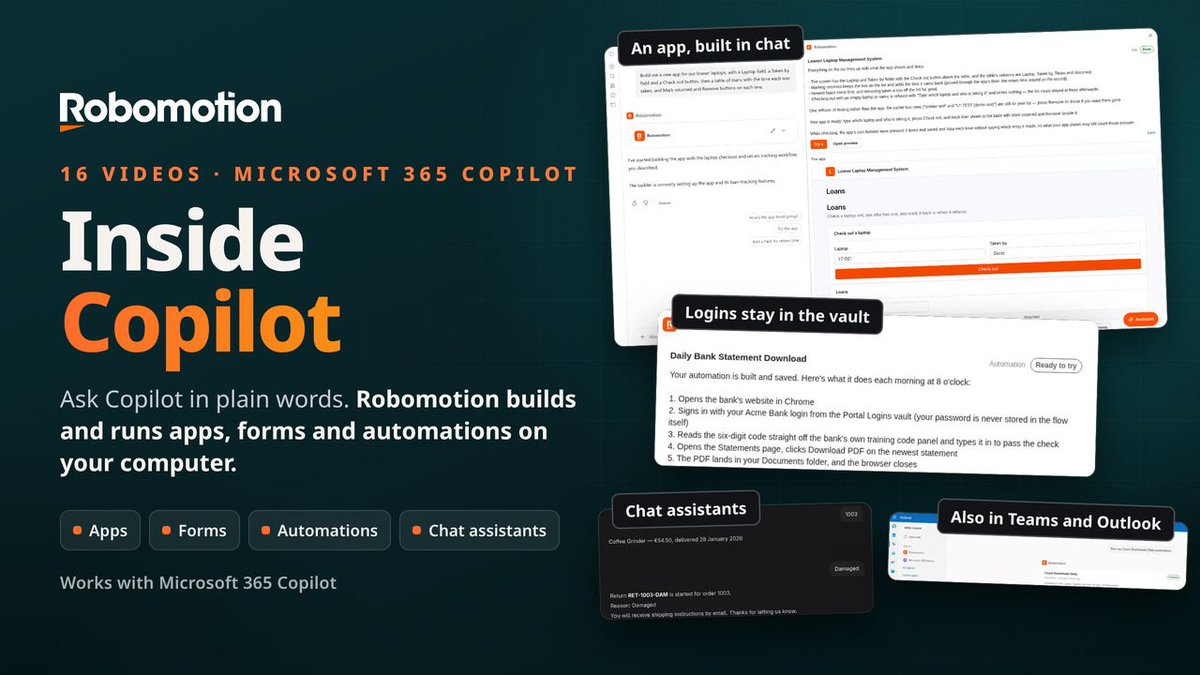
Robomotion now works with Microsoft 365 Copilot.
Ask in plain words, in the chat you already use.
Tell Copilot what you need, and Robomotion builds it on your own computer and runs it on your robots. The build shows up as a card beside the chat: what it is doing, the questions it has for you, and the result.
We filmed 16 videos, for real, from the first admin setup to working builds:
1️⃣. An app from one prompt. A loaner laptop tracker, running in Copilot, used right there, then published for the team.
2️⃣. A form by talking. A team lunch RSVP, changed live on the canvas, with a link to share.
3️⃣. An automation with a login. It signs in to a bank every morning and saves the latest statement. The password stays in the Robomotion vault and never goes into the chat.
4️⃣. Chat assistants. A conversational one for new starters, and a guided one that looks up an order and starts a return.
5️⃣. Fixing what went wrong. Say what you saw, the way you would tell a colleague, and the builder finds the cause and fixes it.
It also works in Copilot in Teams and Outlook, on your organization's own AI model if you want, and IT decides who can build and where.
Watch the series, Robomotion in Microsoft 365 Copilot:
https://t.co/L5zDQxDfFw
#Robomotion #Microsoft365 #Copilot #Automation #RPA #NoCode
We've shipped so much this fall that we decided to put it all into one 35-minute walkthrough.
In our latest video, What's New in Robomotion, we walk through all the major updates, demonstrated on the real product:
💬 Chat Assistant: people talk to your automations, guided or conversational
📝 Forms: anyone can send work to a robot, files included
📚 Knowledge Base: answers from your own documents
🤖 Build with AI: a plain request in, a working flow or app out
🔍 Visual Diff: see exactly what changed between two versions
🧠 AI Agent + RPA: agents that use your RPA flows as their tools
👥 Agent Teams: agents and people working together in channels
🧩 Robomotion Apps: a real web app in front of any flow
📄 Document Understanding: invoices and receipts read on your own machine, no API keys
🖥️ UI Automation: web, Windows, Java and remote desktop, explored by Claude Code
Already running another RPA product in your business? We migrate your automations to Robomotion for free.
Let's talk: [email protected]
#Robomotion #RPA #Automation #AIAgents #LowCode #ClaudeCode
Robomotion Agent Teams is more than a place where AI agents collaborate.
Its their workspace.
Hire ready-to-use AI agents from the Robomotion Store, clone and customize existing ones, or build your own from scratch.
Your agents. Your teams. Your workspace.
Introducing 𝐀𝐠𝐞𝐧𝐭 𝐓𝐞𝐚𝐦𝐬 in Robomotion.
Your AI team, working alongside your people.
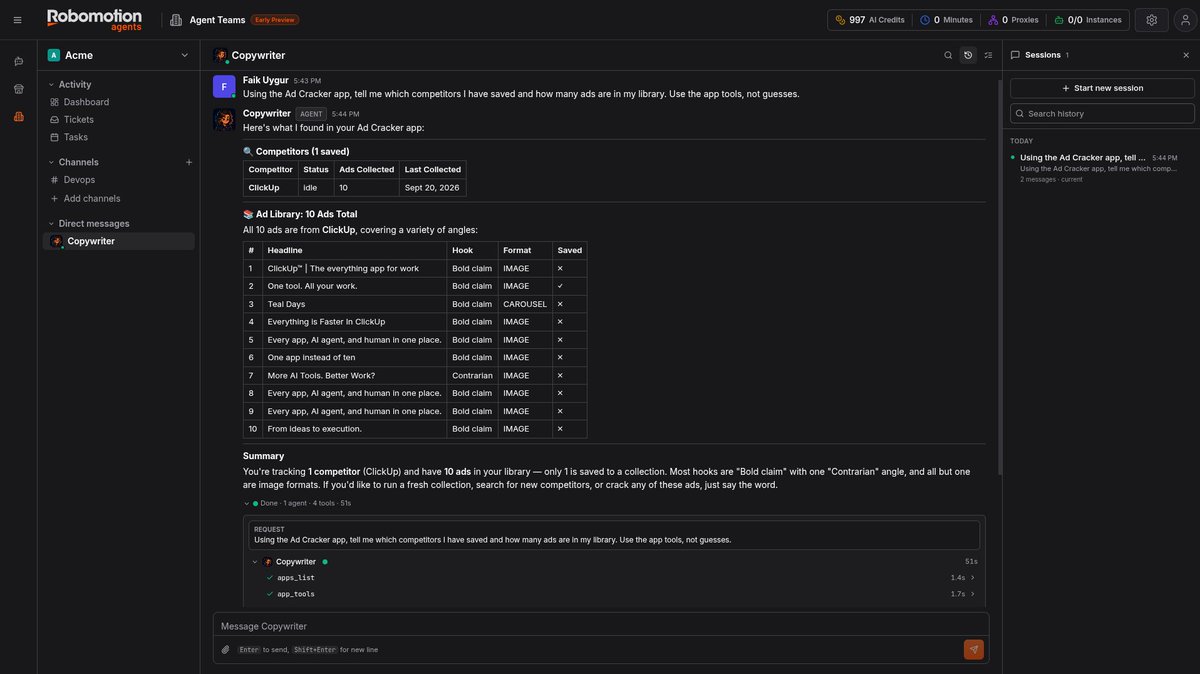
Bring AI agents in from the Robomotion Store, add them to a channel with your team, and give the Team Lead a goal.
The Team Lead delegates tasks to the right specialists. Agents collaborate, share progress, and hand off work to one another, all in the open. Whenever a decision requires your approval, it comes back to you as an actionable card.
We recorded a real demonstration using a fictional startup called Kilnly and gave its AI team five assignments:
1. Write and publish a blog post. Research this week's trends, write the article, generate illustrations, and publish it with the owner's approval.
2. Improve visibility in AI search. Audit the website, implement schema markup and llms.txt, then re-check the live site. The score improved from 40 to 59.
3. Prepare a product launch. Create a launch post and a square video. During the website review, an agent discovered a broken trial button. The Team Lead flagged the issue and requested approval before proceeding.
4. Build an AI SDR. Research nine relevant studios, score each prospect out of 100, and draft personalized outreach emails. The agent refused to add an unqualified tenth prospect just to meet the target. Nothing gets sent without approval.
5. Build an application. Create tickets for each step, write the specification, design the interface, build a working Robomotion App, and conduct a security review with findings referenced by file and line number.
𝐀𝐠𝐞𝐧𝐭𝐬 𝐝𝐨 𝐭𝐡𝐞 𝐰𝐨𝐫𝐤. 𝐘𝐨𝐮 𝐦𝐚𝐤𝐞 𝐭𝐡𝐞 𝐝𝐞𝐜𝐢𝐬𝐢𝐨𝐧𝐬.
Every agent runs on its own Robomotion robot. Nothing gets published, sent, or scheduled without your approval.
Watch the full six-episode series. Links are in the first comment.
#Robomotion #AIAgents #AgentTeams #Automation #AI
Switch to Robomotion and we’ll migrate your existing RPA automations for FREE.
Keep your automations running.
And that’s not all.
Here’s what Robomotion can offer this Fall 2026:
1️⃣ Chat Assistant: let people talk directly to your automations
2️⃣ Forms: collect data and trigger flows from a simple link
3️⃣ Knowledge Base: turn your documents into knowledge for agents
4️⃣ Build with AI: build flows and apps with our Assistant, Claude Code, or Codex
5️⃣ Visual Diff: see exactly what an AI agent changed before you run it
6️⃣ Agent Teams: let multiple AI agents collaborate with each other and your team
7️⃣ AI Agent + RPA: agents think, RPA flows do the work
8️⃣ Robomotion Apps: UI for people, MCP for agents
9️⃣ Document Understanding: process documents offline on your own CPU or GPU
The direction is simple:
People use chat, forms, and apps.
AI agents use MCP.
Systems use APIs, schedules, triggers, and queues.
Underneath it all, Robomotion does the work.
Talk to us 👉 [email protected]
Robomotion can help you 𝐚𝐮𝐭𝐨𝐦𝐚𝐭𝐞 𝐲𝐨𝐮𝐫 𝐛𝐮𝐬𝐢𝐧𝐞𝐬𝐬 in several different ways today:
1️⃣ You can create 𝐰𝐨𝐫𝐤𝐟𝐥𝐨𝐰𝐬 that automate your business processes and run in the background.
2️⃣ You can create 𝐀𝐈 𝐚𝐠𝐞𝐧𝐭𝐬 that you can communicate with and that can do the work for you.
3️⃣ You can now create 𝐚𝐠𝐞𝐧𝐭𝐢𝐜 𝐚𝐩𝐩𝐬 for both humans and agents. Humans can use the UI, while Claude Code, Codex, or Copilot can connect through MCP.
4️⃣ And finally with our latest 𝐃𝐨𝐜𝐮𝐦𝐞𝐧𝐭 𝐔𝐧𝐝𝐞𝐫𝐬𝐭𝐚𝐧𝐝𝐢𝐧𝐠 capabilities, Robomotion is even more powerful. You can process almost any type of document and connect the extracted data directly to your automation workflows and your agents.
Try Robomotion for free:
https://t.co/QI9O6yC8QL
Thanks to Kris for creating this video.
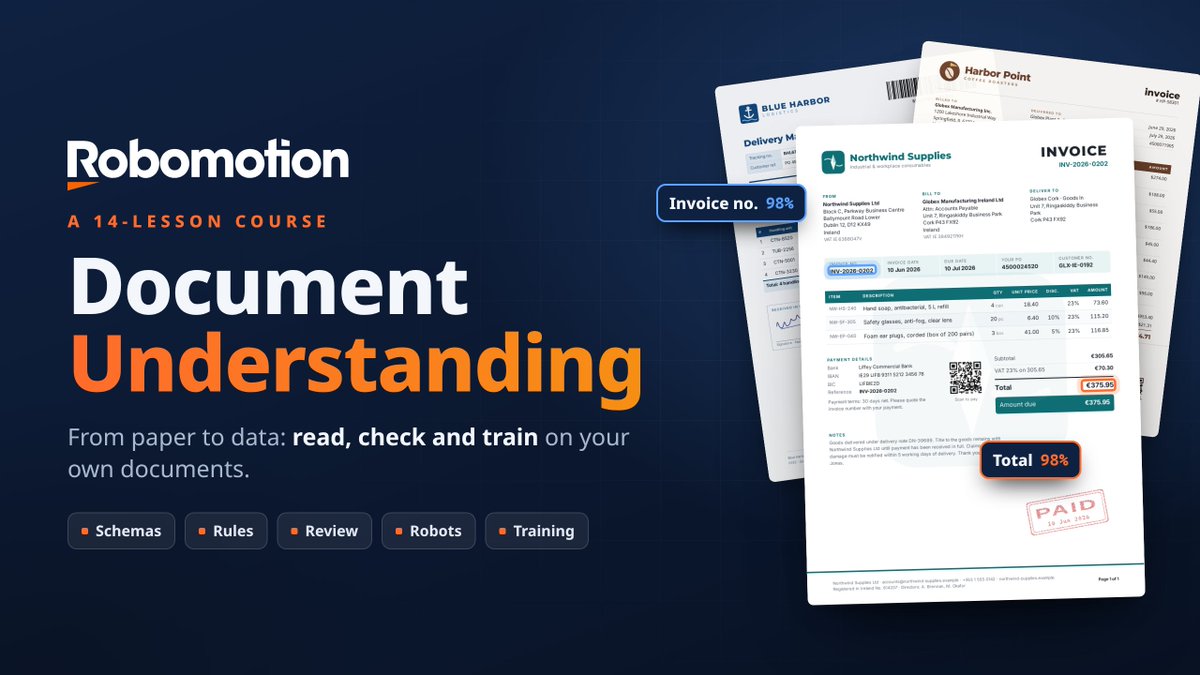
We have been working on Robomotion 𝗗𝗼𝗰𝘂𝗺𝗲𝗻𝘁 𝗨𝗻𝗱𝗲𝗿𝘀𝘁𝗮𝗻𝗱𝗶𝗻𝗴 for a while, and this course finally shows the whole picture
Not just OCR
From raw documents to structured data, validation, human review, automation, measurement, and even training your own models
Robomotion 𝗗𝗼𝗰𝘂𝗺𝗲𝗻𝘁 𝗨𝗻𝗱𝗲𝗿𝘀𝘁𝗮𝗻𝗱𝗶𝗻𝗴 from zero to production 👇
We just published a complete Robomotion Document Understanding course:
From PDFs and photos → structured data → validation → human review → automation → measurement → training.
1/ Turn Any Document into Data
https://t.co/9PWecMZZzy
2/ Machines, GPUs and Models
https://t.co/21XXCMh0fL
3/ Read Your First Invoice in 5 Minutes
https://t.co/bwACgPBf3h
4/ Let AI Draft the Schema
https://t.co/FdcJqK6Jj1
5/ Designing a Great Schema
https://t.co/PV65wmfRav
6/ Business Rules That Catch Mistakes
https://t.co/82DazrKcND
7/ Process Documents in Bulk
https://t.co/R5oFQVBfVs
8/ Human in the Loop: Validation Station
https://t.co/2iP8vw8sOE
9/ Drafts, Publishing and Versions
https://t.co/5p32ujseDb
10/ Use Document Understanding in a Flow
https://t.co/KFVaZTqFbr
11/ Measure Accuracy and Tune Confidence
https://t.co/xBQr0nlg7G
12/ Monitor Production
https://t.co/M7wCcVsIUA
13/ Train a Model on Your Own Documents
https://t.co/et1LrZcmHQ
14/ Team Setup: Shared Machines, Reviewers and Data Policy
https://t.co/MfHwXaPu4H
Full course:
https://t.co/X7VxZwbDKT
It covers the full Document Understanding lifecycle, not just OCR, and processing can run on your own machines.
#Robomotion #DocumentUnderstanding #RPA #IDP #Automation
Robomotion Apps combine a UI frontend with automation flows running on your Application Robots in the backend.
You build them simply by describing what you want.
Easy to build, easy to deploy, and they run locally.
Every app comes with built-in MCP support and an Assistant.
You can connect them to Claude Code, Codex, or Copilot via MCP and let your agents use them directly.
Or you can use the app through its UI.
Either way, everything stays in one shared place, so you can follow your clients, manage your pipeline, and keep the whole process in sync.
Robomotion can now build 𝐀𝐠𝐞𝐧𝐭𝐢𝐜 𝐀𝐩𝐩𝐬 designed for both humans and agents.
Stageline is a CRM app built for outreach campaigns.
We have also started adding ready-to-hire agents to the Agent Hub.
LinkedIn and email outreach agents are coming soon.
You will set your goals and templates, and the agents will handle the outreach pipeline while keeping your CRM up to date over MCP.
Stageline is free.
And not only can you use it for free, you can also clone it, edit it, customize it, and make it your own.
You can develop and extend it using Claude Code, Codex, or the in-app Robomotion AI Assistant.
Check it out:
https://t.co/xTJ6tkiGFn
The direction Robomotion is taking is getting really exciting.
And there is so much more coming soon.
I think we are going to slow down on videos explaining the platform itself.
Instead, we will start showing the outcomes.
The apps.
The agents.
The work they actually do.
Because the platform itself is becoming almost invisible.
You describe what you want, and AI builds it.
With one prompt, you can now create an application and the automation behind it.
Ask Robomotion to create a CRM.
Now you have a real CRM application inside the platform.
But it is not just a UI.
It immediately has automation behind it, its own Assistant, and an MCP interface that lets you connect it to Claude Code or other AI agents.
And then it gets even more interesting.
You can create AI agents inside Robomotion too.
So now you have two completely separate things:
An application with its own flows.
And an AI agent with its own flows, tools, memory, and instructions.
Then you give the application to the agent.
Think about that for a second.
You created your own CRM with one prompt.
Humans can use it.
But your digital workers, your agents, can use it too.
Now give that agent another tool: a LinkedIn automation built with RPA.
Then tell it:
Work through my sales pipeline slowly.
Research each lead.
Reach out when appropriate.
Move the cards.
Update the timeline.
Keep the CRM clean.
And send me a summary of what you accomplished today.
The agent can operate the tools and applications you created for it.
And with Agent Teams, humans and agents can work together in the same Slack-like environment.
Agent Teams is still in Early Preview and moving toward Beta, but this is where things start getting really interesting.
You are no longer just automating tasks.
You are creating applications, creating digital workers, and giving those workers software to use.
We have a lot to build.
And a lot to show.
Follow @robomotionio
Robomotion Designer can build the app for you without Claude Code or Codex.
This opens a new direction for Robomotion: apps as the interface to automation.
Soon, we’ll start adding more apps to the Robomotion Agent Hub.
Every app we build can be connected to an AI agent through MCP, and every app comes with its own Assistant.
Building with AI is becoming incredibly powerful. We can now point it to a screenshot or a video demo we liked on social media and turn that idea into a working app we can actually use on the Robomotion platform.
And there is no shortage of ideas.
Especially after the recent Jev release, new automation examples are showing up everywhere.
We’ll start building some of them, adding them to the Agent Hub, and sharing them here soon.
Follow @robomotionio
You don't need Claude Code or Codex to build a Robomotion App. The Designer can build it itself.
Describe the app in plain English, and its own AI Assistant builds every part:
• the screens people click
• the flow behind them that answers every button
• the robot that runs it
• and it presses every button itself before handing it back
And it runs on your key.
Designer Settings → AI API Keys takes an OpenAI, Anthropic, Gemini or OpenRouter key.
Keys stay in your browser and are never sent to our servers. Then pick any model that provider serves, by name.
We used https://t.co/AUZqnfTnmM GLM-5.3 Flash through OpenRouter. The whole app: about six minutes, about fifteen cents.
A few things every app comes with.
Build with AI and the flow canvas are two views of one conversation. One is for the person who wants the app, the other for the person who wants every step.
Every screen is a subflow of the flow, and one control shows you which button sends which action, and which step answers it.
Point at any part of the app and say what to change, in a sentence.
Then a version, Publish, and an agent in Custom App mode. The app is live on its own robot, at an address with no /preview/ in it.
In the video we start with one paragraph and end with a two screen expense tracker in production.
No terminal. No CLI. No flow drawn by hand.
Prompt → App → Flow → Robot → Publish → Agent → Live
Bring your own key. Build with AI.
▶️ https://t.co/efCgXU0FNS
#Robomotion #AIAgents #Automation #BYOK #OpenRouter #AgenticAutomation
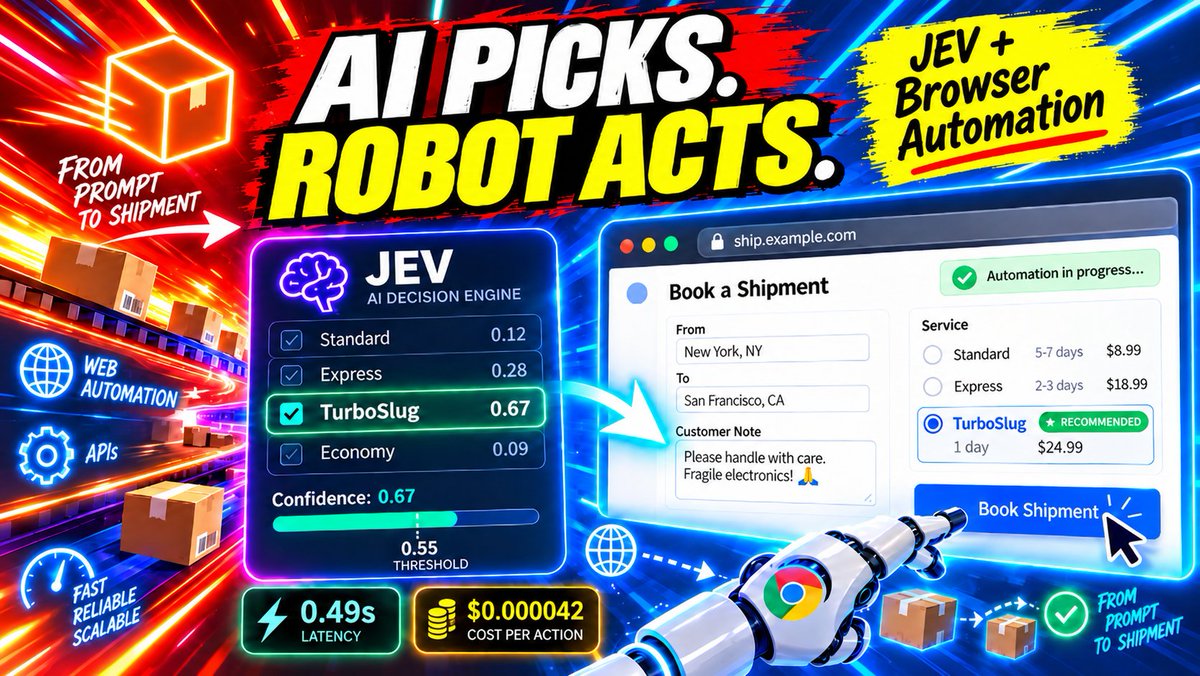
Jev is not a traditional LLM. It is a new model architecture from TypeSafe, built for fast, structured decisions rather than generating text token by token.
We have wanted to add a Browser → Act node to Robomotion for a long time.
The problem was never just getting AI to understand what to do. It was making a decision at every step fast enough that the automation still feels like automation.
When we saw Jev, we thought: this is it.
TypeSafe even demonstrated Jev playing Doom by continuously deciding what to do next from structured game state. That gives you an idea of how quickly these decisions can happen.
Our Browser → Act node uses the same idea for browser automation.
Traditional Computer Use systems are generally screenshot-based: capture the screen, send it to a model, get back where to click or type, then repeat.
With Browser Act, Jev works inside the page. It looks at the page state and decides what the robot should do next: where to click, what to type, which option to choose.
Then it does it again.
And again.
It is fast enough that it feels like the automation is simply running locally, even though AI is continuously deciding the next action.
The economics are just as interesting.
Jev currently costs $0.042 per million input tokens on OpenRouter, with $0 output-token cost.
That changes where AI can be used.
Instead of calling an expensive generative model only for a few important steps, you can start using intelligence throughout the automation.
AI picks. Robot acts. Code verifies.
This is exactly the kind of model I think AI automation has been waiting for.
We built a real browser automation using Jev, TypeSafe’s System One decision model, together with Robomotion’s new Browser Act node.
Jev does not generate text. We give it a question and a fixed set of possible answers. It chooses one and returns a probability for every option.
So the architecture becomes simple:
Jev decides.
Robomotion acts.
Code verifies.
If confidence falls below 0.55, the robot does nothing and sends the order to a human.
For our test:
6 orders
55 AI decisions
$0.0086 total Jev cost
0.49s for the same six decisions in our benchmark
And the browser instructions are just six steps written in plain English. No selectors. No button names. No page-specific rules.
Not every task needs a large language model generating tokens. Sometimes you just need a very fast, very cheap model to make a decision, then let deterministic automation do the work.
AI picks. Robot acts.
▶️ https://t.co/Qt8k1hyhwq
#Robomotion #Jev #TypeSafe #BrowserAutomation #RPA #AIAgents #Automation
🚨 Teaser Alert: 𝐑𝐨𝐛𝐨𝐦𝐨𝐭𝐢𝐨𝐧 𝐀𝐩𝐩𝐬 is coming!
The Invoice Inbox app you see in the video is _not_ a built-in Robomotion product.
It’s what we built with Robomotion using just 𝐨𝐧𝐞 𝐩𝐫𝐨𝐦𝐩𝐭.
Now you can create frontends for your flows, deploy them directly to the Agents dashboard, and launch them just like Chat Assistants.
The best part: every UI comes with an AI Assistant, so you’re building an agentic app from the start.
And every app comes with its own MCP, so you can connect it to Copilot, Claude Code, or Codex and interact with your agent outside the platform.
Whenever you need to, just open the UI and see what your agent is doing for yourself.
The backend is a regular Robomotion flow.
#Agents #MCP #Robomotion #AgenticAutomation #Apps
Most of the "AI agents" we see today are just workflows with a thin layer of AI on top.
Gartner has a name for this: 𝐚𝐠𝐞𝐧𝐭 𝐰𝐚𝐬𝐡𝐢𝐧𝐠.
A document arrives.
An LLM extracts the fields, understands the email, or classifies the request.
Then a predefined workflow takes over:
Validate the data.
Update the ERP.
Send an email.
Ask for approval.
Continue to the next step.
And there is nothing wrong with that.
In enterprise automation, deterministic execution is probably what you want most of the time.
The irony is that today, if you call it automation or RPA, it sounds legacy. Call essentially the same system an "AI agent", and suddenly it sounds cutting edge.
But that does not make it agentic.
The simplest test is:
𝐖𝐡𝐨 𝐝𝐞𝐜𝐢𝐝𝐞𝐝 𝐭𝐡𝐞 𝐨𝐫𝐝𝐞𝐫 𝐨𝐟 𝐭𝐡𝐞 𝐬𝐭𝐞𝐩𝐬?
If a developer already defined:
Step 1 → Step 2 → Step 3 → Step 4
then you have AI inside an automation, but very little agency.
A real agent works differently.
You give it a goal.
It evaluates the situation, decides what to do next, chooses among available tools, acts, observes the result, and adjusts its plan when necessary.
The execution path is not fully predefined. It emerges at runtime.
This is also why I do not think RPA is disappearing.
Agents still need ways to act on real business systems.
If there is an API or MCP tool, great.
But many enterprise applications still have no usable API, no MCP server, or expose only part of what the agent needs.
That is where RPA becomes a tool in the agent's execution layer.
Deterministic workflows handle reliable execution.
The agent decides 𝐰𝐡𝐚𝐭 𝐭𝐨 𝐜𝐚𝐥𝐥, 𝐰𝐡𝐞𝐧 𝐭𝐨 𝐜𝐚𝐥𝐥 𝐢𝐭, 𝐚𝐧𝐝 𝐰𝐡𝐚𝐭 𝐭𝐨 𝐝𝐨 𝐧𝐞𝐱𝐭 𝐛𝐚𝐬𝐞𝐝 𝐨𝐧 𝐭𝐡𝐞 𝐫𝐞𝐬𝐮𝐥𝐭.
AI for reasoning.
Deterministic automation for execution.
Orchestration connecting the two.
At Robomotion, this is exactly how we think about AI agents and RPA.
Our next challenge is making that automation layer dramatically easier to build.
Describe what you want in a prompt, and get a working visual automation back.
It stays visual, so you can follow exactly what it does.
And when AI creates or updates it, you can inspect the visual diff to see exactly what changed.
#AIAgents #Automation #AgenticRPA
Kids have always had endless imagination.
What changed is that AI is starting to remove the barriers between imagination and creation.
Until recently, a child who wanted to build a computer game had to learn programming, understand complicated tools, and maybe even overcome English as a second language before they could turn an idea into something interactive.
Now, a kid who spends hours playing Roblox can also start building games, characters, worlds, and experiences using AI Agents.
That changes something important.
They can start creating much earlier, while their imagination is still largely unconstrained.
I'm very curious to see what these early adopters will grow up being able to do.
What will become second nature to them after spending their childhood not only consuming digital worlds, but creating them?
#AI #ArtificialIntelligence #AIAgents #FutureOfLearning #Creativity #Roblox
RAG gets better when the agent decides what to search for.
Usually, RAG works like this: take your company documents, put them in a vector database, retrieve the relevant pieces, and give them to the model.
But in this example, retrieval is not fixed.
The DeepSeek Harness gets a search tool built with Robomotion flow nodes, then decides for itself how many searches it needs. The same question resulted in 5 searches, then 7, then 9 across different runs.
It searches for one idea at a time, combines facts across multiple documents, and cites the source file in every answer.
The infrastructure is also surprisingly simple:
LanceDB is embedded, so the database is just a directory. No server, no container, no connection string.
Our 11 PDFs became 82 chunks. At that size, we deliberately skip the vector index and let LanceDB scan the embeddings directly.
So the interesting part here is that the agent is not just retrieving context. It is deciding how to retrieve it.
Most RAG pipelines search once, paste the results into the prompt, and hope.
In this example, we give the DeepSeek Harness the search itself.
One question can become several searches, phrased by the agent, across a LanceDB knowledge base.
On our test corpus, a single raw search found 3 of 6 required facts. The agent’s own searches found all 6, with the source document attached to every answer.
In the video, we build the whole thing in Robomotion and expose it through an HTTP endpoint.
RPA + DeepSeek Harness + LanceDB, in action:
https://t.co/FFpN8bMXdo
#RAG #DeepSeek #AIAgents #Robomotion #RPA
RPA has always had a switching-cost problem.
Once you have dozens or hundreds of automations running on one platform, moving somewhere else means rebuilding and retesting everything.
AI changes that equation.
Coding agents can now understand existing automations, rebuild them on another platform, and dramatically reduce the cost of migration.
Migration is becoming less of a barrier.
That’s why we can offer free migrations at Robomotion. Start with one process, run both side by side, and decide for yourself.
Looking for an RPA alternative?
We built Robomotion differently from the runtime up.
Git-native flows. Concurrency built into the flow. Linux, Windows and macOS. AI agents and deterministic RPA in the same flow.
And if you already have automations, we’ll migrate them to Robomotion for free.
Start with one process. Run both side by side. Compare the results yourself.
Swipe through for the differences →
#Robomotion #RPA #Agentic #Automation
Robomotion RPA and DeepSeek Harness, with AI Agents in action.
This is how we combine AI Agents and RPA.
Anything that needs to stay deterministic, SAP, Salesforce, Dynamics, or even a web portal without an API, can be exposed to the AI Agent as an RPA tool.
You define the tool and its input parameters. The AI Agent is forced to pass those parameters as defined, and RPA uses them as regular deterministic inputs.
The agent decides what to do. RPA executes it exactly as designed.
Every RPA robot forgets. This one writes down what it works out.
We handed an invoice agent a German supplier it had never seen before. It worked out the layout from scratch: which of the two dates was the invoice date, which of the two amounts was the grand total, and that decimals were written with a comma.
Then it wrote the whole procedure down as a skill, in its own words, including the traps it found.
The next invoice from that supplier? No figuring it out again. It ran on what it had learned.
Best part: the skill is readable. You can review it, promote it, tag it as v1, and pin a second robot to Replay.
One robot learns, the fleet runs what you reviewed.
Robomotion In Action, built and run for real, start to finish:
https://t.co/B5LikS7P3f
See how RPA and AI Agents work together in the same automation flow.
#RPA #AIAgents #Automation #DeepSeek #InvoiceProcessing #DeepSeekHarness
Turning an empty folder into a learning agent with Claude Code is possible.
Claude Code has two memory systems:
CLAUDE.md contains the instructions you write.
Auto memory contains notes Claude selectively writes for itself based on your corrections, preferences, ongoing work, and things it decides are worth remembering.
Auto memory lives under:
~/.claude/projects/-your-project-folder/memory/
MEMORY.md acts as an index to separate markdown files per each thing to remember.
Because the memory is just Markdown files, you can also copy accumulated memory into another project.
It becomes a simple form of knowledge transfer between agents.
This creates an interesting pattern.
Create a separate project folder for each role, such as marketer/, video-editor/, or graphic-designer/, then start Claude inside that folder.
And it doesn't have to be a coding project.
Over time, Claude running in these folders starts behaving more like a specialized agent that learns by doing.
Then add skills.
Skills are reusable procedures.
A skill can also contain code:
.claude/skills/video-crop/
SKILL.md
scripts/crop.py
This is where things get powerful.
When Claude solves something with a script, such as scraping, fetching, cropping, blurring, an ffmpeg pipeline, or a Remotion render, you can ask it to save the solution as a skill into this project folder.
SKILL.md explains when and how to use it.
Instead of rediscovering remotion usage, ffmpeg flags every time, your agent now has an ability it can reuse.
Next time, it already knows how to do it.
For harder problems, I also like keeping an append-only ISSUES.md file.
When a problem consumes multiple context windows, have Claude record what the problem was, what it tried, what failed, why it failed, and what finally worked.
This is especially useful because auto memory is selective and may skip debugging details that Claude can derive from the codebase or does not consider worth preserving.
So the pattern becomes:
CLAUDE.md for standing instructions.
Auto memory for what Claude learns on its own.
Skills for reusable procedures and the scripts that implement them.
ISSUES.md for hard-won debugging knowledge.
The result is an agent that gets better over time by accumulating memory, reusable abilities, and hard-won experience.
The Year of Linux on the Desktop will finally come true. 🚀
The Omacom Foundation has launched with $8 million in funding from eight Founding Patrons, each contributing $1 million to the mission:
Tobi Lütke, CEO of Shopify
Patrick Collison, CEO of Stripe
Michael Dell, Chairman and CEO of Dell Technologies
Jack Dorsey, Block Head and Chairman of Block
Matthew Prince, CEO of Cloudflare
Brendan Iribe, Co-founder of Sesame and Oculus
Jason Fried, CEO of 37signals
David Heinemeier Hansson, CTO of 37signals
https://t.co/3tLy9Pakk0
𝐃𝐞𝐞𝐩𝐒𝐞𝐞𝐤 𝐇𝐚𝐫𝐧𝐞𝐬𝐬 dynamic skill learning example added to our 𝐠𝐨-𝐝𝐞𝐞𝐩𝐬𝐞𝐞𝐤 library.
We created go-deepseek, an open-source Go SDK for using and embedding DeepSeek Harness in your Go applications.
We are now integrating this library into 𝐑𝐨𝐛𝐨𝐦𝐨𝐭𝐢𝐨𝐧 𝐑𝐏𝐀, where we want to give RPA robots the ability to explore a task, learn how to complete it, save that knowledge as a skill, and reuse it on future runs.
Our new 13th example demonstrates exactly this:
https://t.co/P5WyajcWIV
We created a fake telephone banking service with a deliberately complicated menu, similar to the phone menus we all know.
The task is simple:
"Find my credit card balance."
But the route is not.
Several menu options sound correct. Some lead to dead ends. One even gives a rewards points balance instead of the actual credit card balance.
Run 1️⃣: the agent starts with no knowledge of the menu.
It calls the bank, listens to the prompts, explores different branches, makes wrong choices, goes back, redials, and eventually finds the correct route.
17 wrong turns.
More than 6 minutes of airtime.
Once it succeeds, it saves what it learned as a reusable skill.
It even records details such as:
"Do NOT press 2. The balance is NOT under card services."
Run 2️⃣: a completely fresh session starts with only the learned skill.
This time, there is no exploration.
One call.
One key sequence.
44 seconds of airtime.
Done.
We also change the credit card balance between the two runs on purpose.
This makes sure the agent cannot simply memorize the answer. It has to use the learned route, call the service again, and retrieve the new balance.
The agent did not learn the answer. It learned how to get the answer.
And every claim is verified against the phone system's own call logs, not just what the agent says it did.
There is also a visual demo with a touch-tone keypad and real DTMF tones, so you can watch the agent navigate the phone system live.
This is what we are now bringing into Robomotion RPA:
Explore once. Learn the skill. Reuse it on future runs.
#RPA #AIAgents #Golang #DeepSeek #Automation
#OpenSource