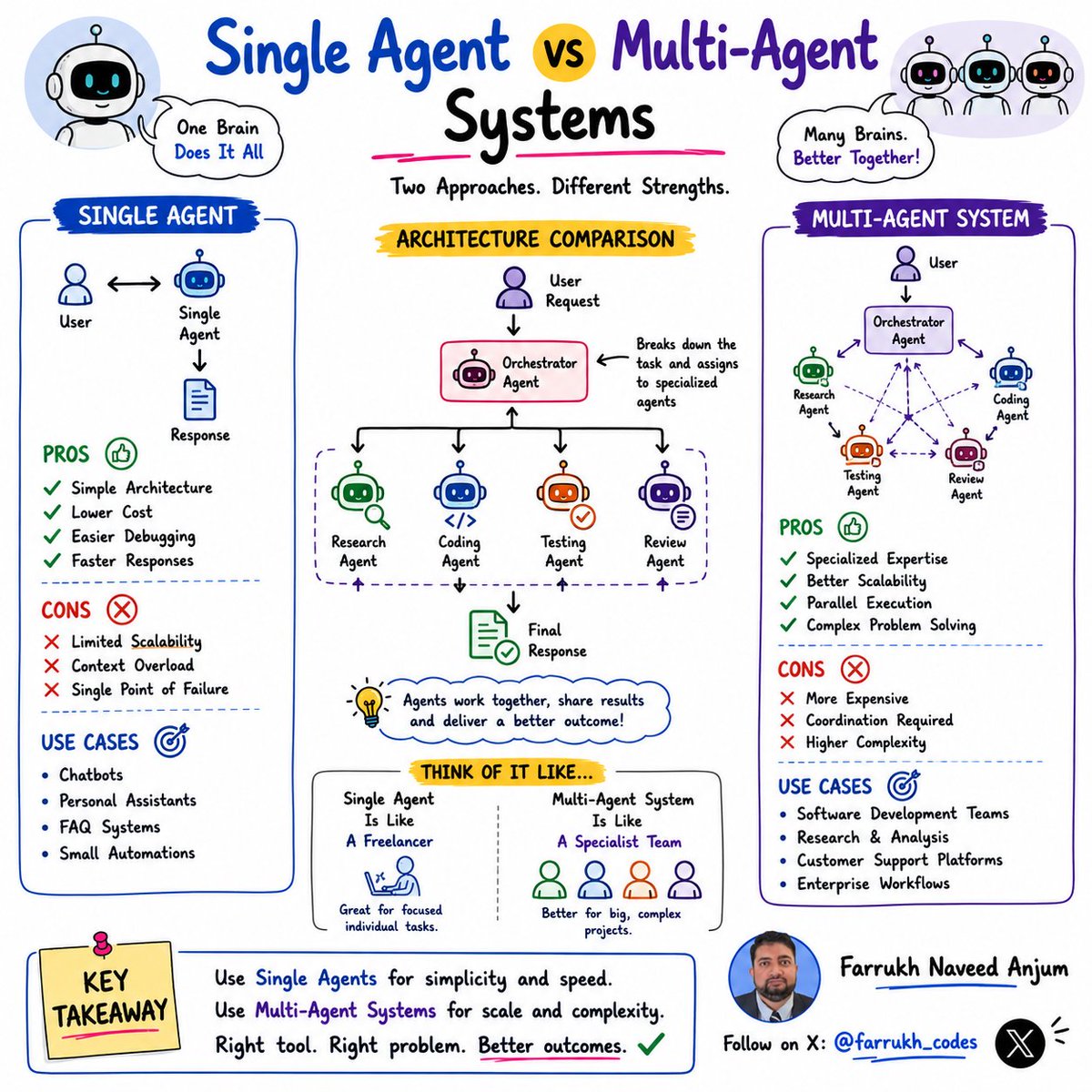
🤖 Single Agent vs Multi-Agent Systems
Many teams jump into Multi-Agent AI because it sounds more advanced.
But that's not always the right choice.
🔹 Single Agent
✅ Simpler Architecture
✅ Lower Cost
✅ Easier Debugging
✅ Faster Responses
Perfect for:
💬 Chatbots
👨💻 Coding Assistants
📚 Knowledge Bots
🔹 Multi-Agent
✅ Specialized Expertise
✅ Better Scalability
✅ Parallel Execution
✅ Complex Problem Solving
Perfect for:
🔬 Research Teams
💻 Software Factories
🏢 Enterprise Workflows
💡 Think of it like this:
👤 Single Agent = Freelancer
👥 Multi-Agent = Specialist Team
The best architecture isn't the most complex.
It's the simplest one that solves the problem.
Which would you choose for your next AI project?
#AI #AIAgents #AgenticAI #SoftwareArchitecture #SystemDesign #LLM #GenAI #techglareexclusive
💡 AI Agent Architecture in 10 seconds:
👤 User asks a question
🧠 Agent creates a plan
🔧 Agent selects tools
💾 Agent retrieves memory
⚙️ Agent executes actions
🔄 Agent evaluates results
Not done yet?
Repeat the loop.
The best AI Agents are not the smartest.
They're the ones with:
✅ Better tools
✅ Better memory
✅ Better feedback loops
Different agents.
Same loop.
What do you think is the most important component?
#AI #AgenticAI #SoftwareEngineering #SoftwareArchitecture #TechTwitter #OpenAI #DataScience #Developers
@unclebobmartin Well Said @unclebobmartin that what LLMs do, they always generate more content. In the end they are Machine Learning Models Only created to guess next token or word (based on context). As Software Coders some time we think we are working with a Super Developer. But its LLM
When you ask an agent to comment on the architecture they often come back with a list of recommendation. As you work down that list you may come to the conclusion that the list doesn't end. They always have more recommendations. If you follow those recommendations for too long you wind up with a vastly over-architected (if that's a word) result that is more like a bunch of dust in the wind than a nicely partitioned structure. (And yes, I looked at the code.)
➡️ 𝐌𝐞𝐦𝐨𝐫𝐲 𝐌𝐚𝐧𝐚𝐠𝐞𝐦𝐞𝐧𝐭 𝐢𝐧 𝐋𝐢𝐧𝐮𝐱 – 𝐄𝐱𝐩𝐥𝐚𝐢𝐧𝐞𝐝
1. Physical Memory (RAM): The actual hardware memory used by the system to store active programs and data for fast access.
2. Virtual Memory: A memory management technique that allows processes to use more memory than the available physical RAM by utilizing disk space.
3. Memory Pages: Fixed-size blocks into which Linux divides memory, making allocation and management more efficient.
4. Page Cache: A portion of memory used to cache frequently accessed files and disk data, improving system performance.
5. Swap Space: A dedicated disk area used when RAM becomes full, allowing inactive memory pages to be temporarily stored on disk.
6. Memory Allocation: The process of assigning memory resources to running applications and system processes as needed.
7. Memory Mapping (mmap): A mechanism that maps files or devices directly into a process's address space for efficient access.
8. Out-Of-Memory (OOM) Killer: A kernel feature that automatically terminates processes when the system runs critically low on memory.
9. Shared Memory: A method that allows multiple processes to access the same memory region for fast inter-process communication.
10. Memory Monitoring Tools: Utilities such as free, vmstat, top, and htop that help administrators monitor and analyze memory usage in Linux.
Grab the Linux ebook: https://t.co/DeHjJ1Wubf
Backbone of Data Science
Strong data science skills are built on solid foundations. Python, SQL, statistics, Git, and reproducible environments form the backbone of effective analysis, collaboration, experimentation, and scalable machine learning workflows.
50 System Design Topics – Simple to Complex
Perfect Learning Roadmap for 2026. Save this list.
1. Design a Rate Limiter
2. Design a URL Shortener
3. Design Pastebin
4. Design a Unique ID Generator
5. Design Consistent Hashing
6. Design a Load Balancer
7. Design an API Gateway
8. Design a Basic Key-Value Store
9. Design a Caching System (e.g., LRU Cache)
10. Design a Notification System
11. Design a Typeahead/Autocomplete System
12. Design a Web Crawler
13. Design a Message Queue
14. Design a 1:1 Chat System
15. Design a Group Chat System
16. Design a News Feed System
17. Design a Proximity Service (e.g., nearby friends)
18. Design Instagram (photo/video sharing + feed)
19. Design Twitter/X (timeline + posts)
20. Design WhatsApp (real-time messaging)
21. Design Dropbox (file storage & sync)
22. Design a Ticket Booking System
23. Design an E-commerce Platform (catalog + checkout)
24. Design a Recommendation System
25. Design a Distributed Cache
26. Design Uber (ride-sharing + matching)
27. Design Netflix (video streaming platform)
28. Design YouTube (video upload + streaming)
29. Design TikTok (short-video platform)
30. Design Facebook-like Social Network News Feed
31. Design Google Docs (real-time collaborative editing)
32. Design a Content Delivery Network (CDN)
33. Design a Search Engine (indexing + querying)
34. Design Google Maps (routing + location services)
35. Design a Distributed Database
36. Design a Real-time Analytics System
37. Design an Ad Serving & Tracking System
38. Design a Fraud Detection System
39. Design a Stock Trading/Exchange System
40. Design a Distributed Job Scheduler
41. Design Event Sourcing + CQRS Architecture
42. Design a Multi-tenant SaaS Platform
43. Design Live Video Streaming at Scale
44. Design a Highly Scalable NoSQL Database
45. Design a Real-time Multiplayer Game Backend
46. Design Machine Learning Model Serving Infrastructure
47. Design a Geo-distributed Low-Latency System
48. Design a Strongly Consistent Global Database
49. Design a High-Frequency Trading Platform
50. Design a Planet-Scale Distributed System (billions of users, multi-region HA)
What will you add to this list?
🚨 𝟔 𝐓𝐲𝐩𝐞𝐬 𝐨𝐟 𝐋𝐋𝐌𝐬 𝐩𝐨𝐰𝐞𝐫𝐢𝐧𝐠 𝐭𝐨𝐝𝐚𝐲’𝐬 𝐀𝐈 𝐚𝐠𝐞𝐧𝐭𝐬
1️⃣ 𝐆𝐏𝐓 – 𝐆𝐞𝐧𝐞𝐫𝐚𝐭𝐢𝐯𝐞 𝐏𝐫𝐞-𝐭𝐫𝐚𝐢𝐧𝐞𝐝 𝐓𝐫𝐚𝐧𝐬𝐟𝐨𝐫𝐦𝐞𝐫
(𝑇ℎ𝑒 𝐺𝑒𝑛𝑒𝑟𝑎𝑙𝑖𝑠𝑡)
Trained on massive datasets, these autoregressive models are the foundational engines for writing, reasoning, coding, and open-ended conversation.
➜ Highly versatile across diverse domains
➜ Excels at zero-shot and in-context learning
➜ The ultimate foundation for downstream fine-tuning
2️⃣ 𝐌𝐨𝐄 – 𝐌𝐢𝐱𝐭𝐮𝐫𝐞 𝐨𝐟 𝐄𝐱𝐩𝐞𝐫𝐭𝐬
(𝑇ℎ𝑒 𝑆𝑐𝑎𝑙𝑒𝑟)
Instead of activating the full neural network, MoE uses sparse routing to send each input only to the most relevant subset of "expert" sub-networks.
➜ Radically higher compute efficiency during inference
➜ Scales seamlessly to trillions of parameters
➜ Achieves deep specialization without sacrificing overall performance
3️⃣ 𝐕𝐋𝐌 – 𝐕𝐢𝐬𝐢𝐨𝐧-𝐋𝐚𝐧𝐠𝐮𝐚𝐠𝐞 𝐌𝐨𝐝𝐞𝐥
(𝑇ℎ𝑒 𝑀𝑢𝑙𝑡𝑖𝑚𝑜𝑑𝑎𝑙)
Combines advanced vision encoders with language models to natively process and reason over spatial data—like images, complex diagrams, and video streams.
➜ Understands deep visual and spatial context
➜ Perfectly aligns pixel data with semantic text
➜ Enables rich multimodal tasks (like visual QA and image-based telemetry)
4️⃣ 𝐋𝐑𝐌 – 𝐋𝐚𝐫𝐠𝐞 𝐑𝐞𝐚𝐬𝐨𝐧𝐢𝐧𝐠 𝐌𝐨𝐝𝐞𝐥
(𝑇ℎ𝑒 𝑇ℎ𝑖𝑛𝑘𝑒𝑟)
Built for "System 2" thinking. Optimized for multi-step reasoning, logical problem-solving, and planning through explicit verification and self-correction loops.
➜ Elite mathematical and logical planning
➜ Drastically reduced hallucinations through step-by-step verification
➜ Excels at complex, highly constrained problem-solving
5️⃣ 𝐒𝐋𝐌 – 𝐒𝐦𝐚𝐥𝐥 𝐋𝐚𝐧𝐠𝐮𝐚𝐠𝐞 𝐌𝐨𝐝𝐞𝐥
(𝑇ℎ𝑒 𝐿𝑖𝑔ℎ𝑡𝑤𝑒𝑖𝑔ℎ𝑡)
Compact, highly optimized models engineered specifically for edge devices, offline execution, or highly cost-sensitive environments.
➜ Ultra-low latency and blazing-fast inference
➜ Highly cost-effective to deploy and maintain
➜ Ensures data privacy through strictly on-device processing
6️⃣ 𝐋𝐀𝐌 – 𝐋𝐚𝐫𝐠𝐞 𝐀𝐜𝐭𝐢𝐨𝐧 𝐌𝐨𝐝𝐞𝐥
(𝑇ℎ𝑒 𝐷𝑜𝑒𝑟)
Designed not just to generate text, but to execute real-world tasks using tools, APIs, and external environments. It operates on a continuous agent loop:
🔄 Plan ➟ Action ➟ Observation ➟ Reflect ➟ Update Memory
➜ Autonomous real-world execution
➜ Native integration with external systems and software
➜ Dynamically adapts to environmental feedback
Agents aren’t just chatbots anymore. They see, act, reason, and run anywhere from cloud GPUs to edge devices. 𝐶ℎ𝑜𝑜𝑠𝑖𝑛𝑔 𝑡ℎ𝑒 𝑟𝑖𝑔ℎ𝑡 𝐿𝐿𝑀 𝑡𝑦𝑝𝑒 𝑑𝑖𝑟𝑒𝑐𝑡𝑙𝑦 𝑖𝑚𝑝𝑎𝑐𝑡𝑠 𝑐𝑜𝑠𝑡, 𝑙𝑎𝑡𝑒𝑛𝑐𝑦, 𝑟𝑒𝑙𝑖𝑎𝑏𝑖𝑙𝑖𝑡𝑦, 𝑎𝑛𝑑 𝑟𝑒𝑎𝑙‑𝑤𝑜𝑟𝑙𝑑 𝑐𝑎𝑝𝑎𝑏𝑖𝑙𝑖𝑡𝑖𝑒𝑠.
Cc : Author
9 database types explained in one sentence:
1) 𝗥𝗲𝗹𝗮𝘁𝗶𝗼𝗻𝗮𝗹
↳ Stores structured data in tables with predefined schemas & SQL queries.
2) 𝗞𝗲𝘆-𝗩𝗮𝗹𝘂𝗲
↳ Stores simple key-value pairs for ultra-fast lookups & caching.
3) 𝗗𝗼𝗰𝘂𝗺𝗲𝗻𝘁
↳ Stores data as JSON-like documents with flexible, nested structures.
4) 𝗪𝗶𝗱𝗲-𝗖𝗼𝗹𝘂𝗺𝗻
↳ Stores data in flexible column families for large-scale distributed workloads.
5) 𝗧𝗶𝗺𝗲-𝗦𝗲𝗿𝗶𝗲𝘀
↳ Stores time-stamped data for real-time metrics, logs, events, & telemetry.
6) 𝗚𝗿𝗮𝗽𝗵
↳ Stores relationships between entities to query connected data efficiently.
7) 𝗩𝗲𝗰𝘁𝗼𝗿
↳ Stores embeddings to enable similarity search & AI-powered retrieval.
8) 𝗖𝗼𝗹𝘂𝗺𝗻𝗮𝗿
↳ Stores data by columns instead of rows to optimize analytical queries.
9) 𝗦𝗲𝗮𝗿𝗰𝗵
↳ Stores indexed text and structured data to enable fast full-text and relevance-based queries.
Most modern systems use several of these together.
As systems become more real-time and AI-driven, the need for time-series infrastructure has grown significantly.
I like using TimescaleDB by Tiger Data because it keeps the simplicity of Postgres while making it much easier to work with large volumes of time-series and real-time data.
Try Tiger Data free with my link below. You'll get a $1,000 30-day credit, no credit card required. It takes just a few minutes to get started, and you can use the credit to build and experiment with whatever you want (new accounts only).
Try it here (for free) → https://t.co/Gcz0RaBFxg
What else would you add?
——
♻️ Repost to help others learn and grow.
🙏 Thanks to @TigerDatabase for sponsoring this post.
➕ Follow me ( Nikki Siapno ) + turn on notifications.
What is Google’s TPU?
A TPU (Tensor Processing Unit) is Google’s custom AI chip, designed from scratch for the giant matrix multiplications that modern models live on. GPUs were built for graphics first.
TPUs were built for deep learning from day one.
At Cloud Next ’26, Google unveiled its 8th generation, and for the first time it ships in two flavors. TPU 8t is built for training, where raw throughput wins. TPU 8i is built for inference, where latency and chip-to-chip speed matter most.
Both still share the same Axion CPUs, liquid cooling, and software stack, so code written for one runs on the other.
The diagram below is a quick study guide to what’s the same, what’s different, and why, based on our understanding of published Google articles.
Who else gets mad at Cursor ? When it start yield sloppy things and piece of work ? Telling him its 3rd Grade Sloppy developer making basic mistakes... despite giving designs and every instruction ?
30 System Design Concepts every developer should know:
→ APIs
→ API Gateways
→ JWT Authentication
→ Webhooks
→ REST vs GraphQL
→ Load Balancing
→ Proxy vs Reverse Proxy
→ Scalability
→ High Availability
→ Single Point of Failure (SPOF)
→ CAP Theorem
→ SQL vs NoSQL
→ ACID Transactions
→ Database Indexing
→ Database Sharding
→ Consistent Hashing
→ Change Data Capture (CDC)
→ Caching
→ Caching Strategies
→ Cache Eviction Policies
→ CDN
→ Rate Limiting
→ Message Queues
→ Bloom Filters
→ Idempotency
→ Concurrency vs Parallelism
→ Long Polling vs WebSockets
→ Stateful vs Stateless Architecture
→ Batch vs Stream Processing
→ Geohashing
Master these concepts and system design interviews become much easier.
Save this post for later 📌
This is where AI agents become engineering force multipliers, not just coding assistants.
Property-based testing is massively underused because defining invariants, domains, and edge cases is mentally expensive.
Agents remove that friction.
If agents can systematically do property tests, mutation tests, and hardening analysis… are we heading toward a world where “untested code” becomes the exception?