Grosse Godillot qui main un perso de type dentine sur smash.
Amateur de Gwak et de side B. Full stack dev mais plus back que front bientôt remplacé par les llm.
Un japonés descubrió antes que nadie cómo aprovechar realmente el potencial de Claude Code.
Instala “Find Skills”, explica lo que quiere lograr y el sistema le sugiere automáticamente las mejores habilidades entre cientos de opciones.
Gracias a eso, su sistema automatizado de YouTube está teniendo un gran éxito.
How to setup your Claude code project?
TL;DR
Most developers skip the setup and just start prompting. That's the mistake.
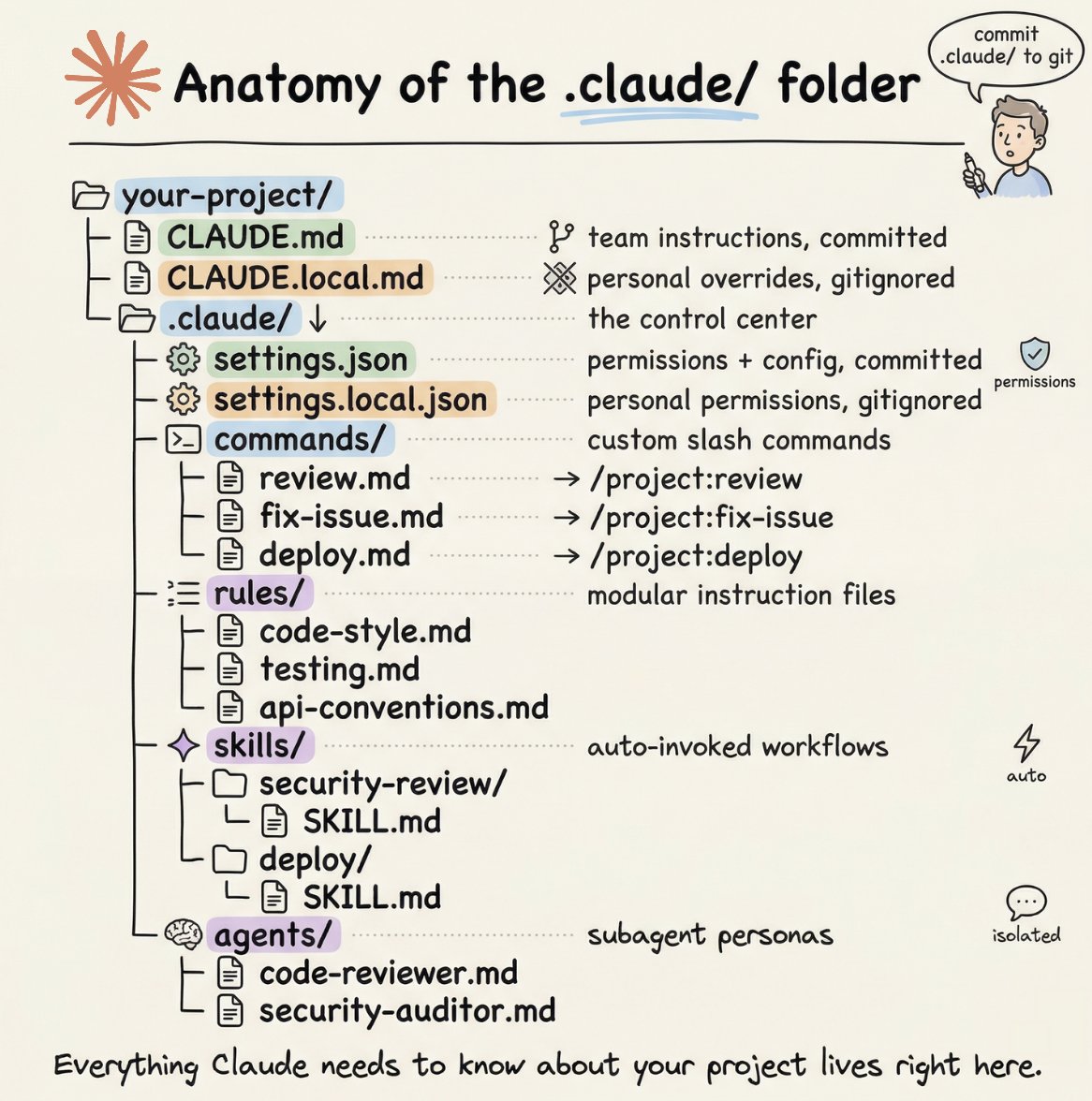
A proper Claude Code project lives inside a .𝗰𝗹𝗮𝘂𝗱𝗲/ folder. Start with 𝗖𝗟𝗔𝗨𝗗𝗘.𝗺𝗱 as Claude's instruction manual. Split it into a 𝗿𝘂𝗹𝗲𝘀/ folder as it grows. Add 𝗰𝗼𝗺𝗺𝗮𝗻𝗱𝘀/ for repeatable workflows, 𝘀𝗸𝗶𝗹𝗹𝘀/ for context-triggered automation, and 𝗮𝗴𝗲𝗻𝘁𝘀/ for isolated subagents. Lock down permissions in 𝘀𝗲𝘁𝘁𝗶𝗻𝗴𝘀.𝗷𝘀𝗼𝗻.
There are two .𝗰𝗹𝗮𝘂𝗱𝗲/ folders: one committed with your repo, one global at ~/.𝗰𝗹𝗮𝘂𝗱𝗲/ for personal preferences and auto-memory across projects.
The .𝗰𝗹𝗮𝘂𝗱𝗲/ folder is infrastructure. Treat it like one.
The article below is a complete guide to 𝗖𝗟𝗔𝗨𝗗𝗘.𝗺𝗱, custom commands, skills, agents, and permissions, and how to set them up properly.
someone built a web-based System Design Simulator.
you drag and drop components (api gateways, dbs, caches) and it actually simulates real-time traffic.
you can watch latency, bottlenecks, and failures happen live...