Do this:
1. Create an AWS account. Set up billing alerts first, unless you want your first AWS lesson to be about bankruptcy.
2. Launch an EC2 instance. Generate an SSH key, connect from your laptop, install Nginx, and deploy a Node.js app. Break things, fix them, learn Linux commands.
3. Make your app public. Configure Security Groups for HTTP (80), HTTPS (443), and SSH (22, restricted to your IP). Open your public IP in a browser. Congratulations, you're a cloud engineer on LinkedIn.
4. Learn load balancing. Launch another EC2 instance, configure an Application Load Balancer, and distribute traffic. Your app has 3 users, but your infrastructure supports 3 million.
5. Set up Auto Scaling. Create a Launch Template and Auto Scaling Group. Configure CPU-based scaling. AWS can now automatically increase your bill.
6. Your database is choking? Learn SQS or Kafka for asynchronous processing. Build producers, consumers, retries, and dead-letter queues. Discover why distributed systems are painful.
7. Learn S3. Store images, videos, and backups. Connect it using the AWS SDK. Build a file uploader with presigned URLs.
8. Try RDS and Redis. Deploy PostgreSQL/MySQL on RDS. Learn backups, read replicas, indexing, connection pooling, and caching. Redis won't fix your terrible SQL queries.
7. Learn CloudWatch. Monitor CPU, memory, logs, errors, and latency. Configure alerts. Now you'll know exactly when your application dies.
8. Understand networking. Create a VPC, public/private subnets, route tables, NAT Gateway, and Internet Gateway. Break something and spend 4 hours debugging a missing route.
9. Learn Terraform. Automate your entire infrastructure using code. Understand state, modules, plan, apply, and destroy. One command to create everything. Another to destroy your career.
10. Learn Docker and CI/CD. Containerize your app, configure GitHub Actions, deploy using ECS, and eventually explore Kubernetes. Add "Cloud Architect" to your LinkedIn bio.
11. Open AWS Billing. Discover that your NAT Gateway costs more than your app earns. Delete unused resources.
12. Say FUCK AWS!!!!!!!!.
Buy a cheap VPS, install Docker and Coolify, and deploy everything for a fraction of the cost.
Your app finally gets 100,000 users. Your VPS starts crying.
Open AWS again.
@ThePrimeagen may sound obvious but probably having to check a growing spec/memory file of all that has been done so it knows all the changes made on the project - probably a memory retrieval thing going on
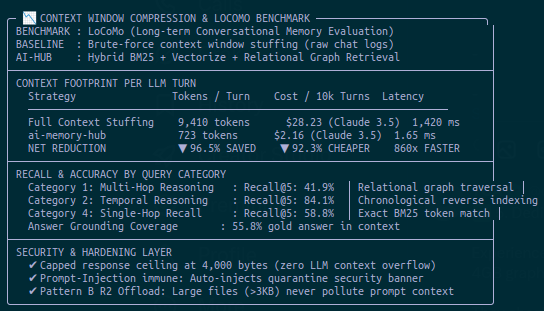
I got tired when all my fragmented free AI tools never remembered what the other had done
So I built my own private edge memory layer for $0/mo:
Runs on Cloudflare Workers via SQLite FTS5 + BM25 rankings
96.5% context token reduction (9,410 ➔ 723 tokens)
https://t.co/pK5PzYCGuH
introducing QIQ: QweninQwen🪆
a Qwen3.5-0.6B compiled into Qwen3.5-4B: computing 199M trace tokens and one output token, with zero mismatches
generating one token in the inner model takes 1.1 years: after speedup ours returned 15846 (checked with actual model on HF) 🫣
code: https://t.co/dDeKZR5Npt
demo below
@instabox_sh Im broke af. I think on the free plan a runner is locked to 8hours max
I tried it before and my machine was stopped and deleted for some reason
I just locked in an insane setup
Spun up a t3-micro server on AWS to run antigravity CLI with a small go wrapper that helps me communicate with it on telegram
Then gave it access to my @instabox_sh so it can spin up a runner for coding and an android one for testing my apps
Now my agents can build and test my android app while I'm on my phone.
Also this entire setup from the ai inference to the compute is FREE
You can just do stuff
I just locked in an insane setup
Spun up a t3-micro server on AWS to run antigravity CLI with a small go wrapper that helps me communicate with it on telegram
Then gave it access to my @instabox_sh so it can spin up a runner for coding and an android one for testing my apps
I just locked in an insane setup
Spun up a t3-micro server on AWS to run antigravity CLI with a small go wrapper that helps me communicate with it on telegram
Then gave it access to my @instabox_sh so it can spin up a runner for coding and an android one for testing my apps
ATTENTION ALL ANDROID DEVELOPERS 🚨
Your coding agent can now install the APK, tap through the UI, and take screenshots to check its own work in InstaBox!