Así lo veo yo: No dependáis solo de un modelo de IA. Construid vuestro propio sistema de aprendizaje encima de él, y nosotros $MSFT ya os daremos la plataforma para hacerlo 👍 #Azure
$MSFT
Las ideas principales del mensaje:
• La IA no sustituirá el capital humano, lo multiplicará.
Las empresas que tengan mejores empleados, mejor cultura y más conocimiento acumulado serán las que más se beneficien de la IA.
• El verdadero activo del futuro no será solo la IA.
Será la combinación entre personas + IA.
• No ganará necesariamente quien tenga el mejor modelo.
Ganará quien construya el mejor sistema de aprendizaje sobre ese modelo.
• Los modelos de IA acabarán pareciéndose entre sí.
La ventaja competitiva estará en los datos propios, los procesos internos y el conocimiento acumulado de cada empresa.
• El conocimiento interno de una empresa se convertirá en un activo.
Todo lo que hoy está en correos, reuniones, procedimientos o en la cabeza de los empleados podrá convertirse en sistemas inteligentes propios.
• La propiedad intelectual será más importante que nunca.
Las empresas deberán evitar depender totalmente de OpenAI, Anthropic o Google y construir sus propias capas de conocimiento.
• La IA crea un nuevo tipo de capital.
Capital humano (personas) + capital de tokens (IA propia entrenada con el conocimiento de la empresa).
• Las empresas que empiecen antes tendrán ventajas enormes.
Porque cada interacción genera más datos, más aprendizaje y más mejoras, creando un efecto compuesto difícil de copiar.
• El riesgo no es tecnológico, sino económico.
Si toda la riqueza acaba concentrándose en unos pocos modelos de IA, surgirán problemas políticos, regulatorios y sociales.
• La IA puede ser para el conocimiento lo que la globalización fue para la industria.
Si no se gestiona bien, puede convertir el conocimiento de muchas empresas en una simple commodity.
11 FREE AI COURSES TO TRY IN 2026:
1. Foundation of Prompt Engineering
👉 https://t.co/ki6EVaxvzl…
2. Retrieval Augmented Generation
👉 https://t.co/X0SypbStVV
3. AI Essential Courses
👉 https://t.co/uxwwJpj425
4. Intro to Generative AI
👉 https://t.co/Hjb3TqyPC5
5. Intro to Responsible AI
👉 https://t.co/ylhfinAPR8…
6. LLMOps
👉 https://t.co/ovzWYoe9LR…
7. CS50 Introduction to AI with Python
👉 https://t.co/y0g7TnAqQg
8. Introduction to AI
👉 https://t.co/yHolxBkUFW…
9. Academy Resources
👉 https://t.co/C3u3nJwtOD
10. A Practical Guide to Building Agents
👉 https://t.co/V3xgcvVGZk…
11. Prompt Engineering for ChatGPT
👉 https://t.co/jRBgwDahn6
🤖 ¡No te lo pierdas! Curso de Inteligencia Artificial aplicada a la Construcción. Potencia tus proyectos con IA.
📅 31 de julio | Caracas.
¡Inscríbete ahora!
#CursoIA#DataLaing#Innovación
🎯 Crear un curso no es lo mismo que diseñar una experiencia de aprendizaje. Mientras la tecnología avanza y las herramientas se multiplican, el diseño instruccional profesional sigue siendo clave para lograr propuestas formativas efectivas, centradas en las personas y orientadas a resultados. Reflexionamos sobre el valor que aporta el diseño instruccional más allá de las tendencias y los debates actuales🔗 https://t.co/xO2g4gDeJz
#DiseñoInstruccional #Elearning #EducaciónDigital #AprendizajeOnline #EdTech #FormaciónVirtual
this is f*cking gold
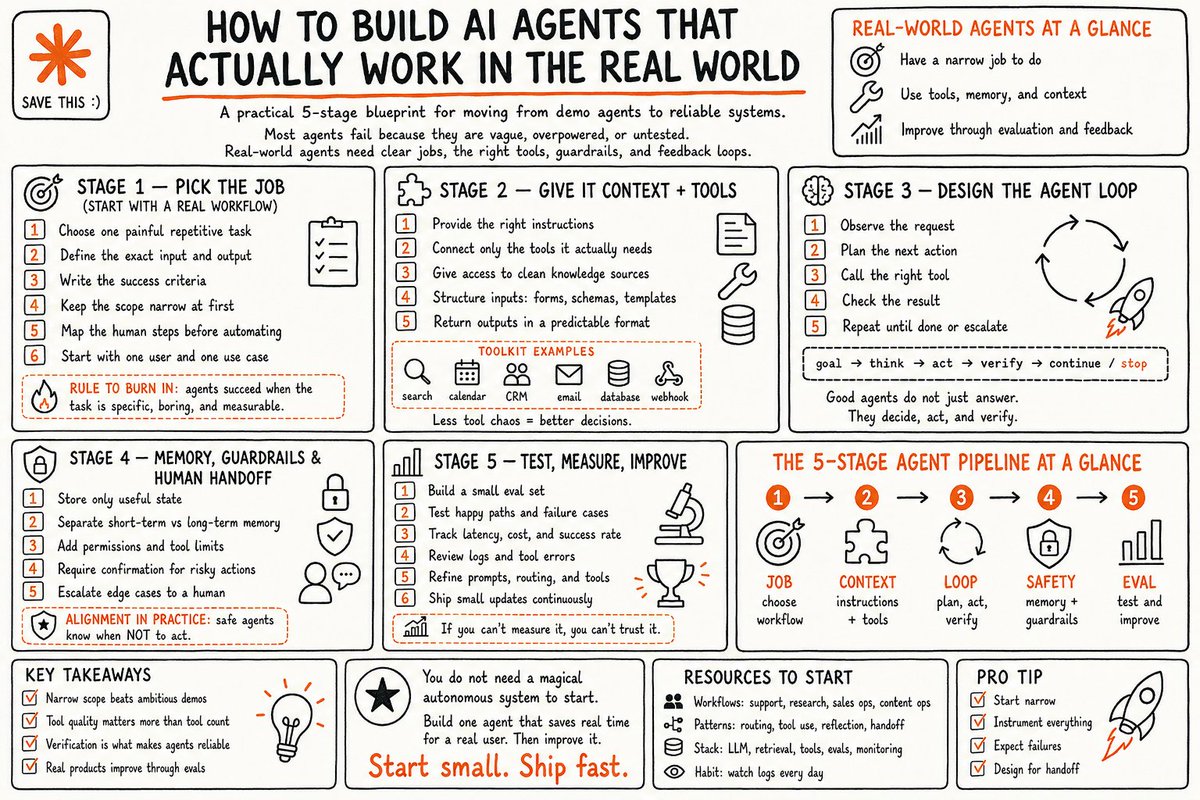
How to build your own AI agents that actually work in the real world - full course
if I had this a year ago, I would've shipped my first agent in a day instead of 2 weeks
in the right hands, this changes everything:
Satya Nadella just posted something that validates the entire AI buildout thesis from the very top of the stack.
The model is commoditizing. The durable value is the learning loop a company builds on top of the model.
He splits it into two assets:
Human capital -- the knowledge, judgment, relationships, and pattern recognition of your people.
Token capital -- the AI capability the firm builds and owns.
He says the real opportunity is building a learning loop where human capital and token capital compound together.
If the model layer is commoditizing then the durable returns are not in the model makers. They are in the infrastructure that powers every company building its own loop. Compute. Memory. Interconnect. Power.
The full stack underneath the application layer.
The model wars will have winners and losers. The infrastructure underneath gets bought either way.
Bullish the AI buildout.
Every layer. If you want to understand them in detail, check out my Substack.
https://t.co/Wna5UzCOVT
Most people spend $10,000+ on a Data Science degree.
I built my entire skillset with free YouTube courses.
Here are 20 courses that will teach you everything:
1. Python
https://t.co/8jveF5vDlu…
2. SQL
https://t.co/U5HyaM3q3P…
3. Excel
https://t.co/GYHbJyFSvO…
4. Power BI
https://t.co/4ZUi0X8UwT…
5. Tableau
https://t.co/2647eFZv2b…
6. Statistics
https://t.co/Bm2aHKw2po…
7. Machine Learning
https://t.co/tWUEGdyIsd…
8. Deep Learning
https://t.co/tWUEGdyIsd…
9. Data Science Bootcamp
https://t.co/XqROchqA6X…
10. Pandas
https://t.co/w9rRMTefDI…
11. NumPy
https://t.co/w9rRMTefDI…
12. Data Visualization
https://t.co/w9rRMTefDI…
13. Data Cleaning
https://t.co/w9rRMTefDI…
14. Exploratory Data Analysis (EDA)
https://t.co/w9rRMTefDI…
15. Feature Engineering
https://t.co/w9rRMTefDI…
16. Natural Language Processing (NLP)
https://t.co/w9rRMTefDI…
17. Time Series Analysis
https://t.co/w9rRMTefDI…
18. Data Structures & Algorithms
https://t.co/w9rRMTefDI…
19. MLOps
https://t.co/w9rRMTefDI…
20. Generative AI & LLMs
https://t.co/w9rRMTefDI…
Master these skills and you'll be ahead of most aspiring Data Scientists in 2026.
I hope you've found this helpful.
Follow me @SeeratFatima112 for more
¿Aburrido de las fórmulas abstractas? 📊 ¡La #Estadística y la #Probabilidad cobran vida!
Con esta increíble herramienta interactiva, tus estudiantes pueden visualizar y experimentar con conceptos complejos mediante simulaciones dinámicas. ¡Ideal para tus clases! 🚀
👉 https://t.co/c0SJFIgLFC
#EdTech #InnovaciónEducativa #TIC #Matemáticas #Docentes
Cómo analizar la rentabilidad REAL de un inmueble paso a paso 🏠
1️⃣ Calcula el coste de la vivienda
No es solo el precio de compra.
Incluye:
• Precio de la vivienda
• ITP o IVA
• Notaría y registro
• Gestoría y otros gastos
📌 Ejemplo:
• Vivienda: 200.000 €
• Gastos e impuestos: 20.000 €
➡️ Coste total = 220.000 €
2️⃣ Calcula la rentabilidad bruta
Fórmula:
Alquiler anual ÷ inversión total × 100
📌 Ejemplo:
• Alquiler: 900 €/mes
• Alquiler anual: 10.800 €
➡️ 10.800 ÷ 220.000 × 100 = 4,9%
3️⃣ Calcula la rentabilidad antes de impuestos
Resta los gastos recurrentes:
• IBI
• Comunidad
• Seguro
• Mantenimiento
• Basuras
📌 Ejemplo:
• Gastos anuales: 2.800 €
➡️ Beneficio antes de impuestos:
10.800 € − 2.800 € = 8.000 €
➡️ 8.000 ÷ 220.000 × 100 = 3,6%
4️⃣ Calcula la rentabilidad neta
Ahora calcula los impuestos teniendo en cuenta las deducciones y reducciones que correspondan.
📌 Ejemplo:
• Beneficio antes de impuestos: 8.000 €
• Base imponible tras deducciones y reducciones: 6.000 €
• IRPF efectivo: 20%
➡️ Impuestos:
6.000 € × 20% = 1.200 €
➡️ Beneficio neto:
8.000 € − 1.200 € = 6.800 €
➡️ 6.800 ÷ 220.000 × 100 = 3,1%
5️⃣ Calcula el ROCE
El ROCE mide la rentabilidad sobre el dinero que realmente has puesto.
Fórmula:
Beneficio neto ÷ capital propio invertido × 100
📌 Ejemplo:
• Entrada: 20% = 40.000 €
• Gastos de compra: 20.000 €
➡️ Capital aportado = 60.000 €
➡️ ROCE:
6.800 € ÷ 60.000 € × 100 = 11,3%
La diferencia entre un inversor amateur y uno profesional suele estar aquí:
No miran cuánto vale el inmueble, miran cuánto rinde el dinero que han invertido.
💾 Guarda este hilo para analizar tu próxima operación
🔁 Compártelo con alguien que quiera invertir con números claros
9 Free University Courses (Focused on High-Income Skills) 🎓
1. Introduction to Artificial Intelligence
👉 https://t.co/42yY0Olz7K…
2. Exercising Leadership: Foundational Principles
👉 https://t.co/wrAZ5MKpLY…
3. Building Personal Resilience
👉 https://t.co/gaEZoI2A9m…
4. Introduction to Negotiation
👉 https://t.co/SlC4LHCaam…
5. Introduction to Psychology
👉 https://t.co/SlC4LHCaam…
6. Managing Emotions in Times of Stress
👉 https://t.co/mETaUPQCwj…
7. Advanced Cybersecurity Preview
👉 https://t.co/VrbRHsAkF7…
8. Designing Your Career
👉 https://t.co/wOdlRiZxoB…
9. Statistical Learning with Python
👉 https://t.co/739pg6QAT5…
Follow @rosemoni18
for more AI, tech & career resources 🚀
TO BECOME AN AI ENGINEER YOU MUST HAVE A CLEAR ROADMAP OF NEXT 3-6 MONTHS
I just made one for you.
There are 4 foundations the roadmap says you actually need.
Clean Python. API literacy (reading docs, handling responses, debugging). LLM frameworks like LangChain or LlamaIndex.
And system design intuition, meaning you know how to connect models, databases, APIs, and UI into something that works.
That's the whole base. Everything else is just phases.
Phase 1 is Python foundation. 4 to 6 weeks. Syntax, OOP, file handling, async basics.
Phase 2 is your first API calls. 1 to 2 weeks. HTTP methods, headers, auth, JSON in and out.
Phase 3 is core concepts. 3 to 4 weeks. How LLMs actually work, prompting techniques, RAG, vectors, embeddings.
Phase 4 is portfolio building. 6 to 10 weeks. Pick 5 project ideas, build them end to end, add memory and agents, push everything to GitHub.
Phase 5 is deployment. 2 to 3 weeks. Streamlit, FastAPI, Railway, Render, databases, monitoring.
Phase 6 is job search. 4 to 8 weeks. Resume, GitHub polish, networking, interviews, applying with focus.
Here is my article that covers it.
🚀 Power BI Roadmap — Topic 4
📊 Power BI Basics
In this section, you'll learn:
- How Power BI works
- The Power BI ecosystem
- Connecting data
- Creating your first report
- Understanding the Power BI interface
📌 1. What is Power BI?
Microsoft Power BI is a Business Intelligence (BI) and Data Visualization platform developed by Microsoft.
It helps organizations:
✔ Analyze data
✔ Create reports
✔ Build dashboards
✔ Share insights
✔ Make data-driven decisions
📌 2. Components of Power BI
Power BI consists of three major components.
🔹 Power BI Desktop
Used for: Creating reports, Building data models, Writing DAX, Data transformation
👉 This is where developers spend most of their time.
🔹 Power BI Service
Cloud-based platform used for: Publishing reports, Sharing dashboards, Scheduled refresh, Collaboration
🔹 Power BI Mobile
- Used for: Viewing reports, Monitoring KPIs, Accessing dashboards on mobile devices
📌 3. Installing Power BI Desktop
Download Options:* Microsoft Store, Official Microsoft website
Installation Steps:
1. Download installer
2. Run setup
3. Complete installation
4. Launch Power BI Desktop
📌 4. Understanding the Power BI Interface
When Power BI opens, you'll see:
Main Sections:
Area | Purpose
Ribbon | Commands & tools
Report Canvas | Build visualizations
Fields Pane | Tables & columns
Visualizations Pane | Charts & visuals
Filters Pane | Filtering
📌 5. Three Main Views in Power BI
🔹 Report View
Used to:
✔ Create reports,
✔ Add charts,
✔ Build dashboards
Icon: 📄 Report
Most work happens here.
🔹 Data View
Used to:
✔ Inspect data,
✔ Create calculated columns,
✔ Verify loaded tables
Icon: 📋 Table
🔹 Model View
Used to:
✔ Create relationships,
✔ Build star schemas,
✔ Manage data models
Icon: 🔗 Relationship
📌 6. Connecting Data Sources
Power BI supports hundreds of data sources.
Common Sources:
Files: ✔ Excel, ✔ CSV, ✔ XML, ✔ JSON
Databases: ✔ SQL Server, ✔ MySQL, ✔ PostgreSQL, ✔ Oracle
Cloud: ✔ Azure, ✔ SharePoint, ✔ Google Analytics
Web: ✔ APIs, ✔ Websites
📌 7. Get Data Process
Steps:
1. Click "Get Data"
2. Choose source
3. Connect
4. Load or Transform
Example:
Excel File: Sales.xlsx
Power BI imports: Sheets, Tables, Named Ranges
📌 8. Import vs DirectQuery vs Live Connection
🔹 Import Mode
Data is loaded into Power BI memory.
Advantages:
✅ Fast performance,
✅ Full DAX support,
✅ Better user experience
Disadvantages:
❌ Requires refresh
🔹 DirectQuery
Data remains in database.
Advantages:
✅ Real-time data
Disadvantages:
❌ Slower performance
🔹 Live Connection
Direct connection to enterprise models.
Example: SSAS Tabular Models
📌 9. Loading Data
After connecting:
Options:
Load: Directly loads data
Transform Data: Opens Power Query Editor
Used for:
✔ Cleaning data,
✔ Removing duplicates,
✔ Formatting columns
👉 In real projects, you'll often choose Transform Data first.
📌 10. Creating Your First Visualization
Suppose you have:
Product | Sales
Laptop | 50000
Phone | 30000
Create Bar Chart:
1. Select Bar Chart
2. Drag Product → Axis
3. Drag Sales → Values
Power BI automatically generates a chart.
📌 11. Understanding Visualizations Pane
Contains Charts:
✔ Bar Chart,
✔ Column Chart,
✔ Line Chart,
✔ Pie Chart,
✔ Area Chart,
✔ Scatter Plot
Advanced Visuals:
✔ KPI Card,
✔ Gauge,
✔ Waterfall,
✔ Funnel,
✔ Matrix
📌 12. Understanding Fields Pane
Shows: Tables, Columns, Measures
Example:
Sales Table
├─ Product
├─ Quantity
├─ Revenue
Used to build visuals.
📌 13. Understanding Filters Pane
Three levels:
Visual-Level Filter: Affects one visual
Page-Level Filter: Affects one page
Report-Level Filter: Affects entire report
📌 14. Saving Power BI Files
File Extension: .pbix
Contains:
✔ Data,
✔ Model,
✔ DAX,
✔ Reports
📌 15. Publishing Reports
Steps:
1. Save PBIX
2. Click Publish
3. Sign in
4. Select Workspace
5. Publish
Report becomes available in Power BI Service.
📌 16. First Mini Dashboard
Create:
KPI Cards: Total Sales, Total Orders
Charts: Sales by Product, Sales by Region
Filters: Region, Month
📌 17. Common Beginner Mistakes
❌ Loading unnecessary columns
❌ Ignoring data types
❌ Using too many visuals
❌ Poor naming conventions
❌ Skipping Power Query cleaning
📌 18. Practice Project
🛒 Sales Dashboard
Dataset: Product, Region, Sales
Tasks:
✔ Import Excel Data
✔ Create: Bar Chart, Line Chart, KPI Cards
✔ Add Filters
✔ Publish Report
📌 19. Interview Questions
1. What is Power BI?
2. Difference between Desktop and Service?
3. What are the three views in Power BI?
4. What is Import Mode?
5. What is DirectQuery?
6. What is a PBIX file?
7. How do you publish reports?
8. What is a Workspace?
9. What is Power Query?
10. What is a Dashboard?
🎯 Goal of This Topic
After this topic you should be able to:
✅ Install Power BI
✅ Connect data sources
✅ Load data
✅ Create visualizations
✅ Build simple dashboards
✅ Publish reports
Double Tap ❤️ For Part-5
🚨 ÚLTIMA HORA: las grandes IA están empezando a liberar formación GRATIS ($0.00) para atraer usuarios y desarrolladores.
Abajo te dejo los cursos y recursos que más valen la pena ahora mismo: