I built https://t.co/2dBtgAlfbT so you can study grandmaster games and the openings they play.
- Mobile first, you can add to your home screen
- Browse by master or opening
- Drag the pieces so you can try different moves than what was played
WezTerm has been so nice as someone who primarily works on Windows.
I was a heavy tmux user when I worked on MacOS, so I was bummed when I found out that there isn't a tmux build for Windows.
With WezTerm, however, I was able to set up all of my tmux shortcuts to mimic the same behavior with WezTerm panes.
Here's my config if you want to copy my shortcuts or just to have a starting place for setting up your own shortcuts: https://t.co/GcCeZA6BSI
Thank you @wezfurlong!
Reading long walls of Claude's writing gets exhausting.
I made a simple /template skill makes it way easier - it adds structure to certain types of output I see often.
For example:
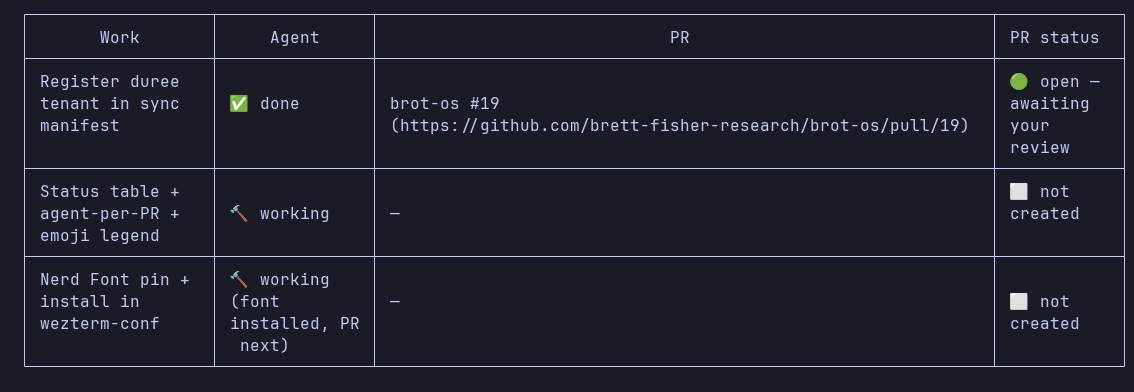
- The "status" template shows every PR Claude has made in my current session with their statuses (open, merged, waiting for my review)
- The "humansteps" template neatly lists out the steps I need to take as the human-in-the-loop to test the code changes Claude made
- The "plan" template gives a specific structure to how I want Claude to present its plans to me (the default plans from Claude's plan mode are too verbose and technical for my taste)
How it works:
1. Create a "templates" directory. Each template is a Markdown file with the structure you want (status.md, humansteps.md, etc.)
2. Create a template SKILL.md that is invoked as /template <name>. The skill instructions explain that <name> corresponds to one of the template Markdown files in the templates directory.
3. In CLAUDE.md, skill files, or in your chat session, invoke /template <name> whenever you want Claude's output to follow a template.
Now I get a lot more predictable output in every session.
Feel free to copy-paste the skill from my GitHub: https://t.co/HRLXN4lrJL
The most useful video on AI workflows I've seen https://t.co/sPay6j101D
My takeaways:
- Stay in the terminal (nvim + tmux = *chef's kiss*)
- Document your opinions (CLAUDE.md, OPINIONS.md)
- Retros after long sessions - have the agent document in CLAUDE.md where you experienced friction
- Subagents in git worktrees for parallel work
- No need to try making skills do everything, CLAUDE.md alone can get you far
Thank you @kunchenguid!
Anyone here use any good terminal emulators for Windows? Most of my work is done by ssh'ing into a box and now I use the WSL Ubuntu terminal to do so but it's a bit limited.
I'm gonna try out Alacritty but open to other suggestions.
Everyone talks about multi-agent workflows, but I always tend to find bugs or issues from a single agent run. This is even after giving the agent a detailed spec.
How have you been orchestrating multiple agents in your projects?
@DanielSmidstrup I've been using Squarespace Domains for years.
I recently used GoDaddy and on EVERY page they try to upsell me on their other products. It's extremely off-putting.
CLAUDE.md files have been so hit or miss for me. Many times Claude completely ignores the instructions in it.
I'm leaning a lot more into custom skills for every different kind of task I need Claude to do. It's been way better at following skill instructions over CLAUDE.md.
One of my first programs was a Monty Hall simulator that I wrote in Perl over 10 years ago. It took me a few days to get it right since I had never coded before.
Today I remade the simulation 100% on my phone by chatting with a remote claude code session. I never would have believed this would be possible.
Check it out! https://t.co/9q94zAoVTK
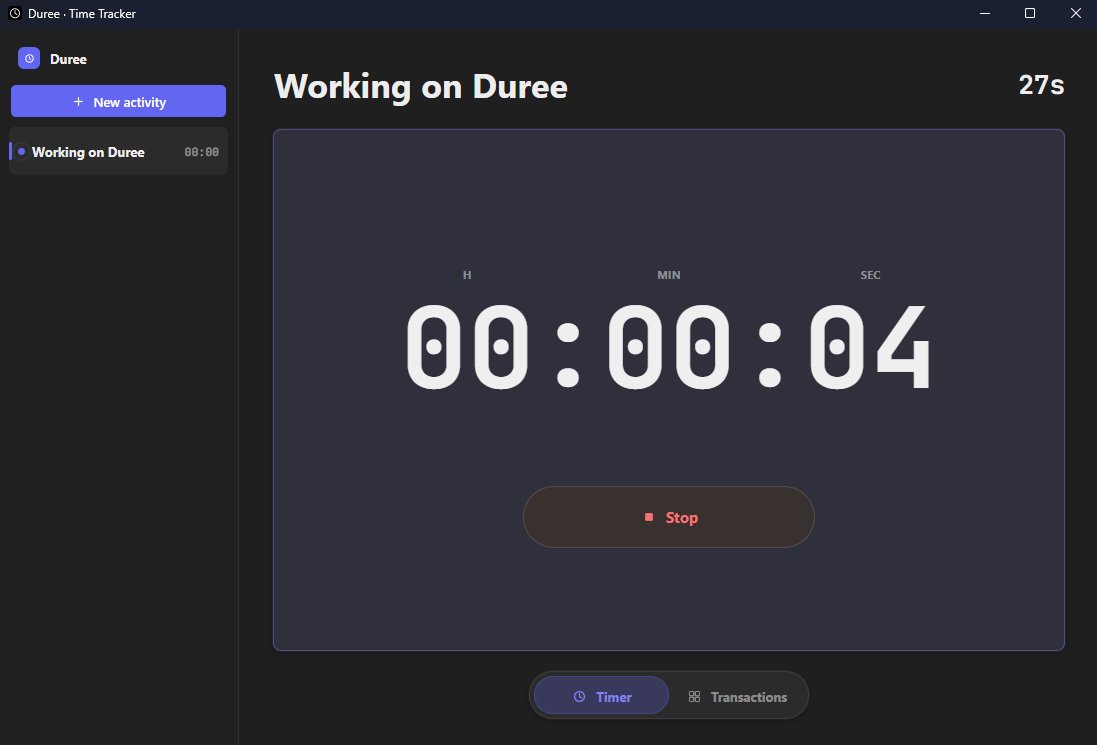
Just launched the MacOS version of my time-tracking desktop app, Duree! https://t.co/ivPGlMAcP3
I made Duree since I wanted a local-first app to help me track the time I spend on different activities (writing, working, reading). Most time tracking apps out there seem built more for tracking billable hours instead of personal activities, so I built the software I wanted. A few features I'm proud of:
- Local first. All data is stored on your machine in sqlite. No internet connection needed.
- Simple. Duree just tracks time for different activities, nothing else.
- Cross platform (Windows + MacOS, iOS + Android coming soon). I mainly work on my PC and Macbook, so it was important to me that I can track time on both devices.
- Sync (coming soon). I want to start a focus timer on my PC and then stop it on my phone. This will be a paid feature since it involves a server, but Duree will always be 100% free for local use.
Stay tuned for mobile releases + multi-device sync!
PWAs are seriously underrated. I’ve been building a personal dashboard PWA 100% on my phone with Claude remote. So far my dashboard has a focus goal, a reading list, and some one-off experiments. Really excited to see where this goes.
When I'm trying to get AI to help me with UX design, I ask it to create ASCII diagrams for several different options and then I pick the one I like the best. Surprisingly, it's been super effective.
Do you have any good patterns for managing environment variables? It can get messy real quick having multiple .env.* files for testing local/dev/prod flows.
I tried https://t.co/MZGozVPkiM today and really liked how easy it was to deploy my NextJS app for https://t.co/KanUvxuF28.
I switched from Netlify since I found their token-based pricing model to be confusing.
I'm testing a new flow with Claude Code:
1. Plan my work in SPEC.md.
2. Have Claude break up the work into Linear tickets. Each ticket references SPEC.md.
3. Have Claude pick up each task and create a PR.
Really enjoying Linear + Claude so far.
I'm building a personal time tracker that stores data locally-first in sqlite and now I'm working on cloud sync. How would you handle conflicts if writes are recorded on one device while it's offline?
I'm dusting off Kleppmann's DDIA for inspo.
@saen_dev Yep, migrations and automatic updates are built in 👍 as someone coming from web it’s been humbling thinking about all the gotchas for desktop development
I spent today setting up my build pipeline for the Windows desktop version of Duree, my personal time tracking app. v0.0.1 is available for download at https://t.co/lzKsudee2v! MacOS coming soon. All data is stored locally with sqlite.