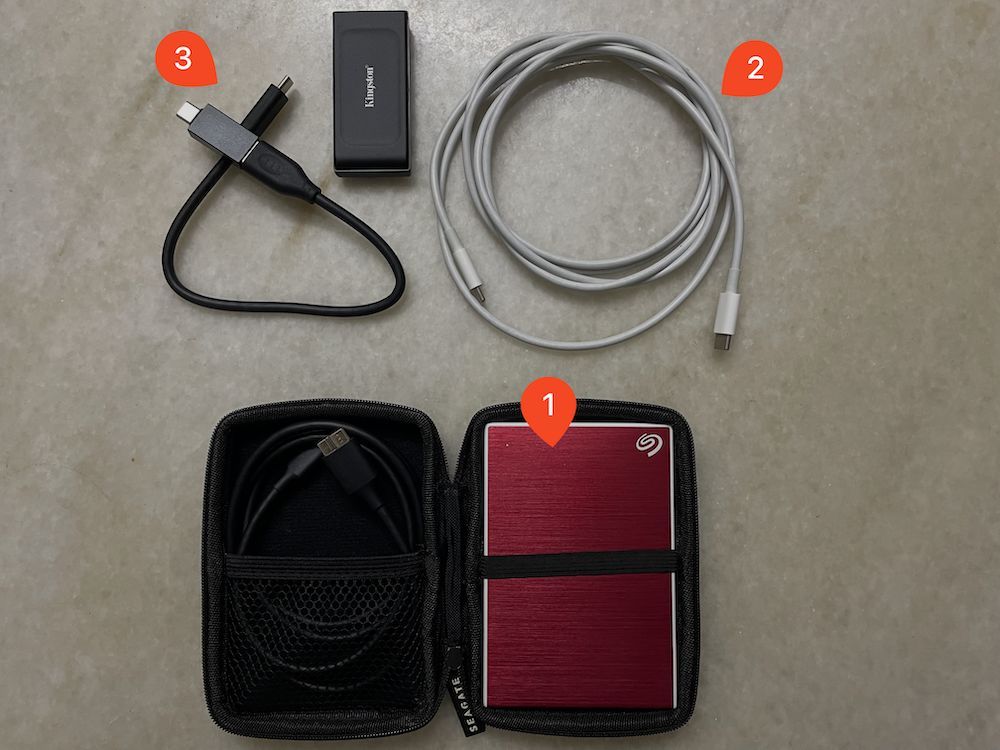
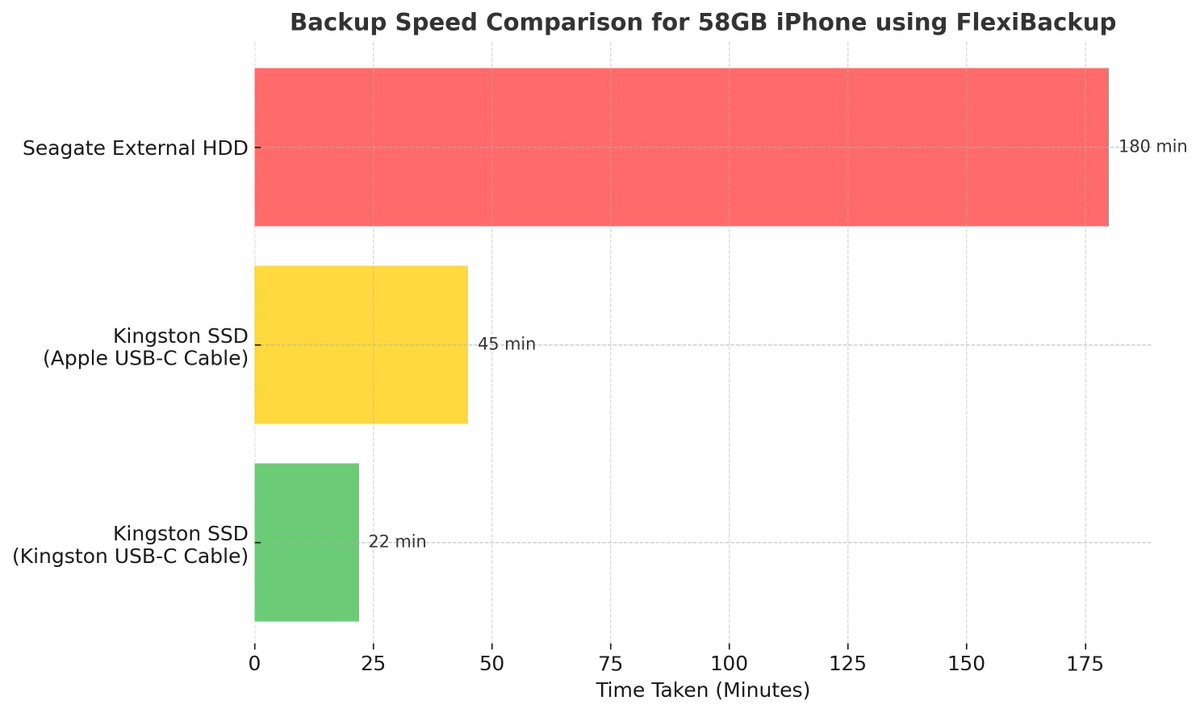
I just ran a quick test using @FlexiBackup to back up my iPhone (with 58GB of data) and discovered some interesting results. I compared the backup speeds using 3 different external hard drive setups - all with USB 3:
1. Seagate External HDD
2. Kingston SSD with an Apple USB-C Cable
3. Kingston SSD with a Kingston USB-C Cable
The graph shows exactly how long each option took to back up my data, and the differences are pretty striking! 📊
What’s cool is that this data highlights how the right combination of hardware can significantly speed up your backup process when using FlexiBackup. It’s fascinating to see how much time you can save with the best setup, and I thought this was worth sharing! 🤩
If you want a seamless way to back up your iOS device to an external hard drive, give FlexiBackup a try.
👉🏻 https://t.co/5ttIbFWT5M
📢 @FlexiBackup v1.2.0 is out with a feature I think you'll love. You can now move all your existing backups from your internal SSD to an external hard drive with just two clicks!
Even better, it's smart enough to identify outdated backups and clean those up instead of moving them. Why waste space on files you don't need?
I've managed to reclaim quite a bit of space on my internal SSD. If you're constantly battling "low disk space" warnings, this update is for you!
If you haven’t checked out FlexiBackup, now’s a great time! You can grab it here (with 30-days money back guarantee):
👉 https://t.co/NzjKo7i6vR
Happy backing up! 😃
You can now find @FlexiBackup on https://t.co/xBTInKPwnJ! 🙌🏻
Does this mean it's now officially part of the Menu Bar App club? 😎
Check it out here 👇🏻 https://t.co/jTOtzYWHF6
@FlexiBackup has been featured on AppAddict! 🎉
They highlighted how FlexiBackup makes iPhone backups to external drives effortless, solving a real-world problem for Mac users.
Check out the full blog post here: 👉 https://t.co/9ZCw3GYk1O
Big thanks to AppAddict for the feature! 🙏🏻
🥳 Just got my first review for @FlexiBackup, and it’s a 5-star one! ⭐️⭐️⭐️⭐️⭐️
This means so much!!! Seeing someone find value in what I built is the best kind of motivation. 💪💪💪
I've been getting questions about whether @FlexiBackup can back up iOS devices to a network drive over Wi-Fi. So, I set up a quick test, and guess what — IT WORKS! 🎉
The only catch is that the backup speed depends a lot on the router’s performance. With a fast setup, I am guessing it should run pretty smoothly.
If you have a fast setup and want to help test it out, drop a comment below, and I’ll send you the installer! 😃
🚨 Last chance! 🚨
The 30% launch discount for @FlexiBackup ends tomorrow. If you've been thinking about getting it, now’s the time!
FlexiBackup makes it easy to back up your iPhone to an external drive! 🤩
Get it here before the discount ends:
👉 https://t.co/yi0lAR0E6v
After tomorrow, it’s back to full price!
I've been receiving inquiries from @FlexiBackup's users who are unsure what to do after selecting a backup destination. To address this, I’ve added a simple instruction using TipKit that appears once the destination is set.
This takes @FlexiBackup one step closer to being a truly self-serving app! 🙌🏻
Created a simple feature plan for @FlexiBackup. Time to start coding! 🔥
⚪️ Onboarding Tips: Provide helpful guidance for users when they first use the app.
⚪️ Menu Bar App: Make the app accessible directly from the Mac menu bar.
⚪️ Backup Reminders: Allow users to set reminders for backing up their devices.
⚪️ Backup Migration: Provide a way for users to migrate existing backups on their Macs to the external hard drive.
⚪️ Backup Progress Display: Display the backup progress percentage within the app while a device is being backed up (though I’m unsure if this is technically feasible).
My goal with @FlexiBackup is to keep it simple and approachable, especially for non-tech-savvy users. What other features would you like to see in the app? 💡
👇🏻 Check out @FlexiBackup here and get a limited-time 30% discount:
https://t.co/yi0lAR0E6v
FlexiBackup is now live! 🎉
To celebrate the launch, we're giving a 30% discount with the promo code "ST7ABD1" – available for the first 100 customer! 🙌🏻🙌🏻🙌🏻
👉 Get it here: https://t.co/pR93pDyRzp
I’m super excited to share that I’ve just launched FlexiBackup 🎉 – a simple Mac app I built to help you back up your iOS devices to an external hard drive super easy.
To celebrate, I’m giving a 30% discount with the promo code "ST7ABD1" – available for the first 100 people!
👉 Check it out here: https://t.co/yi0lAR0E6v
If you’ve ever:
✅ Run out of space on your Mac for backups
✅ Struggled with not enough iCloud storage
✅ Wanted to save money by offloading backups from iCloud
This might be just what you need. 😊
If you think someone else could use this, I’d really appreciate it if you could share this post with them.
Thanks for the support. It really means a lot! ♥️
Created a simple feature plan for @FlexiBackup. Time to start coding! 🔥
⚪️ Onboarding Tips: Provide helpful guidance for users when they first use the app.
⚪️ Menu Bar App: Make the app accessible directly from the Mac menu bar.
⚪️ Backup Reminders: Allow users to set reminders for backing up their devices.
⚪️ Backup Migration: Provide a way for users to migrate existing backups on their Macs to the external hard drive.
⚪️ Backup Progress Display: Display the backup progress percentage within the app while a device is being backed up (though I’m unsure if this is technically feasible).
My goal with @FlexiBackup is to keep it simple and approachable, especially for non-tech-savvy users. What other features would you like to see in the app? 💡
👇🏻 Check out @FlexiBackup here and get a limited-time 30% discount:
https://t.co/yi0lAR0E6v
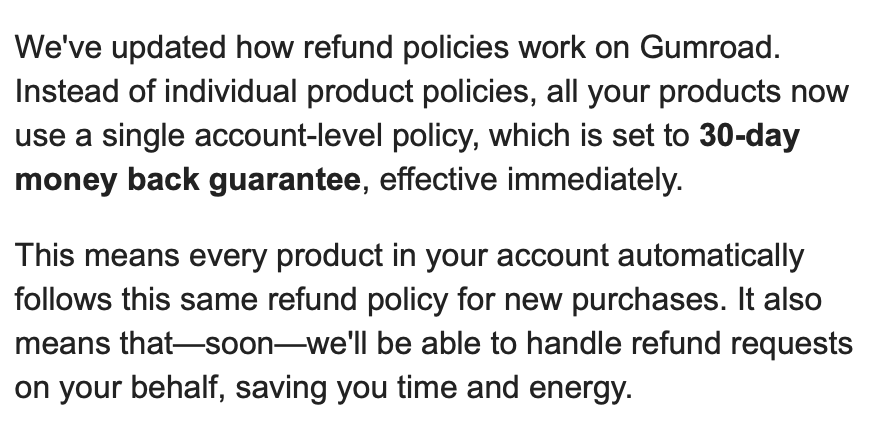
Good news for existing/future @FlexiBackup customers! 🙌🏻🙌🏻🙌🏻
Gumroad is now enforcing a 30-day money-back guarantee policy. This means anyone who purchases FlexiBackup will enjoy a 30-day money back guarantee, an upgrade from the previous 7 days.
Just wrapped up creating a "how-to" video for @FlexiBackup! 🎥✨ It's not perfect, but I’m pretty happy with how it turned out. 🥳
Sharing the tools that helped make it happen:
🖌️ Canva for stunning video templates
🎬 Kapwing for screen recording edits
🖥️ Mac screen recording for capturing the screen
🎵 SoundCloud for cool background music
🎨 Vecteezy for beautiful visuals