The pilot of Copilot | Microsoft MVP 🏆 | Power Platform Expert 🚀 | low code & AI orchestrator | Autonomous agents work 24/7, are cheaper and smarter than you
BREAKING: Microsoft just dropped the Model Context Protocol (MCP) for Copilot Studio.
No more manual updates, no more endless maintenance—connect once, and your agents automatically stay fresh with real-time updates.
With MCP, building agents just got easier:
⚡ Instant Action: Connect once, stay updated forever. MCP auto-syncs new features straight into your Copilot agents.
🌐 Marketplace Power: Plug into pre-built MCP connectors or craft your own. Your data, your rules, enterprise-grade security.
🚀 Customize & Extend: Full SDK support means zero limits. Build the integrations your business demands.
Stop playing the manual-update game. This is automation without the babysitting.
Microsoft just dropped Model Context Protocol in Copilot Studio. Go leverage it before someone else does.
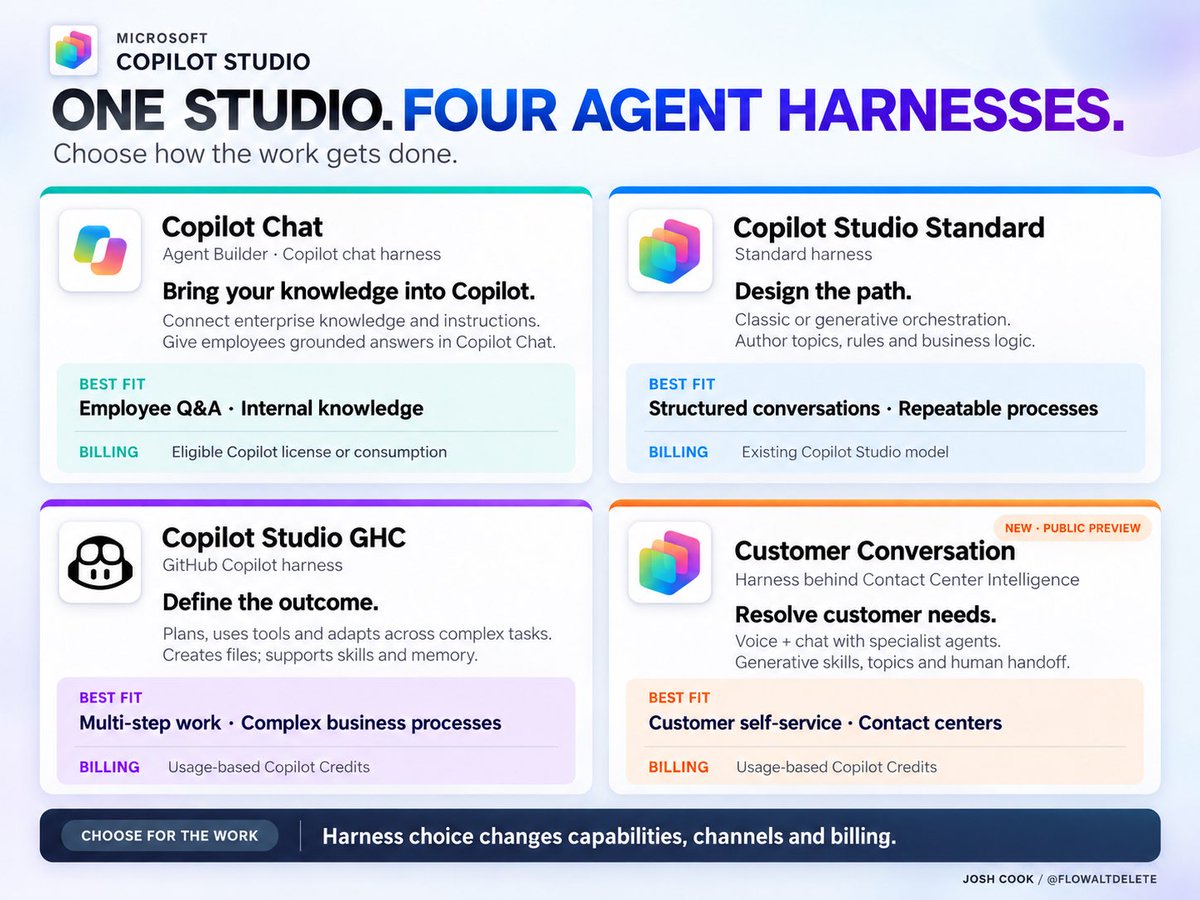
Microsoft added the Customer Conversation harness, so my harness infographic needed an update.
FOUR options across Copilot Chat’s Agent Builder and Copilot Studio:
> Copilot Chat: Ground employee answers in your organization’s knowledge.
> Standard: Build structured conversations and repeatable business processes.
> GitHub Copilot: Handle complex tasks with planning, tools, file creation and adaptation.
> Customer Conversation: Resolve customer needs across voice and chat, with specialist agents and human handoff.
Opus 5.5 has been nerfed? Confirmed 🤯
Everyone was talking about it yesterday, so I tested it myself.
Same prompt. Launch → Oct 3 → today. Worse every time.
And it burns tokens faster. 😱🤦
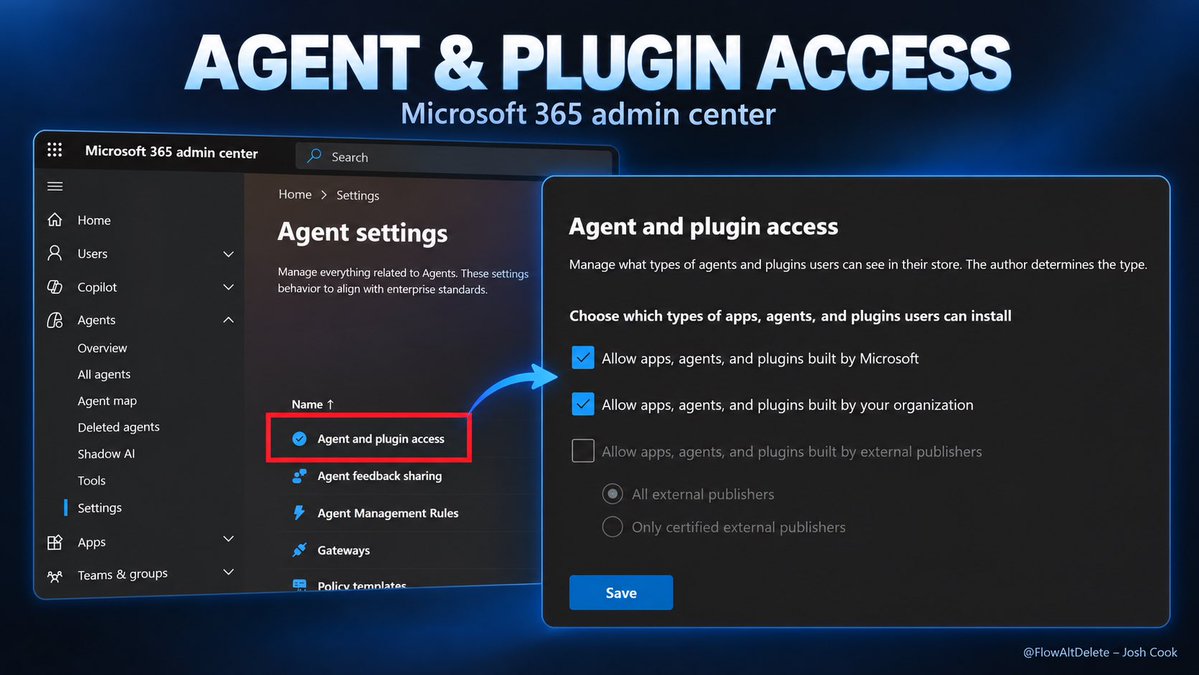
With Plugins and Skills expanding across Copilot, I’d be checking this setting NOW.
Microsoft 365 admin center > Agents > Settings > Agent and plugin access
Choose which publishers users can install apps, agents and plugins from:
- Microsoft
- Your organization
- External publishers, with a certified-only option
If you’re responsible for the Copilot rollout, you should know exactly what’s allowed here.
Copilot Studio just got a FOURTH harness.
A dedicated runtime for customer-facing voice and chat agents. An alternative to the standard harness.
Now THIS is what got me excited about Microsoft’s Contact Center Intelligence announcement.
The new Customer Conversation harness brings:
> Generative skills mixed with deterministic topics.
> Specialist sub-agents with their own knowledge and tools.
> Memory and MCP support.
> Built-in handoff to human representatives.
Through Contact Center Intelligence, these capabilities can connect into existing contact centers, including third-party platforms.
Public preview. Agentic capabilities billed through Copilot Credits.
I want to test this with a customer changing their mind halfway through a request, asking an unrelated question, then needing a human.
Keeping that conversation together is where this gets interesting.
https://t.co/jAiJAeTxKX
Copilot Chat now works INSIDE Outlook shared and delegated mailboxes.
Open the team mailbox.
Open Copilot Chat.
Ask for:
Urgent threads
Customer commitments
Unanswered requests
Draft replies
No account switch.
No mailbox address in every prompt.
Permissions still apply.
Your chat history stays private.
Sending, deleting, flagging and rules are still manual.
Save the prompt below 👇
✨ Review messages received in this shared mailbox since [DATE AND TIME].
Return:
1. Requests requiring a response
2. Explicit deadlines and commitments
3. Customer issues or complaints
4. Messages waiting on someone inside our organization
5. Messages waiting on the sender
6. Informational messages requiring no action
7. Threads where the required action is unclear
For each item, include:
- Subject
- Sender
- Received date
- Required action
- Explicit owner
- Explicit deadline
- Recommended next step
Do not infer an owner, deadline or urgency.
Label missing information as Unconfirmed.
Do not send, move, delete, categorize, pin or flag anything.
After the review, ask me which replies you should draft. ✨
Copilot Code is coming!! Get READY 👀
The Frontier controls are already showing up in the M365 admin center.
LETS GOO!!
GitHub connections, business context, agent execution, automatic approvals.
I expect a LOT of people to build their first internal app with this.
Who needs a Day 1 guide?
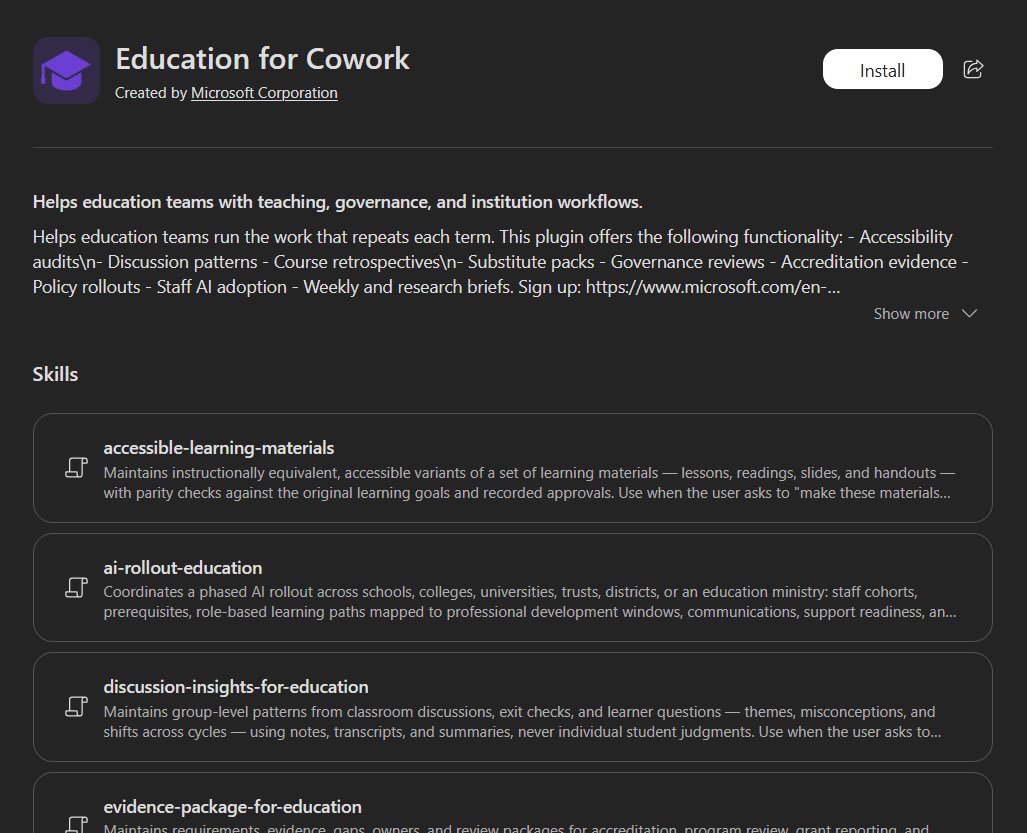
Just spotted Education for Cowork. Created by Microsoft. 👀
The plugin lists skills for:
> Accessible learning materials
> AI rollouts across schools
> Classroom discussion insights
> Accreditation evidence
Plus governance reviews, substitute packs and policy rollouts.
The recurring work behind running a school is a HUGE target for agents.
This week is all about plugins 🔌