Bro… el ingeniero que CREÓ Claude Code soltó un video de 28 minutos y me voló la cabeza
Olvídate de los prompts genéricos que todo el mundo copia y pega
Este tipo te enseña exactamente cómo sacar el 300% de Claude: archivos CLAUDE.md, memoria permanente, sesiones paralelas y trucos de prompting que nadie te cuenta
Pagué cursos de 300 dólares que no llegan ni a la mitad de lo que él explica en los primeros 10 minutos
Y lo mejor: es gratis
No importa si estás empezando o si ya programas todo el día…
después de ver esto vas a usar la IA de una forma que ni sabías que existía
Guárdalo. Vas a volver mil veces 🔖
🚨| CHINA ACABÓ CON EL NEGOCIO DE OCR
Un modelo de 3 mil millones de parámetros del tamaño de un cacahuete puede leer un PDF completo de 100 páginas de una sola vez.
Sin dividir páginas.
Sin pérdida de contexto.
Sin factura en la nube.
Conoce Unlimited-OCR 👇
• Lee documentos completos con una ventana de contexto de 32K
• 93% en benchmarks estándar de análisis OCR (+6 sobre la línea base)
• La tasa de error se mantiene por debajo de 0.11 incluso después de 40+ páginas
• Multilingüe de fábrica
• Se ejecuta 100% localmente en tu hardware
• Soporta Transformers, vLLM, SGLang, Docker, Ollama y llama.cpp
Aquí viene lo loco:
La mayoría de las herramientas OCR todavía procesan los documentos página por página.
Unlimited-OCR lee el documento completo como un contexto único, preservando tablas, referencias, diseños y relaciones entre páginas.
Eso lo cambia todo.
Mientras tanto, las empresas están pagando:
• $1.50–$15 por 1.000 páginas
• Enviando PDFs sensibles a proveedores de nube
• Esperando respuestas de API
Este modelo lo hace offline.
Gratis.
Para siempre.
Construido por Baidu para ir más allá de DeepSeek-OCR.
Ya tiene más de 1,9 millones de descargas en Hugging Face...
...y casi nadie está hablando de ello todavía.
El código abierto se mueve más rápido que la mayoría del software empresarial.
🐞Literatür taramanız için istatistiki veri ararken internetin dehlizlerinde kaybolmamanız için size bir araçtan bahsetmek istiyorum: Google Dataset Search.
Bu araç ile;
👉İnternet üzerinde binlerce farklı yerde bulunan havuzdan açık erişimli olan veri setlerini saniyeler içerisinde bulabilir;
👉Veri kümesini kimin sağladığı, bu verinin kaç makalede atıflandığı ve verinin güncelliği hakkında bilgi sahibi olabilirsiniz.
Çalışmalarında vakit kazanmak isteyen tez ve makale yazarları mutlaka kaydetsinler. 🔗https://t.co/qdL5G7VZ99
Videoda süreci kısaca özetledim:👇
#akademi #veri #data #araştırma #tez #makale. #googledatasetsearch
https://t.co/fe5Alzz5I7 is a platform, a library, a dataset, and an ecosystem on Claw for Scientific Research
technical report and survey: https://t.co/tRY5JGfn6y
Un comando para saber qué modelo de IA puedes ejecutar en tu hardware de forma local.
Detecta RAM, CPU y GPU, puntúa cada modelo según compatibilidad, y te dice cómo funcionará en tu máquina.
Para Windows, macOS y Linux:
→ https://t.co/CsGNVKjR5h
🚨 Este tipo acaba de explicar cómo usar Claude Code completamente gratis.
Un tutorial completo donde muestra cómo ejecutarlo en local, con modelos open-source y flujos completos de agentes.
Si estás aprendiendo IA, esto te interesa �
¿Te da miedo hablar en Inglés? ¡Practica con esto!
Este recurso te permite tener conversaciones naturales con una Inteligencia Artificial.
Voz masculina o femenina, y sigue todo el rato el contexto de tu conversación.
Es gratis → https://t.co/Y04D4S58no
Need an app to streamline your systematic review?
Check out https://t.co/Jf1ImqAhHu for FREE.
The free plan offers the following features:
1. Import studies
2. Screen titles and abstracts
3. Auto retrieval of open access PDFs in full text screening
4. Auto generated table of all extracted data
5. Auto generated PRISMA chart
6. Add collaborators
7. Unlimited literature reviews
PhD Students – How to identify a research gap?
📌Use the following FREE tool to identify a gap.
Meet AnswerThis – a tool for identifying research gaps.
It works in 3 simple steps.
1️⃣ Go to https://t.co/Jjv3fJFSwM
2️⃣ Enter your research topic
3️⃣ @answerthisio will identify 4 types of gaps
→ Methodological gaps
→ Theoretical gaps
→ Practical application gaps
→ Potential for original research
Take it as a starting point.
Then dive deep into the proposed gap.
Assess whether or not it has the potential.
❓Anything you'd like to add?
You can now clone any website design in seconds with AI.
Just grab any live UI with the new MagicPath Extension and the AI will instantly create a working clone you can build on top of.
I literally just recreated Claude’s UI with it.
This is Figma completely redesigned.
PhD Students - Which journal will accept your paper?
Find out using in 3 simple steps.
1. Go to https://t.co/O7yGAdyHuk
2. Upload your paper
3. Review-it will suggest 10 most relevant journals.
These journals are likely to accept your paper.
Claude Desktop is now generally available.
New on Mac: Capture screenshots, click windows to share context, and press Caps Lock to talk to Claude aloud.
Atlas is a great tool for "vife-lifing".
You can use the agent to delegate tasks (personal or professional) and hopefully improve productivity and curiosity.
Available on MacOS.
Agent is only available to Plus and Pro.
More personalization coming soon.
PhD Students – Use this tool to generate the first draft of ANY type of literature review in 10 minutes.
Meet @answerthisio — a tool that makes literature review faster and easier.
Here’s how it works.
1. Visit https://t.co/xDZ1H1T1VV and log in.
2. Select the 𝐿𝑖𝑡𝑒𝑟𝑎𝑡𝑢𝑟𝑒 𝑅𝑒𝑣𝑖𝑒𝑤 option from the menu.
3. From the prompt helper, select 𝑊𝑟𝑖𝑡𝑒 𝑎 𝑙𝑖𝑡𝑒𝑟𝑎𝑡𝑢𝑟𝑒 𝑟𝑒𝑣𝑖𝑒𝑤 𝑜𝑛.
4. Enter your research topic in the blank text field
➝ For example, Vulnerabilities in Big Data Systems
5. Click 𝐶𝑟𝑒𝑎𝑡𝑒 to generate the initial search prompt.
6. Press Enter to see research filter options.
7. Choose your response type based on your needs.
➝ Structured Literature Review: Citation-rich and detailed.
➝ Dynamic Research Assistant: To explore research gaps.
➝ AI Only: Fast, but unreliable with no citations.
8. Set the minimum number of citations for the review.
➝ Choose at least 10 for comprehensive results.
9. Decide whether to enable 𝑇𝑢𝑟𝑏𝑜 𝑀𝑜𝑑𝑒 for faster results.
➝ Disabling it gives you more comprehensive answers.
10. Select the sources for search results.
➝ Choose both web and databases for thorough results.
11. Specify the date range to get recent papers.
12. Enable 𝑑𝑜𝑢𝑏𝑙𝑒-𝑐ℎ𝑒𝑐𝑘 𝑐𝑖𝑡𝑎𝑡𝑖𝑜𝑛𝑠 for accurate results.
13. Once filters are set, click 𝑆𝑢𝑏𝑚𝑖𝑡 𝑆𝑒𝑎𝑟𝑐ℎ to proceed.
14. After a while, your literature review will be generated.
➝ Sources and citations will be listed on the right.
15. Review the results and assess the paper sources carefully.
16. Add relevant papers to your library for easy access later.
17. Export citations in formats like BibTeX or CSV as needed.
18. You can also download the review as a Word or PDF file.
Treat this literature review as an initial draft.
Refine it and build your review on the top of it.
When I teach Principal Component Analysis (PCA), I start with the core idea: a linear, orthogonal transformation that maximizes variance and removes correlation.
Then we jump into my interactive, hands-on demo — using a #Python dashboard built with @matplotlib to perform PCA step by step! 📊🧠
Check it out here:
🔗 https://t.co/9J694YORY9
A manager in the study: "Once the AI recommended reducing marketing spend, but I chose to increase it based on market conditions. Our campaign was a success and boosted brand awareness. I think it's important to balance AI insights with human judgment rather than solely relying on AI recommendations".
PhD Students – How to find references to cite in your paper in seconds?
Finding relevant references is a time-consuming task.
Now you can automate this whole process.
Meet 𝐋𝐢𝐧𝐞𝐫 – a tool that inserts citations for your paper.
𝐇𝐨𝐰 𝐋𝐢𝐧𝐞𝐫 𝐰𝐨𝐫𝐤𝐬?
1. Go to https://t.co/cLzXM44oNC and log in
2. Click on 𝐶𝑖𝑡𝑎𝑡𝑖𝑜𝑛 𝑅𝑒𝑐𝑜𝑚𝑚𝑒𝑛𝑑𝑒𝑟 from the left menu
3. Paste the text in which you want to insert citations
4. Now click on 𝐺𝑒𝑛𝑒𝑟𝑎𝑡𝑒 𝐶𝑖𝑡𝑎𝑡𝑖𝑜𝑛𝑠
5. Liner will start searching for relevant references
6. It shows the search process on the left side
7. This makes the whole process very transparent
8. Finally, citations are inserted in your text
9. Now click on a 𝑠𝑝𝑒𝑐𝑖𝑓𝑖𝑐 𝑐𝑖𝑡𝑎𝑡𝑖𝑜𝑛
10. It will open the citation on the right side
11. You can add this citation to your collection
12. You can also copy the citation in various styles
13. These styles include APA, MLA, etc.
𝐔𝐬𝐢𝐧𝐠 𝐋𝐢𝐧𝐞𝐫 𝐟𝐨𝐫 𝐜𝐢𝐭𝐚𝐭𝐢𝐨𝐧𝐬 𝐡𝐚𝐬 𝟒 𝐚𝐝𝐯𝐚𝐧𝐭𝐚𝐠𝐞𝐬
➝ Unlike ChatGPT, it recommends reliable citations
➝ The whole process is very transparent
➝ The citations automatically get inserted in your text
➝ The process is very quick and super easy
Try Liner today for citations:
https://t.co/cLzXM44oNC
For 40% discount on premium version, use the above link.
Anything you'd like to add?
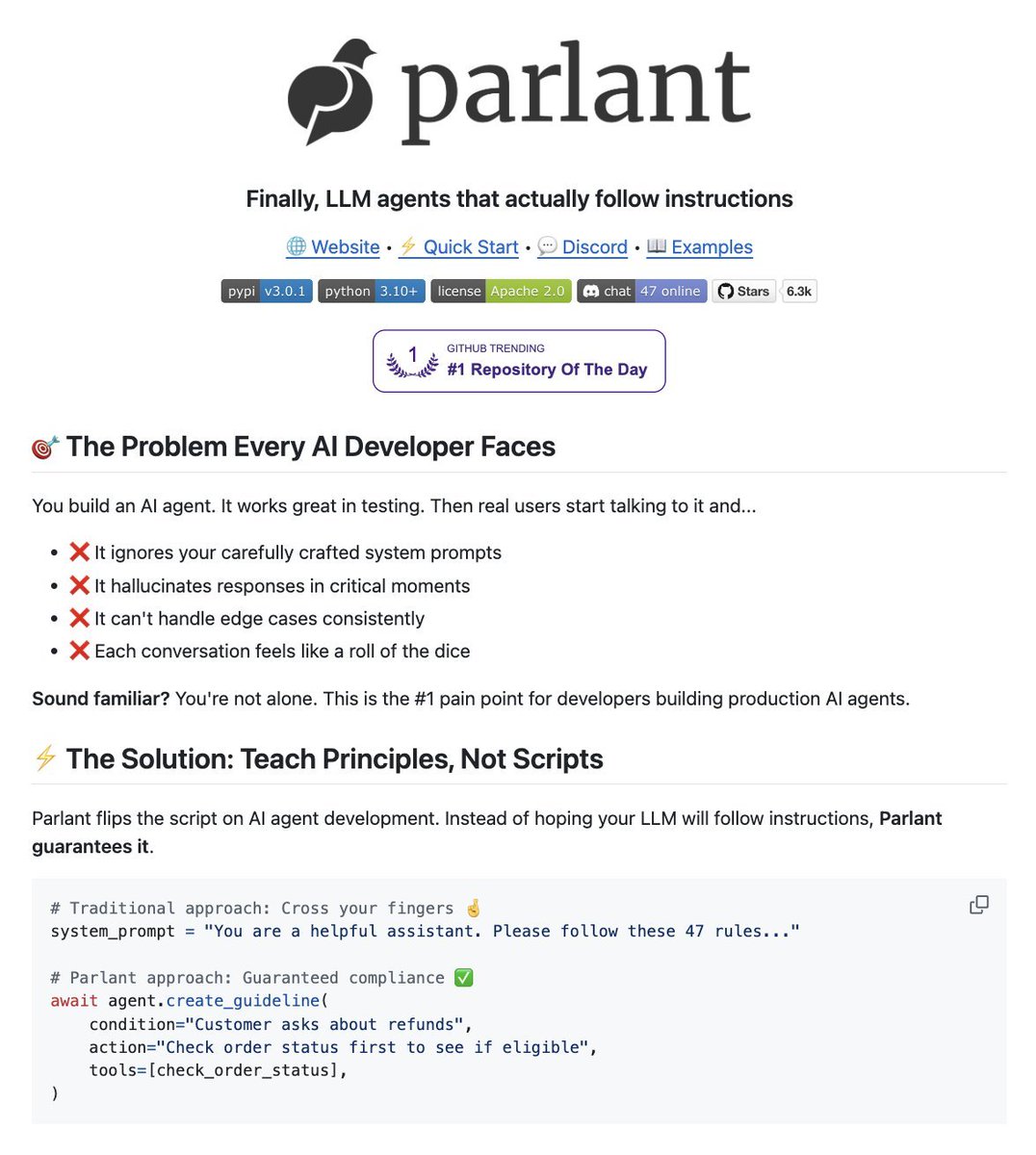
Stop building AI agents that ignore your instructions.
This Python framework guarantees LLM Agents follow your rules in production. Every single time.
100% Opensource.